Introduction
Editorial fashion photography is known for creative compositions, luxury styling, and storytelling. One eye-catching technique used by professional photographers is the overhead camera angle — placing the camera directly above the subject to create a unique, attention-grabbing perspective. With AI, you can now recreate this premium editorial style without hiring a fashion photographer or renting an expensive studio.
The Overhead Vintage Car AI Prompt transforms an ordinary portrait into a high-end fashion editorial while preserving the subject's facial structure, skin tone, hairstyle, age, and recognizable features. Rather than changing the person's appearance, it enhances the clothing, environment, lighting, and composition to create a luxury magazine-style portrait.
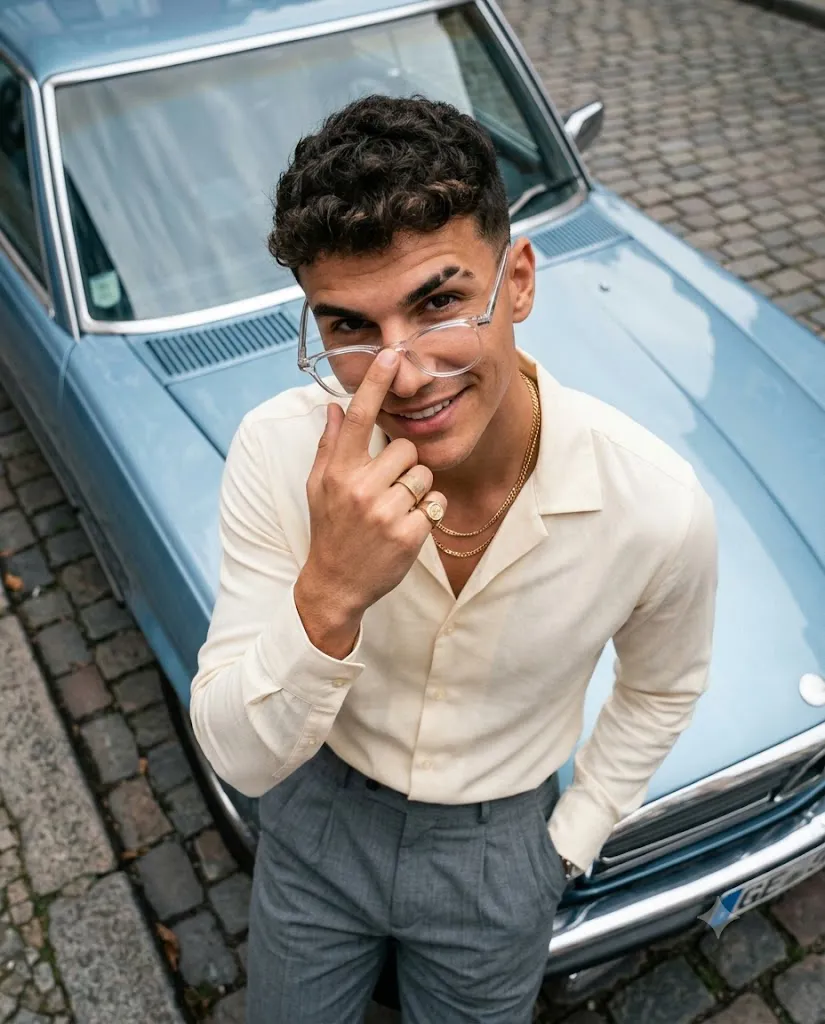
In this concept, the subject leans against the bonnet of a powder-blue vintage car parked on a cobblestone street, captured from a dramatic top-down perspective. A butter-cream Cuban-collar shirt, pleated grey trousers, layered gold chains, clear-frame glasses, and a signet ring create a timeless editorial look. Soft overcast daylight adds balanced lighting and realistic reflections. Professional settings like a 4:5 portrait ratio, natural depth of field, and 8K resolution help AI generate images that resemble luxury fashion campaigns — ideal for Instagram, fashion portfolios, or commercial branding.
"Overhead Vintage Car Prompt"
Create an ultra-realistic editorial portrait in a 4:5 vertical format. The camera is positioned directly overhead, looking straight down. The subject leans naturally against the bonnet of a powder-blue vintage car parked on a cobblestone street. He looks directly into the camera with a confident smile, one eyebrow slightly raised. Clear-frame glasses rest halfway down his nose while one index finger touches the bridge. He wears a butter-cream Cuban-collar shirt, pleated grey trousers, layered gold chains, and a signet ring. Use soft overcast daylight with natural shadows and realistic reflections. Preserve accurate human proportions and perspective. Capture lifelike skin texture, hair detail, fabric folds, subtle film grain, and premium editorial fashion photography quality. Color palette: powder blue, cream, warm skin tones, and cobblestone grey. DSLR-quality, 8K realism, natural depth of field.
How To Use Photo Editing?
Creating an editorial overhead portrait using AI is easy when you follow a structured editing process.
Step 1: Select a High-Quality Reference Image
Choose a sharp, high-resolution portrait with good lighting. The subject's face should be clearly visible so the AI can preserve facial identity accurately.
Step 2: Copy the Complete Prompt
Copy the entire Overhead Vintage Car Prompt exactly as written. Every detail—including camera angle, clothing, lighting, and environment—helps AI understand the desired outcome.
Step 3: Upload Your Reference Photo
Open your preferred AI image generator and upload the original image as the reference photo.
Step 4: Paste the Prompt
Paste the complete prompt into the text input box. Avoid removing instructions related to identity preservation, realistic textures, and camera perspective.
Step 5: Generate Multiple Variations
Generate several versions of the image. Each variation may differ slightly in lighting, expressions, reflections, and composition, allowing you to choose the strongest result.
Step 6: Download the Best Version
Select the portrait with the best facial accuracy, natural proportions, premium lighting, and editorial quality. Download the image in the highest available resolution.
Tools You Can Use for Prompt Copy and Create Photo
Several AI image generation platforms can create realistic editorial fashion portraits.
1. ChatGPT Image Generation
Excellent for writing detailed prompts and generating realistic editorial portraits with accurate face preservation and premium lighting.
2. Midjourney
One of the best AI platforms for cinematic fashion photography, luxury compositions, and magazine-quality visuals.
3. Flux AI
Known for highly realistic facial details, natural skin textures, and excellent prompt accuracy, making it perfect for editorial work.
4. Leonardo AI
Provides advanced portrait models capable of producing luxury fashion photography with realistic lighting and stylish compositions.
5. Adobe Firefly
Ideal for professional designers who need commercial-quality AI editing and high-resolution fashion images.
6. Google Gemini Image Tools
Generates clean, natural-looking portraits with realistic lighting, color balance, and sharp facial details.
7. Ideogram AI
Suitable for editorial and creative portrait photography with detailed clothing, accessories, and cinematic styling.
8. Bing Image Creator
A beginner-friendly AI platform that quickly produces attractive lifestyle and fashion portraits using detailed prompts.
How To Edit Photo?
A premium editorial portrait depends on both the quality of the AI prompt and the editing process. Follow these techniques to achieve professional results.
Preserve Facial Identity
Always include instructions asking the AI to preserve facial structure, hairstyle, skin tone, age, and unique facial features. This ensures the portrait accurately represents the original subject.
Choose Luxury Fashion Styling
Clothing plays a major role in editorial photography. Neutral colors such as cream, grey, powder blue, and warm beige create a timeless appearance. Accessories like layered gold chains, clear-frame glasses, and signet rings add sophistication without overwhelming the portrait.
Use an Overhead Camera Perspective
The top-down angle is the defining feature of this prompt. Positioning the camera directly above the subject creates a fresh and visually striking composition that is commonly seen in premium fashion magazines.
Select Soft Natural Lighting
Overcast daylight produces even illumination without harsh shadows. It enhances skin tones, preserves realistic reflections on the vintage car, and highlights the textures of clothing and accessories.
Include a Detailed Environment
The powder-blue vintage car and cobblestone street create a nostalgic atmosphere while complementing the modern fashion styling. Keeping the background clean and uncluttered allows the subject to remain the focal point.
Enhance the Final Image
After the AI generates the portrait, use image enhancement tools to improve sharpness, increase resolution, refine lighting, and remove minor imperfections. This final step makes the image suitable for social media, print, and commercial use.
Conclusion
The Convertible Couple Drive AI Prompt is an excellent choice for creating luxurious, cinematic, and emotionally engaging lifestyle portraits using artificial intelligence. By combining accurate facial identity preservation, fashionable clothing, realistic body language, golden-hour lighting, and professional camera settings, it delivers images that rival high-end editorial photography.
Whether for romantic social media posts, engagement announcements, travel content, fashion portfolios, or personal keepsakes, this prompt makes premium-quality results easy to achieve. Simply upload a clear reference photo, copy the complete prompt, and generate multiple variations until you find the perfect image — a breathtaking lifestyle portrait capturing love, elegance, and the timeless beauty of a golden-hour drive in a classic convertible.