Introduction
The Paris Cloud Sweater Travel Prompt is a creative AI photo-editing concept designed to transform an ordinary portrait into a stylish and cinematic travel photograph set on the beautiful streets of Paris. The prompt combines casual European fashion, iconic Parisian architecture, soft afternoon lighting, and the Eiffel Tower in the distance to create an elegant travel aesthetic.
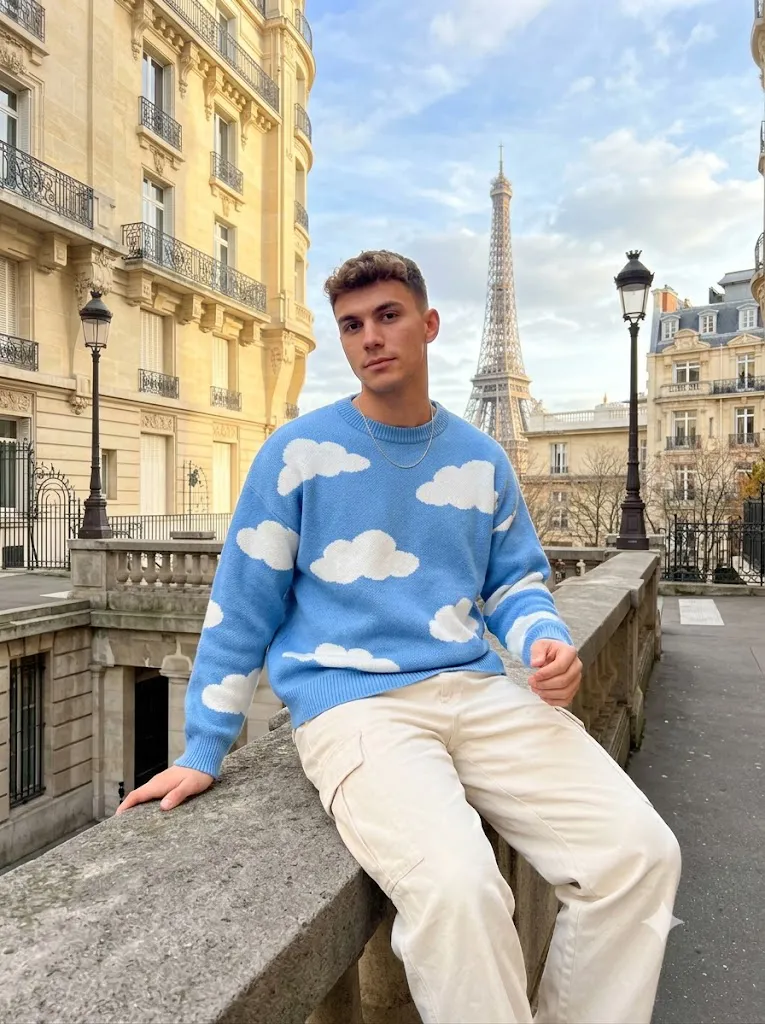
The main character is a young man sitting casually on a gray stone railing in a Parisian street. His styling focuses on relaxed fashion, featuring an oversized sky-blue knitted sweater decorated with large white cloud patterns. The sweater is paired with loose cream-colored cargo pants and a thin silver necklace, creating a modern yet comfortable European streetwear look.
The background is equally important. Colorful cream and beige Parisian buildings, decorative balconies, elegant European windows, street lamps, trees, and a distant Eiffel Tower create the feeling of an authentic Paris travel moment. Instead of making the scene look overly artificial, the prompt focuses on realistic smartphone photography with natural skin texture, realistic proportions, subtle photographic grain, and soft daylight. This type of prompt is especially useful for social media creators, travel-content creators, fashion enthusiasts, and anyone who wants to experiment with AI-generated travel portraits.
"Paris Cloud Sweater Travel Prompt"
Uttre-realistic smartphone travel portrait of a young man sitting casually ons stone railing in Parts streets Curing He has measy dark brown textured hair with natural volume, fair skin, a slim face, and soft facial features. Hi head while looking tower the camara with a calm exressions, K He is wearing an avensized sky-blue knitted sweater covered with large white-cloud pattams, loose cream-colored car and a thin silver necklats The subject is sitting sideways on a gray stone ralling, one hand resting oshadhan on the stone surface while the other hand naturally beside his body. His legs are relaxed and sigidy extended The background heatures wiegent cnsem-colored Parisian buildings with decrative haltences, chic European winthens, street lamps ar trees along the rado. The Eiffel Tower rises in the distance against the synone Soft natural deyigit, partly cloudy blue sky, warm late-aftermoon atmosphere, rolistic shadows, gorde highlieto on mastic reflection in the buildings, authentic smartphone photography, natural sikin teictus, alight tept of fo photogrphy, highly details, photorealistic Phone Pro camera phoato vertauition Luxury travel aesthetic. Farts street atmosphere, social media fashion photography, rasiatic proportions, candlel.
How To Use Photo Editing?
Using the Paris Cloud Sweater Travel Prompt is simple when your AI photo editor supports reference-image editing.
Step 1: Choose a Good Reference Photo
Start with a clear photograph of the person you want to transform. A high-resolution image with the face clearly visible is recommended. Try to select an image where the person's facial features are not hidden by sunglasses, hands, heavy shadows, or other objects. A natural facial expression also helps the AI maintain a realistic appearance.
Step 2: Upload the Reference Imagex
Upload your photograph into an AI photo-editing or image-generation platform that supports reference images. If maintaining the person's identity is important, clearly mention that the facial identity should remain consistent. You can instruct the AI to preserve the original facial structure, hairstyle, skin tone, and recognizable features while changing the clothing and environment.
Step 3: Add the Prompt
Copy the Paris Cloud Sweater Travel Prompt and paste it into the AI editor.
The prompt should describe all the important visual elements, including:
- Facial appearance
- Hairstyle
- Clothing
- Sitting position
- Stone railing
- Parisian buildings
- Eiffel Tower
- Lighting
- Camera style
- Image quality
- Overall atmosphere
Detailed descriptions help the AI understand the intended composition.
Step 4: Generate the Image
Generate the image and inspect the result carefully. If the first version does not have the correct pose, clothing, background, or facial resemblance, try another generation with slightly stronger instructions. Multiple generations can produce different compositions while maintaining the same basic concept.
Tools You Can Use For Prompt Copy and Create Photo
There are several categories of tools you can use for creating this type of AI travel portrait.
1. AI Image Generators
AI image generators can create a complete Parisian scene from a written description. They are useful when you do not have a reference photograph and simply want to generate a fictional fashion-travel portrait. For more personalized results, select a platform that supports reference-image features.
2. AI Photo Editing Tools
AI photo editors are ideal when you already have a photograph and want to change the surroundings, outfit, lighting, or overall atmosphere. You can use these tools to transform a simple portrait into a Paris travel photograph while attempting to preserve the subject's original identity.
3. Smartphone Editing Apps
After generating the image, smartphone editing applications can be used for final adjustments. Exposure, contrast, highlights, shadows, sharpness, and cropping can all be adjusted to make the photograph more suitable for social media.
4. Desktop Photo Editors
Desktop editing software can provide more precise control over color grading and image details. You can refine the sky, buildings, clothing, skin tones, and overall brightness after generating the image.
5. Prompt Libraries and AI Creative Platforms
Prompt libraries can help you discover different photography styles and experiment with variations of the same idea. You can modify the Paris prompt by changing the outfit, time of day, camera angle, weather, or location while keeping the overall travel concept.
How To Edit Photo?
Once the AI has created the Paris Cloud Sweater portrait, careful editing can make the final result much more realistic.
Step 1: Check the Face
Begin by checking the subject's face. Make sure the facial structure, eyes, nose, lips, jawline, hairstyle, and skin texture look natural. Avoid excessive AI beautification. Natural skin texture is important for achieving an authentic smartphone photography appearance.
Step 2: Check the Sweater
The sky-blue knitted sweater should be one of the main visual elements. The large white cloud patterns should look naturally printed or knitted into the fabric. Check the folds and shadows carefully. Realistic fabric texture helps prevent the clothing from appearing digitally generated.
Step 3: Adjust the Cargo Pants
The cream-colored cargo pants should have a relaxed, loose-fitting appearance. Make sure the legs have natural proportions and that the fabric follows the sitting position realistically. The pants should complement the blue sweater without competing with the background.
Step 4: Improve the Paris Background
The background should include authentic-looking Parisian architecture. Cream-colored buildings, decorative balconies, European windows, street lamps, and trees can create the desired atmosphere. The Eiffel Tower should appear naturally in the distance rather than looking oversized or artificially inserted. A slight background blur can help separate the subject from the architecture while preserving the recognizable Paris environment.
Step 5: Enhance the Lighting
Soft natural daylight is essential for this concept. A partly cloudy sky can create gentle illumination without producing extremely harsh shadows. A warm late-afternoon atmosphere can add golden highlights to the buildings while maintaining realistic skin tones.
Step 6: Add Smartphone Photography Details
To make the image feel like a genuine travel photograph, avoid excessive HDR or artificial sharpening. A subtle amount of photographic grain, realistic reflections, natural shadows, and authentic skin texture can help create the appearance of a high-quality smartphone camera photograph.
Step 7: Choose the Right Composition
For Instagram and other social platforms, a vertical composition works particularly well. A 4:5 ratio is suitable for feed posts, while 9:16 is useful for Stories and short-form video covers. Keep the subject clearly visible while leaving enough space around the Eiffel Tower and surrounding architecture.
Conclusion
The Paris Cloud Sweater Travel Prompt combines fashion, travel, architecture, and cinematic photography into one visually appealing AI photo-editing concept. The sky-blue cloud-pattern sweater creates a distinctive fashion statement, while cream cargo pants and a silver necklace provide a clean and relaxed European look.
The Parisian environment adds another layer of visual storytelling. Stone railings, elegant buildings, decorative balconies, street lamps, trees, and the Eiffel Tower create an instantly recognizable travel atmosphere.
For the best results, start with a high-quality reference image, provide detailed instructions to your AI editor, and carefully review the generated face, clothing, proportions, lighting, and background. After generation, subtle color correction and sharpening can help make the final image look more like authentic smartphone travel photography.
Whether you are creating a social-media post, travel-fashion concept, AI photography project, or personal creative portrait, the Paris Cloud Sweater Travel Prompt offers an excellent way to create a stylish and dreamy Parisian visual without losing the natural feeling of a real travel photograph.