Introduction
AI image generation has made it easier than ever to create professional-quality fashion portraits with just a detailed text prompt. One of the most elegant styles is the Parisian Daisy Fashion Prompt, inspired by luxury editorial photography, vintage Parisian fashion, and cinematic golden-hour lighting. This prompt blends timeless French style with romantic floral elements to produce an ultra-realistic portrait that looks like it belongs on the cover of a premium fashion magazine.
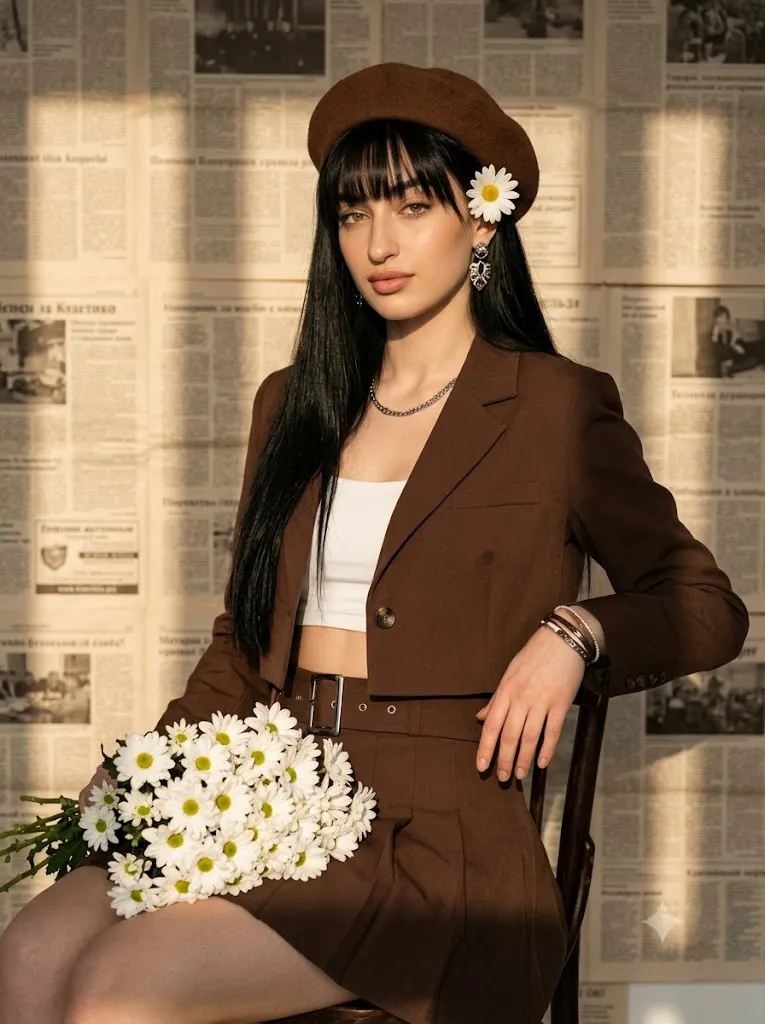
The design features a stylish woman wearing a chocolate-brown Parisian outfit, complete with a classic beret, tailored jacket, pleated skirt, and silver accessories. She is seated gracefully while holding a bouquet of fresh white daisies, surrounded by warm sunlight and a vintage newspaper backdrop. Every detail—from realistic skin texture and lifelike flowers to soft shadows and rich color grading—creates a sophisticated editorial aesthetic. This prompt is ideal for fashion portfolios, Instagram content, wallpapers, magazine-style artwork, and creative AI projects.
"Parisian Daisy Fashion Prompt"
Ultra-realistic Parisian fashion portrait — reference photo jaisa face preserve karte hue, sleek black hair with blunt bangs, soft glam makeup (brick-red lips, winged liner). Seated pose, body angled away, face towards camera, calm-alluring expression. Lap mein white daisies ka bouquet, ek daisy ear ke paas tucked. Outfit: Chocolate-brown cropped jacket + white crop top + matching pleated mini skirt + silver-buckle belt + brown beret. Silver jewelry (earrings, necklace, bracelets). Background: Vintage newspaper-covered wall, golden-hour light se window-shadow pattern, subject ka silhouette shadow bhi visible. Style: 85mm lens, shallow depth of field, sharp eyes/face focus, realistic skin/hair/fabric texture, 8K, film grain, warm vintage tone. Palette: brown, caramel, beige, silver, daisy yellow.
How To Use Photo Editing?
Creating this cinematic portrait is simple when you follow the right workflow.
Step 1: Copy the Prompt
Copy the complete Parisian Daisy Fashion Prompt without removing any details. The AI uses every description to understand the desired clothing, lighting, pose, and background.
Step 2: Choose an AI Image Generator
Paste the prompt into your preferred AI image generation platform. Models that support photorealistic portrait generation usually deliver the best results.
Step 3: Upload a Reference Photo
If you want the final image to resemble a specific person, upload a clear, high-quality reference photo. A sharp portrait helps the AI preserve facial identity while applying the fashion styling.
Step 4: Generate the Image
Create multiple versions and compare the results. Select the image with the best facial expression, lighting, and overall composition.
Tools You Can Use For Prompt Copy and Create Photo
Several AI tools are excellent for producing premium fashion portraits.
1. ChatGPT – Helps create and improve detailed AI prompts.
2. Midjourney – Produces artistic and cinematic editorial portraits.
3. Flux AI – Excellent for ultra-realistic facial details and lighting.
4. Google Gemini – Useful for refining prompts and generating creative ideas.
5. Adobe Firefly – Provides professional AI image generation and editing features.
6. Ideogram AI – Suitable for creative designs and typography-based projects.
7. Canva AI – Helps combine AI-generated images with social media layouts and posters.
How To Edit Photo?
Step 1: Select the Best Image
Generate several versions and choose the portrait with the strongest composition and most realistic facial details.
Step 2: Enhance the Face
Use AI enhancement tools to sharpen the eyes, improve skin texture, and preserve natural facial features.
Step 3: Improve the Lighting
Adjust brightness, contrast, highlights, and shadows to enhance the warm golden-hour atmosphere without losing natural detail.
Step 4: Refine the Background
Clean the newspaper wall, strengthen the window-light shadows, and ensure the backdrop remains detailed yet subtle.
Step 5: Enhance Colors
Increase the richness of the chocolate-brown clothing, creamy white daisies, and warm amber sunlight while maintaining a balanced color palette.
Step 6: Export in High Resolution
Save the final image in high resolution for social media, prints, posters, or portfolio use.
Conclusion
The Parisian Daisy Fashion Prompt is a perfect choice for anyone who wants to create elegant, ultra-realistic fashion portraits using AI. Its combination of Parisian-inspired styling, romantic floral elements, vintage newspaper textures, and cinematic golden-hour lighting creates a luxurious editorial look. Whether you are designing content for Instagram, a fashion portfolio, or creative digital art, this prompt provides a simple and effective way to achieve professional-quality results. By pairing a detailed prompt with modern AI image generators and thoughtful editing, you can create timeless portraits that feel both fashionable and cinematic.