Introduction
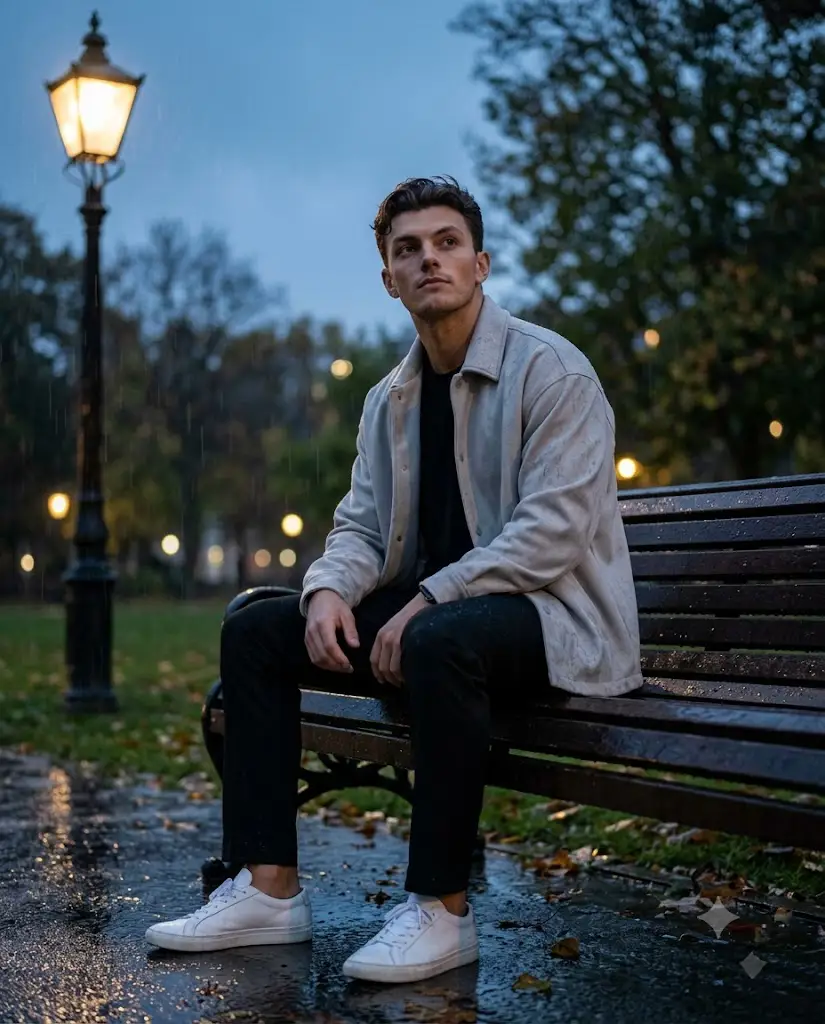
Cinematic photography has always had a special place in visual storytelling, and one of the most captivating themes in recent years is the "rainy park bench" portrait style. Picture this: a lone figure seated on a wooden bench in a misty city park, rain falling gently around a warm glowing street lamp, colors split between cool blue-gray tones and golden amber light. This aesthetic feels like a still frame pulled straight from a moody film, and it has become incredibly popular among photographers, content creators, and AI art enthusiasts alike.
The "Park Bench Cinematic Prompt" is essentially a detailed set of instructions used to recreate this exact mood, whether through traditional photo editing or AI-assisted image generation. It combines elements of composition, lighting, wardrobe, environment, and emotion into a single cohesive vision. Understanding how to use this kind of prompt effectively can help anyone — from hobbyists to professional creators — produce editorial-quality, emotionally resonant imagery without needing an actual film set or expensive equipment.
In this article, we'll break down how to use photo editing techniques to achieve this look, which tools are best suited for building and executing such prompts, a step-by-step approach to editing your photos, and some final thoughts on making the most of this cinematic style.
"Park Bench Cinematic Prompt"
Highly realistic 8K cinematic full-body portrait, vertical 4:5. A young man sits relaxed on a dark wooden bench with black metal supports in a rainy city park, positioned slightly right of frame, hands gently folded in his lap, feet planted on wet pavement, head tilted up toward the rainy sky with a calm, introspective expression. He wears a light-gray oversized shacket, black crew-neck tee, fitted black trousers, and white low-top sneakers, with realistic fabric folds and moisture detail. A tall vintage black street lamp with warm amber glow stands on the left, contrasting the cool blue-gray overcast atmosphere. Misty, defocused trees and bokeh lights fill the background; wet reflective pavement with puddles and scattered autumn leaves in the foreground. Cinematic 50mm DSLR look, shallow depth of field, natural skin texture, soft directional lighting, subtle rim light, realistic anatomy, no artificial smoothing or distortion.
How To Use Photo Editing?
1. Decide the emotional tone
For a rainy evening scene, first decide the mood you want to convey. Use cool blue-gray tones for the ambient atmosphere, and keep warm amber/golden tones for light sources like a street lamp. This contrast is the foundation of the cinematic look.
2. Set the light direction
Real cinematic photos always have directional light, never flat lighting. Add a soft warm glow on one side of the subject and let a gentle shadow remain on the other side. This creates depth and realism on the face.
3. Use the dodge & burn technique
Slightly brighten (dodge) the face, hands, and other important details so attention is drawn there, and keep the background slightly darker/muted (burn) so the subject stands out.
4. Adjust the depth of field
Use a shallow depth of field to keep the subject crisp and sharp while the background dissolves into soft, dreamy bokeh. This creates a professional lens-like effect.
5. Add texture and atmosphere
Details like rain streaks, subtle film grain, and wet reflective surfaces make the photo feel tactile and alive. These small details are what turn a flat image into a cinematic one.
Tools You Can Use For Prompt, Copy And Create Photo
1. Write a detailed prompt
If using an AI image generation tool, create a detailed text prompt covering pose, outfit, lighting, environment, and camera angle. The more specific the prompt, the more accurate the result.
2. Use Adobe Lightroom
Lightroom is best for color grading. Its split-toning feature lets you make shadows cool blue and highlights warm golden, which is the core of this style.
3. Use Adobe Photoshop
For detailed retouching, adding rain effects, blending reflections, and fine adjustments, Photoshop is the most powerful tool.
4. Try mobile editing apps
If working from a phone, apps with advanced curve tools, selective color adjustments, and film-grain overlays can deliver professional results.
5. Maintain a prompt template
Create a written document listing subject pose, outfit, lighting, and environment details in a structured way. This lets you easily copy-paste and reuse it for future projects.
How To Edit Photo?
1. Do basic corrections
Straighten the photo (keep the horizon level) and crop it to a 4:5 vertical aspect ratio, which is perfect for portrait-style cinematic shots.
2. Balance the exposure
Make sure the subject is neither too bright nor too dark. Both highlights and shadows should be balanced.
3. Apply color grading
Push shadows and midtones toward cool blue-teal, while keeping highlights, especially around light sources, warm golden. This
split-tone approach is the base of the cinematic look.
4. Add an atmosphere layer
Use a soft brush overlay for mist or fog. If the original photo doesn't already have visible rain,
add rain streak textures, but keep the opacity natural so it doesn't look artificial.
5. Refine the subject
Soften harsh lighting on the face, slightly enhance the eyes, but keep the skin tone natural. Avoid over-smoothing, as it creates a plastic, artificial look.
6. Finish with final touches
Add light film grain for texture, and apply a subtle vignette so the viewer's focus shifts from the frame's edges toward the subject.
Conclusion
The Park Bench Cinematic Prompt represents more than just a photography trend — it's a masterclass in mood, composition, and storytelling through imagery. By understanding how lighting, color, environment, and subject posture work together, creators can produce visuals that feel emotionally rich and professionally crafted.
Whether you're using AI generation tools or traditional editing software, the key lies in intentionality. Every element, from the placement of a street lamp to the texture of rain on pavement, should serve the overall narrative you're trying to tell. With practice and the right tools, anyone can master this atmospheric, editorial style and create images that feel like they belong in a cinematic film rather than an ordinary photo album.