Introduction
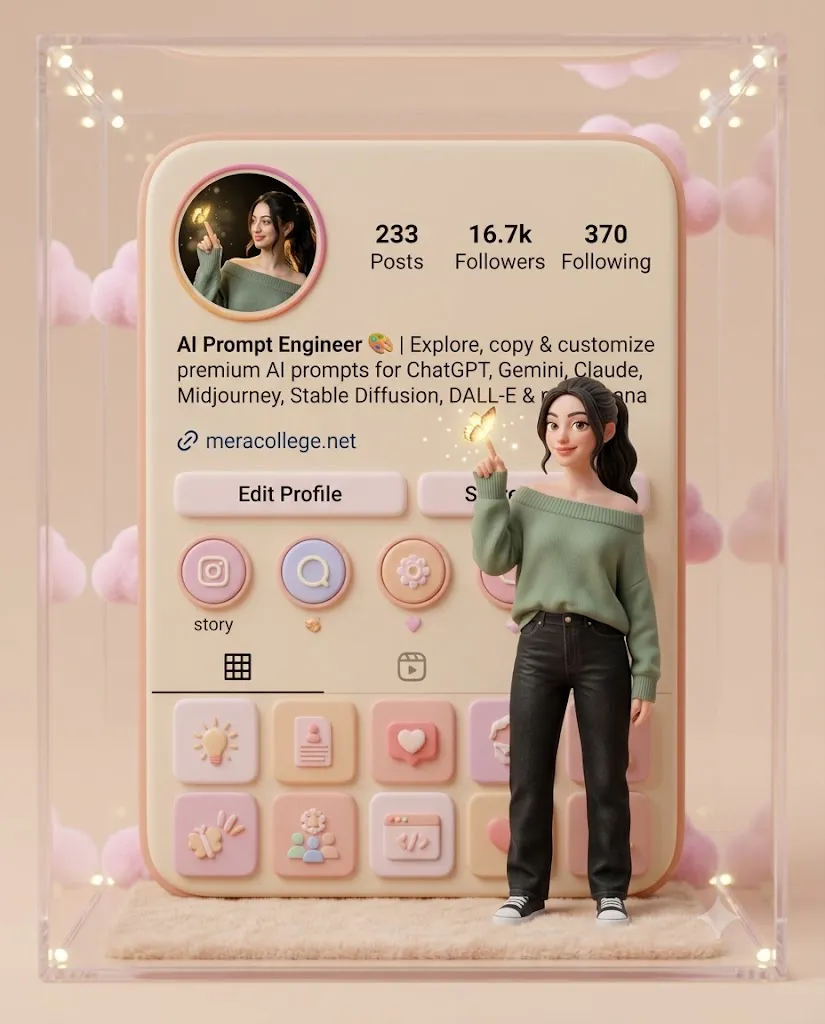
The Pastel Instagram 3D Diorama Prompt is a creative AI image-generation concept that transforms an ordinary social media profile into a beautiful miniature 3D world. Instead of displaying a simple Instagram profile screenshot, this prompt turns the profile interface into a soft, rounded, toy-like 3D scene and places a realistic mini version of the person in front of it.
The visual style combines modern social media design with a cute pastel aesthetic. Soft beige, pink, peach, and cream tones create a warm and friendly appearance, while smooth rounded edges give the entire composition a premium miniature-diorama effect.
One of the most interesting elements of this concept is the mini version of the person. The subject appears to stand slightly in front of the Instagram profile panel, creating the illusion that they have stepped out of their digital profile and entered a tiny physical world.
The profile panel can include the creator's bio, profile picture, username, and other recognizable interface elements. For an AI creator or prompt engineer, the bio can communicate the purpose of the profile while also becoming part of the visual design. The prompt is particularly useful for Instagram profile showcases, creator branding, portfolio images, promotional posts, website graphics, social media campaigns, and AI-themed content.
"Pastel Instagram 3D Diorama Prompt"
Create a highly detailed, ultra-cute 3D pastel diorama of me integrated into my Instagram profile interface. Use my real Instagram profile Ul as a soft rounded background panel, but redesign it in a clean pastel aesthetic (beige, pink, peach tones), with smooth edges and a minimal, toy-like 3D style. Add a realistic mini version of me standing slightly in front of the profile panel. Bio text on profile panel: "AI Prompt Engineer 🎨 | Explore, copy & customize premium AI prompts for ChatGPT, Gemini, Claude, Midjourney, Stable Diffusion, DALL-E & nano banana | 🔗 meracollege.net".
How To Use Photo Editing?
Using the Pastel Instagram 3D Diorama Prompt begins with selecting the right reference materials. You can either use an existing portrait of yourself or create the entire scene from scratch using an AI image generator.
Step 1: Choose Your Reference Photo
Select a high-quality photograph of yourself. A clear portrait with good lighting works best because the AI needs to understand your facial features, hairstyle, skin tone, and overall appearance. If your goal is to create a recognizable mini version of yourself, use a photograph where your face is clearly visible.
Step 2: Prepare Your Instagram Profile
Take a screenshot of your Instagram profile or prepare the profile information you want to display. The profile image, username, bio, and interface elements can become part of the miniature profile panel.
For example, the bio in this concept can read:
“AI Prompt Engineer 🎨 | Explore, copy & customize premium AI prompts for ChatGPT, Gemini, Claude, Midjourney, Stable Diffusion, DALL-E & nano banana | 🔗 meracollege.net”
When using AI-generated text inside an image, remember that AI image generators can sometimes produce incorrect spelling. For important profile information, it is often better to add the text manually during the final editing stage.
Step 3: Add the Prompt
Upload your reference photograph and, if supported, your profile screenshot. Then add the Pastel Instagram 3D Diorama Prompt. Clearly describe the desired appearance: a rounded Instagram profile panel, pastel colors, smooth 3D surfaces, miniature proportions, soft lighting, realistic facial identity, and a clean toy-like environment.
Step 4: Generate the Image
Generate several variations and compare them. Look for the version that provides the best combination of facial similarity, 3D depth, profile-panel accuracy, lighting, and overall composition.
Tools You Can Use For Prompt Copy and Create Photo
There are several categories of tools that can help you create this type of image.
1. AI Image Generators
AI image-generation platforms are useful for transforming text descriptions into creative 3D scenes. They can create miniature environments, pastel backgrounds, characters, furniture, lighting, and other visual elements from a detailed prompt. Choose a tool that supports reference images if maintaining your real appearance is important.
2. AI Photo Editing Tools
AI photo editors are useful when you already have a photograph and want to transform it into the mini-diorama concept. These tools can help replace the background, modify clothing, create a miniature version of the subject, and introduce a stylized 3D environment.
3. Graphic Design Editors
A graphic design editor is extremely useful for the final stage. You can manually add the Instagram username, bio, icons, links, profile statistics, and other interface details. This is especially important when the image contains specific text because manually added typography is usually cleaner and more accurate than AI-generated lettering.
4. Prompt Libraries and AI Communities
Prompt libraries can provide inspiration for camera angles, lighting, miniature environments, 3D materials, and character positioning. You can copy the basic structure of a prompt and customize it according to your own profile, clothing, colors, and branding.
How To Edit Photo?
After generating the main image, careful editing can make the final result look much more professional.
Step 1: Preserve Facial Identity
The mini character should still clearly resemble the person in the reference image. Check the eyes, nose, lips, jawline, hairstyle, skin tone, and facial proportions. Avoid unnecessary beautification or facial changes if your goal is to create an authentic mini version of yourself.
A useful instruction is:
“Maintain the exact identity and recognizable facial characteristics of the reference person.”
Step 2: Create the Pastel Color Palette
The main color palette should contain soft beige, pink, peach, cream, and subtle warm tones. Avoid using too many strong colors because the charm of this concept comes from its soft, cohesive appearance. The Instagram profile panel, background, miniature furniture, and decorative elements should visually complement one another.
Step 3: Improve the 3D Effect
Add realistic depth through soft shadows and highlights. The profile panel should appear slightly raised from the background, while the miniature person should stand clearly in front of it. Subtle ambient shadows beneath the character and stool can make the scene feel physically grounded.
Step 4: Refine the Mini Character
The character should look like a realistic miniature collectible figure rather than a completely cartoon-style character. Keep the face recognizable while allowing the overall environment to maintain a cute 3D aesthetic. The proportions can be slightly stylized, but the character should remain visually connected to the original person.
Step 5: Fix the Instagram Text
AI-generated text may contain spelling mistakes or distorted letters. If the profile bio is important, remove the inaccurate text and recreate it manually with a clean, modern font. Keep the typography small but readable so it fits naturally into the miniature profile panel.
Step 6: Add Final Lighting
Use soft studio lighting with gentle highlights around the miniature character and profile panel. A subtle shadow beneath the profile panel and character can create a realistic diorama effect. Finally, adjust brightness, contrast, sharpness, and overall color balance to create a polished social-media-ready image.
Conclusion
The Pastel Instagram 3D Diorama Prompt offers a unique way to turn a standard social media profile into a creative miniature world. By combining a real portrait, a recognizable profile interface, pastel colors, rounded 3D elements, and a miniature version of the creator, the concept creates an image that feels both personal and visually memorable.
The key to achieving a high-quality result is using a clear reference image, providing detailed instructions, maintaining facial identity, and carefully controlling the pastel color palette. The AI can create the main 3D scene, while a traditional editing tool can be used to correct typography and refine small details.
This style is especially effective for AI creators, digital artists, content creators, prompt engineers, influencers, and personal brands. It can be used for Instagram posts, profile showcases, promotional graphics, portfolio presentations, website banners, and creative branding campaigns.
With the right prompt and editing workflow, your Instagram profile can become more than just a digital page—it can become a cute, premium, three-dimensional miniature world that visually represents your online identity.