Introduction
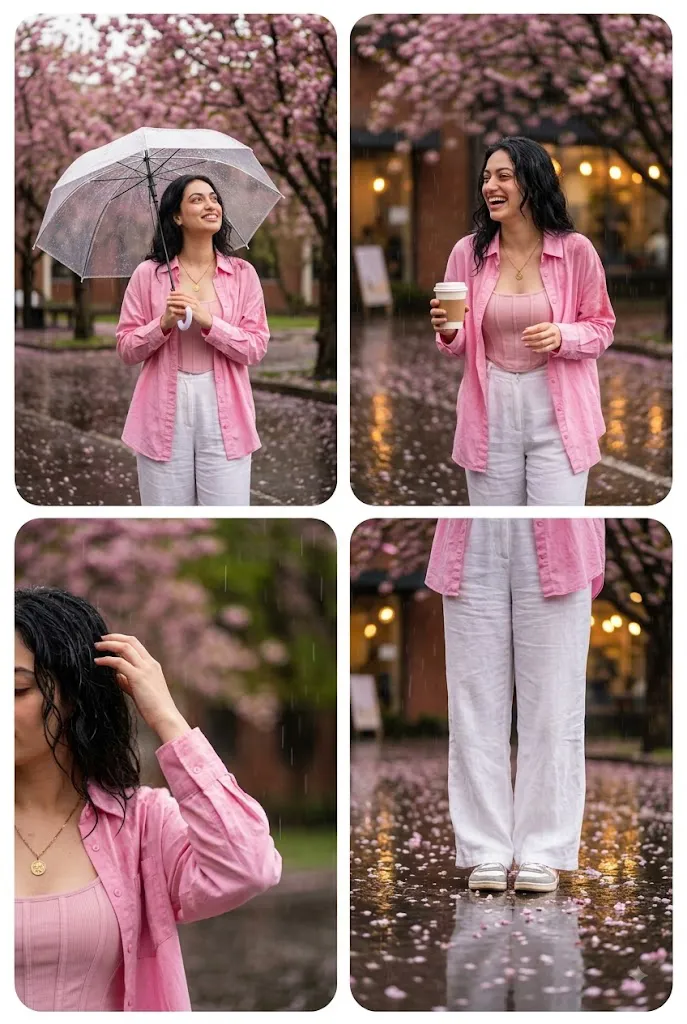
The Pink Aesthetic College Prompt is an AI photo-editing concept that turns an ordinary portrait into a dreamy, rain-soaked campus scene. It blends youthful fashion, monsoon weather, blooming pink flowers, wet-pavement reflections, cinematic lighting, and a soft Korean-inspired mood into one stylish, Instagram-ready image.
The core styling idea is simple: a young woman in a pink oversized button-down shirt paired with white wide-leg pants. The relaxed shirt gives the look an effortless, modern feel, while the clean white trousers stand out against the colorful, rain-soaked backdrop.
Rain isn't just a backdrop detail — it's central to the story. Fine droplets, glistening pavement, and soft atmospheric haze should make the photo feel like a still from a romantic campus film. The setting itself matters too: a college road lined with blooming pink flowers, greenery, trees, and hints of campus architecture, with wet pavement reflecting the subject and her surroundings for extra depth.
A soft "K-mood" aesthetic ties it together — vibrant yet balanced colors, natural skin texture, cinematic depth of field, and gentle lighting that keeps the result polished rather than artificial. The concept also works well as a collage, showing several moments from the same rainy afternoon: walking down the road, gazing at flowers, enjoying the rain, adjusting her shirt, or standing beneath the trees.
When a reference photo is used, the subject's identity should stay recognizable — her face, hairstyle, skin tone, and proportions carry over, while the AI reimagines the outfit, setting, pose, weather, and mood.
“Pink Aesthetic College Prompt”
Aesthetic rainy season college portrait collage of a stylish young woman in a pink oversized shirt and white wide-leg pants, enjoying the rain on a campus road with blooming pink flowers, wet pavement reflections, soft cinematic lighting, dreamy K mood, vibrant colors, multiple poses, photorealistic, Instagram poster style, shallow depth of field, 40.
How To Use Photo Editing?
Using the Pink Aesthetic College Prompt is simple when the process is divided into several clear steps. The most important starting point is a good reference photograph.
Step 1: Select a Good Reference Photo
Choose a high-resolution image where the subject's face is clearly visible. Natural lighting is preferable because it allows the AI to understand facial details more accurately. Avoid extremely blurry images, heavy filters, extreme shadows, or photographs where the face is partially hidden.
Step 2: Upload the Reference Image
Upload the photograph into an AI photo-editing or image-generation platform that supports reference images.
Add an instruction such as:
“Use the uploaded photograph as the primary identity reference. Preserve the subject's recognizable facial characteristics, hairstyle, natural skin texture, skin tone, and proportions while transforming the clothing, environment, weather, pose, and cinematic atmosphere.”
This helps maintain consistency while allowing the AI to create the requested rainy campus scene.
Step 3: Add the Complete Prompt
Paste the full Pink Aesthetic College Prompt into the prompt field. Include the pink oversized shirt, white wide-leg pants, rainy campus road, flowers, reflections, multiple poses, cinematic lighting, and K-inspired mood. Detailed instructions help establish the overall visual direction.
Step 4: Generate Multiple Variations
Generate several versions and compare them carefully. Look for realistic facial identity, natural hands, accurate clothing, convincing rain, beautiful flowers, realistic pavement reflections, and balanced collage composition. Choose the version that has the strongest combination of realism and aesthetic appeal.
Tools You Can Use For Prompt Copy and Create Photo
Different categories of tools can help create this type of AI portrait.
1. AI Image Generators
AI image-generation platforms can create complete rainy campus scenes from detailed prompts. They can generate clothing, flowers, weather, architecture, poses, lighting, and cinematic compositions. For reference-based portraits, choose a platform that supports image references or character consistency.
2. AI Photo Editors
AI photo-editing tools are useful when you already have an existing photograph. They can help replace the background, change clothing, add rain, create reflections, adjust lighting, and transform an ordinary portrait into a campus fashion scene.
3. Graphic Design Applications
Graphic-design software can be particularly useful for the collage aspect of this concept. After generating multiple portraits, you can arrange them into a clean Instagram poster with different poses and crop styles. You can also adjust spacing, framing, typography, and image proportions if you want to create a complete social-media design.
4. Image Enhancement Tools
Upscaling and enhancement tools can improve the final resolution and sharpen small details such as hair strands, raindrops, clothing texture, flowers, and pavement reflections. Enhancement should be applied moderately to preserve natural skin texture.
How To Edit Photo?
Once the initial image has been generated, inspect each major element and refine the areas that need improvement.
Step 1: Check Facial Identity
Compare the generated face with the reference image. Check the eyes, eyebrows, nose, lips, jawline, hairstyle, and facial proportions. The subject should remain recognizable without excessive beautification or artificial skin smoothing.
Step 2: Refine the Pink Shirt
The oversized pink shirt should look fashionable and naturally loose. Make sure the fabric has realistic folds, seams, buttons, and shadows. The pink color should remain vibrant but balanced. Avoid excessive saturation that makes the shirt appear artificial.
Step 3: Improve the White Pants
The white wide-leg pants should have realistic fabric texture and natural folds. Pay attention to how the material interacts with the rain and surrounding environment. The pants should remain clean and visually distinct without appearing unnaturally bright.
Step 4: Enhance the Rain
Rain should appear realistic rather than looking like random white lines. Use fine droplets, subtle atmospheric moisture, and soft reflections on wet surfaces. The amount of rain should support the mood without hiding the subject's face or clothing.
Step 5: Improve the Campus Environment
The college road should feel spacious and visually attractive. Add trees, greenery, campus structures, pathways, and blooming pink flowers. Avoid repetitive flowers or artificial-looking vegetation. Natural variation helps make the environment more believable.
Step 6: Refine Wet Pavement Reflections
Wet pavement is an important visual element. It should subtly reflect the subject, flowers, sky, and surrounding architecture. Reflections should be slightly distorted by the wet surface rather than appearing like a perfect mirror.
Step 7: Adjust Cinematic Lighting
Soft lighting works particularly well for a rainy scene. Use gentle highlights on the face, hair, shirt, and flowers while maintaining soft shadows. A slightly diffused light source can create the dreamy atmosphere associated with rainy-day photography.
Step 8: Add Depth of Field
Keep the subject relatively sharp while allowing distant campus buildings, flowers, and trees to become softer. Foreground flowers can also be slightly blurred to create additional depth.
Step 9: Create the Collage
If the final design requires multiple poses, generate several complementary images with consistent clothing, facial identity, lighting, and environment. Arrange them into a cohesive collage. Keep the images visually connected so that the result feels like one continuous rainy-day story rather than unrelated photographs.
Step 10: Apply Final Color Grading
Use vibrant but controlled colors. The pink shirt and flowers can provide the primary color accents, while green foliage and white clothing balance the composition. Maintain natural skin tones and use subtle contrast, soft highlights, and cinematic color processing.
Conclusion
The Pink Aesthetic College Prompt brings together rainy-season photography, youthful campus style, blooming flowers, and a Korean-inspired cinematic mood in a single concept. The pink shirt and white pants create a fresh, fashionable wardrobe, while the rain-soaked campus setting adds romance and atmosphere. Wet reflections, soft lighting, and shallow depth of field give the final image a cinematic quality well suited to Instagram posters, profile photos, or broader creative projects.
For the best outcome, start with a clear reference photo and give detailed instructions to preserve identity. Pay close attention to the face, hair, clothing, hands, rain, flowers, and reflections, and generate multiple versions before choosing the one that balances realism and style most effectively. When building a collage, make sure every pose feels like part of the same rainy-day story — and finish with restrained enhancement and color grading rather than heavy-handed effects. Done well, this concept turns a simple portrait into a vibrant, youthful, and cinematic rainy-day fashion story.