Introduction
Rain has always been associated with emotion, romance, nostalgia, and cinematic beauty. In photography and digital art, rainy-day portraits create a unique atmosphere that instantly captures attention. The combination of glowing streetlights, reflective wet roads, soft falling raindrops, and natural human expressions creates a magical visual experience that feels both realistic and dreamlike.
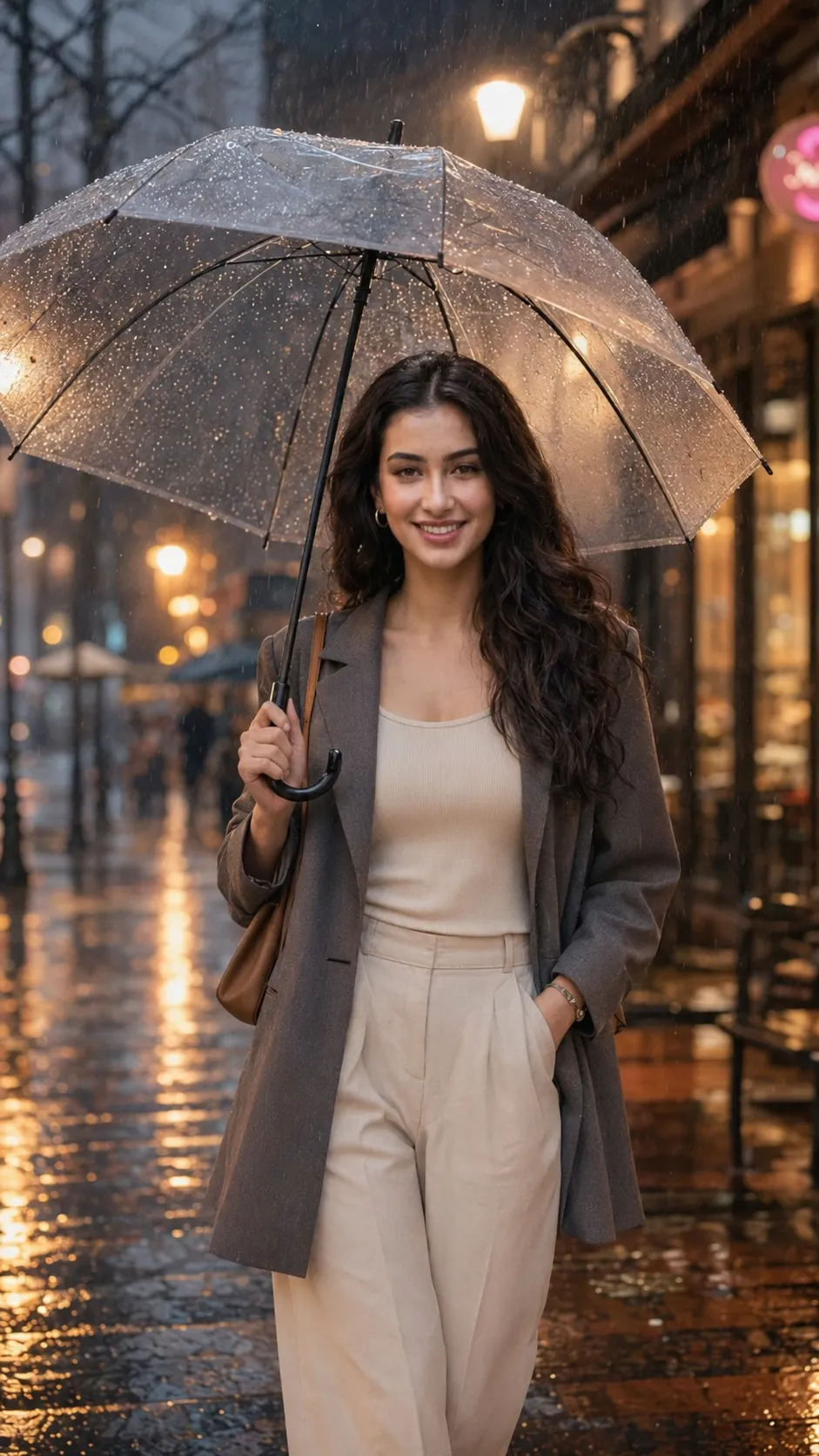
Generate a beautiful rainy atmosphere portrait of the same girl from the uploaded photo. Keep her face exactly the same, including facial features, hairstyle, skin texture, eye shape, smile, and natural expression. Do not beautify or replace the face. She is standing under a transparent umbrella on a rainy evening street, wearing an elegant outfit with soft wet-hair details and natural makeup. The background has warm streetlights, blurred city bokeh, wet pavement reflections, soft falling rain, and a romantic cinematic mood. Create an emotional Instagram-style portrait with realistic raindrops, soft lighting, natural skin texture, and a dreamy rainy-day atmosphere. Vertical 9:16 composition, high resolution, photorealistic. Negative prompt: changed face, unrealistic skin, messy eyes, distorted hands, extra fingers, low quality, blurry details, fake rain, cartoon effect.
With the rise of artificial intelligence image-generation tools, creating a stunning rainy evening portrait has become easier than ever. Using a detailed AI prompt, creators can transform an ordinary reference photo into a cinematic masterpiece while preserving the subject’s identity and facial features. A well-written "Rainy Evening Vibes On A City Street" prompt helps generate realistic lighting, emotional storytelling, and professional-quality results that resemble high-end fashion or movie photography.
This style has become extremely popular on Instagram, Pinterest, and digital art communities because it combines modern aesthetics with emotional depth. Whether you are creating personal portraits, social media content, AI artwork, or creative projects, a rainy evening city portrait can deliver a beautiful and memorable visual impact.
How To Use Photo Editing?
Photo editing is the process of enhancing, modifying, or transforming an image to achieve a desired visual result. When creating a rainy evening city portrait, editing allows users to introduce cinematic elements that may not have existed in the original photograph.
The process usually begins with a clear reference image. AI technology analyzes facial structure, skin tone, hairstyle, and expressions, then applies the desired environment and artistic elements while maintaining realism. This allows the subject to appear naturally placed within a rainy urban setting.
Photo editing can be used to add:
- Realistic rainfall effects
- Warm streetlight glow
- Wet pavement reflections
- Soft cinematic color grading
- Background bokeh lights
- Atmospheric depth
- Natural skin texture enhancement
- Mood-focused storytelling
One of the biggest advantages of modern AI editing is the ability to preserve the original identity of the person while completely transforming the surrounding environment. This makes it possible to create professional-looking portraits without requiring expensive photoshoots or specialized equipment.
For social media creators and photographers, rainy atmosphere edits provide a visually engaging style that attracts viewers and creates an emotional connection.
Tools You Can Use For Prompt Copy and Create Photo
Many AI-powered tools can help you generate realistic rainy city portraits from detailed prompts. Below are some of the most popular options.
1. ChatGPT
ChatGPT is an excellent tool for writing detailed AI image prompts. Users can describe their desired scene, lighting, mood, clothing, and environment, and ChatGPT can generate professional prompts optimized for AI image-generation platforms.
2. Midjourney
Midjourney is known for producing cinematic, artistic, and highly detailed visuals. It excels at creating atmospheric scenes with dramatic lighting and realistic environments.
3. Leonardo AI
Leonardo AI is popular among creators who want photorealistic portraits with strong facial accuracy and natural lighting effects.
4. Flux AI
Flux AI is one of the leading tools for creating ultra-realistic portraits. It generates impressive skin textures, realistic shadows, and lifelike facial details.
5. Google Gemini
Gemini can assist with prompt generation, creative brainstorming, and image-creation ideas for various photography styles.
6. Adobe Photoshop
Photoshop remains the industry-standard editing software. It can be used to refine AI-generated images, improve lighting, adjust colors, and enhance details.
7. Canva
Canva provides beginner-friendly editing tools for adding text, filters, effects, and graphic elements to AI-generated portraits.
8. Ideogram
Ideogram offers excellent image-generation capabilities with strong attention to composition and realistic visual storytelling.
By combining these tools, creators can achieve professional-quality results. For example, you can create the prompt in ChatGPT, generate the image using Flux AI or Midjourney, and then enhance it further using Photoshop.
How To Edit Photo?
Creating a realistic rainy evening portrait involves several important steps.
Step 1: Select a Clear Reference Image
Choose a high-quality image where the subject's face is clearly visible. Good lighting and facial clarity help the AI preserve identity accurately.
Step 2: Write a Detailed Prompt
A strong prompt should include:
- Identity preservation instructions
- Clothing description
- Rain atmosphere details
- Background environment
- Lighting conditions
- Camera settings
- Mood and emotion
- Quality requirements
The more descriptive the prompt, the better the final image quality.
Step 3: Upload the Reference Photo
Upload your chosen image to an AI image-generation platform that supports image references or face preservation features.
Step 4: Generate the Image
Run the prompt and allow the AI to create multiple variations. Review each version and select the one that best matches your vision.
Step 5: Verify Facial Accuracy
Check that the generated portrait maintains the original facial structure, eye shape, smile, hairstyle, and skin tone.
Step 6: Enhance Rain Effects
Add realistic rain elements such as:
- Transparent raindrops
- Rain streaks
- Umbrella water droplets
- Wet clothing details
- Reflective surfaces
These details greatly improve realism.
Step 7: Improve Lighting
Rainy portraits look best with cinematic lighting. Warm streetlights combined with cool ambient tones create a balanced and visually appealing atmosphere.
Step 8: Apply Color Grading
Professional color grading helps establish mood. Soft warm highlights and cooler shadows often work well for rainy evening photography.
Step 9: Refine Details
Enhance important visual elements including:
- Eyes
- Hair texture
- Skin texture
- Rain droplets
- Clothing folds
- Background bokeh
Avoid excessive smoothing because realistic skin texture improves authenticity.
Step 10: Export in High Resolution
Save the final image in high quality, preferably 4K or 8K resolution. High-resolution images are ideal for printing, social media sharing, and portfolio use.
Conclusion
Rainy evening city portraits combine emotion, realism, and cinematic beauty into a single image. The warm glow of streetlights, reflections on wet pavement, and soft falling rain create an atmosphere that feels both romantic and timeless. With the help of AI image-generation tools and detailed prompts, anyone can create stunning professional-quality portraits without needing an elaborate photoshoot.
The key to achieving the best results lies in using a clear reference image, writing a detailed prompt, preserving facial identity, and carefully refining lighting and atmosphere. Whether you are creating content for Instagram, building a photography portfolio, designing artwork, or simply experimenting with AI creativity, the "Rainy Evening Vibes On A City Street" style offers endless possibilities.
As AI technology continues to evolve, creating realistic and emotionally engaging portraits will become even more accessible, allowing creators to bring their imagination to life with remarkable detail and cinematic quality.