Introduction
The Red Monochrome Tribute Poster Prompt is one of the most eye-catching AI photo editing styles trending across Instagram, Pinterest, Behance, and digital art communities. This dramatic design combines a bold red monochrome background, cinematic lighting, high-contrast portraits, and a stylish collage layout to create a powerful fan-made tribute poster. Whether you're creating artwork for yourself, a celebrity-inspired portrait, or a creative social media post, this prompt helps transform an ordinary photo into an editorial-quality masterpiece.
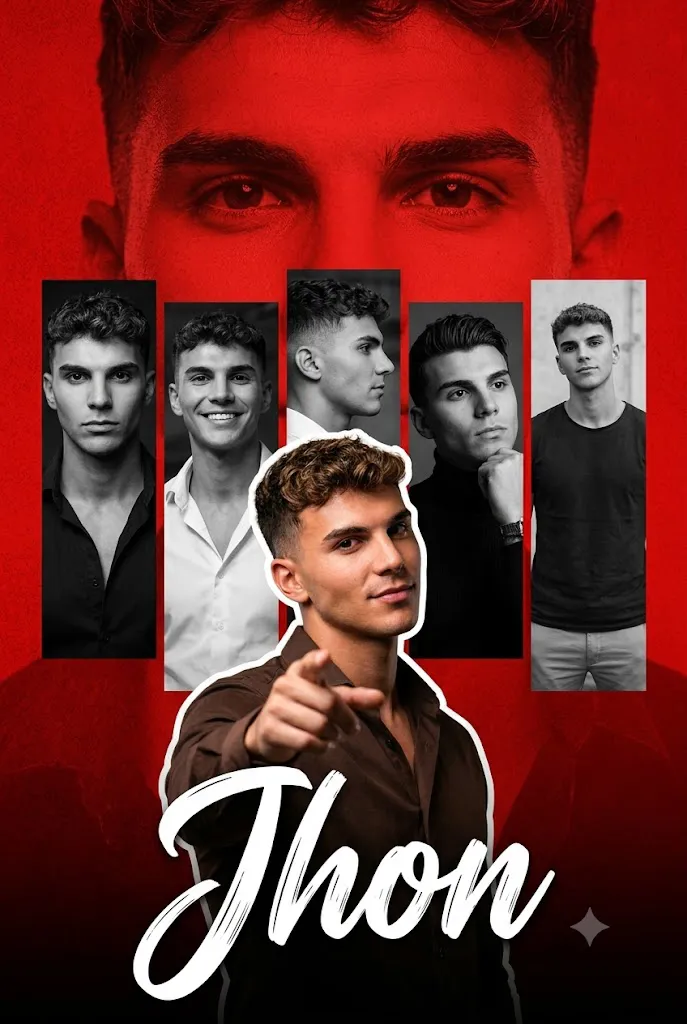
A typical Red Monochrome Tribute Poster features a textured crimson background, large faded facial details such as intense eyes, multiple black-and-white portrait panels, and a vibrant full-color cutout placed in the foreground. Decorative elements like handwritten signature text, dramatic shadows, and modern typography enhance the overall visual impact.
One of the biggest advantages of using an AI prompt is that you don't need advanced Photoshop skills. Simply upload your reference image, copy the prompt, and let the AI generate a professional-looking tribute poster within minutes. Most modern AI image generators can preserve facial identity while applying stunning artistic effects that look realistic and cinematic Whether you're designing content for Instagram, YouTube thumbnails, portfolio projects, wallpapers, or digital artwork, the Red Monochrome Tribute Poster Prompt offers a stylish and memorable presentation that stands out from traditional photo edits.
"Red Monochrome Tribute Poster Prompt"
Create a dramatic tribute poster with a bold red monochrome background. ” The background should feature a faint, large close-up of a man’s eyes blended into the red texture for intensity. In the center, design a collage layout with five vertical rectangular panels showing black-and-white portraits of the same stylish man(reference image), in different poses and expressions (serious, smiling, side profile, casual stance). Overlaying the panels in the foreground, place a larger, full-color cutout of the actor pointing confidently toward the viewer. He should have styled hair, a well groomed appearance, and wear a dark brown shirt with a charismatic expression. At the bottom, add a bold handwritten script-style signature text reading “Jhon” in large white brush lettering, Add subtle cinematic lighting, high contrast, sharp details, and a modern fan-made poster aesthetic. The overall mood should be powerful, celebratory, and stylish with a strong red-and-black theme.
How To Use Photo Editing?
Creating a tribute poster with AI is simple when you follow the correct workflow. Even beginners can achieve professional results by following these steps.
Step 1: Choose a High-Quality Portrait
Select a sharp, high-resolution portrait with clear lighting. A front-facing or slightly angled image works best because AI can accurately preserve facial features and expressions.
Step 2: Copy the AI Prompt
Use a detailed Red Monochrome Tribute Poster Prompt. A well-written prompt should include information about:
- Red monochrome textured background
- Five vertical portrait panels
- Black-and-white portrait effects
- Large faded eye background
- Full-color foreground subject
- Cinematic lighting
- High contrast
- Sharp details
- Handwritten signature text
- Modern fan-made poster style
The more descriptive your prompt, the more realistic the final artwork will appear.
Step 3: Upload Your Reference Image
Upload your portrait to an AI image generator that supports image references. This helps maintain your original facial identity while applying the requested artistic style.
Step 4: Generate the Poster
Paste the prompt into the AI tool and generate the image. If the first result isn't perfect, slightly modify the wording or regenerate until you achieve the desired look.
Step 5: Download the Final Image
Once satisfied, export the image in high resolution (4K or higher) for social media posts, wallpapers, prints, or digital portfolios.
Tools You Can Use for Prompt Copy and Create Photo
Several AI tools can generate stunning Red Monochrome Tribute Posters. Here are some of the best options:
1. ChatGPT
ChatGPT is an excellent tool for writing professional AI prompts. It can help you describe lighting, composition, camera angles, colors, textures, and cinematic effects in detail, making your prompts more effective.
2. Midjourney
Midjourney is known for producing artistic, cinematic, and highly detailed visuals. It creates impressive monochrome posters with dramatic lighting and premium-quality textures.
3. Flux AI
Flux AI excels at preserving facial identity while generating realistic portraits. It is especially useful for fan-made tribute posters and editorial-style compositions.
4. Leonardo AI
Leonardo AI provides excellent control over image generation, allowing users to create realistic posters with layered compositions, shadows, and creative backgrounds.
5. Google Gemini
Gemini can help improve prompt descriptions, generate creative ideas, and refine visual concepts before using them in an AI image generator.
6. Adobe Firefly
Adobe Firefly combines AI image generation with Adobe's editing ecosystem, making it ideal for refining colors, adding effects, and enhancing poster quality.
7. Ideogram AI
Ideogram AI performs exceptionally well when your poster includes typography, handwritten signature text, or stylish graphic elements.
8. Canva AI
Canva AI allows users to combine AI-generated images with additional stickers, text, icons, and graphic overlays to create polished social media designs.
How To Edit Photo?
If you want your Red Monochrome Tribute Poster to look professional, follow these editing tips.
Step 1: Preserve Facial Identity
Always include instructions like:
- Keep the original face exactly the same.
- Preserve hairstyle.
- Maintain natural skin tone.
- Do not change facial structure.
- Keep recognizable features intact.
This ensures the final image still resembles the original subject.
Step 2: Create the Background
Use a bold red monochrome background with subtle textures, gradients, or grunge effects. Blend a faint close-up of the subject's eyes into the background to add depth and emotion.
Step 3: Design the Collage
Arrange five vertical rectangular panels featuring black-and-white portraits of the same person in different poses such as:
- Serious expression
- Smiling portrait
- Side profile
- Casual stance
- Confident pose
This layout creates a cinematic storytelling effect.
Step 4: Add the Foreground Subject
Place a larger, full-color cutout of the subject in front of the collage. A confident pose, such as pointing toward the viewer, creates a dynamic focal point and enhances the poster's impact.
Step 5: Apply Cinematic Lighting
Use dramatic highlights, soft rim lighting, and realistic shadows to create depth. High contrast between the red background and monochrome panels makes the composition visually striking.
Step 6: Add Typography
Include a handwritten brush-style signature, bold title, or inspirational tagline. White lettering contrasts beautifully against the red background and completes the tribute poster aesthetic.
Step 7: Export the Poster
Save the final artwork in high resolution (4K or 8K) to ensure maximum quality for printing, wallpapers, or social media sharing.
Conclusion
The Red Monochrome Tribute Poster Prompt is an outstanding choice for anyone looking to create dramatic, cinematic, and professional AI-generated artwork. Its signature combination of bold red tones, monochrome portrait panels, cinematic lighting, layered compositions, and stylish typography produces an unforgettable visual experience.
One of the greatest benefits of AI photo editing is its simplicity. With a detailed prompt and a quality reference image, you can generate a premium fan-made poster without requiring advanced graphic design skills. Whether you're creating personal portraits, tribute artwork, promotional graphics, or creative social media content, this prompt offers exceptional flexibility and visual appeal.
By using trusted AI tools such as ChatGPT, Midjourney, Flux AI, Leonardo AI, Adobe Firefly, Ideogram AI, and Canva AI, you can customize every aspect of the design, from facial preservation and background textures to lighting, typography, and composition. As AI image generation continues to improve, Red Monochrome Tribute Posters will become even more realistic and visually captivating, making them a perfect choice for artists, content creators, and digital designers who want to create powerful and memorable visuals.