Introduction
Artificial Intelligence has transformed digital artwork by making it possible to create premium-quality posters from detailed text prompts. Whether you're designing a motivational sports campaign, a luxury fashion portrait, or a personal branding image, AI image generators can produce professional results in minutes. One of the most impressive styles is the Redlit Focus Poster, which combines dramatic lighting, bold typography, and cinematic color grading to create a striking editorial poster.
"Redlit Focus Poster Prompt"
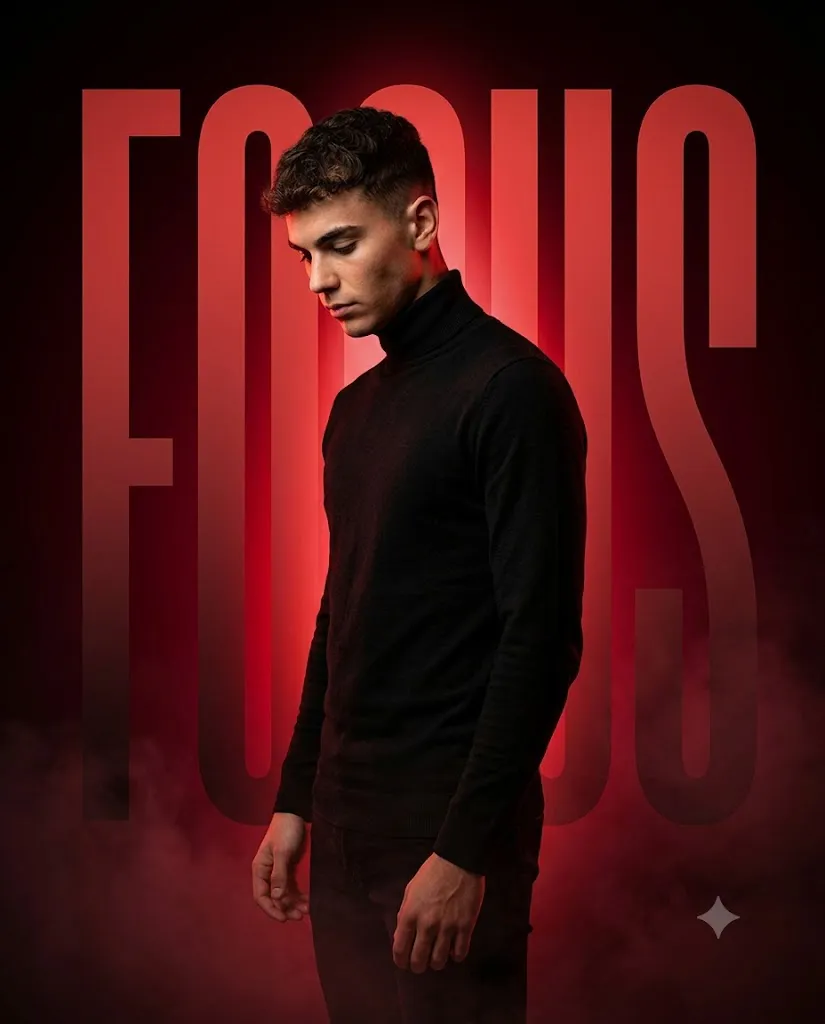
Create a premium cinematic sports-style poster in a 4:5 aspect ratio. Use the uploaded person exactly as provided, preserving the face, hairstyle, expression, and identity. The subject stands in a relaxed 3/4 side profile wearing a fitted black turtleneck sweater. Use dramatic black and crimson lighting, giant integrated "FOCUS" typography, strong red backlight, warm key light, cinematic smoke, textured background, luxury editorial style, ultra-realistic skin detail, premium sports campaign aesthetic, professional color grading, sharp typography, and 8K quality.
The Redlit Focus Poster Prompt is designed to generate an ultra-realistic portrait featuring a young man wearing a fitted black turtleneck sweater, standing in a relaxed three-quarter side profile. His head is slightly lowered with eyes directed toward the ground, expressing calm confidence and deep focus. Behind him, a giant glowing "FOCUS" typography blends naturally into a textured black-and-crimson background, creating a luxury sports campaign aesthetic.
The composition uses strong red backlighting, soft warm facial lighting, subtle atmospheric smoke, and premium editorial color grading. These details work together to produce a powerful, high-end visual that is ideal for Instagram posts, posters, wallpapers, motivational graphics, personal branding, and commercial advertising.
How To Use Photo Editing?
Creating a premium Redlit Focus Poster is simple when you follow the correct workflow.
Step 1: Copy the Prompt
Copy the complete prompt carefully. Every detail—including pose, lighting, typography, clothing, and background—helps the AI generate a more accurate and professional image.
Step 2: Open an AI Image Generator
Paste the prompt into your preferred AI image generation platform. Most advanced AI models support highly detailed prompts for cinematic poster creation.
Step 3: Upload Your Reference Photo
Upload a high-quality portrait with good lighting if you want the AI to preserve your facial identity. A clear reference image produces more accurate results.
Step 4: Generate Multiple Versions
Create several variations using the same prompt. Compare the outputs and choose the version with the strongest composition, realistic lighting, and best typography integration.
Step 5: Enhance the Poster
Use editing software to improve colors, sharpen details, reduce imperfections, and make the overall composition look even more premium.
Tools You Can Use For Prompt Copy and Create Photo
Several AI tools are excellent for creating luxury cinematic posters.
1. ChatGPT
Use ChatGPT to write detailed AI prompts, refine descriptions, and improve image quality through prompt engineering.
2. Midjourney
Midjourney is one of the best AI generators for creating artistic and cinematic editorial-style posters with exceptional lighting.
3. Flux AI
Flux AI produces highly realistic portraits with impressive facial detail, fabric textures, and cinematic realism.
4. Google Gemini
Gemini helps improve prompt wording, generate creative concepts, and explore different visual styles.
5. Ideogram AI
Ideogram performs well when creating designs that include large typography, making it ideal for posters featuring words like FOCUS.
6. Adobe Firefly
Adobe Firefly offers professional AI image generation along with advanced editing capabilities for commercial-quality projects.
7. Canva AI
Canva AI allows you to combine AI-generated portraits with text, layouts, and graphic elements to create social media posts, banners, and print-ready posters.
How To Edit Photo?
Follow these steps to transform your AI-generated image into a premium sports campaign poster.
Step 1: Generate the Base Image
Create multiple images using the Redlit Focus Poster Prompt and select the strongest composition.
Step 2: Improve Facial Details
Enhance facial sharpness while maintaining realistic skin texture and natural identity.
Step 3: Strengthen the Lighting
Adjust brightness, contrast, and highlights to emphasize the dramatic red backlight while keeping facial lighting soft and balanced.
Step 4: Refine the Typography
Ensure the FOCUS text blends naturally into the background, with subtle glow and realistic overlap behind the subject.
Step 5: Add Cinematic Effects
Enhance atmospheric smoke, deepen the vignette, and apply soft bloom around the red lighting for a premium editorial appearance.
Step 6: Export in High Resolution
Save the final poster in high resolution to preserve crisp typography, detailed fabric textures, and professional-quality color grading.
Conclusion
The Redlit Focus Poster Prompt is an outstanding choice for creating ultra-realistic cinematic portraits with a luxury sports campaign aesthetic. Its dramatic crimson lighting, bold integrated typography, textured background, and clean composition produce visuals that resemble high-end commercial advertising.
Whether you're creating motivational content, personal branding images, social media graphics, or editorial posters, this prompt offers a fast and effective way to achieve professional-quality results. By combining a detailed AI prompt with modern image generation tools and thoughtful post-processing, you can create a visually striking poster that communicates confidence, determination, and focus.