Introduction
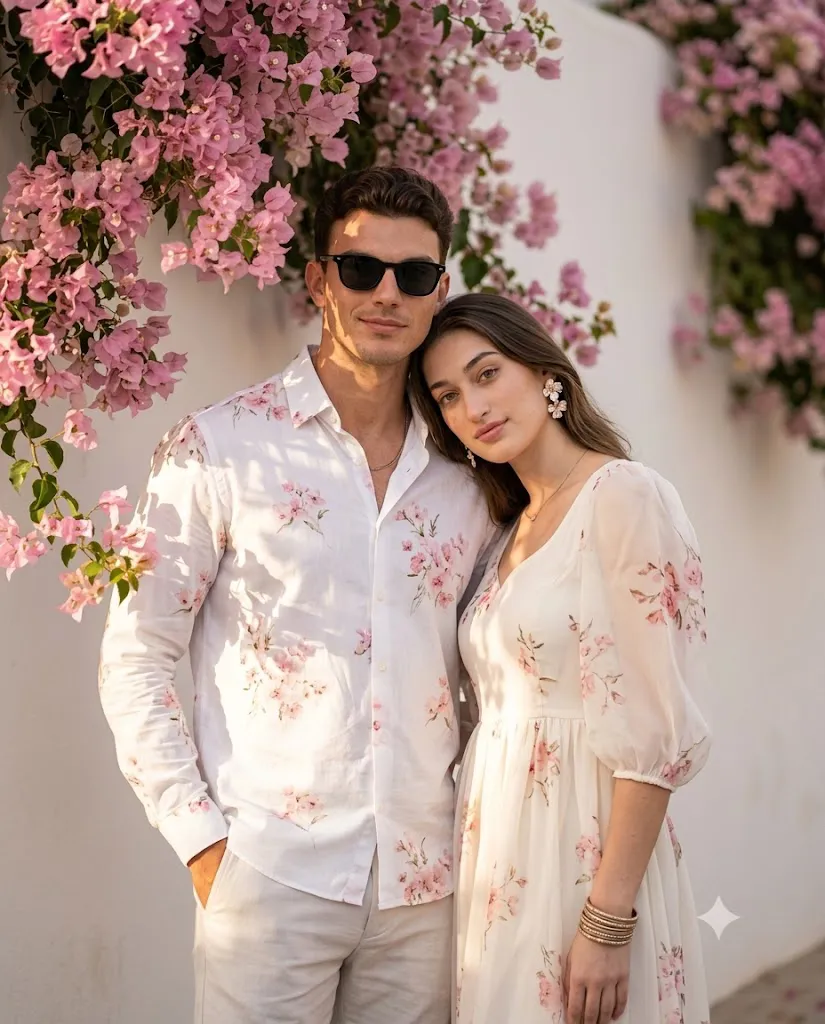
The Romantic Bougainvillea Couple Prompt is a beautiful AI photo editing style that transforms an ordinary couple portrait into a dreamy, cinematic masterpiece. Inspired by luxury lifestyle photography and editorial fashion magazines, this prompt combines soft golden-hour lighting, elegant outfits, blooming pink bougainvillea flowers, and a peaceful outdoor setting to create a timeless romantic portrait.
One of the defining features of this prompt is its harmonious color palette. A clean white wall serves as the background while lush pink bougainvillea vines cascade naturally from above, framing the couple with vibrant floral beauty. The warm sunlight, creamy white tones, and soft blush-pink flowers create a calm and romantic atmosphere that feels perfect for engagement photos, anniversaries, weddings, or social media posts.
The prompt also focuses on preserving the original facial identity of both people. Modern AI image generators can accurately maintain facial structure, hairstyle, skin tone, and natural expressions while enhancing the scene with professional lighting, elegant styling, and cinematic depth. The result is a magazine-quality portrait that looks as though it was captured by a professional photographer. Whether you're creating memories with your partner, designing a romantic profile picture, or producing premium lifestyle content, the Romantic Bougainvillea Couple Prompt offers a stylish and realistic way to elevate your photographs.
"Romantic Bougainvillea Couple Prompt"
Create a romantic cinematic portrait of a stylish couple standing closely together beside a soft white smooth wall covered with lush pink bougainvillea flowers. The couple is posed naturally and affectionately, with the woman gently leaning her head against the man’s shoulder. The man has a relaxed, confident expression with a gentle natural smile, while the woman has calm, romantic eyes and a subtle, serene smile with both the man and woman are facing forward and looking directly into the camera. The man has, a neatly groomed look, and wears black sunglasses, a thin chain necklace, and a white button-up shirt decorated with delicate pink floral prints. He wears light-colored trousers, with one hand casually placed inside his trouser pocket, creating a relaxed and confident pose. The woman has long, voluminous hair flowing naturally over her shoulders. She wears soft natural makeup, glowing skin, subtle pink lips, elegant floral statement earrings, a delicate necklace, and stacked metallic bangles. She is dressed in a flowing ivory-white traditional-inspired dress with sheer puff sleeves and delicate pink floral prints, beautifully matching the man’s floral shirt. Her body is gently angled toward him while maintaining direct eye contact with the camera. Lush pink bougainvillea vines cascade from the upper-left corner, naturally framing the couple. Warm golden-hour sunlight softly illuminates their faces and outfits, creating beautiful leaf shadows and gentle highlights across the white wall. The scene has a peaceful, dreamy summer atmosphere with creamy white tones, blush-pink flowers, natural colors, ultra-detailed skin texture, and elegant cinematic color grading. Composition: medium couple portrait, centered vertical framing, intimate and balanced pose, both subjects clearly visible, natural proportions, no people in the background. Lighting: warm soft golden-hour sunlight, gentle directional light, realistic shadows, soft highlights, natural skin tones. Camera: eye-level angle, premium lifestyle photography, shallow depth of field, 85mm lens, f/1.8 aperture, cinematic depth, ultra-detailed textures, photorealistic, 8K resolution, vertical 4:5 aspect ratio.
How To Use Photo Editing?
Using an AI prompt to create a romantic couple portrait is simple. Follow these steps to achieve the best results.
Step 1: Choose a High-Quality Couple Photo
Select a clear, high-resolution image where both faces are visible. Natural lighting and a sharp image help the AI preserve facial identity more accurately.
Step 2: Copy the Prompt
Copy the complete Romantic Bougainvillea Couple Prompt. Make sure it includes detailed descriptions of the clothing, background, lighting, poses, camera settings, and facial preservation instructions.
Step 3: Upload the Reference Image
Upload your original couple photo into an AI image generator that supports reference images. This allows the AI to recreate both individuals while keeping their recognizable features intact.
Step 4: Paste the Prompt
Paste the copied prompt into the AI tool. Ensure it includes important details such as:
- White wall background
- Pink bougainvillea flowers
- Romantic pose
- Golden-hour sunlight
- Luxury outfits
- Natural expressions
- 85mm portrait lens
- Shallow depth of field
- Ultra-realistic skin texture
- Cinematic color grading
- Vertical 4:5 aspect ratio
These instructions help the AI produce a realistic and elegant portrait.
Step 5: Generate the Image
Click the generate button and review the results. If necessary, regenerate the image or slightly adjust the prompt to improve the composition, lighting, or pose.
Step 6: Download
Export the final portrait in 4K or 8K resolution for social media, printing, digital albums, or personal keepsakes.
Tools You Can Use for Prompt Copy and Create Photo
Many AI image generators support detailed prompts like this. Here are some of the best tools to use:
1. ChatGPT
ChatGPT is ideal for creating detailed AI prompts. It helps describe poses, clothing, lighting, camera settings, backgrounds, and artistic styles for realistic image generation.
2. Midjourney
Midjourney creates stunning cinematic portraits with artistic composition, soft lighting, and premium editorial quality.
3. Flux AI
Flux AI is excellent for preserving facial identity while generating highly realistic couple portraits with natural expressions and detailed textures.
4. Leonardo AI
Leonardo AI provides advanced controls for realistic rendering, lighting adjustments, and luxury fashion-style photography.
5. Google Gemini
Gemini helps improve prompt wording, refine scene descriptions, and generate creative ideas before creating the final image.
6. Adobe Firefly
Adobe Firefly combines AI image generation with professional editing tools for enhancing colors, lighting, and overall image quality.
7. Ideogram AI
Ideogram AI is useful when adding elegant typography, romantic quotes, or poster-style text to your couple portraits.
8. Canva AI
Canva AI allows users to combine AI-generated portraits with beautiful layouts, decorative elements, and social media templates.
How To Edit Photo?
To achieve the most realistic Romantic Bougainvillea Couple Portrait, follow these editing tips.
Step 1: Preserve Facial Identity
Always include instructions such as:
- Keep both faces exactly the same.
- Preserve natural hairstyle.
- Maintain skin tone.
- Keep natural facial proportions.
- Avoid distortion or cartoon effects.
This ensures that both individuals remain easily recognizable.
Step 2: Style the Couple
Dress the man in a premium white button-up shirt with delicate pink floral prints, light-colored trousers, black sunglasses, and minimal accessories such as a thin chain necklace. Dress the woman in an elegant ivory-white traditional-inspired outfit featuring sheer puff sleeves and matching floral prints. Add subtle jewelry, floral earrings, stacked metallic bangles, and soft natural makeup to complete the coordinated look.
Step 3: Create the Background
Use a smooth white wall decorated with cascading pink bougainvillea flowers. The floral vines should naturally frame the couple while maintaining a clean and uncluttered composition.
Step 4: Apply Cinematic Lighting
Golden-hour sunlight creates soft highlights and realistic shadows that add warmth and depth to the portrait. Gentle directional lighting enhances facial features while maintaining natural skin tones.
Step 5: Improve Image Quality
Apply:
- HDR rendering
- 85mm lens simulation
- f/1.8 aperture
- Shallow depth of field
- Ultra-realistic skin texture
- Sharp facial details
- Cinematic color grading
- Realistic fabric textures
These adjustments produce a premium editorial finish.
Step 6: Export
Save the final portrait in high resolution (4K or 8K) for printing, framing, social media posts, or digital portfolios.
Conclusion
The Romantic Bougainvillea Couple Prompt is a perfect choice for creating elegant, cinematic, and emotionally expressive couple portraits with AI. Its combination of blooming pink bougainvillea flowers, warm golden-hour lighting, coordinated fashion styling, and realistic photography techniques results in timeless images that feel both luxurious and authentic.
One of the greatest benefits of AI photo editing is its ability to produce professional-quality visuals without requiring expensive photography equipment or advanced editing skills. By simply uploading a clear reference image and using a detailed prompt, you can create breathtaking romantic portraits that preserve both individuals' facial identity while enhancing the overall scene with artistic lighting, realistic textures, and premium composition.
Whether you are designing engagement photos, anniversary memories, wedding portraits, lifestyle content, or social media posts, this prompt delivers beautiful and consistent results. With AI tools such as ChatGPT, Midjourney, Flux AI, Leonardo AI, Adobe Firefly, Ideogram AI, and Canva AI, you can customize every element of your portrait and create a truly memorable image. As AI technology continues to improve, romantic editorial prompts like this will remain a favorite for couples, photographers, and digital creators seeking elegant, magazine-quality visuals.