Introduction
Every couple wants a photo that captures their love story in a way that feels timeless and cinematic — the kind of image you'd expect from a professional pre-wedding shoot or a movie poster. Thanks to AI image generation, that dream is no longer limited to those who can afford a photographer, a scenic location, and a full day of styling. The "Romantic Couple Photoshoot Prompt" trend has taken over social media, allowing couples to transform simple photos into dreamy, editorial-style portraits complete with golden-hour lighting, elegant poses, and breathtaking backdrops like beaches, gardens, or city skylines at dusk.
This trend has quickly become a favorite among couples celebrating anniversaries, engagements, or simply wanting a beautiful new profile picture together. Instead of booking an expensive photoshoot, users are uploading a clear photo of themselves and pairing it with a detailed AI prompt describing the pose, setting, lighting, and mood they want. Within minutes, the AI generates a polished, romantic portrait that looks like it was captured by a professional photographer on location.
What sets this trend apart from typical filters is the depth of detail involved. These aren't simple color adjustments or soft-focus effects — they're carefully written prompts specifying camera lens, lighting direction, wardrobe style, and emotional expression. The result is a portrait that feels intimate and cinematic rather than artificial. This article breaks down how the editing process works, which AI tools are best suited for creating this look, and a simple step-by-step guide to generating your own romantic couple photoshoot portrait.
"Romantic Couple Photoshoot Prompt"
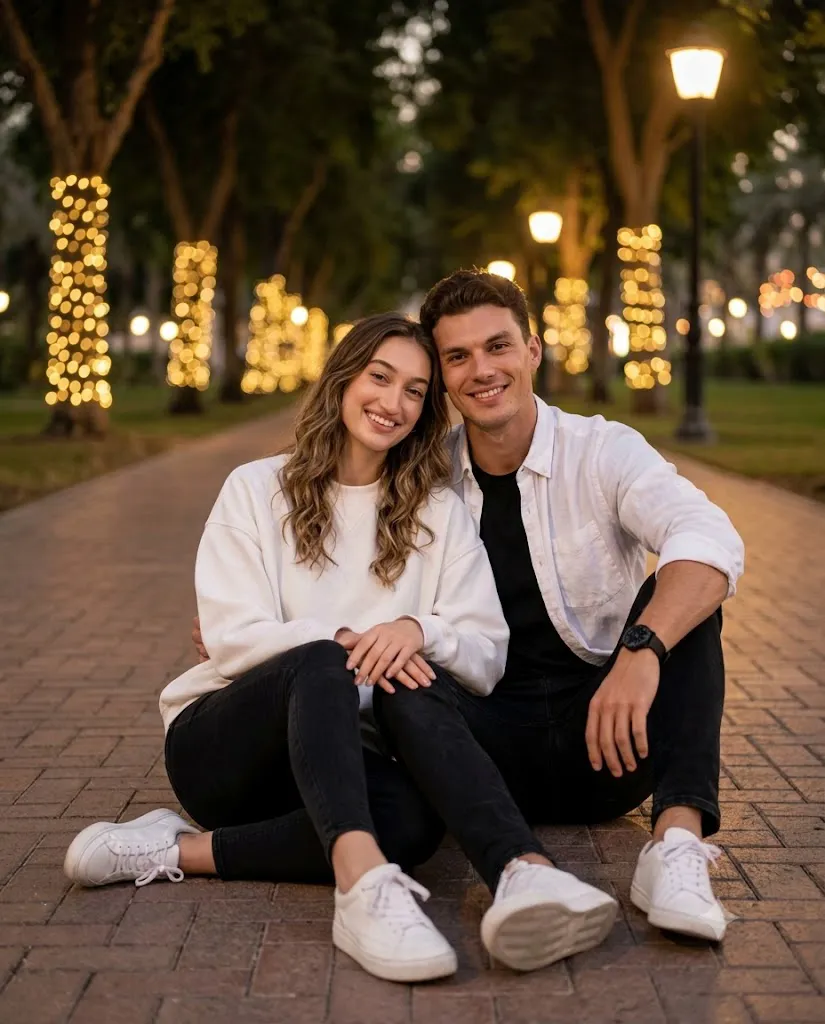
A romantic outdoor couple photoshoot at night in a resort park. A young uploaded couple sits together on a brick-paved pathway, both smiling warmly at the camera. The man sits behind and slightly to the right, with one arm draped affectionately over the woman's shoulder. He has naturally styled hair and a well-groomed appearance, wearing an open white button-down shirt with sleeves rolled to the elbows over a black t-shirt, black slim-fit jeans, white sneakers, and a black wristwatch. The woman leans back against him with naturally wavy hair, soft glam makeup, wearing an oversized white sweatshirt, black skinny jeans, and white sneakers, hands resting on her knee. Background: a tree-lined pathway with warm golden fairy lights wrapped around tree trunks, glowing street lamps, and soft bokeh from distant lights. Shallow depth of field, subjects in sharp focus, dreamy blurred background. Warm cinematic color grading, professional portrait photography, shot at eye level, 4:5 vertical, full-body composition, 85mm lens look, high resolution, accurate facial details, photorealistic.
How To Use Photo Editing?
Unlike traditional photo editing apps that simply enhance an existing image, the romantic couple photoshoot trend relies on AI models that generate an entirely new, stylized portrait based on a written prompt and reference photos of both people. Understanding this process makes it much easier to achieve consistent, high-quality results.
Here's the general workflow:
1. Upload clear reference photos of both partners
Front-facing images with good lighting help the AI accurately preserve facial features and expressions.
2. Write or copy a romantic photoshoot prompt
Describing the pose, setting, lighting, wardrobe, and overall emotional tone you want to capture.
3. Generate the portrait
The AI blends both faces into the described scene, pose, and lighting style.
4. Compare multiple variations
Most platforms produce several outputs, letting you choose the one with the most natural expressions and cleanest composition.
5. Refine with follow-up prompts
You can request changes like warmer lighting, a different pose, or a softer background blur.
The key to getting a believable, high-quality result is prompt specificity. A vague request like "make us look romantic together" often produces inconsistent results. Instead, successful prompts include details such as "golden-hour lighting," "foreheads gently touching," "flowing white dress," "candid laughing expression," or "85mm lens with soft bokeh background." The more precise the description, the more control you have over the final cinematic outcome.
Tools You Can Use For Prompt Copy and Create Photo
Several AI platforms have become popular choices for creating romantic couple photoshoot portraits, each offering different strengths:
1. Midjourney
Known for producing rich, artistic lighting and realistic fabric and skin textures, making it ideal for achieving a warm, editorial-style romantic look.
2. Leonardo AI
Offers strong facial consistency across multiple generations, which is especially valuable when trying to keep both partners' likenesses accurate throughout the editing process.
3. Google Gemini-based tools
Popular for quick, simple photo-to-portrait transformations, especially favored by beginners who want fast results without complex settings.
4. Canva AI Image Generator
A convenient all-in-one option, combining prompt-based generation with easy post-editing tools like cropping, filters, and text overlays for captions.
5. ChatGPT with image generation
Many users copy a ready-made romantic couple prompt directly into ChatGPT, upload both photos, and generate the final portrait within the same conversation.
Instead of writing prompts from scratch, most couples search for trending "Romantic Couple Photoshoot Prompt" templates shared across Pinterest, Reddit, and prompt-sharing communities. They then copy these templates and personalize them — adjusting the setting, wardrobe color, or lighting mood to match their own vision. This copy-and-customize approach has made the trend accessible even to those with no prior experience writing AI prompts.
How To Edit Photo?
Creating your own romantic couple photoshoot portrait is simpler than it appears. Follow these steps for the best results:
Step 1: Choose clear reference photos of both partners
Select images with even lighting and front-facing angles so the AI can accurately capture both faces.
Step 2: Copy a trending romantic prompt template
Adjust the details to fit your preferences — setting, wardrobe style, pose, or lighting mood.
Step 3: Add cinematic styling keywords
Phrases like "golden-hour lighting," "soft bokeh background," "gentle embrace," "flowing fabric," and "cinematic color grading" help guide the AI toward a polished, editorial-style output.
Step 4: Generate multiple variations
Don't settle for the first result — comparing a few outputs helps you find the version with the most natural expressions and composition.
Step 5: Request targeted refinements
If the pose looks stiff or the lighting feels flat, ask the AI to adjust just that element, such as "make the embrace more natural" or "add warmer tones to the lighting."
Step 6: Finalize with light post-editing
Once you're happy with the AI-generated portrait, use a tool like Canva or Lightroom for final touches such as color balance, cropping, or adding a subtle vignette before sharing.
Conclusion
The Romantic Couple Photoshoot Prompt trend beautifully combines emotion and technology, allowing couples to create dreamy, cinematic portraits without the cost or logistics of a professional shoot. With clear reference photos, a well-crafted prompt, and the right AI tool, anyone can generate a stunning romantic portrait that feels authentic and deeply personal. Whether it's for an anniversary, an engagement announcement, or simply a beautiful keepsake of a relationship, this trend proves that heartfelt, magazine-worthy photography is now within reach for everyone, one thoughtful prompt at a time.