Introduction
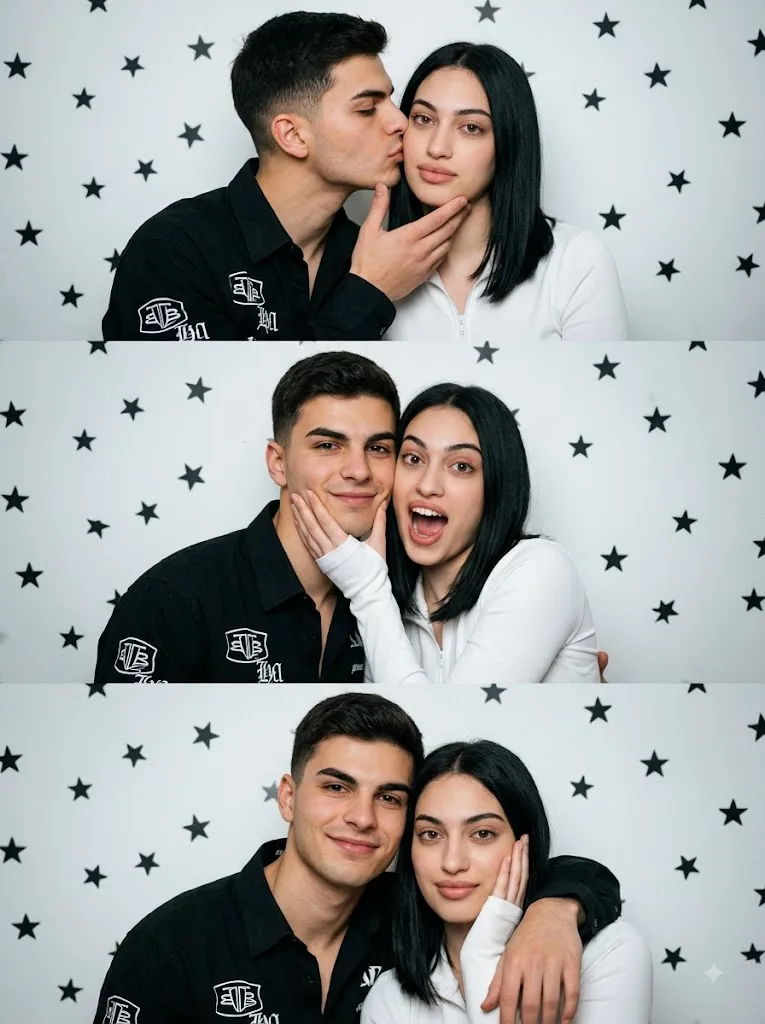
The Romantic Star Wall Triptych Prompt is a creative AI photo-editing concept designed to transform a simple couple photograph into a stylish, cinematic three-panel portrait. The composition combines playful romance, expressive poses, vintage photography, and a minimalist studio background to create an image that feels like a professional fashion editorial or romantic movie storyboard.
The defining feature of this concept is its vertical triptych layout. Instead of presenting one ordinary photograph, the final image is divided into three carefully designed panels. Each panel captures a different interaction between the couple, allowing the final composition to tell a small visual story.
The background is intentionally simple: a clean white wall decorated with scattered black star decals. This creates a graphic contrast that keeps attention on the couple. Soft cinematic lighting, vintage film grain, and a simulated 35mm lens aesthetic give the image a nostalgic photographic quality.
The male subject is styled in a black collared shirt featuring bold white graphic text and logos, while the female subject wears a clean white long-sleeve zip-up top. The contrasting black-and-white wardrobe creates a modern fashion-editorial appearance.
Another important aspect of the prompt is facial identity preservation. When using a reference photograph, the AI should maintain the recognizable facial characteristics of the subjects rather than unnecessarily changing their appearance. The objective is to transform the scene and composition while keeping the people visually consistent with the reference.
"Romantic Star Wall Triptych Prompt"
3> A photorealistic vertical triptych storyboard featuring three panels of a romantic couple posing playfully in front of a white wall covered in scattered black star decals. The male subject is a 24-year-old with a tall athletic build, dark wavy hair, and light a beard, wearing a black collared shirt with bold white graphic text and logos. The female subject has straight dark shoulder-length hair and soft makeup, wearing a white long-sleeve zip-up top. TOP PANEL: The male is gently holding the female's chin and kissing her cheek, while she looks forward with a calm, soft expression. MIDDLE PANEL: The female playfully holds the male's face with her hands while he makes a surprised, fun, open-mouthed expression, both leaning close together. BOTTOM PANEL: The male has his arm wrapped around the female's shoulders, man looking him camera, while she rests her hand near her face, looking softly at the camera. Soft cinematic lighting, vintage film grain aesthetic, 35mm lens simulation, highly detailed, expressive and romantic mood, 100% my face same, I need this prompt picture, zoom in 3:4.
How To Use Photo Editing?
Creating the Romantic Star Wall Triptych is easiest when the editing process is performed in several stages.
Step 1: Select Your Reference Image
Start with a clear, high-resolution photograph of the person or couple you want to use. The faces should be visible and reasonably well-lit. For the best identity consistency, avoid extremely blurry images, heavy filters, or photographs where the subjects' faces are partially hidden.
Step 2: Upload the Reference Photo
Open an AI photo-editing or image-generation platform that supports reference images. Upload your photograph and use it as the primary visual reference.
Add a clear identity instruction such as:
“Preserve the recognizable facial identity and natural facial characteristics of the reference subjects. Maintain facial proportions, eyes, nose, lips, jawline, hairstyle, and overall appearance without unnecessary alteration.”
This helps the AI prioritize the reference faces.
Step 3: Add the Triptych Prompt
Paste the complete Romantic Star Wall Triptych Prompt into the prompt field. Include the three different poses, clothing, star-decorated wall, lighting, lens aesthetic, and vertical composition. Be specific about which action belongs in each panel. This is especially important because the triptych depends on three visually different moments.
Step 4: Generate the Image
Generate the image and carefully inspect all three panels. Check whether the couple appears consistent from panel to panel and whether each pose accurately represents the intended action. If one panel is incorrect, regenerate the image or modify the instructions to emphasize that specific panel.
Tools You Can Use For Prompt Copy and Create Photo
Different categories of tools can help you create and refine this type of AI portrait.
1. AI Image Generators
AI image-generation platforms are useful for creating the complete triptych from a detailed text prompt. They can interpret the couple's appearance, clothing, poses, background decorations, lighting, camera style, and overall composition. For reference-based projects, choose a platform that supports image references and identity consistency.
2. AI Photo Editors
AI photo-editing tools are particularly useful when you already have a photograph and want to transform it into a cinematic couple portrait. They can help modify the background, clothing, lighting, poses, and photographic style while using the original photograph as a reference.
3. Graphic Design Applications
A graphic-design editor can be useful for arranging the three panels manually after generation. You can adjust panel spacing, crop each photograph, align the borders, and add subtle design elements if necessary.
4. Photo Enhancement Tools
Image enhancement tools can improve clarity, sharpness, and resolution after the AI generation process. This can be particularly useful when the image is intended for social media, printing, or a high-resolution digital portfolio.
How To Edit Photo?
After generating the initial triptych, carefully refine each element.
Step 1: Check Facial Accuracy
Begin by checking the faces in all three panels. Since the same couple appears multiple times, consistency is important. Look at the eyes, eyebrows, nose, lips, jawline, hairstyle, and facial proportions. If the faces appear noticeably different between panels, strengthen the identity instructions and regenerate the image.
Step 2: Check the Top Panel
The top panel should show the male gently holding the female's chin while giving her a kiss on the cheek. The female should have a calm and soft expression while looking forward. The interaction should feel affectionate and natural rather than exaggerated.
Step 3: Check the Middle Panel
The middle panel should create a more playful moment. The female should hold the male's face with her hands while he reacts with a surprised and humorous open-mouthed expression. Both subjects should lean naturally toward each other, creating a fun and energetic romantic moment.
Step 4: Check the Bottom Panel
The bottom panel should feel calmer and more intimate. The male should have his arm comfortably around the female's shoulders while looking toward the camera. The female can rest her hand near her face and look softly toward the camera. This final frame works as a relaxed conclusion to the visual story.
Step 5: Refine Clothing
The male's black collared shirt should maintain its bold white graphic text and logo details. The female's white long-sleeve zip-up top should remain clean and realistic. Pay attention to fabric folds, shadows, seams, and natural clothing proportions.
Step 6: Improve the Background
The white wall should remain clean and minimal, with scattered black star decals positioned naturally around the couple. The stars should not overpower the subjects. Their purpose is to provide a simple graphic element that enhances the romantic editorial aesthetic.
Step 7: Add Cinematic Lighting
Use soft cinematic lighting across all three panels. The lighting should remain consistent so that the triptych looks like it was captured during the same photoshoot. Subtle shadows can provide depth while gentle highlights help define the subjects' faces and clothing.
Step 8: Add Vintage Film Texture
A subtle 35mm-inspired film grain can give the image a nostalgic character. Keep the grain controlled rather than excessive. A slight vintage color treatment, natural skin tones, soft contrast, and gentle highlights can help reproduce the feeling of an analog fashion photograph.
Step 9: Choose the Final Composition
For a social-media-friendly portrait, a 3:4 vertical composition works particularly well. Make sure the three panels are evenly balanced and that the couple remains clearly visible in each section. The final image should feel like one unified photographic story rather than three unrelated pictures.
Conclusion
The Romantic Star Wall Triptych Prompt combines playful couple photography, cinematic lighting, vintage film aesthetics, and creative storytelling into one stylish composition.
Its three-panel structure gives the image a unique personality because each section captures a different emotional moment. The affectionate cheek kiss creates a romantic opening, the playful middle interaction adds humor, and the relaxed final pose provides a soft conclusion.
For the best results, begin with a clear reference photograph and prioritize consistent facial identity throughout the three panels. Use detailed instructions for each pose, maintain consistent clothing and lighting, and keep the star-decorated white wall simple.
Finally, apply subtle film grain, natural color grading, realistic shadows, and careful cropping to achieve a polished cinematic appearance. With a well-written prompt and thoughtful editing process, this concept can transform a simple couple photograph into a memorable Romantic Star Wall Triptych suitable for Instagram, profile images, digital albums, wallpapers, and creative photography projects.