Introduction
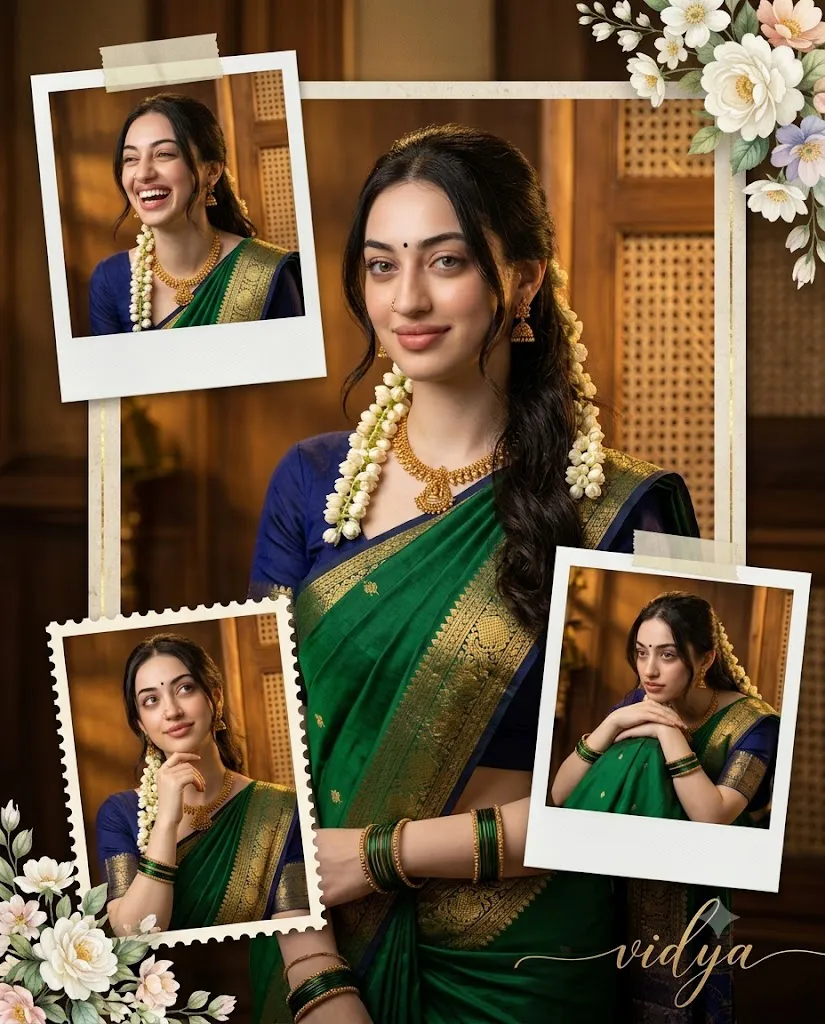
The Royal Emerald Saree Collage Prompt is a beautiful AI photo-editing concept designed to transform an ordinary portrait into a premium traditional Indian fashion collage. The concept combines the elegance of an emerald-green silk saree, royal navy-blue blouse, traditional gold jewelry, jasmine flowers, vintage wooden interiors, cinematic lighting, and sophisticated scrapbook elements.
The main attraction of this prompt is its four-photo collage composition. Instead of creating a single portrait, the design presents one large central photograph surrounded by three smaller Polaroid or postage-stamp-style frames. Each frame captures a different emotion or pose, creating the feeling of a carefully designed personal memory album.
The subject wears a rich green silk saree featuring a detailed golden zari border. A royal navy-blue blouse provides an elegant contrast to the emerald color. Traditional gold jewelry, green bangles, a small black bindi, and jasmine flowers complete the Indian ethnic appearance.
The background adds another layer of luxury. A warm vintage wooden interior with woven cane panels creates a nostalgic atmosphere, while soft golden cinematic lighting produces rich shadows and dimensional depth. Floral decorations, pastel flowers, realistic tape effects, and scrapbook details make the final composition feel artistic and premium.
Another important part of this prompt is face accuracy. When a reference photograph is provided, the AI should preserve the person's natural facial identity as accurately as possible. The facial structure, eyes, nose, lips, hairstyle, skin tone, and other recognizable characteristics should remain consistent while the clothing, poses, background, and collage design are transformed.
"Royal Emerald Saree Collage Prompt"
100% face accuracy very Hyper a Create a premium 24K ultra-HD cinematic portrait collage of a beautiful young Indian woman wearing a traditional green silk saree with a royal navy-blue blouse and golden zari border, adorned with elegant gold jewelry, green bangles, a small black bindi, and jasmine flowers in her hair. Use a 4-photo collage layout with one large central portrait and three smaller Polaroid/postage-stamp style frames placed artistically around it. Each pose should express a different emotion-gentle smile, candid laughter, dreamy thinking pose, and resting on folded knees. Background should feature a warm vintage wooden interior with woven cane panels, soft golden cinematic lighting, rich shadows, floral decorations in the corners, and luxury aesthetic. Add elegant white and pastel floral elements, premium scrapbook details, realistic tape effects, and subtle depth of field. Include stylish calligraphy for the name at the bottom "vidya"with a luxury signature look. Hyper-realistic.
How To Use Photo Editing?
Creating a Royal Emerald Saree Collage is easiest when you follow a structured editing process.
Step 1: Choose a High-Quality Reference Image
Start with a clear, well-lit photograph of the woman. A high-resolution image with a visible face is ideal. Avoid images where the face is heavily covered or blurred. The reference image should provide enough facial information for the AI to maintain the person's identity consistently throughout the collage.
Step 2: Upload the Reference Image
Open an AI photo editor or image-generation platform that supports reference-image editing. Upload the selected photograph and make it the primary reference.
Add a strong identity instruction such as:
“Preserve the exact identity and natural facial characteristics of the reference image. Do not unnecessarily alter facial structure, eyes, nose, lips, skin tone, or hairstyle.”
This helps the AI understand that the person's identity is a priority.
Step 3: Add the Full Prompt
Paste the Royal Emerald Saree Collage Prompt into the editor. Include the saree, blouse, jewelry, flowers, background, lighting, poses, collage arrangement, and typography details. Avoid removing important visual information if you want the final result to closely match the original concept.
Step 4: Generate the Collage
Generate the image and inspect all four sections carefully. The large central portrait should remain the primary visual focus, while the three smaller frames should complement it. Each frame should represent a different emotion, such as a gentle smile, candid laughter, dreamy thinking, and a relaxed pose with folded knees.
Tools You Can Use For Prompt Copy and Create Photo
There are several categories of tools that can help you create this type of AI portrait collage.
1. AI Image Generators
AI image-generation platforms are useful for creating the complete composition from a detailed text prompt. They can interpret clothing, environment, lighting, poses, collage layouts, and decorative elements. For this concept, select a platform that supports reference images if maintaining the subject's identity is important.
2. AI Photo Editors
AI photo editors are ideal when you already have a photograph and want to transform it into a traditional fashion portrait. These tools can be used to change clothing, backgrounds, lighting, poses, and artistic effects while keeping the original image as a visual reference.
3. Graphic Design Tools
A graphic-design application can be useful for polishing the collage after AI generation. You can manually adjust frame placement, add decorative tape, create scrapbook borders, position floral elements, and refine the overall composition. This is particularly useful when you want precise control over the final four-photo layout.
4. Photo Enhancement Tools
Image-enhancement software can improve sharpness, resolution, contrast, and fine details after the AI generation process. If the final image is intended for printing or high-quality social media publishing, enhancement can help improve the visual presentation.
How To Edit Photo?
After generating the initial collage, carefully refine the image.
Step 1: Check Face Accuracy
Begin by checking the face in the central portrait. Make sure the identity remains natural and recognizable. Look closely at the eyes, eyebrows, nose, lips, jawline, skin texture, and hairstyle. If the face appears significantly different from the reference, regenerate the image using stronger identity-preservation instructions.
Step 2: Check the Saree
The emerald-green silk saree should appear luxurious and realistic. Look for natural fabric folds, realistic silk reflections, and a clearly visible golden zari border. The royal navy-blue blouse should contrast beautifully with the green saree without overpowering it.
Step 3: Refine Jewelry and Accessories
Gold jewelry should appear detailed but natural. Green bangles, the small black bindi, and jasmine flowers should be clearly visible. The jasmine flowers should blend naturally with the hairstyle instead of appearing artificially attached.
Step 4: Improve the Four-Photo Layout
The central image should be the largest and most visually important frame. The three smaller Polaroid or postage-stamp-style photographs can be positioned around it at slightly different angles. The arrangement should feel artistic rather than perfectly symmetrical.
Step 5: Adjust the Background
The vintage wooden interior should have warm brown textures and woven cane details. Floral decorations can be placed subtly around the corners. Avoid adding too many objects because the subject should remain the primary focus.
Step 6: Enhance Lighting
Soft golden cinematic lighting should create warmth across the scene. Use realistic highlights on the saree, jewelry, and hair while maintaining rich shadows for depth. A subtle depth-of-field effect can separate the subject from the background.
Step 7: Add Scrapbook Details
Add realistic tape effects, pastel flowers, paper textures, elegant borders, and subtle vintage decorations. The elements should look physically attached to the scrapbook rather than digitally pasted on top.
Step 8: Add the Name
At the bottom of the composition, include the name “vidya” using an elegant luxury-signature calligraphy style. The typography should remain readable while complementing the vintage and royal aesthetic.
Conclusion
The Royal Emerald Saree Collage Prompt combines traditional Indian fashion with modern AI photography and premium scrapbook design. The emerald-green silk saree, navy-blue blouse, gold jewelry, jasmine flowers, vintage wooden interior, and warm cinematic lighting create a timeless visual style.
The four-photo collage makes the concept even more interesting by presenting different emotions and poses in one composition. The central portrait establishes the main visual identity, while the smaller Polaroid-style frames create a personal memory-book effect.
For the best results, always begin with a clear reference image, prioritize facial identity preservation, use detailed clothing and lighting instructions, and carefully inspect the generated result. After generation, refine the collage layout, jewelry, floral decorations, typography, shadows, and overall color balance.
With the right AI image tool and a well-structured prompt, this concept can turn a simple photograph into a luxurious traditional Indian portrait collage suitable for Instagram, profile images, digital scrapbooks, fashion inspiration, personal albums, and creative portfolios.