Introduction
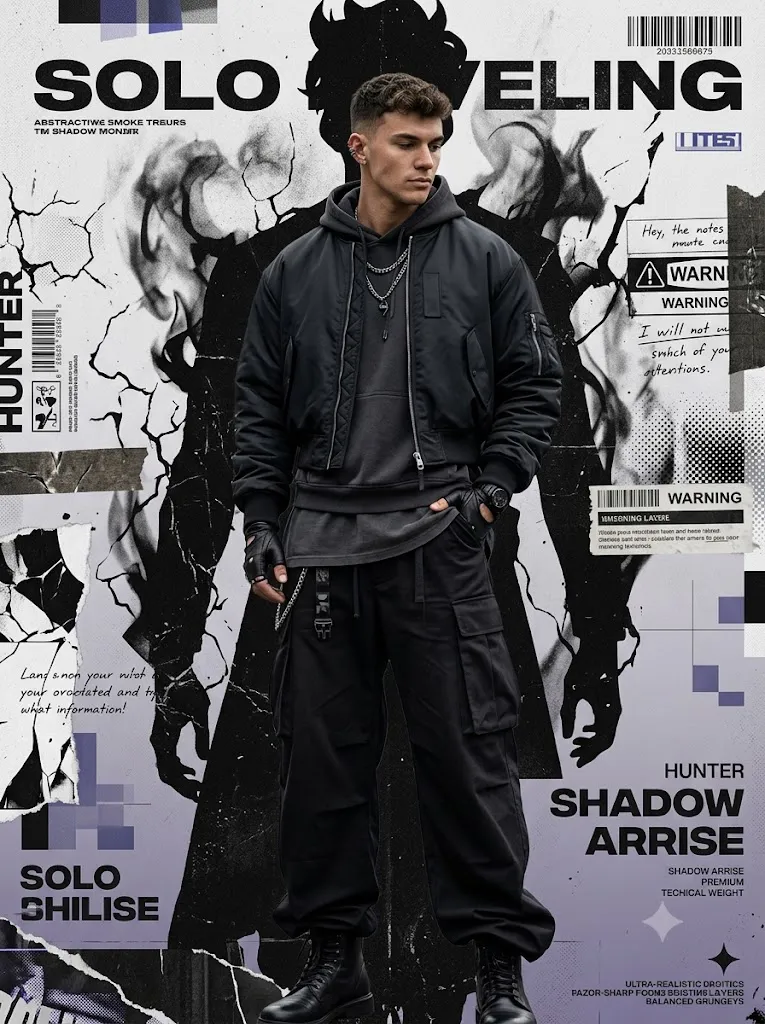
The Shadow Monarch Streetwear Prompt is a powerful AI image-generation concept created for producing a dark, mysterious, and premium high-fashion editorial portrait. The visual style combines luxury streetwear photography with distressed graphic-poster artwork, creating an image that feels like a premium fashion magazine cover mixed with a dark fantasy-inspired graphic design.
The central character is a mysterious young man standing confidently in the middle of the composition. His calm and emotionless expression, slightly lowered head, relaxed body language, and powerful stance create a silent and dominant personality. Instead of looking directly at the camera, the subject looks toward the side, giving the portrait an intriguing and cinematic feeling.
The clothing is an important part of the concept. The model wears a matte-black cropped tactical bomber jacket over a heavyweight charcoal hoodie and a long washed graphite oversized T-shirt. Extremely wide-leg black cargo trousers with natural stacked folds complete the silhouette, while polished leather combat boots add a luxury tactical element.
The visual identity is further enhanced with oxidized silver chains, tactical belt details, ear cuffs, fingerless leather gloves, and a matte-black luxury wristwatch. Messy, textured black hair naturally falls across part of the forehead, creating a realistic and effortless streetwear appearance.
Instead of placing the subject in a real-world location, the background is designed as a completely flat editorial graphic poster. A gigantic shadow-monarch-inspired silhouette dominates the background, surrounded by controlled grunge textures, torn paper, barcode graphics, warning labels, halftone patterns, scratched ink, and editorial typography.
"Shadow Monarch Streetwea Prompt"
Ultra-realistic full-body editorial portrait, mysterious young man, Solo Leveling-inspired poster. Calm emotionless face, looking away, hand in oversized cargo pocket, dominant silent posture. Wears oversized black tactical bomber, charcoal hoodie, graphite tee, wide-leg black cargo pants, combat boots, silver chains, ear cuffs, fingerless gloves, black watch, messy black hair. Flat graphic background — giant Shadow Monarch silhouette, shadow smoke, torn manga textures, ink cracks, grunge/halftone overlays, editorial typography — chaotic yet clean, subject in focus. Palette: black, charcoal, ash white, muted violet, electric blue accents. Cinematic lighting, film grain, sharp detail, 8K, magazine-cover quality. No extra people, no magic glow, no 3D.
How To Use Photo Editing?
Using this prompt with an AI photo editor is straightforward, especially if you already have a reference photograph.
Step 1: Choose a High-Quality Reference Image
Begin with a clear photograph of the person you want to transform. A full-body image is ideal because the final concept focuses heavily on the complete streetwear outfit and footwear. Make sure the face is visible and the original image has enough detail for the AI to understand the person's facial structure, hairstyle, and proportions.
Step 2: Upload the Reference Image
Upload the photograph into an AI image-editing tool that supports reference images or image-to-image generation. If preserving the person's identity is important, add a clear instruction such as: “Maintain the exact facial identity of the reference image. Preserve facial structure, skin tone, hairstyle, and natural facial characteristics without unnecessary alteration.” This helps the AI understand that the fashion transformation should not completely redesign the person.
Step 3: Add the Shadow Monarch Streetwear Prompt
Paste the complete prompt into the editor. Make sure the description includes the clothing, pose, accessories, graphic background, lighting, color palette, and photography style. The background instructions are especially important because this concept is intended to look like a premium graphic poster rather than a photograph taken at a physical location.
Step 4: Generate Several Variations
Create multiple versions and compare them. AI-generated images can differ in facial accuracy, clothing details, hand positioning, background composition, and overall realism. Select the version that provides the best combination of identity consistency, natural proportions, realistic clothing, and balanced graphic design.
Tools You Can Use For Prompt Copy and Create Photo
There are several types of tools that can be used for this type of AI fashion transformation.
1. AI Image Generators
Text-to-image generators can create the complete concept from a written prompt. They are useful when you want to experiment with different poses, outfits, lighting styles, and graphic compositions. For this particular concept, look for tools that support detailed prompting and reference-image features.
2. AI Photo Editors
AI photo-editing platforms are more suitable when you already have a photograph and want to transform its styling. These tools can help modify clothing, background, lighting, pose, and atmosphere while attempting to preserve the original subject.
3. Graphic Design Tools
After generating the portrait, graphic-design software can be used to enhance the poster composition. You can add typography, barcode elements, warning labels, paper textures, torn edges, or additional editorial details. This is particularly useful if you want the final image to look like a professional fashion campaign poster.
4. Professional Photo Editors
A traditional photo editor can be used for final color grading, sharpening, cropping, exposure correction, and texture adjustments. The final image can then be prepared for platforms such as Instagram, Pinterest, websites, or digital portfolios.
How To Edit Photo?
Once the AI-generated image is complete, careful editing can make the final result much more professional.
Step 1: Check Facial Details
First, inspect the subject's face. Make sure the eyes, nose, lips, jawline, skin texture, and hairstyle look natural. Avoid excessive AI smoothing because the concept specifically calls for authentic skin texture and realistic photography.
Step 2: Improve the Clothing
The black tactical bomber, charcoal hoodie, graphite T-shirt, and wide-leg cargo trousers should have clearly visible fabric textures. Pay attention to natural folds and shadows. Oversized clothing should look heavy and realistic rather than appearing painted onto the body. The polished combat boots should also have realistic reflections and leather texture.
Step 3: Refine Accessories
Accessories should remain subtle but visible. Silver chains, tactical belts, ear cuffs, gloves, and the black wristwatch can add detail without distracting from the main character. Avoid adding too many unnecessary accessories because the composition already contains a large amount of graphic artwork.
Step 4: Balance the Poster Background
The shadow silhouette should be large enough to create visual impact but should not overpower the subject. Grunge elements such as torn paper, ink scratches, barcode graphics, halftone patterns, masking tape, and typography should remain controlled and strategically placed. The goal is to create organized chaos rather than a cluttered background.
Step 5: Adjust the Color Palette
Maintain a dark color palette dominated by black, charcoal gray, and ash white. Muted violet and subtle electric-blue accents can be introduced carefully. Avoid overly bright colors because they can destroy the mysterious premium aesthetic.
Step 6: Apply Cinematic Finishing
Use soft editorial lighting with realistic shadows and subtle film grain. Increase clarity carefully to bring out clothing textures while maintaining natural skin. A small amount of film grain, dust, scratches, and photocopy texture can make the poster feel more authentic. For social-media use, vertical formats such as 4:5 or 9:16 can work particularly well, while a wider composition can be used for desktop wallpapers or website banners.
Conclusion
The Shadow Monarch Streetwear Prompt combines luxury fashion photography, dark streetwear, graphic poster design, and cinematic editorial aesthetics into one powerful visual concept.
Its biggest strength is the contrast between the realistic human subject and the highly stylized flat graphic background. The oversized black streetwear creates a strong silhouette, while the distressed poster elements add mystery, attitude, and visual depth.
For the best results, begin with a high-quality reference image, provide detailed identity-preservation instructions, describe the clothing and pose precisely, and keep the background intentionally graphic rather than realistic.
After generation, carefully refine the face, clothing textures, accessories, lighting, color balance, and graphic elements. Avoid excessive effects or unnecessary glowing elements because the premium aesthetic depends on controlled design.
When executed correctly, this prompt can transform an ordinary photograph into a striking dark luxury streetwear editorial poster suitable for social media, fashion inspiration, digital artwork, profile banners, creative portfolios, and AI photography projects.