Introduction
Social media has become one of the most powerful tools for personal branding, business growth, and audience engagement. Whether you are a content creator, entrepreneur, educator, influencer, or digital marketer, having a strong online presence is essential for building credibility and connecting with your target audience. One of the most effective ways to establish a memorable digital identity is through high-quality visual branding.
"Social Media Branding With Digital Creator Prompt"
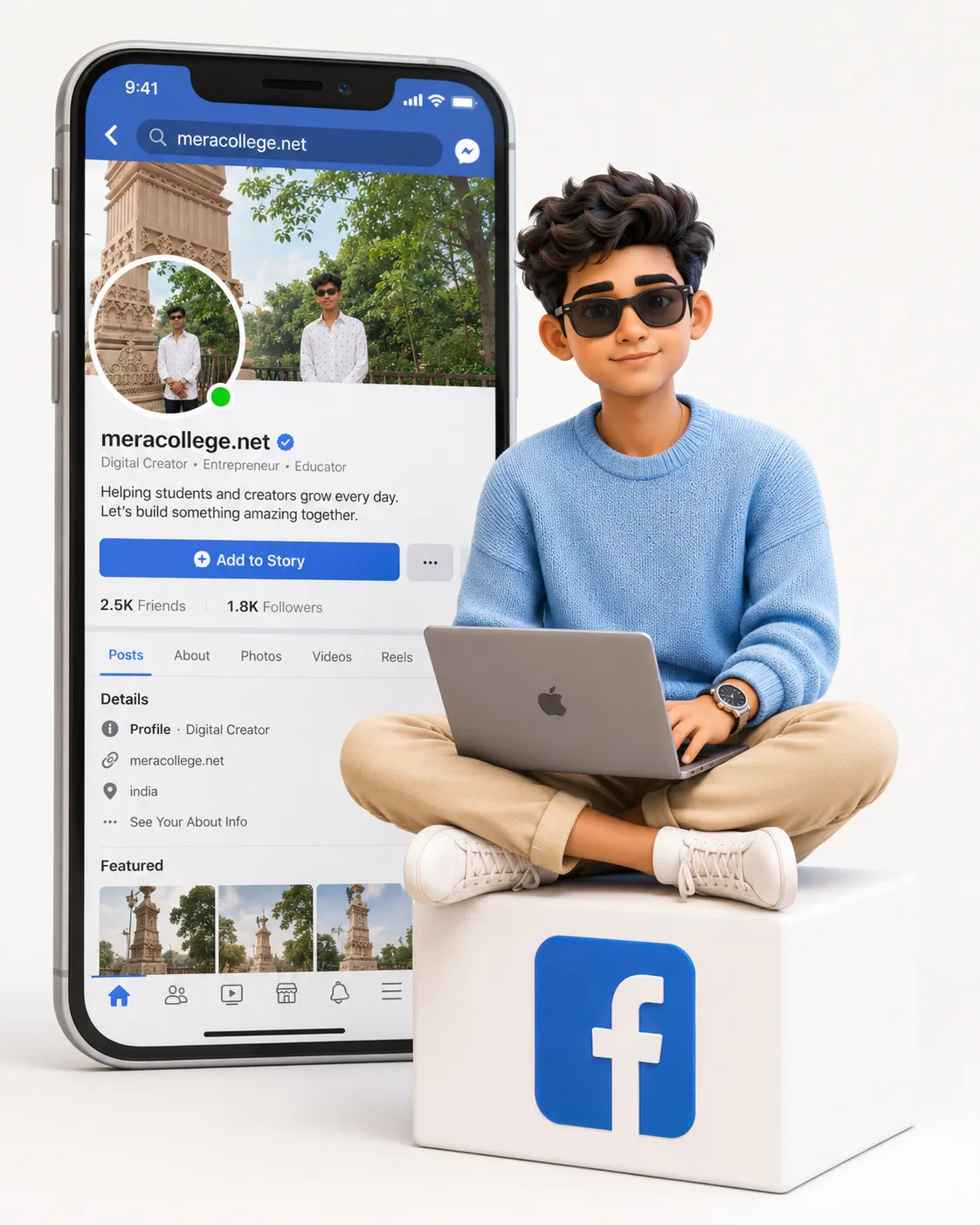
Create a high-quality Pixar-style 3D animated illustration of a young man with a warm, friendly, and confident personality, representing a modern digital creator and entrepreneur. He has expressive eyes, natural facial features, a youthful appearance, a confident approachable smile, and a modern well-groomed hairstyle with realistic texture and volume. The character is sitting comfortably in a relaxed cross-legged position on top of a minimal white cube placed slightly to the right side of the frame, with a sleek modern laptop resting naturally on his lap while actively working, creating an authentic and engaging work-in-progress moment. He wears a stylish sky-blue knitted sweater or premium casual sweatshirt with realistic fabric texture, paired with beige chinos or dark jeans and clean white sneakers, complemented by a minimalist wristwatch and a simple bracelet. The white cube beneath him features a bold blue Facebook-style logo prominently displayed on its front face. The scene is set in a seamless white studio environment where the floor blends perfectly into the background, creating an infinite premium white backdrop with no visible edges or distractions. Behind him on the left side stands a large modern smartphone positioned vertically, displaying a realistic Facebook-style social media profile interface featuring a profile picture, realistic cover photo, featured image section, blue online status indicator, profile name "meracollege.net", short bio, friends count, recent posts with image thumbnails, and a clean modern Facebook-inspired layout with realistic spacing and professional UI details. Use soft diffused studio lighting with gentle shadows and subtle highlights to create a premium commercial look while maintaining a clean, welcoming atmosphere. Render the image in a Pixar/DreamWorks-inspired 3D character style with ultra-clean rendering, smooth high-quality materials, realistic fabric textures, detailed hair strands, natural skin shading, cinematic depth of field, professional color grading, and a polished modern social media creator aesthetic. Unreal Engine 5 and Octane Render quality, ultra-detailed, vibrant yet realistic, 8K resolution, masterpiece quality. Composition should be vertical 4:5, with the young man as the primary focus in the center-right area while the smartphone appears slightly behind on the left to create depth and visual balance. The overall result should feel like a premium branding and digital marketing illustration featuring a professional content creator in a clean modern studio environment.
The Social Media Branding With Digital Creator Prompt is designed to create a modern, professional, and visually appealing representation of a digital creator. This style combines premium character design, clean studio aesthetics, modern technology elements, and recognizable social media branding to produce an image that immediately communicates professionalism and creativity.
The concept typically features a confident creator working on a laptop, accompanied by a large smartphone displaying a social media profile. This instantly tells viewers that the character is active in the digital space. The clean white environment, polished design elements, and professional composition help create a trustworthy and modern visual identity.
With the rise of AI-powered image-generation tools, creators can now produce high-quality branding illustrations without hiring expensive design teams. By using detailed prompts, users can generate professional images suitable for websites, blogs, social media pages, online courses, presentations, and marketing campaigns.
Whether you are launching a personal brand, promoting a website, growing a social media audience, or creating educational content, the Social Media Branding With Digital Creator Prompt provides a powerful visual solution for modern digital marketing.
How To Use Photo Editing?
Photo editing is an important part of creating professional branding visuals. Even when using AI-generated images, editing helps improve quality, consistency, and overall visual impact.
The process begins with selecting a clear reference image if identity preservation is required. This helps maintain facial structure, hairstyle, skin tone, and natural expressions. Once the AI image is generated, editing software can be used to enhance the final result.
Photo editing can help improve:
- Facial clarity
- Skin texture
- Hair details
- Clothing realism
- Lighting balance
- Background cleanliness
- Social media UI elements
- Brand consistency
- Color grading
- Overall sharpness
A professional edit should maintain a clean and realistic appearance. The goal is not to over-edit the image but rather to enhance the details that contribute to a premium branding aesthetic.
Editing also helps ensure that all design elements, such as logos, profile interfaces, and promotional content, work together visually. Consistency is a key factor in successful personal branding.
Tools You Can Use For Prompt Copy and Create Photo
Several modern tools can help generate and refine digital creator branding images.
1. ChatGPT
ChatGPT is one of the best tools for creating detailed image prompts. Users can describe character appearance, poses, environments, branding elements, and social media themes to generate professional prompts.
2. Midjourney
Midjourney is highly popular for creating visually impressive digital artwork and branding illustrations with cinematic quality.
3. Flux AI
Flux AI excels at producing realistic faces, accurate skin textures, and polished branding visuals.
4. Leonardo AI
Leonardo AI is useful for generating high-quality character illustrations, marketing visuals, and creator-focused branding concepts.
5. Adobe Photoshop
Photoshop remains the industry standard for editing and enhancing generated images. It allows for detailed refinement of lighting, textures, and branding elements.
6. Canva
Canva provides an easy way to turn generated images into banners, thumbnails, social media posts, and marketing graphics.
7. Adobe Lightroom
Lightroom is ideal for color correction, exposure adjustments, and overall image enhancement.
8. Ideogram
Ideogram helps generate creative visual concepts and branding-focused artwork.
Using a combination of these tools often produces the best results. For example, ChatGPT can create the prompt, an AI image generator can produce the artwork, and Photoshop can refine the final design.
How To Edit Photo?
Creating a premium social media branding image involves several important editing steps.
Step 1: Select a High-Quality Reference
If the image represents a real person, start with a clear reference photo that shows facial details and natural expressions.
Step 2: Create a Detailed Prompt
An effective prompt should include:
- Character description
- Facial details
- Clothing design
- Pose instructions
- Laptop and workspace elements
- Social media interface details
- Studio environment
- Lighting setup
- Composition guidelines
- Quality settings
Detailed prompts typically generate more accurate and professional results.
Step 3: Generate Multiple Variations
Create several image versions and compare them. Different generations may produce better compositions, lighting, or character details.
Step 4: Verify Character Consistency
Check:
- Face shape
- Hair style
- Eye structure
- Smile
- Skin tone
- Overall likeness
Maintaining consistency helps strengthen personal branding.
Step 5: Improve Social Media Interface
The smartphone profile should appear realistic and professional.
Refine:
- Profile image
- Cover photo
- Bio section
- Friends count
- Post previews
- Interface spacing
Clean UI design enhances credibility.
Step 6: Enhance Clothing Details
Improve:
- Fabric texture
- Knit patterns
- Wrinkles
- Accessories
- Watch reflections
Detailed clothing contributes to a premium look.
Step 7: Optimize Lighting
Professional lighting creates depth and realism.
Focus on:
- Soft highlights
- Balanced shadows
- Natural skin tones
- Laptop reflections
- Device realism
Good lighting makes branding visuals more appealing.
Step 8: Refine the Environment
The white studio background should remain:
- Clean
- Minimal
- Professional
- Distraction-free
This helps viewers focus on the creator and branding elements.
Step 9: Apply Color Grading
Color grading should enhance:
- Skin tones
- Clothing colors
- Social media branding colors
- Contrast
- Brightness
The final image should feel modern, vibrant, and professional.
Step 10: Export in High Resolution
Export the image in 4K or 8K resolution for maximum quality. High-resolution images are useful for websites, banners, presentations, advertisements, and social media campaigns.
Conclusion
The Social Media Branding With Digital Creator Prompt is an excellent solution for building a modern and professional online presence. By combining realistic character design, social media elements, clean studio aesthetics, and premium rendering quality, creators can produce branding visuals that immediately communicate professionalism and expertise.
The strength of this style lies in its versatility. It can be used for personal branding, educational platforms, business promotions, digital marketing campaigns, websites, social media profiles, and online communities. The combination of a laptop, creator-focused styling, and a realistic social media interface helps establish a strong digital identity.
With the right prompt, a high-quality reference image, and proper editing techniques, anyone can create professional branding visuals that rival commercial advertising campaigns. As AI image-generation technology continues to advance, digital creators have more opportunities than ever to develop powerful visual identities and stand out in the competitive online world.
Whether you are an entrepreneur, educator, influencer, blogger, freelancer, or content creator, mastering social media branding visuals can help you attract attention, build trust, and grow your audience more effectively.