Introduction
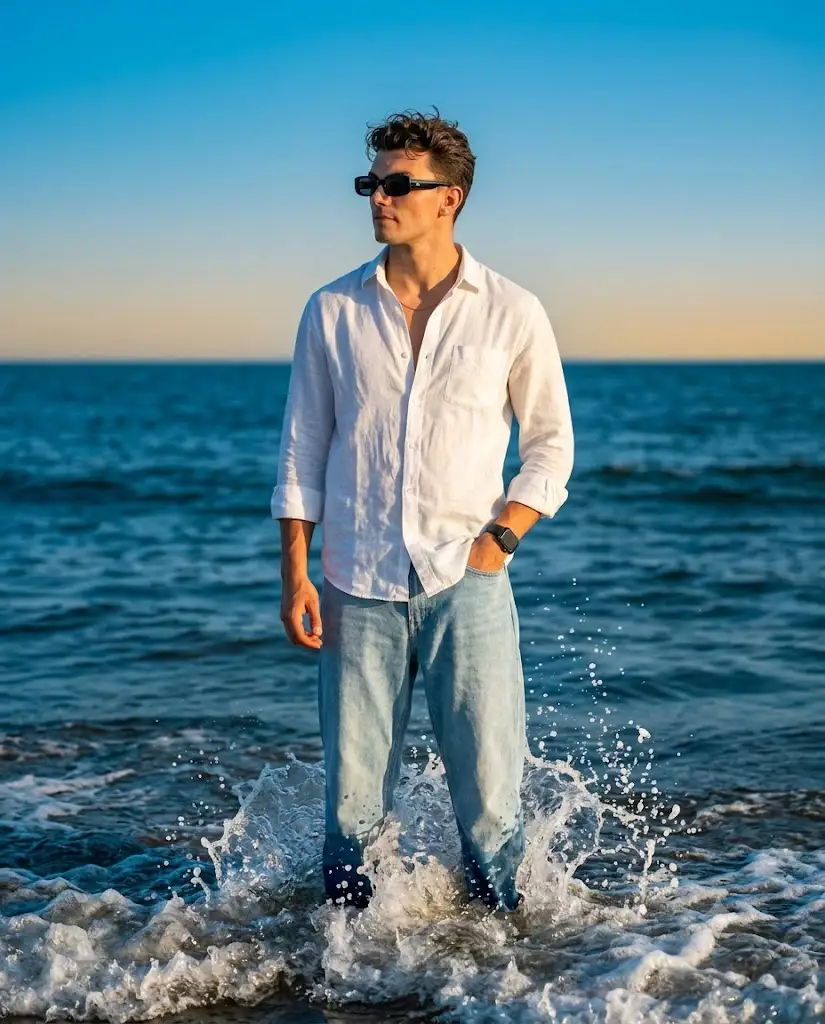
In the world of AI-generated photography, few styles capture attention quite like the "stylish linen portrait" — a cinematic, golden-hour aesthetic featuring relaxed fashion, natural textures, and dramatic outdoor settings. Think of a figure standing at the ocean's edge, dressed in a loose linen shirt, waves crashing gently around them, sunlight painting warm highlights across their skin and clothing. This look has become a favorite among photographers, content creators, and AI art enthusiasts because it blends realism with emotion — a sense of calm, confidence, and cinematic storytelling packed into a single frame.
The rise of AI image generation tools has made this style more accessible than ever. You no longer need an expensive camera, a professional model, or a coastal location to produce a portrait that feels like it belongs on the cover of a fashion magazine. Instead, a well-crafted prompt — detailed, specific, and thoughtfully structured — can guide an AI model to produce stunning, photorealistic results. But writing that prompt is only half the process. Understanding how to refine, edit, and enhance the resulting image is what separates an amateur output from a professional-grade visual.
This article walks through everything you need to know: how to approach photo editing after generation, which tools are best suited for prompt writing and image creation, the step-by-step editing process, and how to bring it all together for a polished final result.
"Stylish Linen Portrait Prompt"
A photorealistic cinematic full-body portrait of a stylish man standing knee-deep in powerful ocean waves, centered in frame, eye-level angle, vertical 4:5 composition. He has naturally tousled hair, black rectangular sunglasses, a relaxed calm expression, gazing toward the left. He wears a loose white linen shirt with top buttons open, sleeves rolled to the forearms, and light blue relaxed-fit jeans; a black wristwatch on his left wrist, one hand in his pocket, the other hanging naturally at his side. Splashing waves surround his legs with sparkling water droplets, against a vast deep-blue ocean, clean horizon, and bright vibrant blue sky with subtle gradient. Golden-hour sunlight casts warm highlights on his face and clothing while ocean and sky stay vivid blue. Shot on 85mm lens, f/1.8, shallow depth of field, strong subject separation, high contrast, crisp realistic skin texture and linen fabric detail, cinematic color grading, natural shadows, HDR, ultra-detailed, 8K, realistic anatomy, no distortion.
How To Use Photo Editing?
1. Color Grading
Golden-hour warmth ko highlight karne ke liye white balance adjust karein, aur ocean/sky ke blue tones ko deep aur vibrant rakhein.
2. Contrast & Clarity
Subject ko background se alag dikhane ke liye selective sharpening use karein — subject sharp, background halka blur.
3. Texture Enhancement
Linen fabric ki wrinkles, skin pores, aur water droplets ko naturally enhance karein — over-sharpening se bachें taaki artificial na lage.
4. Depth of Field
Background ko soft blur dekar camera lens (85mm f/1.8) jaisa cinematic look create karein.
5. Cropping & Aspect Ratio:
Composition ko 4:5 ya jo bhi format chahiye usme adjust karein — chhoti cropping bhi bada farak dalti hai.
6. Highlights & Shadows
Face aur clothing par warm highlights, aur natural shadows maintain karein for realistic depth.
Tools You Can Use For Prompt Copy and Create Photo
1. Midjourney
Cinematic, artistic aur dramatic lighting ke liye best — ocean aur golden-hour portraits ke liye perfect.
2. DALL·E (ChatGPT/API)
Specific pose, clothing, aur composition instructions ko accurately follow karta hai.
3. Stable Diffusion
Custom checkpoints aur LoRA models ke through fine-tuned control deta hai — texture aur lighting par full control.
4. Adobe Firefly
Photoshop/Lightroom ke saath seamlessly integrate hota hai — generation se editing tak smooth workflow.
5. Prompt Management Tools/Notes
Successful prompts ko save aur reuse karne ke liye simple text editor ya spreadsheet use karein — signature style consistently repeat karne mein madad milti hai.
How To Edit Photo?
Once an image has been generated, the editing workflow typically follows a structured sequence.
Step 1: Initial Cleanup.
Review the image for any obvious AI artifacts — distorted hands, unnatural fabric folds, or asymmetrical features — and correct them using inpainting tools or manual retouching.
Step 2: Color Correction
Adjust white balance, exposure, and color curves to establish the golden-hour warmth on the subject while preserving vibrant blue tones in the ocean and sky. This contrast between warm and cool tones is what gives the image its cinematic quality.
Step 3: Detail Enhancement
Sharpen key focal areas like the face, eyes, and clothing texture. Add subtle grain or noise if the image feels too digitally clean, as this can enhance realism and give it a more photographic feel.
Step 4: Background and Depth Adjustments
Apply a slight blur or depth-of-field effect to the background to strengthen subject separation, mimicking the look of a wide-aperture lens.
Step 5: Final Grading and Export
Apply an overall cinematic color grade — often a teal-and-orange style grading works beautifully for ocean scenes — and export the image in the desired resolution and aspect ratio, such as 4:5 for portrait-style social posts.
Conclusion
The stylish linen portrait prompt represents more than just a passing aesthetic trend — it's a demonstration of how thoughtful prompt writing, combined with skilled photo editing, can produce genuinely striking visual content. By understanding how to structure a detailed prompt, choosing the right AI tools for generation, and following a clear editing workflow, creators can consistently produce cinematic, photorealistic portraits that rival professional fashion photography. Whether you're a content creator, digital artist, or simply someone exploring the creative potential of AI imagery, mastering this process opens the door to endless creative possibilities.