Introduction
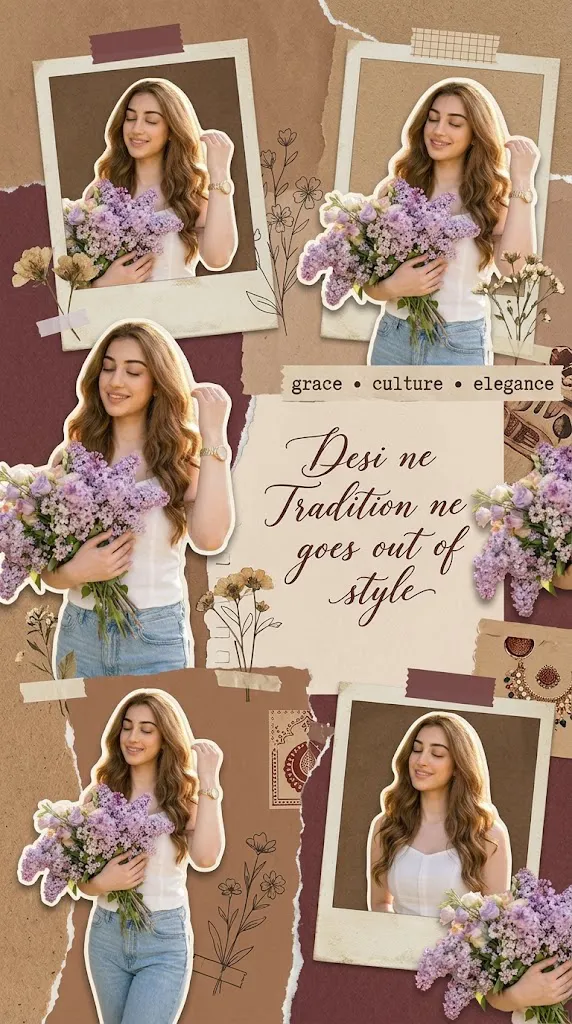
The Timeless Elegance Collage Prompt is a sophisticated AI photo-editing concept designed to turn a single portrait into a stylish, Pinterest-inspired vintage scrapbook mood board. It blends classic fashion photography, desi-inspired elegance, warm earthy tones, vintage paper textures, Polaroid-style photos, handwritten typography, botanical accents, and carefully arranged cutouts.
The core visual idea features a stylish man in a crisp white button-down shirt and tailored black trousers, shown in multiple poses across the collage—standing on a historic staircase, adjusting his sleeve, glancing thoughtfully aside, or posing confidently in relaxed editorial style.
Identity preservation is central to the concept. When a reference photo is uploaded, the person's face, hairstyle, proportions, skin tone, outfit, and distinctive features must stay unchanged. The AI's job is to build creative compositions from the original photo, not to alter the subject's identity.
The scrapbook background uses warm brown, burgundy, beige, cream, and muted gold. Torn paper edges, aged parchment, Polaroid frames, tape, paper clips, floral doodles, dried flowers, handwritten notes, and soft shadows give it the feel of a curated personal mood board. Elegant phrases—"Desi Gentleman," "Not Just an Outfit, It's a Legacy," "Culture Is Timeless," "Effortless Desi Charm," "Grace • Culture • Elegance," "Rooted in Culture, Dressed in Confidence"—reinforce the storytelling.
The final result should feel premium, nostalgic, and artistic: ideal for Pinterest, Instagram, fashion inspiration, personal branding, and editorial social content.
"Timeless Elegance Collage Prompt"
Use the uploaded photo to create a Pinterest-style aesthetic scrapbook collage. Keep the person's face, outfit, and features unchanged. Generate multiple cutouts and poses from the uploaded image. arranged in a vintage mood-board layout. Use warm brown, burgundy, and beige tones, polaroid frames, torm paper textures, tape stickers, delicate floral doodles, elegant handwritten typography, soft shadows, and a cozy desi aesthetic. Add classy text elements such as desi ne tradition ne K K goes out of style and grace culture elegance. Make it look like professional rash editorial coll elegant, high-quality, Instagram and Pinterest worthy, 9:16 portrait ratio.
How To Use Photo Editing?
Using the Timeless Elegance Collage Prompt is simple when the process is divided into a few organized steps. The most important part is selecting a good reference image because the quality of the original photograph can strongly influence the final result.
Step 1: Select a Good Reference Photo
Choose a clear, high-resolution photograph where the person's face, hairstyle, clothing, and body proportions are visible. A naturally lit photograph is preferable because it provides better facial information. Avoid extremely blurry photographs, excessive filters, heavy shadows, or images where the face is hidden.
Step 2: Upload the Reference Image
Upload the selected photograph into an AI photo-editing or image-generation platform that supports image references.
Use the photograph as the primary identity reference. Add an instruction such as:
“Preserve the person's recognizable facial identity, facial proportions, hairstyle, skin tone, outfit, and natural features. Do not alter the person's appearance unnecessarily.”
This tells the AI that the purpose of the editing is to create a creative collage while keeping the original person recognizable.
Step 3: Add the Complete Prompt
Paste the full Timeless Elegance Collage Prompt into the prompt field. Include the details about the scrapbook layout, multiple poses, vintage textures, colors, typography, floral elements, and desi-inspired aesthetic.
Step 4: Generate Multiple Variations
Create several variations and compare them carefully. Look for the version that maintains the strongest facial consistency while also producing a balanced collage. Pay attention to the typography, photo placement, paper textures, facial details, and overall color harmony.
Tools You Can Use For Prompt Copy and Create Photo
Several types of tools can help create this type of Pinterest-style collage.
1. AI Image Generators
AI image-generation platforms can create complete scrapbook compositions from detailed prompts. They are useful for generating vintage backgrounds, multiple poses, paper textures, decorative elements, and editorial layouts. Choose a platform that supports reference images if maintaining the person's appearance is important.
2. AI Photo Editors
AI photo editors are useful when you already have an existing photograph. They can help modify the background, create different compositions, add decorative elements, and blend the original photograph into a creative mood board.
3. Graphic Design Applications
Graphic-design software is excellent for manually arranging the final collage. You can place photographs inside Polaroid frames, adjust typography, add tape stickers, position flowers, and control the spacing between different elements. These applications are especially useful when you want precise control over the final Pinterest-style layout.
4. Image Enhancement Tools
Image enhancement and upscaling tools can be used after the collage has been generated. They can improve resolution, sharpen important details, and refine textures. However, avoid excessive sharpening because it can make facial skin and paper textures look unnatural.
How To Edit Photo?
Once the initial collage has been generated, carefully refine each important element.
Step 1: Check Facial Identity
Compare every portrait variation with the original reference image. Check the eyes, eyebrows, nose, lips, jawline, hairstyle, skin tone, and overall facial structure. The face should remain recognizable in every cutout. If one variation has significant identity changes, regenerate or replace that particular section.
Step 2: Refine the Outfit
The white shirt should remain crisp and realistic, with natural fabric folds and subtle shadows. The tailored black trousers should maintain realistic proportions and texture. Avoid unnecessary changes to the original outfit if identity and clothing preservation are important.
Step 3: Create Natural Pose Variations
Multiple poses can make the collage more dynamic. Suitable poses include adjusting a sleeve, standing on a staircase, looking to the side, standing confidently, or adopting a relaxed editorial posture. Every pose should maintain realistic hands, arms, legs, and body proportions.
Step 4: Build the Vintage Background
Use aged paper, parchment, torn edges, and muted brown surfaces as the foundation. Burgundy sections can provide contrast while cream and beige elements keep the composition balanced. Layering different paper textures can create a handmade scrapbook appearance.
Step 5: Add Polaroid Frames
Place selected portraits inside Polaroid-style frames with slightly different rotations. Some photographs can appear taped to the background while others can overlap naturally. Avoid making every photograph perfectly aligned because slight irregularity creates a more authentic mood-board aesthetic.
Step 6: Add Decorative Elements
Use dried flowers, leaves, botanical sketches, paper clips, tape, small hearts, vintage stamps, and subtle line drawings. These details should complement the portraits rather than covering important facial or clothing areas.
Step 7: Add Elegant Typography
Typography is an important storytelling element. Use a mixture of classic serif lettering and elegant handwritten-style text. Short phrases such as “Desi Gentleman,” “Culture Is Timeless,” “Grace • Culture • Elegance,” and “Rooted in Culture, Dressed in Confidence” can be distributed across different sections. Keep the text readable and avoid filling the entire collage with words.
Step 8: Apply Warm Color Grading
Use warm brown, beige, burgundy, cream, and muted gold tones. Subtle sepia grading can enhance the nostalgic feeling. Maintain realistic skin tones so the subject does not appear overly orange or artificially tinted.
Step 9: Add Shadows and Texture
Soft shadows beneath photographs, tape, and paper layers can create realistic depth. Subtle paper grain can make the design feel more tactile. Avoid excessive texture because too much grain can reduce image clarity.
Step 10: Choose the Final Composition
A 9:16 vertical composition is ideal for Instagram Stories, Reels covers, Pinterest pins, and mobile-screen viewing. Arrange the largest portrait as the primary focal point and use smaller photographs around it to create visual rhythm. Leave enough breathing room between important text and images.
Conclusion
The Timeless Elegance Collage Prompt merges vintage scrapbook aesthetics, modern masculine fashion, desi-inspired cultural elegance, and editorial photography into one cohesive visual concept. Polaroid frames, torn paper, tape, florals, and burgundy accents give the image a personal, nostalgic character while keeping a premium editorial finish.
Start with a high-quality reference photo, prioritize identity preservation, and generate several variations—checking each face and pose carefully. Then refine with balanced typography, warm color grading, realistic shadows, and thoughtfully arranged photographs so the final piece feels intentionally designed rather than randomly generated—perfect for Pinterest boards, Instagram posts, fashion portfolios, and personal branding.