Introduction
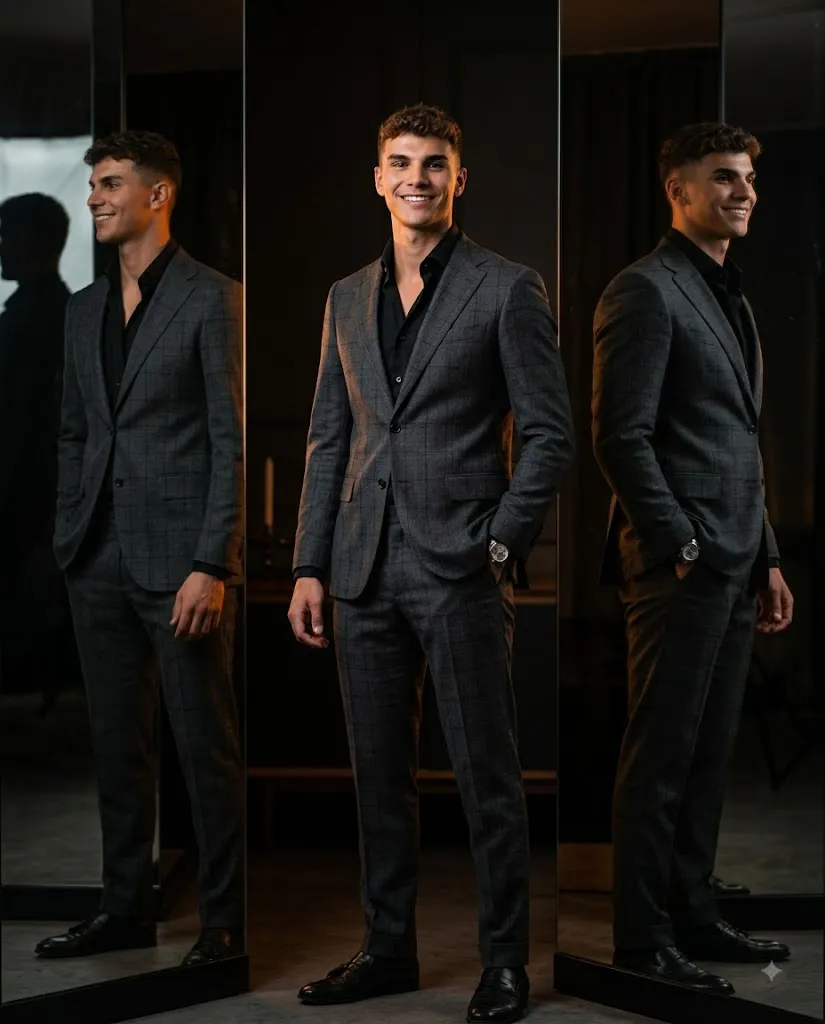
The Triple Reflection Luxury Suit Prompt is a premium AI photo-editing concept designed to turn an ordinary portrait into a sophisticated, high-fashion editorial photograph. It combines a tailored charcoal-grey checked wool suit, a dark luxury studio setting, reflective glass mirror panels, cinematic low-key lighting, and a relaxed yet powerful masculine pose. The subject stands centered in frame, body angled slightly away from the camera with his face turned toward the lens, exuding quiet confidence. The concept's signature feature is a striking triple-figure effect created by mirrored reflections on either side of the subject, resulting in a polished, magazine-worthy luxury portrait.
"Triple Reflection Luxury Suit Prompt"
Luxury editorial portrait of a confident man, three-quarter framing cropped below knee, angled stance with one hand in pocket, face turned to camera. Wearing a bespoke charcoal-grey checked wool suit over a black shirt, top button open. Standing in a dark luxury studio with reflective glass/mirror panels, creating a triple-figure reflection effect; deep charcoal walls with warm brown undertones. Cinematic low-key lighting — warm amber rim light on both sides, soft neutral key light on face, moody controlled shadows. Vertical composition, centered, eye-level, medium-long lens compression, negative space above head. Ultra-photorealistic, sharp facial detail with visible skin texture and pores, natural hair strands, accurate reflections, subtle film grain, HDR, 8K editorial quality. Preserve subject's exact identity, facial structure, hairstyle, and facial hair — no smoothing or beautification. Negative: cartoon, CGI, plastic skin, distorted face, bad anatomy, extra/missing fingers, duplicate subject, incorrect reflections, blurry face, low-res, oversaturated, artificial hair, warped mirror, cluttered background, text, watermark. --ar 4:5.
How To Use Photo Editing?
Using the Triple Reflection Luxury Suit Prompt is straightforward when the workflow is divided into several important stages. Because this concept relies heavily on identity preservation and physically accurate reflections, starting with a high-quality reference photograph is especially important.
Step 1: Select a Good Reference Photo
Choose a sharp, high-resolution photograph where the person's face is clearly visible. A photo with natural lighting and minimal filters will generally provide better results. Avoid images where the face is heavily covered, extremely blurry, distorted, or hidden by strong shadows.
Step 2: Upload the Reference Image
Open an AI image-generation or photo-editing platform that supports reference images. Upload the photograph and designate it as the primary identity reference.
You can add an instruction such as:
“Use the uploaded photograph as the primary identity reference. Preserve the subject's facial proportions, bone structure, hairstyle, facial hair, natural skin texture, and recognizable features while changing the clothing, pose, studio environment, reflections, and lighting.”
This helps separate identity preservation from the creative transformation.
Step 3: Add the Full Prompt
Paste the complete Triple Reflection Luxury Suit Prompt into the prompt field. Make sure the description includes the suit, pose, mirror panels, triple reflection, lighting, camera composition, and image-quality requirements.
Step 4: Generate Multiple Variations
Create several variations and compare them carefully. Pay particular attention to the face, hands, suit fit, mirror geometry, and reflections. Select the version where the three-figure effect looks most natural and physically believable.
Tools You Can Use For Prompt Copy and Create Photo
Several categories of tools can help you create this luxury editorial concept.
1. AI Image Generators
AI image-generation platforms are useful when you want to create the complete fashion studio scene from a text prompt. They can generate clothing, studio architecture, lighting, reflections, and composition. For reference-based portraits, choose a platform that supports image references and identity consistency.
2. AI Photo Editors
AI photo editors are useful when you already have an existing portrait and want to transform it into the luxury suit concept. These tools can help modify clothing, backgrounds, lighting, and environmental details while using the original photograph as a reference.
3. Professional Editing Software
Traditional image-editing software can be used after AI generation to refine exposure, contrast, cropping, sharpness, color grading, and other details. It is particularly useful when small imperfections appear in mirror reflections or clothing.
4. Image Enhancement Tools
AI upscaling and enhancement tools can improve the final resolution and help reveal details in the face, hair, suit fabric, and reflective surfaces. Use enhancement carefully to avoid creating artificial skin texture or excessive sharpness.
How To Edit Photo?
Once the initial image has been generated, carefully refine each major component.
Step 1: Check Facial Identity
Compare the generated face with the reference photograph. Examine the eyes, nose, lips, jawline, cheekbones, hairstyle, facial hair, and natural skin texture. Avoid excessive beautification. The goal is a realistic luxury photograph rather than an artificially perfected face.
Step 2: Refine the Suit
The charcoal-grey checked wool suit should look bespoke and precisely tailored. Inspect the plaid pattern, lapels, buttons, stitching, sleeves, trousers, and fabric folds. The checked pattern should remain consistent across the jacket and trousers without becoming warped or randomly duplicated.
Step 3: Improve the Black Shirt
The black shirt should remain clean and understated, with the top button naturally open. Make sure the collar sits correctly beneath the suit jacket. The shirt should have realistic fabric texture rather than appearing completely flat.
Step 4: Perfect the Pose
The pose should communicate quiet confidence. One hand should rest naturally inside the trouser pocket while the opposite arm hangs comfortably at the side. Check the hands carefully for incorrect fingers or unnatural wrist positions.
Step 5: Build the Triple Reflection
The mirror effect is the defining characteristic of the concept. The central subject should be accompanied by one reflection on the left and another on the right. The reflections should follow the subject's posture and proportions correctly. They should not appear as separate people standing behind him. The reflected versions can be slightly darker and softer than the original subject while maintaining realistic geometry.
Step 6: Refine the Studio Background
Keep the studio dark and minimal. Use black and charcoal walls, elegant vertical lines, reflective glass, and subtle warm brown undertones. Avoid unnecessary furniture or decorative objects because they can weaken the luxury editorial aesthetic.
Step 7: Adjust the Lighting
Use low-key cinematic lighting. Warm amber rim lights should illuminate the edges of the subject from both sides, helping separate him from the dark studio. A soft neutral key light should illuminate the face while preserving natural shadows. The mirror surfaces should also capture subtle warm reflections.
Step 8: Improve Reflections and Shadows
Carefully inspect the relationship between the subject and the mirror panels. Reflections should follow the correct position, scale, perspective, and lighting. Incorrect reflections are one of the most noticeable AI artifacts in this type of composition, so regenerate or manually correct them if necessary.
Step 9: Apply Cinematic Color Grading
Use a refined dark luxury color palette. Charcoal, black, grey, and subtle amber tones should dominate the image. Maintain natural skin tones and avoid excessive saturation. Moderate contrast and subtle film grain can enhance the high-fashion campaign aesthetic.
Step 10: Finalize the Composition
The recommended 4:5 vertical composition works particularly well for fashion editorials and social media. Keep the subject centered with generous negative space above his head. The symmetrical mirror panels should frame him without overwhelming the composition.
Conclusion
This concept blends tailored menswear, cinematic lighting, and reflective architecture into a distinctive luxury portrait style. Its standout feature is the triple-figure mirror effect — when reflections are accurate and well-aligned, the image reads as a genuine high-end fashion campaign shot. Start with a strong reference photo, prioritize identity preservation, and finish with restrained color grading rather than heavy filters for the most believable result.