Introduction
Artificial Intelligence has revolutionized the world of digital photography, making it possible to create professional-quality portraits without expensive cameras or advanced editing software. Today, AI image generators can transform a simple reference photo into a breathtaking cinematic masterpiece using only a detailed text prompt. One of the most elegant examples is the Twilight Beach Couple Prompt, which creates a luxurious romantic portrait on a beautiful beach during the magical blue hour.
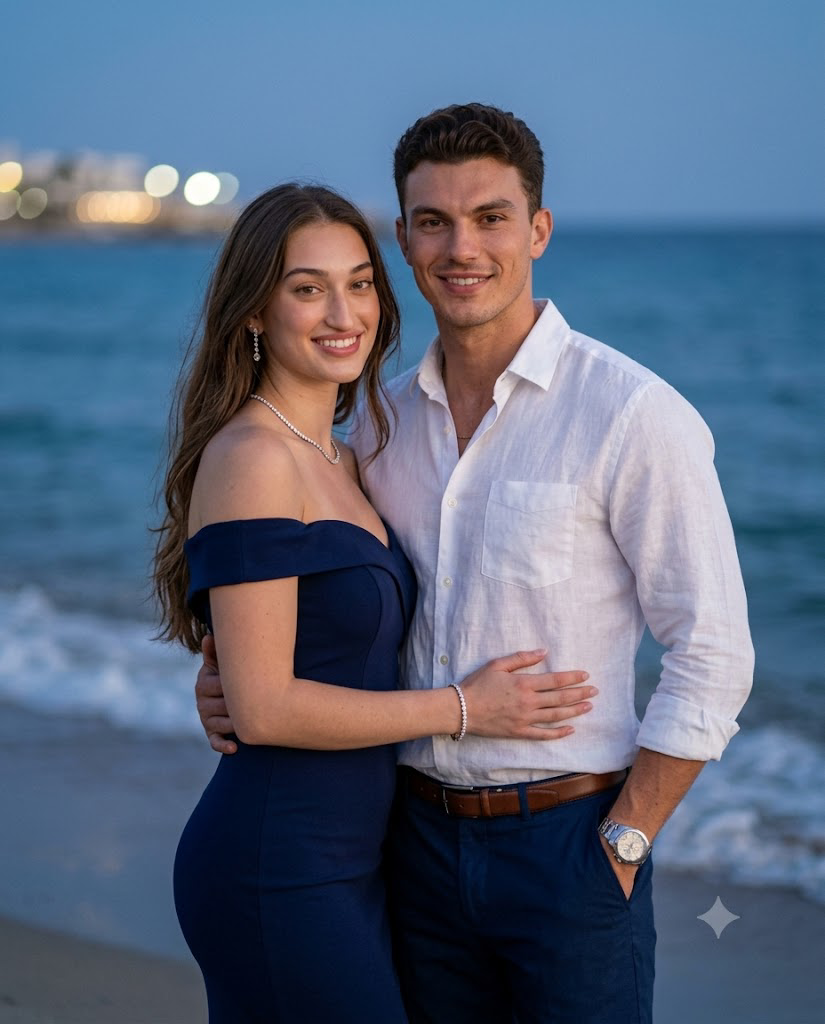
This prompt is designed for couples who want a realistic, cinematic image featuring soft evening lighting, gentle ocean waves, and glowing city lights in the background. The carefully written description preserves both subjects' facial identities while adding premium fashion styling, realistic skin textures, and professional photography effects. The result looks as though it was captured during an expensive destination photoshoot.
Whether you're creating content for Instagram, wedding invitations, anniversary gifts, wallpapers, social media branding, or digital portfolios, this prompt delivers stunning, high-resolution images with remarkable realism. The combination of an 85mm portrait lens, shallow depth of field, and warm diffused lighting produces an elegant and timeless photograph that stands out from ordinary AI-generated images.
"Twilight Beach Couple Prompt"
A photorealistic, ultra-detailed medium portrait of a highly attractive, elegant couple standing closely together on a beach at twilight. The beautiful woman has long, flowing hair and is wearing a form-fitting navy blue off-the-shoulder evening dress, accessorized with diamond drop earrings, a diamond necklace, a tennis bracelet, and a silver ring. She has a warm, radiant smile. The handsome man natural hair and wears a crisp white linen button-down shirt with rolled-up sleeves, navy blue dress pants, a brown leather belt, and a silver steel watch. He has a confident, subtle smile. His right arm is around her waist, and his left hand is tucked in his pocket. Both make direct eye contact with the camera. The background features a dark blue ocean with gentle waves, and creamy bokeh from distant coastal city lights under a deep blue evening sky. Shot on an 85mm lens, f/1.8 aperture, shallow depth of field, soft flattering diffused lighting illuminating their faces, 8k, masterpiece, cinematic portrait photography, ultra-detailed skin textures. Aspect ratio 4:5. Maintain accurate identity and precise face matching to the provided reference image for both subjects.
How To Use Photo Editing?
Creating a realistic Twilight Beach Couple portrait with AI is simple when you follow the correct process. Most modern AI image generators require only a reference image and a detailed prompt.
Step 1: Choose High-Quality Reference Photos
Select clear, high-resolution images for both individuals. Make sure their faces are visible, well-lit, and free from heavy filters or blur. Better reference images lead to more accurate face matching.
Step 2: Copy the Complete Prompt
Copy the full Twilight Beach Couple Prompt exactly as written. Every detail—including clothing, lighting, background, accessories, and camera settings—helps the AI understand your desired result.
Step 3: Upload the Reference Images
Open your preferred AI image generation platform and upload the couple's reference photos. If the platform supports multiple image references, upload both subjects separately.
Step 4: Paste the Prompt
Paste the copied prompt into the text input field. Enable Character Reference or Face Preservation if your chosen AI tool provides those options.
Step 5: Generate the Image
Click the Generate button and allow the AI to create the portrait. Most platforms provide several image variations, allowing you to choose your favorite.
Step 6: Refine the Result
If necessary, regenerate the image with slight adjustments to lighting, facial expressions, pose, or background until the final portrait matches your vision.
Tools You Can Use For Prompt Copy and Create Photo
Several AI platforms can generate cinematic portraits using detailed prompts. Here are some of the most popular choices.
1. ChatGPT Image Generation
ChatGPT can help create detailed prompts and generate realistic AI portraits with cinematic lighting, accurate facial preservation, and natural compositions.
2. Midjourney
Midjourney is famous for creating artistic, luxurious, and highly detailed portraits with impressive cinematic color grading.
3. Flux AI
Flux AI specializes in photorealistic rendering, producing natural skin textures, realistic lighting, and excellent prompt accuracy.
4. Google Imagen
Google Imagen creates highly realistic images with sharp details, balanced colors, and advanced prompt understanding.
5. Adobe Firefly
Adobe Firefly is ideal for designers and creators who want commercial-friendly AI artwork with easy editing capabilities.
6. Leonardo AI
Leonardo AI offers extensive customization options for fashion portraits, cinematic scenes, and romantic photography.
7. Ideogram AI
Ideogram AI is suitable for creating realistic portraits, posters, and creative artwork while maintaining excellent visual quality.
8. Microsoft Designer
Microsoft Designer provides an easy-to-use interface for beginners and produces impressive AI-generated images suitable for both personal and professional projects.
How To Edit Photo?
Follow these simple steps to create a premium Twilight Beach Couple portrait.
Step 1: Select High-Resolution Images
Choose clear reference photos where both faces are visible with natural lighting. High-quality images improve facial recognition accuracy.
Step 2: Upload Your Images
Open your preferred AI image generator and upload both reference images.
Step 3: Paste the Prompt
Copy and paste the complete Twilight Beach Couple Prompt into the prompt field without removing important descriptive details.
Step 4: Enable Face Matching
Activate Face Lock, Character Reference, or Identity Preservation if your AI platform supports these features. This ensures both individuals maintain their original facial appearance.
Step 5: Configure Image Settings
Use recommended settings such as:
- Aspect Ratio: 4:5 Portrait
- Resolution: Ultra HD or 8K
- Style: Photorealistic
- Lens: 85mm
- Aperture: f/1.8
- HDR: Enabled
- Lighting: Twilight Blue Hour
- Depth of Field: Shallow Background Blur
- Color Grading: Cinematic
Step 6: Generate the Portrait
Allow the AI to render the image. Most platforms generate several variations so you can select the most realistic composition.
Step 7: Fine-Tune the Result
If needed, regenerate with adjustments to:
- Facial expressions
- Ocean lighting
- Background bokeh
- Clothing details
- Jewelry reflections
- Color balance
- Camera framing
Step 8: Download the Final Image
Export the highest-quality version available for printing, social media, digital albums, or professional portfolios.
Conclusion
The Twilight Beach Couple Prompt is an excellent choice for anyone looking to create elegant, cinematic AI portraits with a romantic atmosphere. Its detailed instructions combine luxury fashion, soft twilight lighting, gentle ocean scenery, and realistic photography techniques to produce images that appear professionally captured.
By preserving facial identity while enhancing the environment with natural lighting, shallow depth of field, and cinematic color grading, this prompt consistently delivers premium-quality results. Whether you are creating anniversary memories, engagement portraits, travel-themed artwork, or stylish social media content, this prompt offers a reliable way to generate breathtaking visuals.
As AI image generation continues to advance, detailed prompts like the Twilight Beach Couple Prompt demonstrate how carefully crafted descriptions can transform ordinary reference photos into extraordinary works of digital art. Experiment with different outfits, poses, and lighting while keeping the core prompt intact to create unique romantic portraits every time.