Introduction
Portrait photography has evolved far beyond traditional headshots and studio poses. Modern creators are constantly exploring new ways to combine artistic storytelling with professional photography techniques. One of the most visually striking trends in contemporary portrait photography is the Color Splash Studio Portrait. This style creates a dramatic contrast between a vibrant, full-color subject and a monochrome black-and-white background, resulting in an image that immediately captures attention.
"Ultra-Realistic Cinematic Color Splash Studio Portrait Female Prompt"
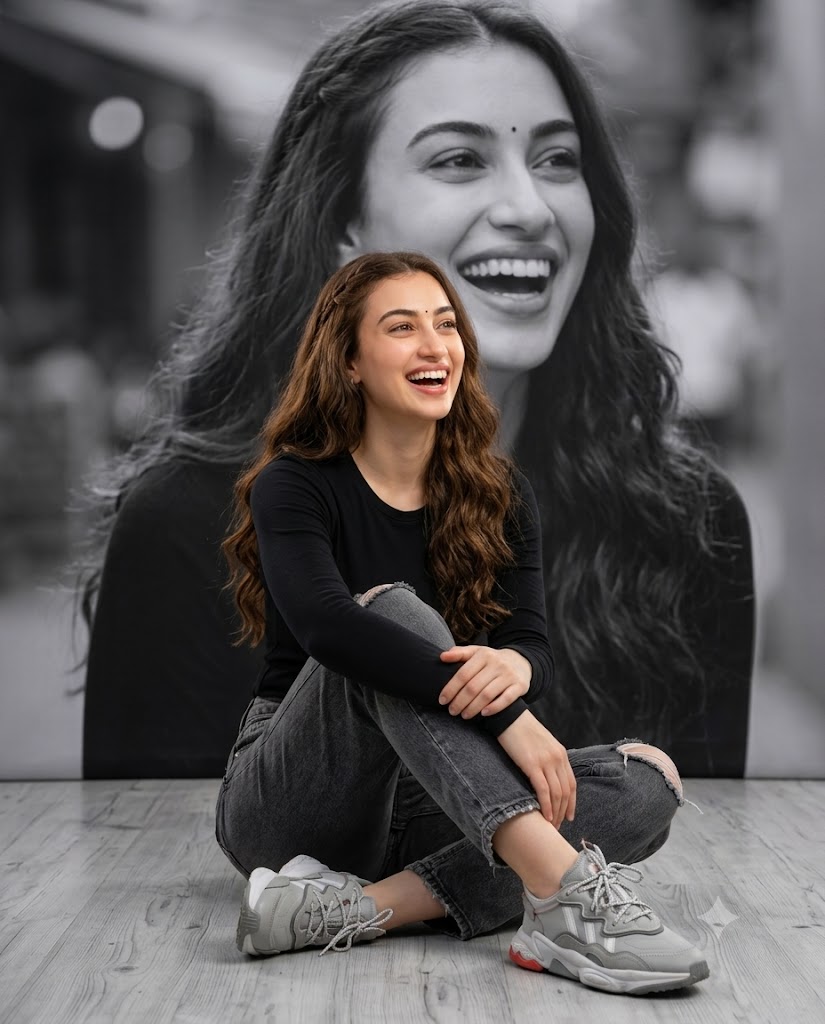
Create a 4:5 aspect ratio, professional-grade, high-definition studio photograph, executed in a dramatic colour-splash style. Important: Use the provided reference image strictly only for face and identity. Foreground Subject (Full Color): A joyful reference female, with long, cascading, wavy chestnut natural color hair that features a subtle side-braid starting at the temple. She has clear, radiant skin and a small bindi on her forehead. She is sitting cross-legged (Indian style) on a light grey-washed wooden floor with visible grain patterns. She is looking upwards and to the right, with a genuinely wide-mouthed, heartwarming natural laugh. Her hands are clasped loosely and rest naturally over her knees. Foreground Clothing: She wears a simple, fitted black long-sleeved crew-neck t-shirt. She is clad in high-waisted, charcoal-grey distressed denim jeans, which show specific, authentic rip details at the knees and minor fraying on the pocket and hem. Her feet are in complex, highly detailed grey and white chunky lifestyle sneakers, which feature multiple textured leather panels, white mesh sections, intricate lacing, and a unique sole design with geometric patterns and a very small red accent detail on the heel. Background (Monochrome, Soft Focus): Directly behind her is a massive, grayscale (black and white) portrait backdrop. This portrait features a larger-scale, slightly more frontal close-up of the exact same woman, laughing with the same joyful expression and bindi. This background is softly blurred (bokeh) to create depth but maintains enough detail to be clearly identifiable. Additional Details: The floor is light grey wooden planking. The entire scene is bathed in soft, even studio lighting that makes the foreground woman's colors pop against the monochromatic backdrop. Composition: Eye-level medium shot. Sharp focus on the color woman and the floor texture, with a shallow depth of field for the B&W background.
An Ultra-Realistic Cinematic Color Splash Studio Portrait is designed to highlight emotion, personality, and visual contrast. The subject remains fully colored and richly detailed, while the surrounding environment or background portrait is transformed into grayscale. This technique creates a powerful separation that naturally directs the viewer’s attention toward the subject.
The style is particularly effective when combined with expressive emotions such as laughter, happiness, confidence, or candid moments. A genuine smile, realistic skin texture, natural lighting, and professional composition contribute to an image that feels both artistic and authentic.
With modern AI image-generation technology and advanced editing software, creators can now produce luxury-quality color splash portraits while maintaining facial identity, skin tone, hairstyle, and unique personal features. Whether used for social media, personal portfolios, photography projects, fashion editorials, or digital artwork, this portrait style delivers a timeless and sophisticated visual impact.
"Ultra-Realistic Cinematic Color Splash Studio Portrait Male Prompt"
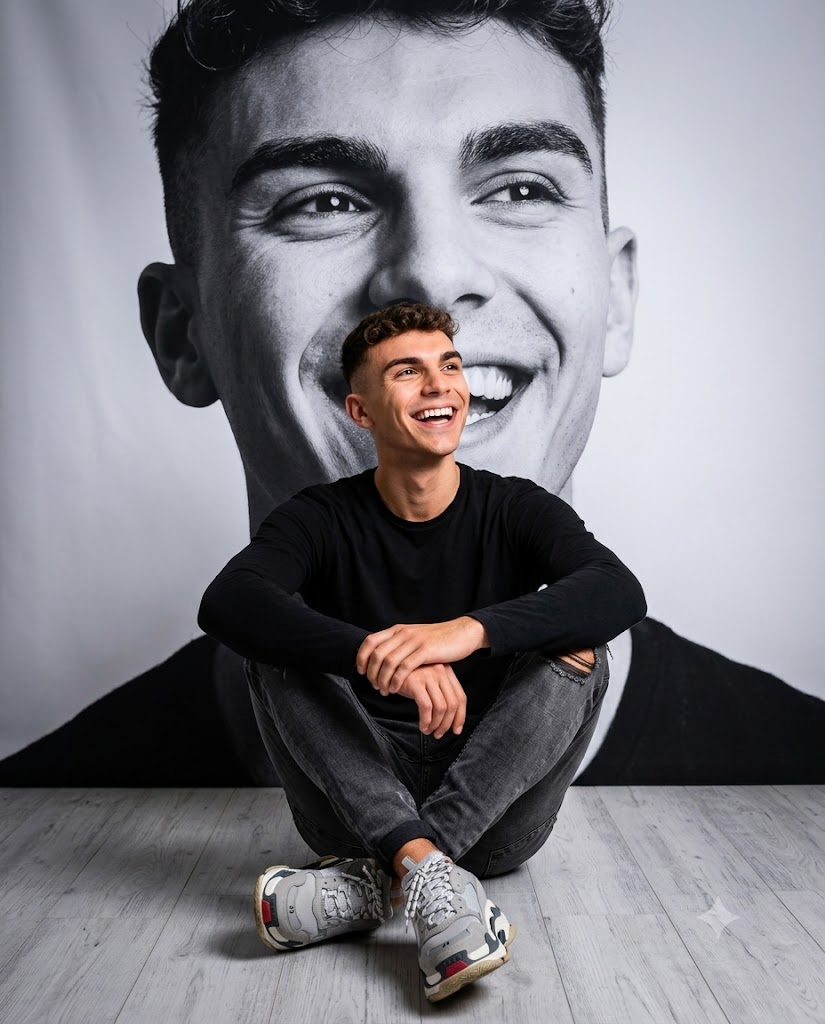
Create a 4:5 aspect ratio, professional-grade, high-definition studio photograph, executed in a dramatic color-splash style. Important: Use the provided reference image strictly only for face and identity. Preserve the subject's exact facial structure, skin tone, hairstyle, beard details (if present), eye shape, natural smile, and overall likeness. Do not beautify, stylize, or alter identity. Foreground Subject (Full Color) A joyful young man sits cross-legged on a light grey-washed wooden floor with visible natural grain textures. He is looking slightly upward and to the right with a genuine wide smile and natural laughter, creating a warm, candid, and uplifting mood. His posture is relaxed and comfortable, with his hands loosely clasped together and resting naturally on his knees. He has realistic skin texture, visible pores, natural facial details, and authentic expressions. His hairstyle matches the reference image exactly, including length, texture, volume, and styling direction. Foreground Clothing He wears a fitted black full-sleeve crew-neck t-shirt with realistic fabric folds and texture. He is dressed in charcoal-grey distressed denim jeans featuring authentic knee rips, subtle fading, natural creases, and slight fraying around the pockets and hems. His footwear consists of highly detailed grey-and-white chunky lifestyle sneakers featuring: Multiple layered leather panels White mesh inserts Intricate lace patterns Textured midsoles Geometric outsole design Small red accent detail near the heel All clothing should appear realistic, naturally worn, and professionally photographed. Background (Monochrome, Soft Focus) Directly behind him is a massive grayscale (black-and-white) portrait backdrop featuring the exact same man. The monochrome portrait shows a larger-scale close-up of his face with the same joyful laughing
How To Use Photo Editing?
Photo editing plays a crucial role in creating a successful color splash portrait. While AI image generators can create impressive compositions, editing helps refine the image and achieve a polished professional result.
The process typically begins with a high-quality reference photograph. AI systems use the reference image to preserve facial features, skin texture, hairstyle, and identity consistency. Once the base image is generated, editing tools can enhance both the colored foreground subject and the monochrome background.
Photo editing can be used to:
- Improve facial detail
- Enhance skin texture
- Adjust lighting balance
- Refine monochrome backgrounds
- Increase visual contrast
- Improve clothing details
- Enhance footwear textures
- Refine depth of field
- Create cinematic color grading
- Strengthen overall composition
One of the key goals is maintaining realism. The foreground subject should remain natural and believable rather than appearing heavily retouched. Visible skin pores, realistic shadows, and authentic fabric textures help preserve the professional photography look.
When executed correctly, photo editing transforms a simple portrait into a visually compelling piece of art.
Tools You Can Use For Prompt Copy and Create Photo
Several powerful tools can help create ultra-realistic cinematic color splash portraits.
1. ChatGPT
ChatGPT is highly effective for generating detailed image prompts. Users can describe clothing, expressions, lighting, poses, and composition, and ChatGPT can convert those ideas into professional prompts optimized for AI image-generation platforms.
2. Flux AI
Flux AI is known for producing realistic portraits with exceptional facial consistency, accurate skin textures, and natural lighting.
3. Midjourney
Midjourney excels at artistic and cinematic image generation. It is especially useful for creating visually dramatic portraits and editorial-style compositions.
4. Leonardo AI
Leonardo AI offers excellent realism and identity preservation, making it a popular choice for portrait-focused projects.
5. Adobe Photoshop
Photoshop remains the industry standard for image editing. It allows creators to refine AI-generated images, improve contrast, adjust colors, and create professional-quality monochrome effects.
6. Canva
Canva provides simple editing tools for creating layouts, social media graphics, and presentation-ready images.
7. Ideogram
Ideogram can generate realistic compositions and assist with visual storytelling.
8. Google Gemini
Gemini can help with creative brainstorming, prompt writing, and concept development.
Many professionals use a combination of these tools. For example, ChatGPT can create the prompt, Flux AI can generate the portrait, and Photoshop can perform final refinements.
How To Edit Photo?
Creating an Ultra-Realistic Cinematic Color Splash Studio Portrait requires attention to detail and a structured editing workflow.
Step 1: Choose a High-Quality Reference Image
Select a clear photograph with visible facial features, natural lighting, and sufficient detail. A high-quality reference image improves identity preservation and realism.
Step 2: Create a Detailed Prompt
A successful prompt should include:
- Identity preservation instructions
- Clothing details
- Pose descriptions
- Background design
- Expression requirements
- Lighting conditions
- Camera specifications
- Color splash effect instructions
- Depth-of-field settings
- Realism requirements
Detailed prompts help generate more accurate and visually appealing results.
Step 3: Generate Multiple Versions
AI image generators often create different interpretations of the same prompt. Generate several versions and compare them carefully before selecting the best result.
Step 4: Verify Identity Accuracy
Carefully compare the generated image with the reference photograph.
Check:
- Face shape
- Eye structure
- Nose and lips
- Skin tone
- Hairstyle
- Expression
Maintaining identity consistency is essential for realistic portrait creation.
Step 5: Create the Color Splash Effect
The defining feature of this style is the contrast between color and monochrome elements.
Maintain:
- Full color on the subject
- Black-and-white background portrait
- Balanced contrast
- Natural tonal transitions
Avoid excessive saturation that may appear artificial.
Step 6: Enhance Studio Lighting
Professional studio lighting creates depth and dimension.
Focus on:
- Soft highlights
- Balanced shadows
- Natural skin tones
- Even illumination
- Clean separation between subject and background
Good lighting significantly improves realism.
Step 7: Refine Clothing and Accessories
Enhance details such as:
- Denim texture
- Shirt fabric
- Shoe construction
- Hair strands
- Jewelry reflections
- Small accessories
These details help create a premium editorial appearance.
Step 8: Improve Depth of Field
A shallow depth of field helps separate the foreground subject from the monochrome backdrop.
Maintain:
- Sharp focus on the subject
- Soft background blur
- Smooth bokeh transitions
- Natural perspective
This creates a professional DSLR-style portrait look.
Step 9: Apply Cinematic Color Grading
Color grading helps unify the image.
Popular adjustments include:
- Warm skin tones
- Rich blacks
- Controlled highlights
- Natural contrast
- Balanced saturation
The goal is a polished editorial finish without losing realism.
Step 10: Export in High Resolution
Save the final image in 4K or 8K quality. High-resolution exports preserve every detail and ensure professional-quality results for social media, printing, and portfolio presentation.
Conclusion
The Ultra-Realistic Cinematic Color Splash Studio Portrait Prompt combines artistic creativity with professional photography techniques to create a visually stunning and emotionally engaging image. By placing a vibrant full-color subject against a monochrome background, this style naturally draws attention to the subject while maintaining strong visual storytelling.
What makes this portrait style particularly effective is its ability to balance realism and artistry. Genuine expressions, realistic skin texture, professional lighting, and thoughtful composition work together to create images that feel authentic yet visually dramatic.
With the right prompt, a high-quality reference image, and careful editing techniques, creators can produce portraits that rival professional studio photography. Whether you're creating content for social media, personal projects, digital portfolios, or artistic exhibitions, the color splash portrait remains one of the most powerful and timeless styles in modern photography.
As AI image-generation technology continues to advance, creators will have even greater opportunities to experiment with innovative portrait concepts while maintaining exceptional realism and visual quality.