Introduction
Travel photography is much more than capturing a location. The most memorable travel portraits tell a story, preserve an emotion, and allow viewers to experience a moment through the eyes of the subject. With the rapid growth of AI image generation and advanced photo editing technologies, creators can now produce stunning cinematic travel portraits that look as if they were captured by professional photographers using premium camera equipment in breathtaking destinations.
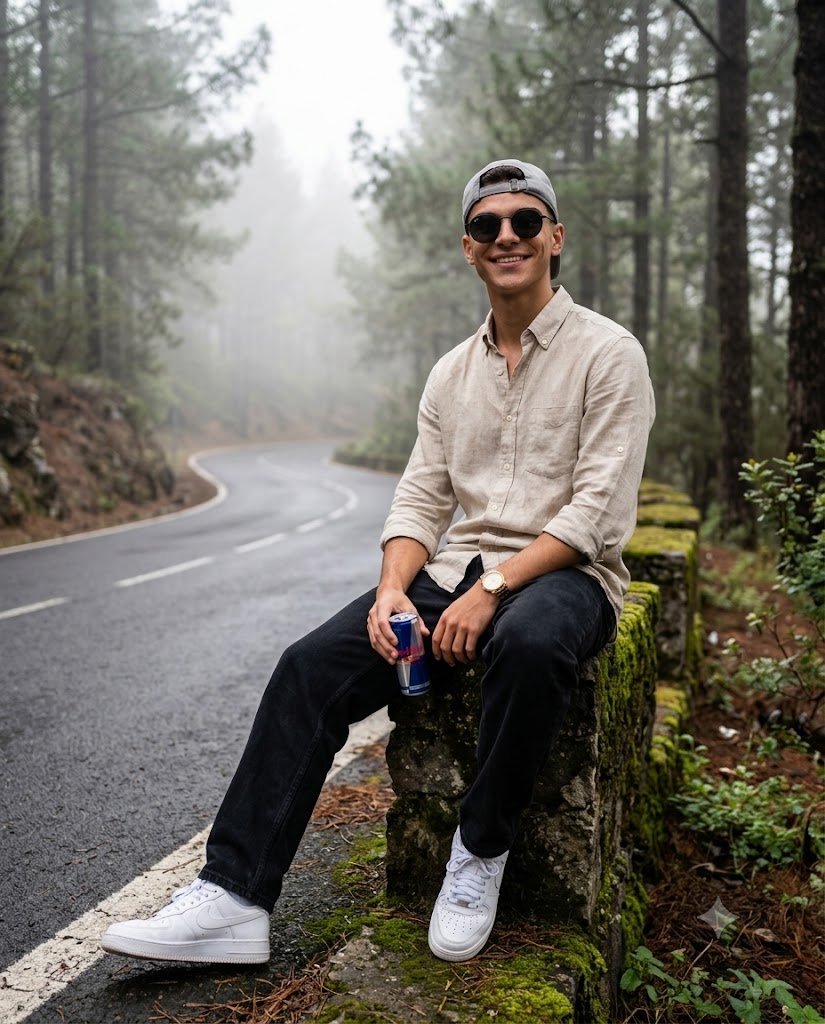
Use the uploaded male image strictly only for face and identity reference. Preserve the person’s real facial features, skin tone, age, hairstyle, and overall likeness accurately.Create an ultra-realistic cinematic travel portrait of a man sitting casually on a moss-covered roadside stone barrier beside a winding mountain road in a misty pine forest. The mood should feel calm, fresh, natural, and emotionally alive — like a peaceful road-trip moment captured candidly in the mountains. The man is seated in a relaxed, natural posture on the stone barrier, with his torso upright but easy, shoulders relaxed, and body angled slightly toward the camera. His legs are placed naturally and comfortably, with one leg extending forward and the other bent in a relaxed seated position. His hands rest naturally near his lap while loosely holding a Red Bull can, with no stiffness in the arms or fingers. The pose should feel effortless, balanced, and realistic, not overly posed. His expression should be happy but natural — a soft genuine smile, relaxed jaw, and an easy, pleasant vibe. Avoid exaggerated smiling or forced expression. The face should feel alive, warm, and candid, as if he is enjoying the quiet mountain atmosphere. He wears a light beige linen button-down shirt with sleeves rolled to the forearms, black loose-fit jeans, clean white Nike Air Force 1 style sneakers, a light grey baseball cap worn backwards, black round sunglasses, and a subtle gold wristwatch. Keep clothing details realistic with soft folds, natural fabric texture, and proper fit. The background should show a quiet curved mountain road fading into fog, surrounded by tall pine trees, wet ground, scattered leaves, small roadside plants, and moss-covered stone textures. Use soft diffused natural light, realistic fog depth, shallow depth of field, sharp focus on the subject, and premium cinematic travel photography styling. Vertical 4:5 aspect ratio, full-body seated composition, realistic perspective, natural body proportions, correct hands, correct posture, and a believable candid travel feel.
An Ultra-Realistic Cinematic Travel Portrait combines realistic facial details, natural poses, environmental storytelling, and professional photography techniques. Unlike traditional portraits that focus only on the subject, travel portraits blend the individual with their surroundings. Mountain roads, misty forests, scenic landscapes, and atmospheric lighting become essential parts of the visual narrative.
One popular concept is a relaxed traveler sitting beside a winding mountain road surrounded by pine trees and fog. The scene feels calm, adventurous, and authentic. Soft natural lighting, realistic clothing textures, shallow depth of field, and cinematic color grading work together to create an image that resembles a frame from a travel documentary or adventure film.
Today, AI-powered tools make it possible to create these professional-quality portraits while preserving facial identity, skin tone, hairstyle, and personal characteristics. Whether you are creating content for social media, travel blogs, digital portfolios, or creative projects, cinematic travel portrait prompts offer a powerful way to bring your vision to life.
How To Use Photo Editing?
Photo editing is a vital step in creating realistic travel portraits. While AI image generators can produce impressive results, editing helps refine details and improve overall visual quality.
The process usually begins with a clear reference image. AI systems analyze facial features, expressions, skin tone, and hairstyle to ensure accurate identity preservation. Once the base image is generated, editing tools can be used to enhance realism and storytelling.
Photo editing can help with:
- Facial detail enhancement
- Natural skin texture preservation
- Background atmosphere improvement
- Color correction
- Exposure balancing
- Cinematic color grading
- Depth-of-field adjustments
- Clothing texture refinement
- Environmental enhancement
- Overall image consistency
One of the most important goals is maintaining realism. Over-editing can make portraits appear artificial, while subtle refinements create a natural and professional appearance. Travel portraits should feel genuine, as if they were captured during a real journey rather than created in a studio.
Modern editing techniques allow creators to balance technical perfection with authentic visual storytelling, resulting in portraits that are both beautiful and believable.
Tools You Can Use For Prompt Copy and Create Photo
Many AI-powered platforms and editing applications can help generate ultra-realistic cinematic travel portraits.
1. ChatGPT
ChatGPT is one of the best tools for creating detailed AI image prompts. Users can describe environments, clothing, poses, lighting, and camera settings, and ChatGPT can convert those ideas into professional prompts optimized for image-generation platforms.
2. Flux AI
Flux AI is highly regarded for creating realistic portraits with excellent skin textures, accurate facial details, and natural lighting effects.
3. Midjourney
Midjourney is known for its cinematic visual style and ability to create atmospheric outdoor scenes with strong storytelling elements.
4. Leonardo AI
Leonardo AI offers impressive realism and identity consistency, making it an excellent option for portrait-focused projects.
5. Adobe Photoshop
Photoshop remains the industry-standard editing software. It can be used to refine generated images, adjust lighting, improve colors, and enhance realism.
6. Canva
Canva provides beginner-friendly tools for image editing, layout design, and social media content creation.
7. Ideogram
Ideogram is useful for generating realistic compositions with balanced layouts and strong visual storytelling.
8. Google Gemini
Gemini can assist with prompt writing, creative ideas, and concept development for travel photography projects.
Many creators combine several of these tools in a workflow. For example, ChatGPT can generate the prompt, Flux AI can create the image, and Photoshop can perform final refinements.
How To Edit Photo?
Creating an ultra-realistic cinematic travel portrait involves multiple steps that focus on both realism and storytelling.
Step 1: Select a High-Quality Reference Image
Choose a clear photograph with visible facial features and natural lighting. A strong reference image improves identity preservation and overall image quality.
Step 2: Create a Detailed Prompt
Your prompt should include:
- Facial preservation instructions
- Clothing descriptions
- Pose details
- Environmental elements
- Lighting conditions
- Camera specifications
- Mood and atmosphere
- Composition requirements
- Color grading preferences
- Realism settings
The more specific the prompt, the better the results.
Step 3: Generate Multiple Versions
AI systems often produce different interpretations of the same prompt. Generate several variations and select the image that best matches your vision.
Step 4: Check Facial Accuracy
Compare the generated image with the original reference photo. Ensure that facial structure, hairstyle, skin tone, and overall identity remain consistent.
Step 5: Refine Environmental Details
Travel portraits depend heavily on their surroundings. Enhance:
- Mountain roads
- Pine forests
- Fog layers
- Stone textures
- Vegetation
- Natural landscape depth
Environmental realism strengthens the storytelling aspect of the portrait.
Step 6: Improve Lighting
Cinematic travel photography often uses soft natural light.
Focus on:
- Smooth highlights
- Gentle shadows
- Natural exposure
- Atmospheric depth
- Soft contrast
Avoid harsh lighting or excessive HDR effects.
Step 7: Enhance Clothing and Accessories
Pay attention to:
- Fabric folds
- Clothing texture
- Watch details
- Sunglasses reflections
- Footwear realism
- Natural wrinkles
Small details contribute significantly to authenticity.
Step 8: Adjust Color Grading
Travel portraits often benefit from cinematic color grading.
Popular adjustments include:
- Muted greens
- Soft earth tones
- Warm highlights
- Natural skin tones
- Slight desaturation
These color choices create a premium travel-photography aesthetic.
Step 9: Apply Depth of Field
A shallow depth of field helps separate the subject from the background.
Maintain:
- Sharp facial focus
- Soft background blur
- Realistic bokeh
- Natural perspective
This creates the professional DSLR look commonly seen in travel magazines.
Step 10: Export in High Resolution
Save the final image in 4K or 8K quality to preserve all details and ensure professional presentation across digital and print platforms.
Conclusion
The Ultra-Realistic Cinematic Travel Portrait Prompt combines modern AI technology with the timeless appeal of travel photography. By blending realistic facial preservation, authentic environments, natural lighting, and cinematic storytelling, creators can produce portraits that feel immersive and emotionally engaging.
The strength of this style lies in its ability to capture both the individual and the journey. Misty mountain roads, peaceful forests, and candid expressions work together to tell a story that feels personal and genuine. With the right prompt, high-quality reference image, and thoughtful editing process, anyone can create stunning travel portraits that rival professional photography.
Whether you're designing social media content, building a creative portfolio, documenting travel memories, or experimenting with AI art, cinematic travel portraits provide endless opportunities for creativity. As image-generation technology continues to evolve, this style will remain one of the most compelling ways to combine realism, adventure, and visual storytelling in a single frame.