Introduction
Character-inspired portrait photography has become one of the most exciting creative trends in modern digital art and AI image generation. By combining realistic human portraits with beloved fictional characters, creators can produce visually engaging images that feel playful, professional, and highly shareable. One of the most popular concepts in this category is the Ultra-Realistic Pikachu Companion Studio Portrait, a creative portrait style that blends premium commercial photography with the charm and energy of one of the world's most recognizable characters.
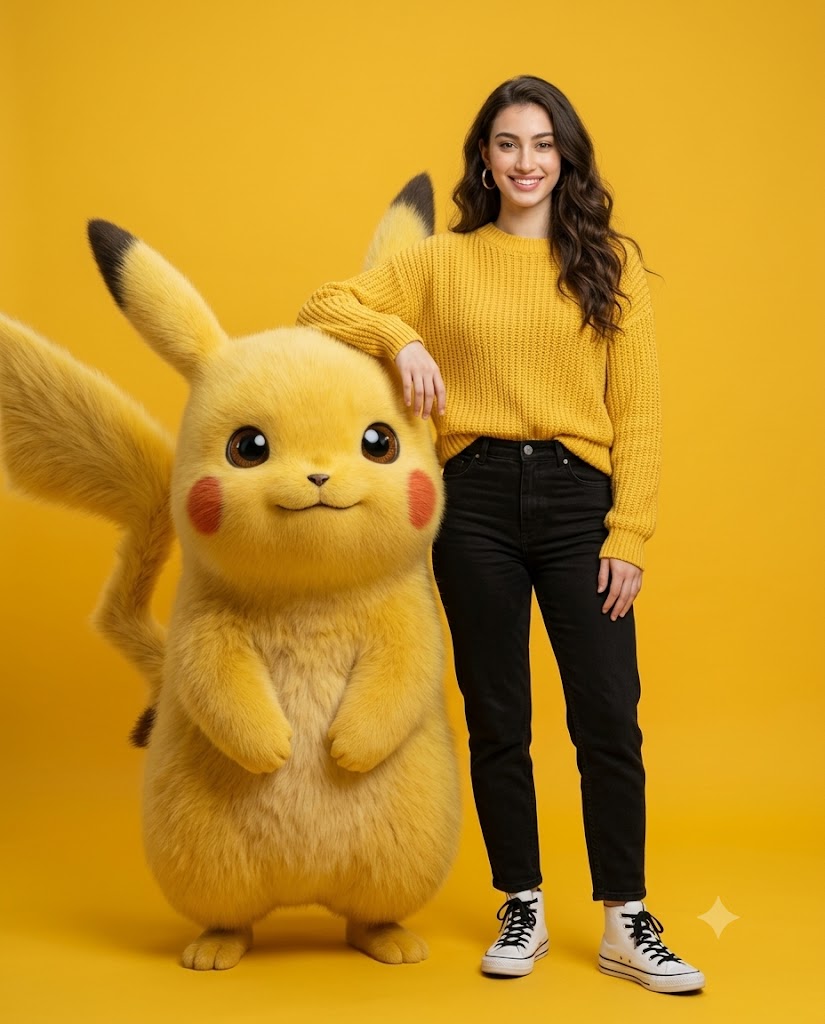
"Ultra-Realistic Pikachu Companion Studio Portrait Prompt"(Female Version)
Use the uploaded image ONLY as the facial identity reference for the human. Preserve exact facial structure, proportions, skin tone, hairstyle length, and the same natural friendly smile. Do not beautify or modify facial features. Everything else must remain exactly as defined below. Composition & Aspect Ratio Vertical 4:5, full-body framing Subject on the right, Pikachu on the left Clean space above head and below shoes Eye-level, straight-on studio shot No crop, no tilt, no distortion Human Pose (LOCKED) Standing relaxed Weight on right leg Left leg casually crossed at the ankles Left arm bent and resting on Pikachu’s head/upper shoulder Right arm relaxed straight by the side Torso slightly angled toward camera Head slightly tilted, eyes looking at camera Expression: cheerful, confident natural smile Outfit (LOCKED) Chunky knit bright yellow sweater Black high-waisted jeans White high-top sneakers with black laces Small gold hoop earrings only Pikachu (LOCKED) Giant photorealistic 3D Pikachu, standing upright Facing the girl with a friendly smile Arms/paws held together in front of its belly Ears upright, tail fully visible Scale slightly shorter than the human Ultra-detailed fluffy fur, vivid red cheeks Natural interaction with human’s arm resting on its head Background (STRICT) Perfectly solid, single-color yellow High saturation, bold studio yellow No gradient, no texture, no pattern Lighting & Style Soft, even studio lighting Clean highlights on face, sweater knit, and Pikachu fur Natural skin tones Bright, joyful, premium commercial look Hyper-realistic, ultra-sharp detail Negative Prompt No changes to pose, Pikachu pose, outfit, background, color tone, camera angle, or framing. No text, logos, props, stylization, or cropping.
This portrait concept focuses on creating a hyper-realistic studio scene where a human subject stands naturally beside a giant photorealistic Pikachu. The image is designed to look like a high-end advertising campaign rather than a cartoon illustration. Every detail—from facial identity preservation and clothing textures to Pikachu’s fluffy fur and studio lighting—is carefully crafted to achieve maximum realism.
The appeal of this style lies in its balance between fantasy and reality. The human subject remains completely realistic and true to the reference image, while Pikachu is rendered as a believable three-dimensional character with detailed fur, realistic shadows, and natural interaction with the subject. The bright yellow studio background further enhances the playful atmosphere and creates a bold, visually striking composition.
Whether you are creating social media content, promotional artwork, fan-inspired photography, portfolio projects, or creative AI-generated images, the Ultra-Realistic Pikachu Companion Studio Portrait offers a fun and professional aesthetic that captures attention instantly.
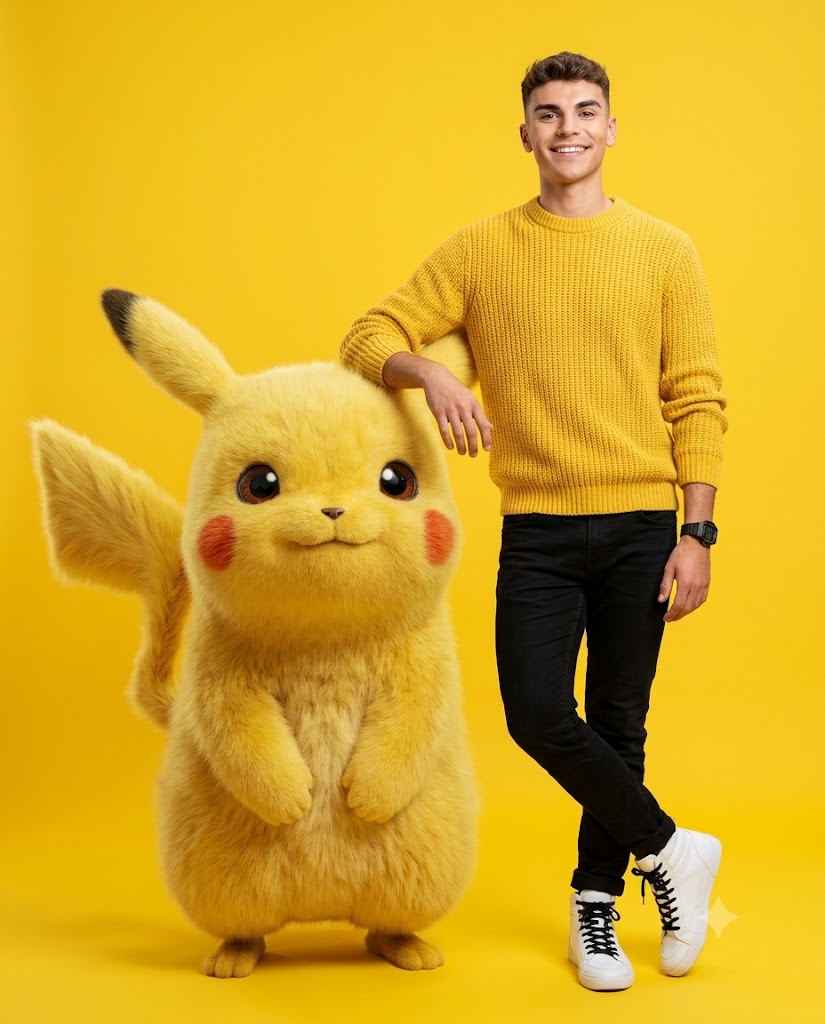
"Ultra-Realistic Pikachu Companion Studio Portrait Prompt"(Male Version)
Use the uploaded image ONLY as the facial identity reference for the human. Preserve the exact facial structure, proportions, skin tone, hairstyle, facial hair (if present), eye shape, and natural friendly smile without beautifying, stylizing, or modifying any facial features. Create a hyper-realistic commercial studio portrait in a vertical 4:5 aspect ratio with full-body framing from head to shoes. Position the young man on the right side of the frame and a giant photorealistic 3D Pikachu on the left side, maintaining clean negative space above the head and below the shoes. Capture the scene at eye level with a straight-on camera angle, no tilt, no crop, and no distortion. The man stands in a relaxed posture with his weight resting naturally on his right leg, left leg casually crossed at the ankles, left arm bent and comfortably resting on Pikachu’s head or upper shoulder, right arm hanging naturally by his side, torso slightly angled toward the camera, head gently tilted, and eyes looking directly into the lens with a cheerful, confident, natural smile. He wears a chunky knit bright yellow sweater with realistic knitted texture, black slim-fit jeans with natural fabric folds, clean white high-top sneakers with black laces, and a black Casio-style sports watch, with no additional accessories. Pikachu is slightly shorter than the man, standing upright with ultra-detailed fluffy yellow fur, vivid red cheeks, upright ears, fully visible tail, friendly smile, and paws gently held together in front of its belly, naturally interacting with the man’s arm resting on its head. The background must be a perfectly solid high-saturation studio yellow with no gradient, texture, pattern, or visible shadows, creating a clean seamless backdrop. Use soft, even professional studio lighting with clean highlights on the face, sweater texture, sneakers, and Pikachu’s fur, maintaining natural skin tones, realistic depth, dimensionality, and premium advertising campaign quality. The final image should feature hyper-realistic rendering, ultra-sharp details, DSLR-quality photography, bright joyful commercial aesthetics, and 8K resolution. Negative prompt: no changes to pose, Pikachu pose, outfit, background color, camera angle, or framing; no text, logos, props, stylization, cartoon human, cropping, extra people, extra limbs, distorted hands, unrealistic fur, AI artifacts, beauty filters, over-smoothing, low quality, or blur on the subject.
How To Use Photo Editing?
Photo editing is an essential step in creating a polished and professional-looking portrait. Even if an AI image generator produces an impressive initial result, editing can significantly improve realism, consistency, and overall visual quality.
The editing process begins with a high-quality reference image. This reference helps maintain accurate facial identity, skin tone, hairstyle, and expression. Once the image is generated, photo editing software can be used to enhance the final result.
Photo editing helps with:
- Improving facial details
- Preserving identity accuracy
- Enhancing skin texture
- Refining clothing details
- Improving lighting balance
- Strengthening color harmony
- Enhancing fur realism
- Removing unwanted artifacts
- Improving image sharpness
- Creating a premium commercial appearance
One of the most important aspects of editing is maintaining realism. The human subject should look natural, with realistic skin texture and authentic facial expressions. Pikachu should also appear physically present in the scene, with believable lighting, shadows, and fur detail.
Professional editing ensures that both subjects blend seamlessly into the same environment, creating a convincing and visually appealing final image.
Tools You Can Use For Prompt Copy and Create Photo
Several powerful tools can help create an Ultra-Realistic Pikachu Companion Studio Portrait.
1. ChatGPT
ChatGPT is one of the most effective tools for generating detailed image prompts. Users can describe poses, lighting, outfits, character interactions, and camera settings to create highly detailed prompts for AI image generators.
2. Midjourney
Midjourney excels at producing artistic and visually stunning images. It is especially useful for creating cinematic compositions and character-based portraits.
3. Flux AI
Flux AI is known for generating highly realistic portraits with accurate facial features, natural skin textures, and professional-quality lighting.
4. Leonardo AI
Leonardo AI offers strong realism, detailed character rendering, and excellent identity consistency for portrait projects.
5. Adobe Photoshop
Photoshop remains the industry standard for editing and refining generated images. It allows creators to improve textures, lighting, and overall image quality.
6. Canva
Canva is useful for creating social media content, promotional graphics, and presentation-ready designs.
7. Ideogram
Ideogram helps create visually appealing compositions and supports creative experimentation.
8. Google Gemini
Gemini can assist with brainstorming, prompt development, and creative project planning.
Many creators use a workflow that combines multiple tools. For example, ChatGPT can generate the prompt, Flux AI can create the image, and Photoshop can perform final refinements.
How To Edit Photo?
Creating an Ultra-Realistic Pikachu Companion Studio Portrait requires careful editing and attention to detail.
Step 1: Choose a High-Quality Reference Image
Select a clear image with visible facial features, natural lighting, and sufficient detail. A strong reference image improves identity preservation and realism.
Step 2: Write a Detailed Prompt
A successful prompt should include:
- Identity preservation instructions
- Outfit details
- Pose descriptions
- Pikachu positioning
- Lighting conditions
- Camera specifications
- Background requirements
- Realism settings
- Composition guidelines
Detailed prompts typically produce more accurate results.
Step 3: Generate Multiple Variations
AI systems often create several interpretations of the same prompt. Generate multiple images and compare them carefully before choosing the strongest version.
Step 4: Verify Facial Identity
Compare the generated portrait with the reference image.
Check:
- Face shape
- Eye structure
- Nose and lips
- Skin tone
- Hairstyle
- Smile
Maintaining facial consistency is essential for a realistic portrait.
Step 5: Refine Pikachu Details
Pikachu is one of the focal points of the image.
Enhance:
- Fur texture
- Ear details
- Tail structure
- Red cheeks
- Facial expression
- Shadow placement
Detailed rendering helps Pikachu feel physically present in the scene.
Step 6: Improve Studio Lighting
Studio lighting should be clean, balanced, and professional.
Focus on:
- Soft highlights
- Natural shadows
- Consistent illumination
- Facial visibility
- Fur reflections
- Clothing detail
Proper lighting greatly improves realism.
Step 7: Enhance Clothing and Accessories
Refine:
- Sweater texture
- Denim fabric
- Shoe details
- Watch reflections
- Fabric folds
These details contribute to the premium commercial photography look.
Step 8: Maintain Background Consistency
The bright yellow background is a defining feature of this style.
Ensure:
- Uniform color
- No visible texture
- No unwanted shadows
- Smooth studio appearance
A clean background keeps attention focused on the subjects.
Step 9: Apply Color Correction
Color grading helps unify the entire composition.
Adjust:
- Yellow background balance
- Skin tones
- Clothing colors
- Fur saturation
- Contrast levels
The goal is a bright, cheerful, and polished appearance.
Step 10: Export in High Resolution
Save the final image in 4K or 8K quality to preserve details and ensure excellent results for printing, social media, and portfolio use.
Conclusion
The Ultra-Realistic Pikachu Companion Studio Portrait Prompt combines the fun of character-inspired artwork with the professionalism of commercial photography. By placing a realistic human subject alongside a photorealistic Pikachu in a carefully designed studio environment, creators can produce images that are both entertaining and visually impressive.
What makes this style unique is its ability to blend fantasy and realism seamlessly. Accurate facial identity preservation, realistic fur rendering, professional lighting, detailed clothing textures, and a clean studio backdrop work together to create a believable and engaging image.
With the right prompt, a strong reference image, and careful editing techniques, anyone can create stunning Pikachu companion portraits that resemble premium advertising campaigns. As AI image-generation technology continues to evolve, creative concepts like this will become even more realistic and accessible, allowing artists, photographers, and content creators to bring imaginative ideas to life with extraordinary quality.
Whether you are creating personal artwork, social media content, fan projects, or professional portfolio pieces, the Ultra-Realistic Pikachu Companion Studio Portrait remains a fun, eye-catching, and highly creative visual style that stands out in any collection.