Introduction
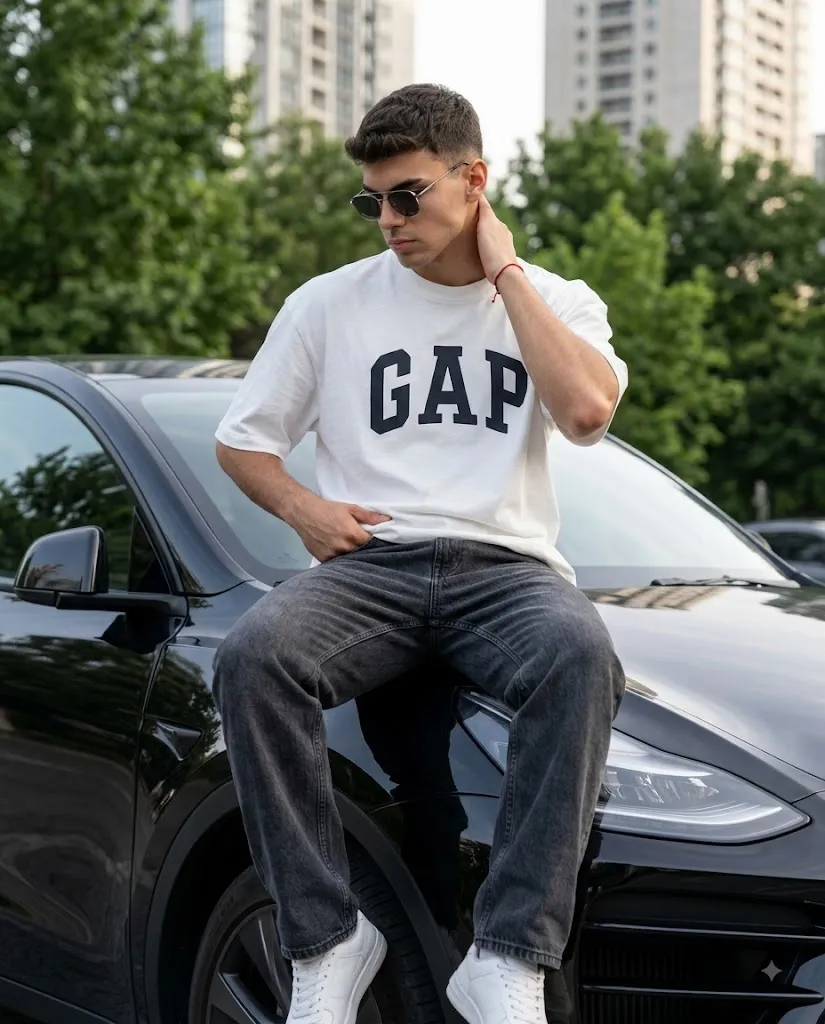
The Urban Black SUV Streetwear Prompt is a modern AI photo-editing concept designed to create a premium cinematic lifestyle portrait with a strong urban fashion aesthetic. The concept combines relaxed streetwear, a glossy black SUV, natural daytime lighting, blurred greenery, distant high-rise buildings, and a sophisticated editorial composition.
The subject wears a clean white oversized T-shirt featuring bold dark “GAP” lettering, dark grey relaxed-fit denim jeans, white sneakers, and stylish sunglasses. A thin red string bracelet adds a small but distinctive detail to the outfit. The combination of neutral clothing and a black luxury SUV creates a fashionable monochromatic appearance, while the red bracelet provides a subtle visual accent.
The pose is intentionally casual. The subject sits comfortably on the front hood and wheel-arch area of the SUV, with one hand positioned near his waist and the other touching the back of his neck. His head is slightly lowered as he looks away from the camera. This creates a natural, candid feeling rather than the appearance of a traditional studio pose.
A major feature of this prompt is facial identity preservation. When an uploaded reference photograph is used, the AI should treat it as the primary facial reference and preserve the person's recognizable characteristics as closely as the technology allows. The goal is to transform the styling and environment while retaining the subject's natural appearance.
The requested 4:5 vertical composition makes this concept particularly suitable for social media posts, fashion portfolios, profile photography, and lifestyle content.
"Urban Black SUV Streetwear Prompt"
A highly realistic, cinematic lifestyle photograph of a medium-height young man with a short beard and a strictly serious, neutral facial expression (100% my face same). He is wearing a white oversized t-shirt with the word 'GAP' in large dark letters across the chest, dark grey relaxed-fit denim jeans, white sneakers, and stylish sunglasses. He has a thin red string bracelet on his right wrist. He is posing by sitting casually on the front hood and front wheel arch of a glossy, sleek black modern SUV. One hand is resting near his waist, and the other is casually touching the back of his neck while he looks down and away from the camera. The car is parked on a smooth asphalt road. The background features a shallow depth of field with blurred lush green trees and slightly out-of-focus high-rise buildings in the distance under soft, natural daytime lighting. Urban streetwear aesthetic, photorealistic, 4k resolution, highly detailed." 100% my face same, I need this prompt picture, zoom in 4:5.
How To Use Photo Editing?
Using the Urban Black SUV Streetwear Prompt is straightforward when the editing process is divided into clear stages.
Step 1: Select a Reference Photo
Choose a high-resolution photograph of the person you want to use. A clear face with natural lighting is ideal. Avoid images where the face is heavily covered, blurred, or distorted. For stronger identity consistency, use a reference photograph in which the facial features are clearly visible.
Step 2: Upload the Image
Open an AI image editor that supports reference-image editing or image-to-image generation. Upload the photograph and use it as the main identity reference.
Add an instruction such as:
“Preserve the subject's natural facial identity and recognizable facial characteristics. Keep the facial proportions and appearance consistent with the reference image.”
This tells the AI that the person's identity is a priority.
Step 3: Add the Prompt
Paste the complete Urban Black SUV Streetwear Prompt into the prompt field. Include details about the outfit, vehicle, pose, environment, lighting, camera framing, depth of field, and image quality. Because the composition is designed for a vertical social-media image, specify a 4:5 aspect ratio.
Step 4: Generate the Image
Generate the first version and carefully inspect it. Pay particular attention to the face, hands, sunglasses, clothing text, SUV proportions, and body position. If any element looks unnatural, modify the prompt and generate another variation.
Tools You Can Use For Prompt Copy and Create Photo
Different categories of tools can be used to create this type of AI fashion portrait.
1. AI Image Generators
AI image-generation platforms can create complete scenes from detailed text prompts. They are useful for generating the SUV, clothing, background, lighting, camera perspective, and overall cinematic atmosphere. If you want to use your own face, select a platform that supports reference images or identity-consistency features.
2. AI Photo Editors
AI photo-editing platforms are useful when you already have an existing photograph and want to transform it into the desired lifestyle scene. These tools can modify backgrounds, clothing, lighting, poses, and surrounding elements while using the original photograph as a reference.
3. Graphic Design Applications
After generating the image, a graphic-design tool can be used for final composition adjustments. You can crop the image to 4:5, improve typography if required, add subtle overlays, and prepare the image for social media.
4. Image Enhancement Tools
Upscaling and enhancement tools can improve resolution and fine details after generation. They are useful for improving the appearance of skin texture, denim, fabric, vehicle surfaces, and background details. Always review enhanced images carefully because excessive sharpening can create unnatural edges.
How To Edit Photo?
Once the AI-generated image has been created, the final editing process should focus on realism and consistency.
Step 1: Check Facial Accuracy
Start with the face. Compare the generated portrait with the reference image and check the overall facial structure, eyes, nose, lips, jawline, hairstyle, and natural skin appearance. If the face has changed too much, regenerate the image with clearer identity-preservation instructions.
Step 2: Check the Outfit
The white oversized T-shirt should look naturally loose and should display the “GAP” lettering clearly across the chest. The dark grey relaxed-fit jeans should have realistic denim texture, folds, and natural proportions. The white sneakers should appear clean but photorealistic rather than artificially bright.
Step 3: Check the Accessories
The sunglasses should sit naturally on the subject's face, with realistic reflections and proportions. The thin red string bracelet should remain visible on the right wrist without becoming oversized. Small accessories can make a significant difference to the realism of a fashion portrait.
Step 4: Refine the SUV
The glossy black SUV should have realistic reflections, body contours, windows, tires, headlights, and surface details. The subject's position should also make physical sense. Avoid unnatural body intersections between the person and vehicle.
Step 5: Improve the Pose
The pose should remain relaxed and believable. One hand can rest near the waist while the other touches the back of the neck. The subject's downward, away-from-camera gaze creates a candid editorial mood. Make sure the neck, shoulders, arms, and hands have natural proportions.
Step 6: Adjust the Background
The background should feature lush green trees and distant high-rise buildings with a strong shallow-depth-of-field effect. The background should remain slightly blurred so that the subject and SUV remain the visual focus.
Step 7: Enhance Natural Lighting
Soft daytime lighting should illuminate the subject naturally. Avoid excessively dramatic artificial lighting because this concept is based on a realistic lifestyle photograph. Subtle highlights on the SUV and gentle shadows underneath the subject can add depth.
Step 8: Apply Final Color Grading
Use moderate contrast and balanced saturation. The black SUV should retain rich dark tones without losing its surface details, while the white T-shirt and sneakers should remain naturally bright. Avoid excessive skin smoothing, artificial HDR effects, or oversaturation.
Step 9: Crop to 4:5
Finally, crop the image into a 4:5 vertical composition. Keep the subject, SUV, and face comfortably inside the frame. A slightly zoomed-in composition can make the portrait feel more intimate and suitable for social media while still showing enough of the vehicle to establish the lifestyle setting.
Conclusion
The Urban Black SUV Streetwear Prompt combines modern streetwear fashion with a premium automotive lifestyle aesthetic. Its white oversized T-shirt, dark grey denim, white sneakers, sunglasses, subtle red bracelet, and glossy black SUV create a clean and sophisticated visual identity.
The natural daytime environment, blurred green trees, distant buildings, and shallow depth of field help the image feel like a professionally captured urban lifestyle photograph rather than a heavily artificial AI creation.
For the best results, begin with a clear reference image, prioritize consistent facial identity, provide detailed clothing and pose instructions, and carefully review the generated hands, sunglasses, vehicle geometry, and body proportions.
Finally, use subtle color correction, realistic lighting, and a 4:5 vertical crop to achieve a polished social-media-ready composition. With a detailed prompt and careful editing, an ordinary reference photograph can be transformed into a stylish cinematic streetwear portrait featuring a sophisticated black SUV.