Introduction
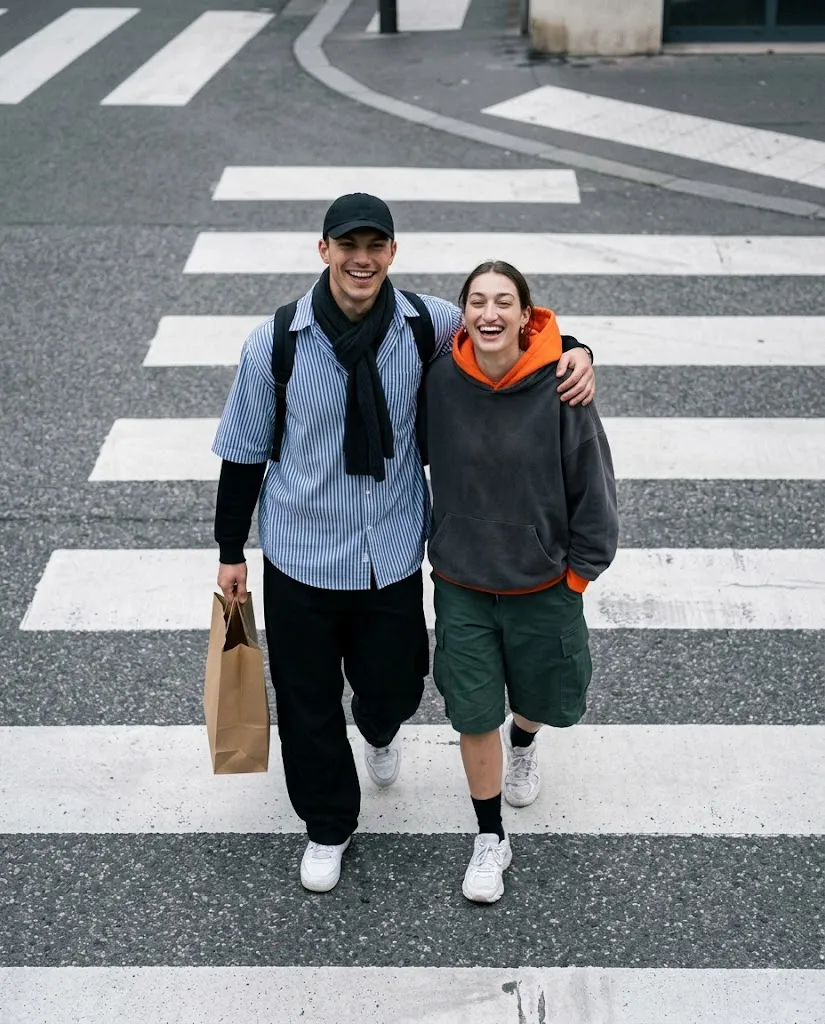
The Urban Crossing Candid Couple Prompt is designed to create an ultra-realistic, spontaneous, and cinematic street-photography scene featuring a young couple walking together across a city zebra crossing. The concept focuses on natural emotions rather than stiff posing, capturing the couple laughing, looking upward toward the camera, and enjoying an authentic moment together.
One of the defining features of this prompt is its high overhead camera perspective. Instead of photographing the couple from eye level, the camera looks down from above, creating an artistic composition where the white zebra-crossing stripes become an important part of the visual design.
The clothing is also carefully coordinated. The man wears a black baseball cap, dark scarf, oversized blue-and-white striped shirt, black layered top, loose black pants, white sneakers, and a black backpack. He carries a brown paper shopping bag while casually placing his arm around the woman's shoulder.
The woman wears an oversized charcoal-gray hoodie with a bright orange hood and inner layer, loose dark-green cargo shorts, black crew socks, and white chunky sneakers. The orange details provide a subtle warm accent against the otherwise cool-gray urban color palette.
The overall scene uses soft overcast daylight, natural skin texture, realistic fabric details, subtle film grain, and gentle background softness. The result is intended to feel like a genuine candid photograph captured by a professional street photographer rather than an artificial studio image.
"Urban Crossing Candid Couple Prompt"
Ultra-realistic candid street photography of a couple walking together across a city zebra crossing, photographed from a high overhead angle. The couple is laughing naturally and looking upward toward the camera, creating a joyful, spontaneous moment. The man wears a black baseball cap, dark scarf, blue-and-white striped oversized short-sleeve shirt layered over a black long-sleeve top, loose black pants, white sneakers, and a black backpack, carrying a brown paper shopping bag. His arm is casually around the woman’s shoulder. The woman wears an oversized charcoal-gray hoodie with a bright orange hood, orange inner layer, loose dark green knee-length cargo shorts, black crew socks, and white chunky sneakers. Both have genuine smiles and relaxed body language. Wide white zebra-crossing stripes surround them on textured gray asphalt, with a minimal urban background and no visible vehicles or crowd. Soft overcast daylight, muted cool-gray color palette with subtle warm orange accents, natural grain, soft contrast, realistic skin and fabric textures, authentic candid composition, 50mm street-photography look, high-angle perspective, sharp subjects with gentle background softness, cinematic framing, photorealistic, 8K, highly detailed. No text, no watermark, no extra people, no distorted anatomy, natural hands and faces. Aspect ratio 4:5.
How To Use Photo Editing?
Creating this style of image is easiest when the prompt is used with an AI image editor or image-generation platform that supports reference images.
Step 1: Choose Your Reference Photos
If you want the couple to resemble specific people, begin with clear reference photographs. Choose images where the faces are visible and reasonably well lit. Avoid extremely blurry photographs or images where the faces are covered by accessories.
Step 2: Upload the Reference Images
Upload the photographs into an AI editor that supports image references. If the platform allows multiple references, provide the appropriate image for each person. For identity preservation, clearly instruct the AI to maintain the natural facial characteristics of the reference images without unnecessary changes.
Step 3: Paste the Prompt
Copy the complete Urban Crossing Candid Couple Prompt and paste it into the generation or editing field. Make sure the important details remain intact, including the overhead camera perspective, clothing, zebra crossing, expressions, lighting, and 4:5 composition.
Step 4: Generate Several Variations
Generate multiple versions rather than relying on the first result. Small differences in facial expression, body position, hand placement, and camera perspective can make one version significantly better than another. Choose the image that looks the most natural and photographically convincing.
Tools You Can Use For Prompt Copy and Create Photo
Different categories of creative tools can be used to create this type of image.
1. AI Image Generators
AI image-generation platforms can create the entire street scene from a detailed text prompt. They are useful for controlling the environment, clothing, composition, lighting, camera angle, and photographic style. For reference-based portraits, choose a platform that provides image-reference or character-consistency features.
2. AI Photo Editors
AI photo-editing tools are particularly useful when you already have photographs of the couple. They can help transform clothing, backgrounds, lighting, poses, and photographic atmosphere while maintaining the reference images.
3. Graphic Design Applications
A traditional graphic-design application can be useful for final composition adjustments. You can crop the image, adjust the 4:5 framing, add subtle grain, refine contrast, or prepare the final image for social media.
4. Image Enhancement Tools
Upscaling and enhancement tools can improve fine details after the image has been generated. They can help refine fabric textures, hair strands, skin details, and the small visual elements of the street environment. Always inspect enhanced images afterward because excessive sharpening can introduce unnatural artifacts.
How To Edit Photo?
After generating the initial image, use a careful editing workflow to make the result more realistic.
Step 1: Check Facial Details
Start by examining both faces. The expressions should look natural and spontaneous. Look for realistic eyes, facial proportions, skin texture, smiles, and hair details. Avoid excessive beauty filters or unnatural skin smoothing. If reference images are being used, compare the generated faces with the references and regenerate if the identity has changed significantly.
Step 2: Check the Expressions
The couple should appear genuinely happy rather than posing for a formal photoshoot. Their laughter, upward gaze, and relaxed body language should communicate a spontaneous moment. The man's arm around the woman's shoulder should look comfortable and naturally positioned.
Step 3: Check Clothing Accuracy
Pay close attention to the clothing because it contributes strongly to the identity of the scene. The man's blue-and-white striped oversized shirt, dark scarf, black layers, loose pants, white sneakers, backpack, and brown paper shopping bag should all appear realistic. For the woman, check the charcoal-gray hoodie, bright orange hood and inner layer, dark-green cargo shorts, black socks, and chunky white sneakers. Fabric should show natural folds and realistic texture.
Step 4: Refine the Zebra Crossing
The white crossing stripes should be clearly visible and properly aligned with the perspective of the overhead camera. The gray asphalt should have subtle realistic texture without becoming distracting. Avoid adding unnecessary vehicles, pedestrians, advertisements, or street clutter because the original concept calls for a minimal urban environment.
Step 5: Adjust Lighting
Soft overcast daylight is ideal for this scene. It should produce gentle shadows rather than harsh sunlight. The lighting should remain consistent across the couple, clothing, asphalt, and background. A subtle cool-gray atmosphere can reinforce the urban mood while the orange hood and shopping bag provide warm visual accents.
Step 6: Apply Cinematic Color Grading
Keep the overall palette muted and sophisticated. Cool gray, charcoal, dark green, white, and blue should dominate the scene, while orange details create controlled contrast. Avoid excessive saturation. Natural colors will make the photograph feel more authentic.
Step 7: Add Natural Grain
A small amount of film grain can make the image resemble a professionally captured street photograph. The grain should remain subtle. Too much grain can reduce facial and clothing detail.
Step 8: Final Composition
Use a 4:5 vertical aspect ratio for a strong social-media-friendly composition. Keep both subjects clearly visible while allowing enough surrounding zebra-crossing space to emphasize the overhead perspective. The final image should have sharp subjects, gentle background softness, realistic anatomy, natural hands, and no unnecessary text or watermark.
Conclusion
The Urban Crossing Candid Couple Prompt combines authentic street photography with cinematic AI image generation. Its strongest feature is the natural emotional interaction between the couple, supported by a carefully designed urban composition.
The overhead camera perspective transforms an ordinary zebra crossing into an artistic visual element, while the muted gray environment provides a clean background for the couple's colorful clothing details.
For the best results, use clear reference photographs, carefully preserve facial identity, describe the clothing precisely, and maintain consistent lighting throughout the scene. Pay special attention to hands, facial expressions, body proportions, clothing folds, and the geometry of the zebra crossing.
Finally, use subtle color grading, realistic texture, gentle grain, and a 4:5 crop to give the image a polished cinematic street-photography finish.
With a detailed prompt and thoughtful editing process, the Urban Crossing Candid Couple concept can produce a convincing photograph that feels spontaneous, emotional, modern, and professionally captured.