Introduction
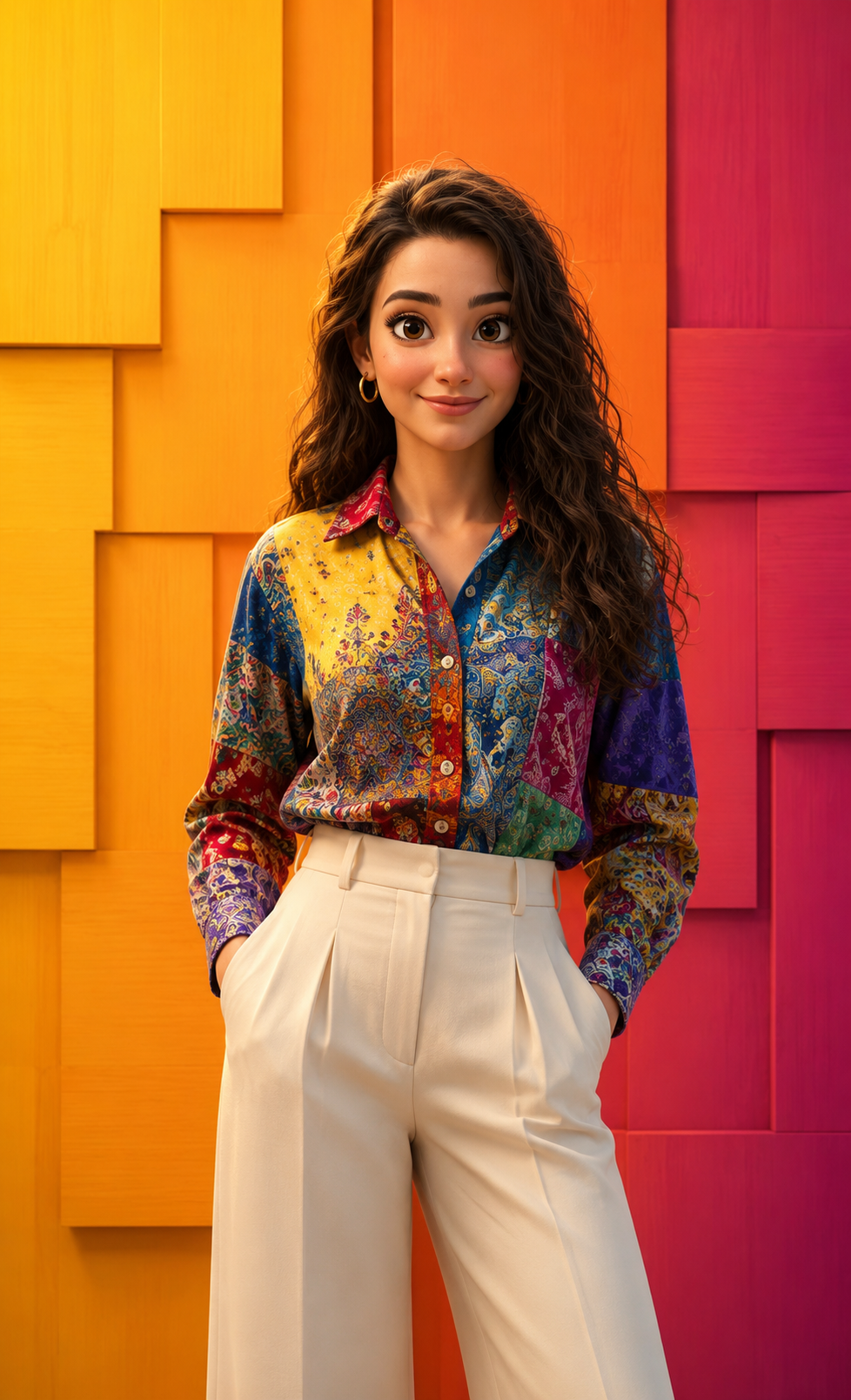
In the world of digital art and AI-generated imagery, colorful character portraits have become one of the most popular creative styles. These portraits combine expressive character design, vibrant color palettes, cinematic lighting, and detailed rendering techniques to create images that feel both playful and professional. One particularly captivating trend is the Vibrant Portrait With A Whimsical Touch, a style inspired by modern animated films, luxury editorial illustrations, and premium 3D character design.
"Vibrant Portrait With A Whimsical Touch Prompt"
Create a highly polished, ultra-detailed 3D animated portrait in a modern Pixar / Disney-inspired character style. Subject & Appearance: A woman with large, expressive eyes, soft rosy cheeks, and a smooth, cute youthful face. Her hair is natural color, styled in a slightly messy yet natural way, with subtle flyaways for realism. Outfit & Styling: She wears a vibrant, long-sleeved patchwork button-down shirt featuring intricate mixed patterns (paisley, florals, geometric motifs, and solid color blocks). The color palette includes rich, saturated tones of yellow, blue, red, green, and purple, with clearly visible fabric texture, stitching, and seams. The shirt is neatly tucked into high-waisted, tailored cream-white wide-leg trousers with sharp front pleats and a clean, structured silhouette. Pose & Expression: Relaxed and confident stance. She stands upright with both hands casually placed inside her trouser pockets. Her expression is soft and warm, featuring a gentle, confident, slightly whimsical half-smile. Eyes looking directly at camera. Composition & Framing (STRICT): Medium shot. Perfectly centered composition with balanced negative space. Straight-on, eye-level camera angle. Vertical 4:5 aspect ratio. Environment & Background: A geometric feature wall made of overlapping, staggered 3D rectangular panels with subtle wood grain textures. The background displays a smooth, vibrant gradient transitioning from bright golden-yellow (left), to warm orange (center), to deep magenta-pink (right). Background must remain clean, graphic, and visually striking with no additional elements. Lighting: Soft, diffused cinematic studio lighting. Even facial illumination with gentle, soft-edged shadows. Subtle highlights on hair and fabric to enhance depth and material realism. Rendering & Quality: Ultra-high resolution (8K). Pixar-quality character rendering with stylized realism. Octane Render / Unreal Engine 5 quality. Highly detailed materials: skin shading, fabric weave, wood texture. Crisp edges, vibrant color grading, and smooth global illumination.
This artistic style often features a charming character with expressive eyes, soft facial features, detailed clothing, and a bright, visually engaging environment. Unlike traditional portraits that focus purely on realism, whimsical portraits introduce elements of imagination while maintaining believable textures, lighting, and proportions. The result is an image that feels magical, friendly, and visually unforgettable.
The popularity of advanced AI image-generation tools has made it easier than ever for creators to produce Pixar-inspired portraits with stunning detail. Rich fabric textures, realistic hair strands, cinematic shadows, and vibrant backgrounds help transform simple character concepts into professional-quality artwork.
Whether you are creating social media content, digital artwork, character designs, branding materials, or personal projects, the Vibrant Portrait With A Whimsical Touch style offers a perfect balance between realism and fantasy. It captures attention instantly while maintaining a polished, premium appearance.
How To Use Photo Editing?
Photo editing plays an important role in refining and enhancing digital portraits. Even if an AI image generator creates a strong initial image, editing helps improve quality, consistency, and visual impact.
The editing process typically starts with a high-quality reference image. This helps maintain facial identity, skin tone, hairstyle, and expression accuracy. Once the image has been generated, editing software can be used to polish every detail.
Photo editing helps improve:
- Facial clarity
- Skin texture
- Hair definition
- Clothing details
- Background consistency
- Lighting balance
- Color vibrancy
- Material realism
- Image sharpness
- Overall composition
One of the most important goals is maintaining a natural appearance. Even though whimsical portraits are stylized, they should still feel believable. Realistic lighting, authentic expressions, and carefully rendered textures contribute to a more engaging final image.
Professional editing also helps create harmony between the subject and background, ensuring that every element works together visually.
Tools You Can Use For Prompt Copy and Create Photo
Several modern tools can help create stunning vibrant character portraits.
1. ChatGPT
ChatGPT is an excellent tool for writing detailed prompts. Users can describe characters, clothing, poses, lighting, environments, and artistic styles, and ChatGPT can convert those ideas into professional prompts.
2. Midjourney
Midjourney is known for producing highly artistic and visually impressive images. It excels at colorful compositions, fantasy-inspired portraits, and editorial-style artwork.
3. Flux AI
Flux AI is popular for generating realistic facial features, detailed textures, and high-quality portrait imagery.
4. Leonardo AI
Leonardo AI offers strong consistency and excellent character rendering capabilities, making it ideal for portrait projects.
5. Adobe Photoshop
Photoshop remains one of the most powerful editing tools available. It allows creators to enhance textures, refine lighting, and improve overall image quality.
6. Canva
Canva is useful for creating social media graphics, presentation materials, and visual content layouts.
7. Ideogram
Ideogram helps users create unique visual concepts and experiment with creative image styles.
8. Adobe Lightroom
Lightroom is excellent for color grading, exposure adjustments, and improving overall image consistency.
Many creators combine several tools in their workflow. For example, ChatGPT can generate the prompt, an AI image generator can create the portrait, and Photoshop can be used for final enhancements.
How To Edit Photo?
Creating a professional Vibrant Portrait With A Whimsical Touch requires a thoughtful editing process.
Step 1: Select a Quality Reference Image
Choose a clear image with visible facial features, good lighting, and sufficient detail. High-quality references improve the accuracy of generated portraits.
Step 2: Write a Detailed Prompt
An effective prompt should include:
- Character description
- Facial features
- Clothing details
- Pose instructions
- Lighting setup
- Background design
- Color palette
- Artistic style
- Composition details
- Rendering quality
The more detailed the prompt, the better the final result.
Step 3: Generate Multiple Versions
AI image generators often produce different interpretations of the same prompt. Generate several versions and compare them before selecting the strongest result.
Step 4: Check Facial Consistency
If using a reference image, carefully verify:
- Face shape
- Eye structure
- Nose and lips
- Skin tone
- Hairstyle
- Expression
Identity preservation is essential for realistic portrait creation.
Step 5: Enhance Hair Details
Hair contributes significantly to character appeal.
Refine:
- Individual strands
- Volume
- Highlights
- Natural movement
- Flyaway hairs
Detailed hair rendering adds realism and depth.
Step 6: Improve Fabric Textures
Clothing should appear realistic and visually rich.
Enhance:
- Stitching
- Seams
- Fabric weave
- Buttons
- Pleats
- Material folds
Detailed clothing greatly improves image quality.
Step 7: Refine Background Elements
The geometric feature wall and vibrant gradient background are important visual components.
Ensure:
- Smooth gradients
- Consistent colors
- Clean edges
- Proper depth
- Balanced composition
A polished background helps emphasize the subject.
Step 8: Adjust Lighting
Professional lighting is essential for creating a premium look.
Focus on:
- Soft highlights
- Gentle shadows
- Even illumination
- Natural skin tones
- Material reflections
Good lighting improves realism and visual appeal.
Step 9: Apply Color Grading
Color grading helps unify the entire image.
Enhance:
- Warm tones
- Vibrant colors
- Contrast
- Saturation
- Highlight control
The goal is to create a bright, cheerful, and polished appearance.
Step 10: Export in High Resolution
Save the final image in 4K or 8K resolution. High-resolution exports preserve fine details and provide excellent quality for printing, portfolios, and social media platforms.
Conclusion
The Vibrant Portrait With A Whimsical Touch Prompt combines colorful design, cinematic lighting, expressive character styling, and premium digital rendering techniques to create visually stunning artwork. By blending realism with imagination, this style captures the charm of animated storytelling while maintaining the sophistication of professional illustration.
What makes this portrait style particularly appealing is its versatility. It can be used for personal artwork, branding projects, social media content, digital portfolios, character concepts, and creative marketing materials. The combination of vibrant colors, detailed textures, and expressive facial features creates images that feel both modern and timeless.
With a strong prompt, a high-quality reference image, and careful editing techniques, creators can produce professional-level portraits that rival artwork from major animation studios. As AI image-generation technology continues to evolve, whimsical portrait styles will become even more accessible, allowing artists and creators to bring imaginative ideas to life with remarkable quality and realism.
Whether you are an aspiring digital artist, content creator, designer, or photography enthusiast, mastering the Vibrant Portrait With A Whimsical Touch style can help you create captivating images that leave a lasting impression on viewers.