Introduction
Artificial Intelligence has made it easier than ever to design premium-quality birthday posters with a unique artistic style. Instead of spending hours creating layouts manually, you can now generate stunning birthday portraits simply by using a detailed AI prompt. Among the most popular trends is the Vintage Birthday Portrait Prompt, which combines classic typography, elegant floral decorations, and luxury editorial styling to produce timeless birthday designs.
"Vintage Birthday Portrait Prompt"
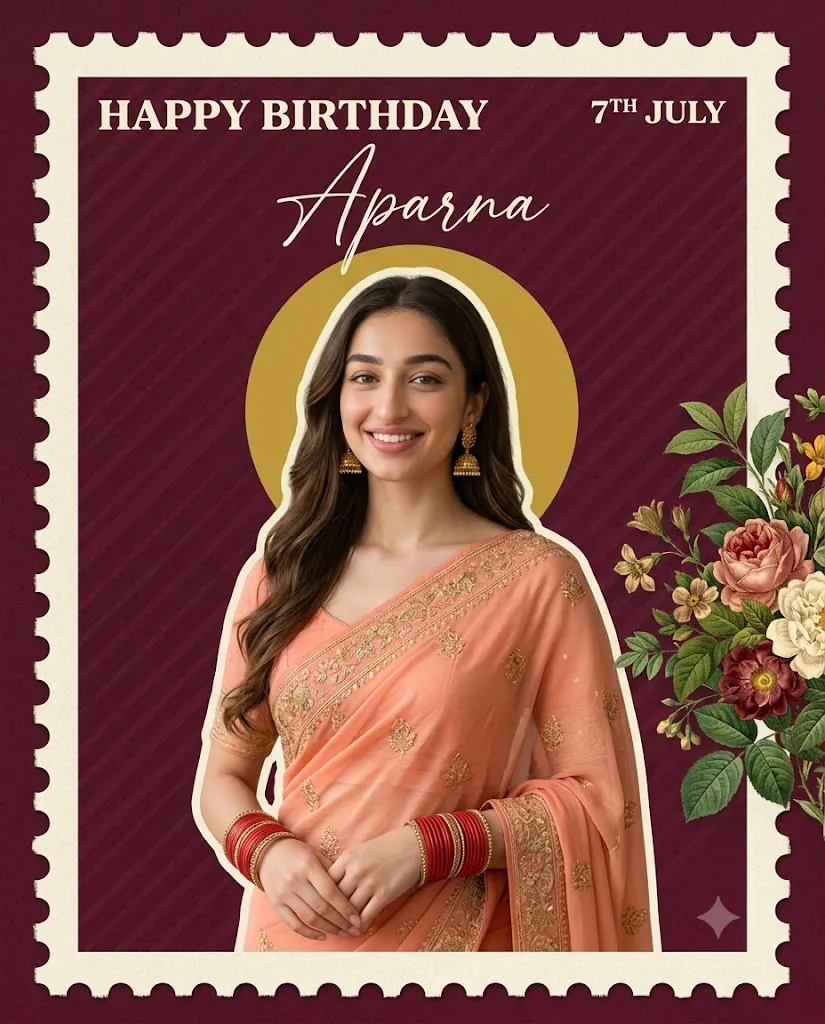
Premium minimalist birthday poster in 4:5 vertical ratio, deep burgundy textured background with subtle diagonal stripes, large cream postage-stamp frame with perforated edges, bold vintage "HAPPY BIRTHDAY" typography, elegant calligraphy name, realistic cutout portrait of a beautiful young woman in a peach embroidered saree with red bangles and jhumka earrings, soft natural skin tones, mustard-yellow circular halo, vintage botanical flowers and green leaves, luxury editorial aesthetic, warm soft lighting, ultra-realistic details, premium print quality, 8K resolution.
This prompt creates a sophisticated birthday poster featuring a beautiful young woman wearing a peach embroidered saree, complemented by traditional accessories such as red bangles and jhumka earrings. The portrait is placed inside a large cream-colored postage-stamp frame with perforated edges, giving the design a nostalgic vintage appearance. A deep burgundy textured background with subtle diagonal stripes enhances the premium look, while a mustard-yellow circular halo behind the subject draws attention to the portrait.
Additional decorative elements such as botanical flowers, green leaves, elegant calligraphy, and warm natural lighting complete the luxurious composition. The result is a print-ready birthday poster suitable for social media, greeting cards, framed gifts, invitations, and premium birthday celebrations.
How To Use Photo Editing?
Creating a vintage birthday portrait with AI is simple if you follow the proper process.
Step 1: Copy the Prompt
Copy the complete Vintage Birthday Portrait Prompt without changing important details. Every element—including typography, clothing, lighting, colors, and decorative objects—helps the AI understand the intended style.
Step 2: Choose an AI Image Generator
Open your preferred AI image generation platform and paste the prompt into the input field. Advanced AI tools interpret detailed prompts more accurately, resulting in higher-quality images.
Step 3: Upload a Reference Photo (Optional)
If you want the poster to feature a specific person, upload a clear, high-resolution portrait. This helps the AI preserve facial identity while applying the vintage birthday design.
Step 4: Generate Multiple Variations
Create several versions of the image. Compare the results and select the one with the best composition, lighting, and facial expression.
Step 5: Refine the Final Image
Use photo editing software to improve sharpness, remove small imperfections, and enhance the overall color balance before exporting the final poster.
Tools You Can Use For Prompt Copy and Create Photo
Several AI tools can help you generate premium birthday posters with ease.
1. ChatGPT
ChatGPT is excellent for creating detailed prompts, improving descriptions, and customizing image ideas based on your preferences.
2. Midjourney
Midjourney is widely recognized for producing artistic and highly realistic editorial-style portraits with beautiful textures and lighting.
3. Flux AI
Flux AI specializes in photorealistic human portraits with exceptional skin details, clothing textures, and natural lighting.
4. Ideogram AI
Ideogram performs particularly well when generating posters that include decorative typography and elegant text layouts.
5. Google Gemini
Gemini helps refine prompts and generate creative concepts for birthday poster designs.
6. Adobe Firefly
Adobe Firefly combines AI image generation with professional editing tools, making it suitable for commercial-quality designs.
7. Canva AI
Canva AI allows you to transform AI-generated images into greeting cards, printable posters, social media graphics, and invitation templates with minimal effort.
How To Edit Photo?
Follow these steps to create a polished vintage birthday poster.
Step 1: Generate the Base Image
Use the prompt to create multiple poster variations and choose the one with the strongest overall composition.
Step 2: Improve Facial Details
Enhance facial sharpness while maintaining realistic skin tones and preserving the subject's natural identity.
Step 3: Adjust Lighting
Fine-tune brightness, contrast, and warmth to create a soft, premium editorial appearance.
Step 4: Refine the Background
Ensure the deep burgundy texture remains clean and balanced while the mustard-yellow halo blends naturally behind the portrait.
Step 5: Enhance Decorative Elements
Improve the visibility of botanical flowers, leaves, typography, and calligraphy without making the design feel cluttered.
Step 6: Export in High Resolution
Save the finished artwork in high resolution to preserve crisp details, clean typography, and premium print quality.
Conclusion
The Vintage Birthday Portrait Prompt is an ideal choice for creating elegant birthday posters that blend timeless design with modern AI technology. Its combination of vintage typography, luxurious floral decorations, traditional attire, and editorial lighting produces a sophisticated composition suitable for both digital and printed formats.
Whether you are designing a personalized birthday gift, creating social media content, or producing premium greeting cards, this prompt helps you achieve professional-quality results quickly. By combining a detailed AI prompt with advanced image generators and thoughtful post-processing, you can create memorable birthday posters that look refined, artistic, and truly special.