Introduction
The White Urban Korean Street Style Prompt is a modern AI photo-editing concept designed to transform an ordinary reference photograph into a clean, elegant, and fashionable urban portrait. The style combines Korean and C-Pop-inspired fashion, minimalist white streetwear, subtle makeup, natural facial details, and a soft city background to create a premium editorial appearance.
The key feature of this prompt is strict facial identity preservation. When a reference image is uploaded, the AI should use that photograph as the only facial reference and preserve the person's recognizable facial characteristics. Facial structure, eye shape, eye spacing, nose, lips, jawline, cheekbones, skin tone, and other unique details should remain consistent.
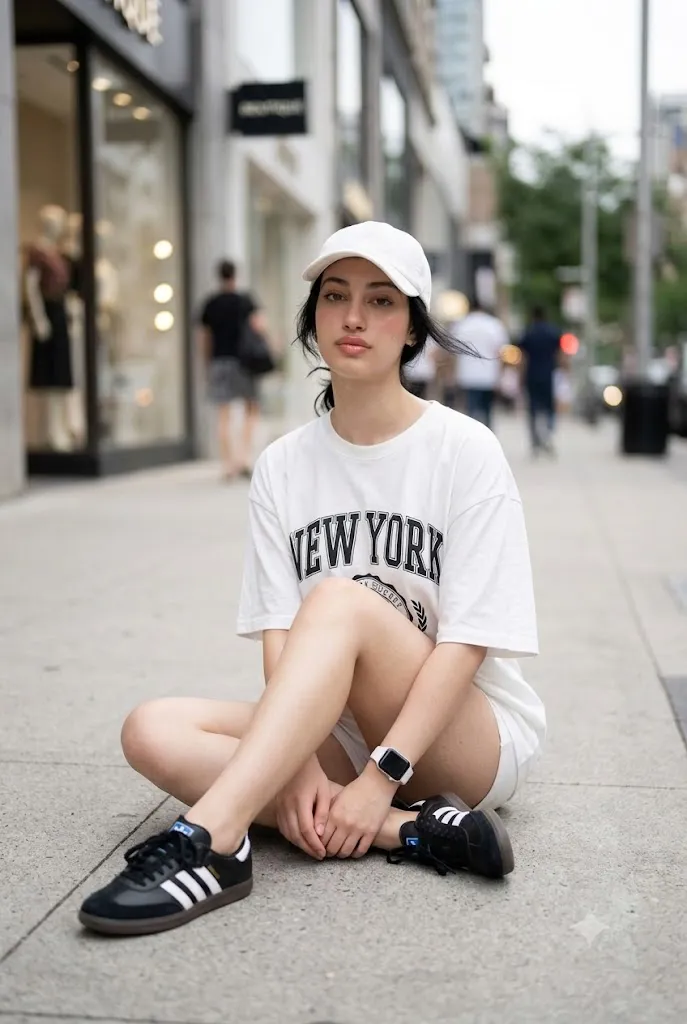
The outfit gives the portrait its signature visual identity. The subject wears an oversized white NY-style T-shirt, very short white shorts, a white baseball cap, a white smartwatch, and black-and-white Adidas Samba-style sneakers. The mostly white outfit creates a clean, minimal aesthetic while the black-and-white sneakers add a small amount of contrast.
The location is equally important. Instead of a studio backdrop, the subject is seated casually on a modern city sidewalk surrounded by soft urban bokeh. The background remains slightly blurred so that attention stays on the subject. Soft, diffused lighting creates a luxurious photographic effect without harsh shadows. This prompt is especially suitable for Instagram portraits, fashion inspiration, profile photos, creative portfolios, social media content, and AI photography projects.
"White Urban Korean Street Style Prompt"
Hyper-realistic portrait using uploaded photo as ONLY facial reference — strict identity preservation, no beautification, no face swap, exact same face (structure, eyes, nose, lips, jawline, skin tone). Expression: calm, gentle, slightly coquettish, soft natural gaze. Makeup: subtle doll-like, natural lashes, soft rose-pink "drunk blush," glossy nude-pink lips, realistic skin texture. Hair: loose chic Korean/C-Pop style, tied back, face-framing strands. Outfit: oversized white NY-style tee, short white shorts, white baseball cap, white smartwatch, black-white Adidas Samba-style sneakers. Pose: seated casually on city sidewalk, legs folded, relaxed model pose. Background: urban bokeh, soft blur. Lighting: soft diffused, no harsh shadows, gentle breeze effect on hair/clothes. Style: elegant, minimal, cinematic depth, premium photography, natural color grading, ultra-high detail, 2:3 aspect ratio.
How To Use Photo Editing?
Using the White Urban Korean Street Style Prompt becomes easier when you follow a structured editing workflow.
Step 1: Choose a Clear Reference Photo
Start by selecting a high-quality photograph of the person you want to edit. The face should be clearly visible, preferably with good natural lighting and minimal obstruction. Avoid reference images where the face is heavily covered by sunglasses, hands, hair, masks, or extreme shadows. A clear reference gives the AI more information for maintaining facial consistency.
Step 2: Upload the Reference Image
Upload the selected photograph into an AI photo-editing tool that supports image references. The reference image should be treated as the only facial reference. Include a strong identity-preservation instruction in the prompt. For example, the AI should be instructed not to replace the face with another person's face or transform it into an idealized model appearance.
Step 3: Add the Complete Prompt
Paste the White Urban Korean Street Style Prompt into the tool's prompt field. The prompt should describe the face-preservation requirements, expression, makeup, hairstyle, clothing, pose, environment, lighting, camera quality, and negative instructions. Detailed prompts generally provide better control because they tell the AI exactly which elements should change and which elements should remain consistent.
Step 4: Generate the Image
Generate the edited image and carefully inspect the result. If your chosen platform provides multiple variations, compare them and select the version with the most accurate facial resemblance and natural anatomy. If the face looks different, regenerate the image with stronger identity-preservation instructions.
Tools You Can Use For Prompt Copy and Create Photo
Different AI tools can be used depending on whether you want to edit an existing photograph or create an entirely new fashion image.
1. AI Photo Editing Tools
AI photo editors are ideal when you already have a reference photograph. They can modify clothing, hairstyle, background, lighting, and overall composition while using the original photograph as a visual reference. For this particular prompt, choose a tool that supports reference-image editing and identity consistency.
2. AI Image Generation Platforms
Text-to-image platforms can create a Korean street-style fashion portrait from a written description. These are useful when you want to experiment with different locations, poses, clothing combinations, and lighting setups. If facial identity is important, use a platform with image-reference or character-reference functionality rather than relying only on text.
3. Online Photo Editors
After generating the main image, online editing software can be used for final corrections. You can adjust exposure, contrast, crop, sharpness, highlights, shadows, and overall color balance. These adjustments can make the final image look more polished without dramatically changing the subject.
4. Professional Image Editing Software
Professional editing software can be useful for detailed finishing work. Small distractions in the background can be removed, clothing edges can be corrected, and lighting can be balanced. The final goal should remain natural and photographic rather than heavily processed.
How To Edit Photo?
Once the AI creates the initial result, several editing steps can improve the final image.
Step 1: Check Facial Identity
This should be your first priority. Compare the generated face with the original reference image. Check the eye shape, distance between the eyes, nose structure, lips, jawline, cheekbones, skin tone, and other recognizable characteristics. If the AI has created a different-looking person, regenerate the image instead of trying to fix the entire face manually.
Step 2: Check the Makeup
The makeup should remain subtle and natural. The prompt uses a soft doll-like appearance with long natural-looking lashes, a gentle rose-pink or light-peach blush, and glossy nude-pink lips. The blush should look like a natural flush rather than a heavy cosmetic effect. Avoid excessive skin smoothing because realistic skin texture is an important part of photorealism.
Step 3: Check the Hair
The hairstyle should have a loose Korean or C-Pop-inspired appearance. The hair is casually tied back with a few natural strands framing the face. Small loose strands can make the image feel more realistic and less artificially generated.
Step 4: Check the Outfit
The oversized white NY-style T-shirt should fall naturally over the hips. The very short white shorts should maintain realistic proportions and fabric folds. The white baseball cap and smartwatch should appear naturally integrated into the outfit. The black-and-white Adidas Samba-style sneakers provide contrast and should have realistic shape and texture.
Step 5: Adjust the Pose
The subject should appear seated casually on a modern city sidewalk. The legs should be folded naturally, while the posture remains relaxed and stylish. Avoid unnatural body positions or exaggerated model poses. A simple, effortless pose works best for this aesthetic.
Step 6: Improve the Background
The city environment should remain clean and slightly blurred. Soft bokeh creates depth while preventing background elements from competing with the subject. The background should not become overly busy, colorful, or artificial.
Step 7: Adjust Lighting
Use soft, diffused ambient lighting. Harsh shadows should be avoided. A gentle breeze can subtly move the hair and clothing, adding a sense of realism and movement. Keep the lighting luxurious but natural rather than using excessive glamour effects.
Step 8: Final Color and Detail Correction
Finally, make small adjustments to exposure, contrast, sharpness, and color grading. Avoid excessive HDR, oversaturation, artificial skin smoothing, heavy filters, or fake bokeh. The final result should look like a professionally photographed fashion portrait rather than an obviously AI-generated image. A 2:3 aspect ratio works well for this composition because it provides enough vertical space to show the subject, outfit, sneakers, and surrounding city environment.
Conclusion
The White Urban Korean Street Style Prompt offers a stylish way to create a clean, sophisticated, and contemporary AI fashion portrait. Its combination of strict identity preservation, minimalist white streetwear, Korean-inspired styling, subtle makeup, natural hair, and a soft urban environment creates a visually appealing editorial aesthetic.
The most important part of the workflow is using a clear reference photograph and giving the AI strong instructions to preserve the person's identity. After that, attention should be given to clothing accuracy, natural anatomy, realistic skin texture, lighting, background depth, and overall composition.
For the best results, avoid over-processing the final image. Natural skin texture, realistic fabric, subtle lighting, and authentic facial details will make the portrait feel much more like a professional photograph.
Whether you are creating an Instagram post, fashion profile picture, creative portfolio image, or social media visual, this prompt can help transform a simple photograph into a polished White Urban Korean Street Style fashion portrait while maintaining a realistic and recognizable appearance.