Introduction
Nature-inspired portraits are one of the biggest trends in AI photography, combining soft natural light, beautiful landscapes, and elegant styling into timeless images. The Wildflower Crown Portrait stands out for its fresh, romantic, dreamy look — a handmade wreath of daisies, clover, Queen Anne's lace, and meadow grasses capturing the peaceful beauty of summer. With AI, you can recreate this premium editorial style without traveling to the countryside or hiring a photographer.
The Wildflower Crown Portrait AI Prompt generates an ultra-realistic close-up portrait while preserving the subject's facial features, skin tone, hairstyle, and expressions. Instead of changing the face, AI enhances the surroundings, lighting, styling, and composition to create a premium lifestyle photograph.
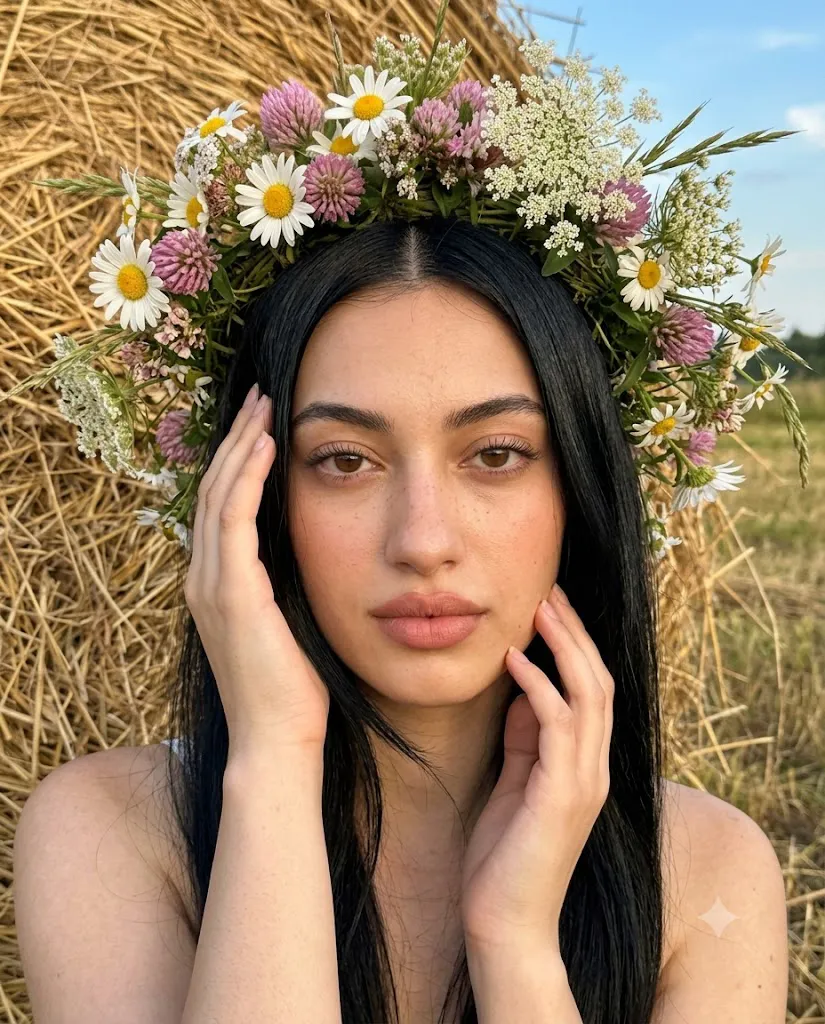
In this concept, the subject sits in front of a golden haystack under warm golden-hour sunlight, wearing a lush wildflower wreath of daisies, clover, Queen Anne's lace, and fresh grasses. Her long, glossy hair flows naturally, complemented by soft glam makeup. Warm sunlight highlights her hair and flowers, while a blurred haystack and blue summer sky form a cinematic background. Specifications like an iPhone 17 Pro Max camera style, 1× focal length, RAW quality, and 4:5 portrait ratio help AI generate images resembling modern editorial lifestyle photography — ideal for Instagram, fashion portfolios, or personal keepsakes.
"Wildflower Crown Portrait Prompt"
A photorealistic close-up portrait, 4:5 vertical, shot on iPhone 17 Pro Max. A young woman sits in a field in front of a golden haystack, camera at eye level, close to her face, symmetrical framing from shoulders up, gaze into the lens. Both hands gently touch her hair and face. She wears a lush wreath of wildflowers — daisies, pink clover, Queen Anne's lace, and green grasses. Her hair is long, smooth, straight, with a center part and natural shine. Skin looks natural with light freckles and a soft glow, no retouching. Makeup is "soft glam" — even complexion, peach-pink blush, subtle eyeliner, and matte dusty-rose lips. Lighting is warm golden-hour sunlight with soft highlights and no harsh shadows. Background shows a blurred haystack, dry grass, and blue sky.Style: warm tones, natural colors, soft contrast, iPhone-shot aesthetic, slight grain, RAW quality, ultra-photorealism.
How To Use Photo Editing?
Creating a beautiful Wildflower Crown Portrait with AI is easy if you follow a simple workflow.
Step 1: Choose a High-Quality Reference Photo
Select a clear portrait with good lighting and visible facial details. High-resolution images allow AI to preserve facial identity more accurately.
Step 2: Copy the Complete Prompt
Copy the full Wildflower Crown Portrait Prompt exactly as written. Every instruction—including the hairstyle, flower crown, camera angle, lighting, and background—helps the AI understand the desired result.
Step 3: Upload the Reference Image
Open your preferred AI image generator and upload the original portrait. Most AI tools allow you to combine a reference image with a detailed text prompt.
Step 4: Paste the Prompt
Paste the copied prompt into the AI text box. Avoid removing important instructions related to facial preservation, lighting, and camera settings.
Step 5: Generate Multiple Versions
Generate several variations of the portrait. Different outputs may offer slight improvements in lighting, flower arrangement, or facial expression.
Step 6: Download the Best Image
Select the version with the most natural skin texture, realistic flowers, accurate lighting, and authentic facial details. Save the image in the highest available resolution.
Tools You Can Use for Prompt Copy and Create Photo
Many AI-powered platforms can generate stunning Wildflower Crown Portraits. Here are some of the best options.
1. ChatGPT Image Generation
Ideal for creating highly detailed prompts and realistic lifestyle portraits with excellent facial preservation and natural expressions.
2. Midjourney
One of the most popular AI image generators for artistic fashion photography, cinematic lighting, and luxury editorial portraits.
3. Flux AI
Known for producing realistic skin textures, natural lighting, accurate facial details, and premium-quality images.
4. Leonardo AI
Offers advanced portrait models with excellent control over styling, composition, and photorealistic rendering.
5. Adobe Firefly
Suitable for photographers and designers who need commercial-quality AI editing with high-resolution outputs.
6. Google Gemini Image Tools
Provides balanced lighting, natural colors, and realistic portrait generation for modern lifestyle photography.
7. Ideogram AI
Excellent for generating creative editorial portraits with realistic flowers, elegant styling, and premium visual quality.
8. Bing Image Creator
A beginner-friendly AI image generation platform that quickly creates attractive summer portraits using detailed prompts.
How To Edit Photo?
Creating a premium Wildflower Crown Portrait requires careful prompt writing and thoughtful editing. Follow these techniques for the best results.
Preserve Facial Identity
Always include instructions asking the AI to preserve facial structure, skin tone, hairstyle, age, and recognizable features. This keeps the generated image authentic.
Use a Natural Flower Crown
A lush wreath featuring white daisies, pink clover, Queen Anne's lace, meadow flowers, and fresh grasses creates a romantic countryside atmosphere. Slightly tousled flowers look more realistic than perfectly arranged ones.
Style the Hair Naturally
Long, smooth hair with a center part and soft face-framing strands enhances the natural beauty of the portrait. Avoid overly polished hairstyles that reduce realism.
Apply Soft Glam Makeup
Choose subtle makeup with an even complexion, light bronzer, peach-pink blush, delicate eyeliner, long lashes, and matte nude lips. This complements the natural outdoor setting without looking excessive.
Use Golden-Hour Lighting
Golden-hour sunlight creates soft highlights, flattering skin tones, and a warm summer mood. It also enhances the colors of the flowers and hair while maintaining realistic shadows.
Create a Beautiful Background
A softly blurred haystack, dry grass, and a clear blue summer sky provide a peaceful countryside environment. Keeping the background slightly out of focus ensures that attention remains on the subject.
Enhance the Final Image
After the portrait is generated, use AI enhancement or upscaling software to improve sharpness, refine lighting, and increase image resolution. This makes the final image suitable for social media, websites, or high-quality printing.
Conclusion
The Wildflower Crown Portrait AI Prompt is a perfect choice for creating elegant, nature-inspired portraits with artificial intelligence. By combining accurate facial preservation, natural summer styling, realistic flower crowns, soft golden-hour lighting, and professional camera settings, it produces images that look like premium editorial lifestyle photography.
Whether for Instagram content, fashion editorials, seasonal campaigns, or personal portraits, this prompt helps you achieve exceptional results without expensive equipment. Simply upload a high-quality reference image, copy the detailed prompt, and generate multiple variations until you find the perfect portrait — a breathtaking summer masterpiece capturing warmth, elegance, and the timeless beauty of a wildflower meadow.