Introduction
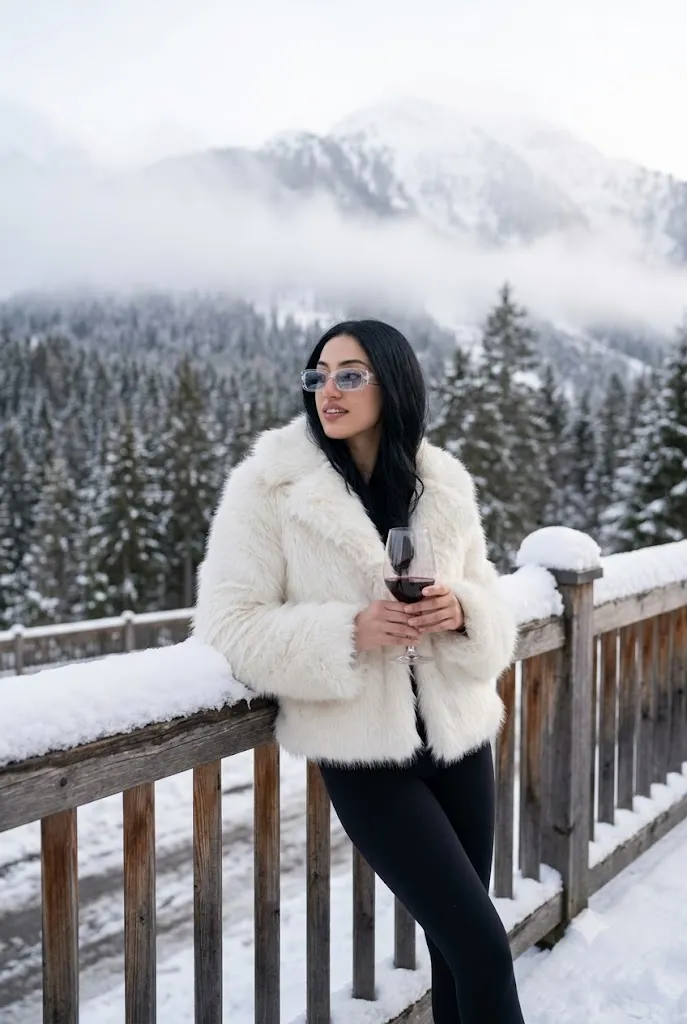
The Winter Après-Ski Prompt is designed to create luxurious, ultra-realistic AI portraits inspired by high-end winter resorts and alpine fashion. This prompt combines a snowy mountain terrace, a stylish white faux-fur coat, elegant black leggings, luxury accessories, and cinematic winter lighting to produce magazine-quality images. With a vintage mountain setting and a sophisticated après-ski atmosphere, it is perfect for creating premium portraits for Instagram, Pinterest, fashion blogs, digital portfolios, and creative projects. Using an AI image generator and a few simple editing techniques, you can achieve professional winter fashion photography without visiting a ski resort.
"Winter Après-Ski Prompt"
Create an image. Reference image: uploaded photo Face: keep the same face from the reference image. Pose: model standing with left arm resting on railing, holding glass of red wine, body slightly leaned to side, looking away. Clothes: fluffy white faux-fur coat, tight black leggings. Accessories: transparent rectangular sunglasses. Background: snowy mountain terrace, heavy snow on railings, forest in background. Lighting: cold daylight softened by fog, natural reflections on glass. Camera: 50mm f/2.0, natural cinematic winter tone. Mood: luxury après-ski, calm sophistication. Format: portrait 2:3.Use the face from the uploaded reference image and preserve the same facial features - do not alter the face.
How To Use Photo Editing?
Step 1: Generate the AI Portrait
Copy the complete Winter Après-Ski Prompt and paste it into your preferred AI image generator.
Step 2: Download the Best Version
Select the most realistic image and download it in the highest available resolution.
Step 3: Open a Photo Editing Application
Import the image into Lightroom, Photoshop, Canva, Snapseed, or another editing program.
Step 4: Adjust Brightness
Increase brightness slightly to create a crisp winter daylight appearance while preserving snow details.
Step 5: Improve Contrast
Add gentle contrast to separate the subject from the snowy background without creating harsh shadows.
Step 6: Enhance Winter Colors
Improve the white snow, teal or neutral background tones, and clothing colors while maintaining a cool natural color balance.
Step 7: Apply Cinematic Color Grading
Use cool blue and neutral tones to create a premium luxury winter atmosphere. Avoid warm yellow tones.
Step 8: Export the Final Image
Save the edited portrait in high resolution for Instagram, Pinterest, websites, or professional printing.
Tools You Can Use For Prompt Copy and Create Photo
Step 1: Copy the Prompt
Copy the complete Winter Après-Ski Prompt.
Step 2: Choose an AI Image Generator
Popular AI platforms include:
- ChatGPT Image Generator
- Midjourney
- Flux AI
- Google Imagen
- Leonardo AI
- Stable Diffusion
- Adobe Firefly
- Canva AI
Step 3: Paste the Prompt
Open your preferred AI platform and paste the prompt into the image generation field.
Step 4: Upload a Reference Image (Optional)
If you want to preserve your facial identity, upload a clear reference photo before generating the portrait.
Step 5: Select Image Settings
Choose the following settings:
- Ultra Realistic
- Editorial Fashion
- 8K Resolution
- DSLR Photography
- Cinematic Lighting
- 2:3 Portrait Ratio
- High Detail
- Shallow Depth of Field
Step 6: Generate the Portrait
Click the Generate button and allow the AI to create the winter portrait.
Step 7: Download the Image
Download the highest-quality version for editing and sharing.
How To Edit Photo?
Step 1: Import the Portrait
Open Lightroom, Photoshop, Canva, or Snapseed and import the AI-generated image.
Step 2: Crop the Composition
Maintain the 2:3 portrait ratio while keeping the snowy terrace and mountain scenery balanced.
Step 3: Correct White Balance
Adjust the white balance to remove any unwanted yellow tint and maintain realistic snow colors.
Step 4: Adjust Exposure
Increase exposure slightly to create a bright winter atmosphere while preserving texture in the snow.
Step 5: Enhance Skin Tones
Apply subtle skin corrections while keeping natural texture and realistic facial details intact.
Step 6: Improve Clothing Details
Increase clarity slightly on the faux-fur coat, leggings, and accessories to highlight fabric textures.
Step 7: Refine Background Details
Enhance the snowy mountains, forest, and glass reflections while keeping the background softly blurred.
Step 8: Sharpen Important Areas
Sharpen the eyes, hair, sunglasses, wine glass, and clothing details without overprocessing the image.
Step 9: Add a Professional Finish
Apply a soft vignette or light cinematic effect to draw attention to the subject while maintaining a luxury editorial appearance.
Step 10: Export the Final Portrait
Save the image as a high-quality JPEG or PNG for Instagram, Pinterest, websites, magazines, or print.
Conclusion
The Winter Après-Ski Prompt is an excellent choice for creating elegant, luxury-inspired AI portraits with a premium editorial style. The combination of snowy mountain scenery, sophisticated winter fashion, soft natural lighting, and cinematic composition produces timeless images suitable for fashion portfolios, travel content, social media, and creative projects. By following the steps above, you can easily generate, edit, and enhance professional-quality winter portraits that look like they were captured during an exclusive alpine photoshoot. With the right prompt, AI image generator, and editing workflow, you can create stunning winter fashion images in just a few minutes.