Introduction
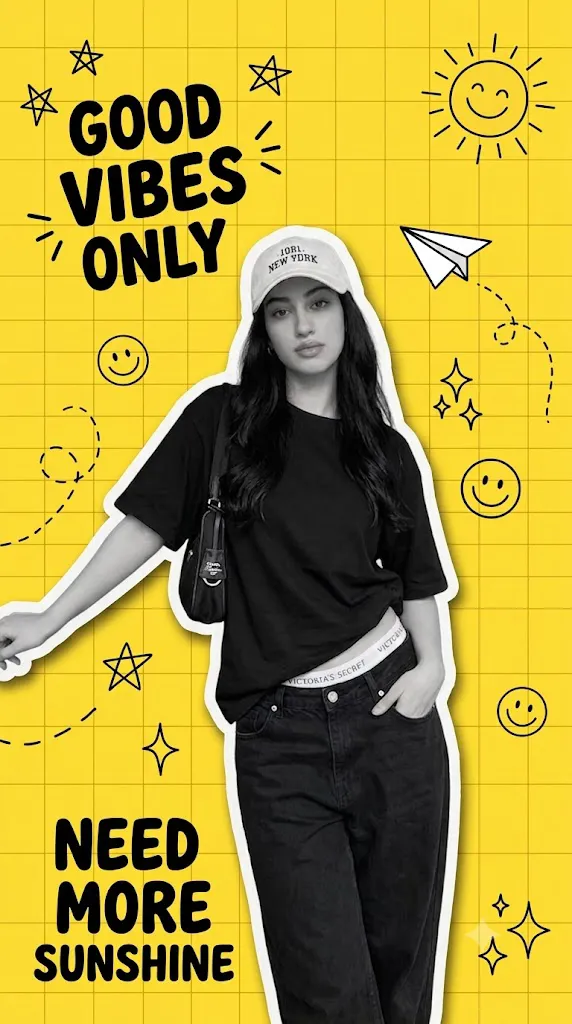
The Yellow Scrapbook Collage Poster Prompt is one of the most popular AI photo editing styles currently trending on Instagram, Pinterest, and other social media platforms. This creative design combines a bright yellow grid background, torn paper textures, handwritten notes, stickers, doodles, tape effects, and photo frames into one eye-catching composition. The result is a modern scrapbook-style poster that looks both artistic and professional.
Unlike ordinary photo editing, AI-generated scrapbook collage posters preserve the subject's identity — face, hairstyle, and clothing — while transforming the overall presentation into a vibrant, editorial-style artwork. Many creators use this style for profile pictures, travel photos, fashion portraits, graduation pictures, birthday celebrations, and social media branding.
The biggest advantage of using an AI prompt is that you only need to copy and paste it into an AI image generator. The AI automatically understands the scene, background, lighting, paper textures, decorative elements, typography, and overall composition. Even beginners with no graphic design experience can create premium-quality scrapbook posters within minutes.
"Yellow Scrapbook Collage Poster Prompt"
Use the uploaded image as the reference. Keep the person's original face, pose, hairstyle, and outfit exactly as in the uploaded photo. Do not change the dress or clothing. Convert the image into a modern scrapbook/ collage poster with a bright yellow grid background, white paper-cut outline around the person, black-and-white subject, hand-drawn doodles like stars, sun, paper airplane, smiley, sparkles, and curved dashed lines. Add trendy typography such as "GOOD VIBES ONLY" and "NEED MORE SUNSHINE". High contrast, clean cutout effect, soft drop shadow, aesthetic Gen Z poster design, ultra-detailed, vibrant, 8K, Instagram poster style. Negative Prompt: Do not change clothes, no outfit replacement, no face change, no pose change, no extra people, no blurry, no watermark, no text distortion, no low quality, no bad anatomy, no cropped body.
How To Use Photo Editing?
Using an AI photo editing prompt is simple. Follow these steps to transform your image into a professional scrapbook collage.
Step 1: Choose a High-Quality Photo
Select a clear portrait with good lighting. A high-resolution image produces better AI editing results.
Step 2: Copy the Prompt
Copy the complete Yellow Scrapbook Collage Poster Prompt without removing any details. The more detailed the prompt, the better the final image.
Step 3: Upload Your Image
Open your preferred AI image editor and upload your original photo. Most modern AI tools allow you to upload a reference image to preserve facial identity.
Step 4: Paste the Prompt
Paste the copied prompt into the prompt box. Make sure it includes important instructions such as:
- Preserve the original face
- Keep the same hairstyle
- Maintain the same clothing
- Add a yellow grid background
- Include white paper-cut borders
- Use scrapbook stickers and tape
- Add realistic shadows
- Apply cinematic lighting
Step 5: Generate the Image
Click the Generate button and wait for the AI to create your scrapbook collage artwork.
Step 6: Download
Once satisfied with the result, download the image in high resolution for Instagram, Facebook, Pinterest, or your portfolio.
Tools You Can Use for Prompt Copy and Create Photo
Many AI image generators support detailed prompts for scrapbook collage posters. Here are some of the best options:
1. ChatGPT
ChatGPT helps you create detailed AI prompts with professional descriptions, lighting instructions, camera settings, and composition ideas. You can also modify prompts based on your editing style.
2. Midjourney
Midjourney produces artistic and highly detailed scrapbook posters with realistic paper textures, creative layouts, and vibrant colors.
3. Flux AI
Flux AI is known for generating ultra-realistic portraits while preserving facial identity. It performs especially well with modern collage and editorial designs.
4. Google Gemini
Gemini can help improve prompts and generate creative ideas for scrapbook layouts before you use them in an image generator.
5. Leonardo AI
Leonardo AI offers excellent control over lighting, composition, and decorative elements, making it a strong choice for scrapbook-style artwork.
6. Adobe Firefly
Adobe Firefly integrates AI editing with professional Adobe tools, allowing you to refine colors, textures, and backgrounds after generation.
7. Ideogram AI
Ideogram AI is particularly useful when your scrapbook poster includes stylish typography, handwritten text, or decorative quotes.
8. Canva AI
Canva AI allows you to combine AI-generated images with additional stickers, frames, and design elements for a polished final poster.
How To Edit Photo?
Creating a professional Yellow Scrapbook Collage Poster is easy when you follow these steps.
Step 1: Select Your Portrait
Choose a front-facing or slightly angled portrait with natural lighting. Avoid blurry or low-quality images.
Step 2: Use Face Preservation
Always include instructions such as:
- Keep the original face exactly the same.
- Do not change skin tone.
- Preserve hairstyle.
- Keep original clothing.
This helps maintain the person's identity.
Step 3: Add Background
Replace the original background with a bright yellow grid pattern. This forms the foundation of the scrapbook design.
Step 4: Add Paper Cut Effects
Include white paper-cut borders around the subject to create a layered scrapbook appearance.
Step 5: Add Decorative Elements
Enhance the composition with:
- Washi tape
- Sticky notes
- Handwritten doodles
- Stars
- Hearts
- Arrows
- Paper clips
- Polaroid frames
- Vintage stamps
- Notebook paper
- Paint splashes
These details make the collage more engaging and visually appealing.
Step 6: Apply Lighting
Use soft daylight with realistic shadows to make the collage appear natural rather than flat.
Step 7: Improve Colors
Increase vibrance slightly while keeping skin tones realistic. Avoid excessive saturation.
Step 8: Export
Save the final image in high resolution, preferably 4K or higher, for the best quality on social media.
Conclusion
The Yellow Scrapbook Collage Poster Prompt is an excellent way to transform ordinary portraits into stylish, creative, and professional-looking artwork. Its combination of bright yellow backgrounds, paper textures, stickers, tape effects, handwritten notes, and realistic lighting creates a fun yet premium visual style that attracts attention on social media.
One of the biggest advantages of AI photo editing is that it saves time while producing high-quality results without requiring advanced editing skills. Simply upload a clear photo, paste a detailed prompt, and let the AI generate a unique scrapbook collage within minutes.
Whether you're creating Instagram posts, personal portraits, fashion content, travel memories, graduation photos, or promotional graphics, this editing style delivers impressive results with minimal effort. By using reliable AI tools such as ChatGPT, Midjourney, Flux AI, Leonardo AI, Adobe Firefly, Ideogram AI, and Canva AI, you can further customize your design and achieve a polished, eye-catching poster.
As AI technology continues to evolve, scrapbook collage prompts will become even more realistic and creative. Learning how to use detailed prompts today will help you create standout visuals that reflect your personal style and leave a lasting impression on your audience.