Introduction
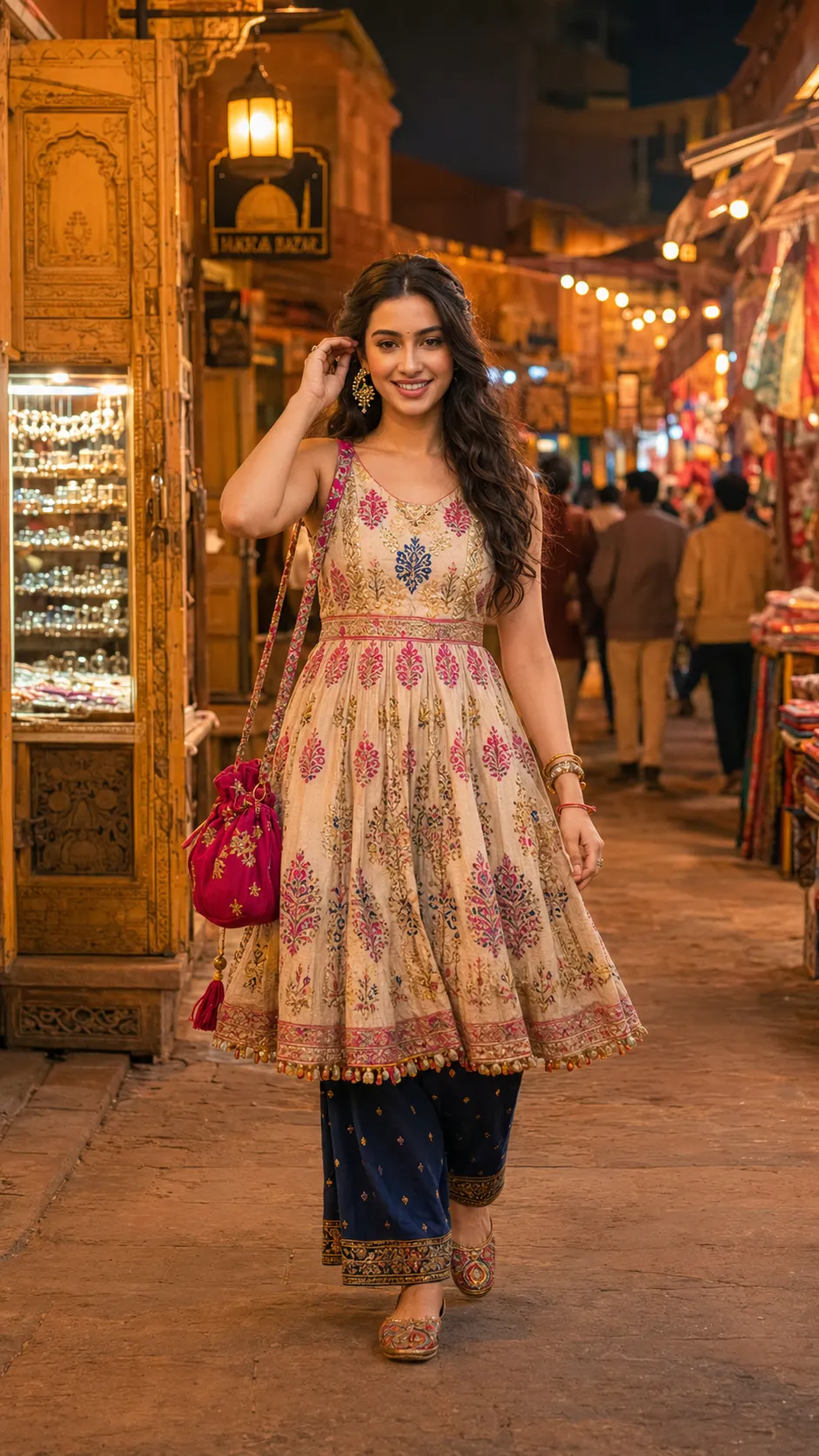
Jaipur Night Bazaar cinematic portrait editing is becoming one of the most popular AI photography trends on Instagram, Pinterest, and digital art platforms. These portraits combine traditional Indian fashion, warm lantern lighting, dreamy bazaar backgrounds, and cinematic photography styles to create stunning visual artwork. Inspired by Bollywood travel scenes and luxury editorial photography, this style gives every image a magical and cultural atmosphere.
AI-generated cinematic portraits allow users to transform ordinary photos into professional-quality edits within minutes. By using a detailed AI prompt, users can create ultra-realistic images featuring Jaipur streets, colorful markets, ethnic outfits, glowing lights, and realistic facial details. This editing style is perfect for Instagram reels, profile photos, wallpapers, travel-themed content, and aesthetic social media posts.
The best part about AI photo editing is that you do not need advanced editing knowledge. A clear image and a well-written prompt are enough to generate beautiful cinematic portraits. In this article, you will learn how to use AI photo editing, the best tools for creating cinematic portraits, and step-by-step methods for editing Jaipur Night Bazaar photos professionally.
How To Use Photo Editing?
AI photo editing is very easy and beginner-friendly. Anyone can create professional cinematic portraits using a smartphone or computer. Follow these simple steps.
Step 1: Choose a Clear Portrait Photo
Select a high-quality portrait image with natural lighting. Clear facial details help AI generate realistic and professional results.
Step 2: Open an AI Editing Tool
Use an AI image generator or editing platform and upload your photo.
Step 3: Copy the Prompt
Paste a detailed Jaipur Night Bazaar cinematic portrait prompt. For example:
“Ultra realistic 8K vertical portrait, 9:16 ratio, of a young Indian woman walking through a traditional Jaipur night bazaar filled with glowing lanterns and warm string lights. Use the uploaded reference face exactly with identical facial features, natural skin texture, realistic pores, and the same hairstyle. She wears a sleeveless anarkali crop top with deep pink, saffron, and indigo block prints on a cream fabric, paired with indigo palazzo pants featuring gold detailing and embroidered juttis. She carries a deep pink zari embroidered potli bag and wears kundan earrings, gold bangles, and a red-gold thread bracelet. Her hair is styled in a relaxed half-up twist with a vintage gold flower clip, while soft waves flow naturally down her back. She walks toward the camera with a gentle smile, casually adjusting her earring, her eyes reflecting the warm lantern glow. The background features Rajasthani carved doorways, colorful fabric stalls, jewelry shops, and softly blurred evening visitors creating cinematic depth. Warm tungsten lighting and dreamy golden bokeh create a Bollywood-inspired atmosphere. Sony A7 III, 35mm f1.8 lens, shallow depth of field, ultra realistic photography.”
The more detailed your prompt is, the better the AI-generated image will look.
Step 4: Generate the Image
Click on the generate button and wait for the AI to process your photo. Most platforms create the final image within a few seconds.
Step 5: Download and Share
After the image is generated, download it in HD or 4K quality. You can use it for Instagram posts, reels, wallpapers, and social media content.
AI editing makes cinematic portrait creation fast, creative, and professional.
Tools You Can Use For Prompt Copy and Create Photo
There are many AI editing tools available online for creating cinematic portraits and Jaipur bazaar-style edits.
1. Leonardo AI
Leonardo AI is one of the best AI image generation tools for ultra-realistic cinematic editing.
Features:
Realistic portrait generation
Cinematic lighting effects
High-quality image details
Fast AI processing
2. Canva
Canva is beginner-friendly and ideal for adding text, overlays, and social media designs.
Features:
Easy editing tools
Templates and effects
Background editing
Social media optimization
3. Adobe Firefly
Adobe Firefly helps create artistic AI visuals with professional effects.
Features:
AI creative tools
Cinematic color grading
Realistic enhancement
High-quality artwork
4. Pixlr
Pixlr is a lightweight editor with useful AI tools for portrait editing.
Features:
Background remover
Blur effects
AI enhancement
Mobile-friendly editing
5. Fotor
Fotor is popular for portrait retouching and cinematic filters.
Features:
AI beauty enhancement
Cinematic filters
HD image export
Simple user interface
These tools help users create stunning cinematic portraits without professional editing skills.
How To Edit Photo?
Creating a Jaipur Night Bazaar cinematic portrait becomes easy when you follow the correct editing process.
Step 1: Remove Background
First, remove the original background using an AI background remover. This helps place the subject inside a cinematic Jaipur market scene.
Step 2: Add Jaipur Bazaar Background
Choose a warm and detailed Jaipur night bazaar background featuring lanterns, string lights, colorful shops, and traditional architecture.
Step 3: Use Warm Cinematic Lighting
Apply golden tungsten lighting and soft glow effects to create a dreamy evening atmosphere. Warm lighting enhances the ethnic fashion and skin tones beautifully.
Step 4: Add Traditional Fashion Styling
Use ethnic outfits such as anarkali dresses, lehengas, palazzo pants, embroidered juttis, and traditional jewelry to create authentic Indian fashion aesthetics.
Step 5: Apply Background Blur
Use shallow depth of field and soft bokeh blur effects to separate the subject from the background and create a cinematic photography look.
Step 6: Adjust Color Grading
Enhance orange, gold, saffron, and pink tones to create a rich Bollywood-style cinematic mood.
Step 7: Add Final Touches
Adjust brightness, contrast, highlights, and shadows carefully. Make sure the face remains natural and realistic without over-smoothing.
Step 8: Export in High Quality
Save the image in Full HD, 4K, or 8K resolution for the best results.
Following these steps helps create professional-looking cinematic portraits suitable for social media and digital art.
Conclusion
Jaipur Night Bazaar Cinematic Portrait Prompt editing is one of the most beautiful AI photography styles inspired by Indian culture and Bollywood aesthetics. It combines traditional ethnic fashion, glowing lantern lighting, realistic facial details, and cinematic photography techniques to create visually stunning portraits.
With AI tools like Leonardo AI, Canva, Adobe Firefly, Pixlr, and Fotor, anyone can create ultra-realistic cinematic edits without advanced editing knowledge. You only need a clear photo and a detailed AI prompt to generate professional-quality images within minutes.
Whether you want to create Instagram content, profile pictures, wallpapers, or artistic travel portraits, Jaipur Night Bazaar cinematic editing is a perfect choice. By using creative prompts, warm lighting, and realistic cultural details, users can create eye-catching portraits that look luxurious, dreamy, and unforgettable.