Introduction
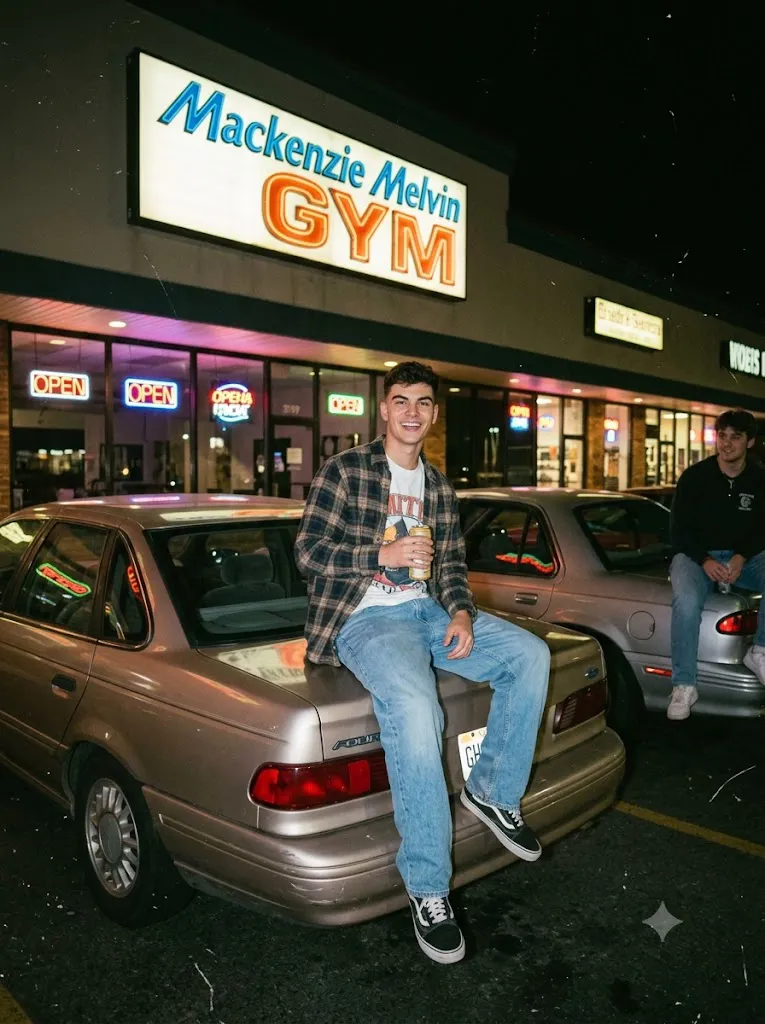
The 1990s Disposable Camera Night Parking Lot Portrait style captures the nostalgic charm of casual film photography from the late 1990s. Unlike modern digital portraits that emphasize perfect sharpness and flawless editing, this aesthetic celebrates authenticity. Harsh direct flash, soft focus, imperfect framing, subtle motion blur, visible film grain, dust, scratches, and faded colors all contribute to the unmistakable look of a disposable camera snapshot.
"1990s Disposable Camera Night Parking Lot Portrait Prompt"
Using the reference image for facial identity and hairstyle, create a hyper-realistic portrait of a young man sitting casually on a parked car in a suburban shopping center parking lot at night. Bright neon storefront lights softly illuminate the background while several older model sedans are parked nearby. The image should resemble an authentic 1990s disposable camera snapshot captured on Kodak Gold 200 35mm film using a basic point-and-shoot camera with harsh direct flash. Include realistic film grain, soft focus, subtle motion blur, imperfect framing, faded colors, dust particles, fine scratches, slightly aged film texture, and authentic analog imperfections. The subject wears period-inspired casual clothing suitable for the late 1990s and looks naturally toward the camera with a relaxed expression. A large illuminated gym sign appears in the background as part of the environment. The final image should feel nostalgic, spontaneous, cinematic, and naturally imperfect while maintaining realistic skin texture and DSLR-level detail.
This style is inspired by everyday moments captured on inexpensive point-and-shoot cameras using classic 35mm film stocks. Shopping center parking lots illuminated by neon storefront signs, older model sedans, and quiet suburban streets create a timeless atmosphere that feels both cinematic and personal. Rather than appearing overly polished, these portraits intentionally preserve imperfections that make the image feel genuine.
Today, AI image generation allows photographers, artists, and content creators to recreate this nostalgic look with incredible realism. A carefully written prompt can describe the lighting, environment, clothing, facial expression, camera characteristics, and film texture in enough detail to produce convincing retro photography. When paired with professional editing software, the final image can closely resemble an authentic 1990s analog photograph while maintaining high-resolution output.
This guide explains how to use AI-assisted photo editing, the best tools for generating retro portraits, an example prompt structure, and professional editing techniques that help recreate the classic disposable camera aesthetic.
How To Use Photo Editing?
Photo editing plays an important role in recreating the authentic appearance of vintage disposable camera photography. AI image generators provide the foundation, while editing software refines the final result.
Step 1: Select a High-Quality Reference Photo
Begin with a clear portrait that shows good facial detail and natural lighting. High-resolution references help preserve facial identity during generation.
Step 2: Use a Detailed Prompt
Write or copy a prompt that includes the environment, wardrobe, lighting style, camera type, film stock, and nostalgic atmosphere you want to achieve.
Step 3: Upload the Reference Image
Use an AI image generation platform that supports image references or image-to-image editing for greater facial consistency.
Step 4: Generate Multiple Variations
Create several versions of the portrait. Compare the results and choose the one with the most natural pose, lighting, and analog film appearance.
Step 5: Refine the Image
Complete the process using professional editing software to adjust exposure, film grain, colors, scratches, and subtle imperfections that enhance realism.
Combining AI generation with thoughtful editing produces a much more convincing retro film photograph.
Tools You Can Use For Prompt Copy and Create Photo
Several AI and editing platforms can help create realistic 1990s disposable camera portraits.
ChatGPT
Generate highly detailed prompts describing lighting, clothing, film stock, background, and camera characteristics.
Midjourney
Excellent for creating cinematic nostalgic scenes with impressive composition and vintage color rendering.
Flux AI
Produces realistic facial details while preserving identity and natural expressions.
Stable Diffusion
Offers advanced prompt control, image-to-image editing, and customization for users who want maximum creative flexibility.
GPT Image
Useful for producing realistic retro-style portraits directly from descriptive prompts while maintaining consistent visual quality.
Adobe Photoshop
Perfect for adding authentic film scratches, dust particles, subtle blur, grain, light leaks, and realistic imperfections.
Adobe Lightroom
Ideal for adjusting exposure, contrast, faded colors, highlights, shadows, and recreating classic film color grading.
Canva
Useful for creating nostalgic posters, album covers, YouTube thumbnails, and social media graphics using the completed portrait.
Using AI generation alongside professional editing tools creates the most convincing analog photography results.
How To Edit Photo?
Professional editing helps transform an AI-generated image into a convincing analog photograph.
Reduce Digital Perfection
Lower overall clarity slightly to remove the overly sharp appearance common in digital images.
Add Film Grain
Introduce realistic fine grain rather than excessive digital noise. Grain should enhance the image without overwhelming facial details.
Apply Vintage Color Grading
Use warm highlights, muted shadows, slightly faded colors, and reduced saturation to recreate the appearance of aged film.
Create Authentic Flash Lighting
Enhance the bright foreground illumination while maintaining darker surroundings and natural shadow transitions.
Add Film Imperfections
Include subtle scratches, dust particles, tiny light leaks, and slight edge softness to replicate old film scans.
Keep Natural Blur
Maintain a small amount of motion blur or soft focus instead of sharpening every detail. Disposable cameras rarely produced perfectly crisp images.
Export the Final Image
Save the portrait in 4K resolution while preserving the analog texture and nostalgic atmosphere for websites, prints, or social media.
Conclusion
The 1990s Disposable Camera Night Parking Lot Portrait style celebrates the beauty of imperfect photography. Instead of striving for flawless digital precision, it embraces the spontaneity, grain, harsh flash, and nostalgic character that made disposable camera snapshots memorable.
With a detailed AI prompt, a quality reference image, and thoughtful post-processing, you can recreate the timeless feeling of a late-night suburban photograph from the 1990s. Every element—from neon storefront lighting and older vehicles to authentic film grain and imperfect framing—helps tell a believable visual story.
As AI image generation continues to improve, retro film photography remains one of the most engaging creative styles for artists and photographers. Experiment with different film stocks, weather conditions, locations, and wardrobe choices to develop unique vintage-inspired portraits that combine nostalgic charm with modern AI technology. The result is a striking image that feels as though it came directly from a forgotten family photo album while still benefiting from today's advanced creative tools.