Introduction
Social media has transformed the way people create and consume visual content. Among the most eye-catching trends in modern digital art and AI image generation is the 3D Instagram Influencer Pop-Out Portrait. This creative style combines realistic character design, social media aesthetics, and immersive three-dimensional effects to produce images that immediately capture attention.
"3D Instagram Influencer Pop-Out Portrait Prompt"
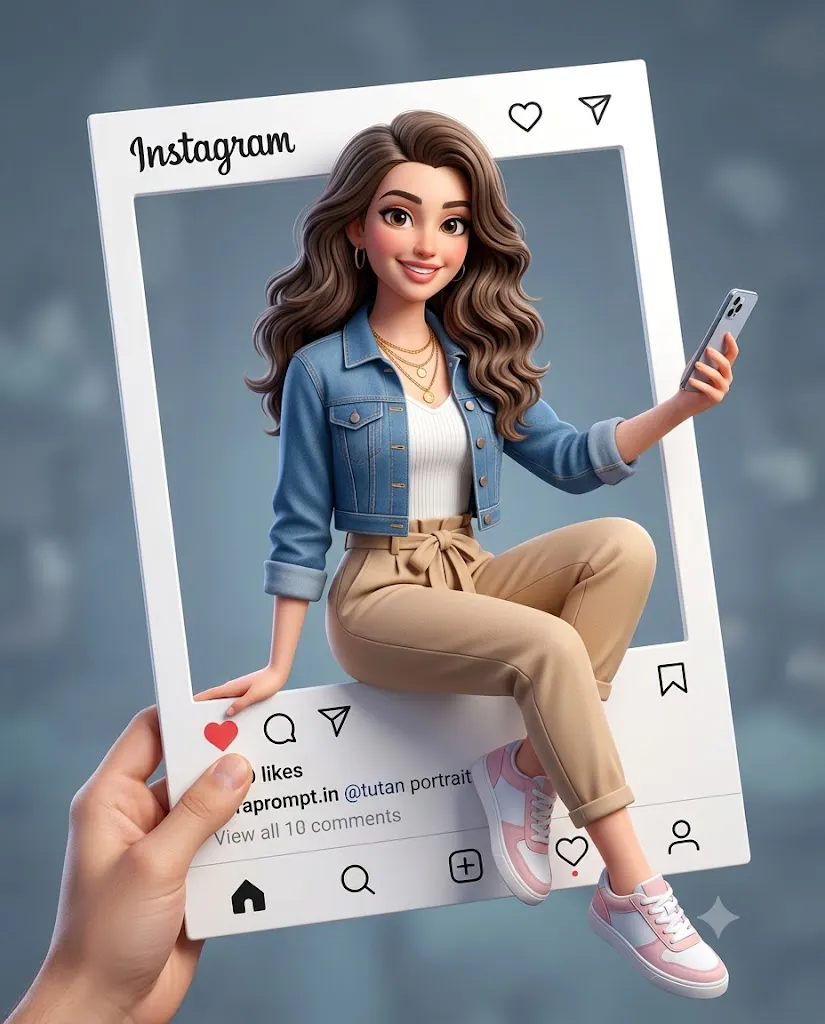
Use the uploaded image only as the facial identity reference. Create a polished ultra-realistic 3D cartoon influencer portrait emerging from a large Instagram-style post frame. The woman sits naturally on the bottom edge of the frame, with one hand supporting her body and the other holding a smartphone. One leg remains bent inside the frame while the other extends outward toward the viewer. Long wavy hair, denim jacket, white ribbed top, beige paperbag trousers, pastel pink sneakers, layered gold necklaces. Strong pop-out effect, premium CGI rendering, soft studio lighting, realistic shadows, modern influencer aesthetic, high-end social media mockup, shallow depth of field, 8K quality.
The concept is simple yet visually powerful. A realistic 3D character appears to emerge from an Instagram-style post frame, breaking the boundaries of the interface and stepping into the viewer's space. This pop-out illusion creates depth, interaction, and excitement while maintaining the recognizable visual language of social media platforms.
Influencer-inspired portraits have become extremely popular because they blend fashion, lifestyle, branding, and storytelling into a single image. Instead of appearing as a static photograph, the subject becomes part of an interactive composition. Arms, legs, shoes, accessories, and props extend beyond the frame, creating a dynamic visual effect that feels playful and modern.
One of the key strengths of this style is its versatility. It can be used for personal branding, social media marketing, profile showcases, promotional campaigns, influencer mockups, digital advertisements, and creative portfolios. The combination of realistic facial features and polished cartoon-inspired rendering creates a professional yet approachable appearance.
Modern AI image generators make it possible to create highly detailed 3D influencer portraits with realistic lighting, clothing textures, facial expressions, and social media interface elements. Combined with professional editing software, creators can produce images that look like premium commercial advertising campaigns.
In this guide, you will learn how to use photo editing effectively, discover the best tools for generating these portraits, and follow a step-by-step editing workflow to create a polished influencer-style masterpiece.
How To Use Photo Editing?
Photo editing is essential when creating a realistic 3D Instagram pop-out portrait because it helps refine depth, lighting, colors, and visual consistency.
The first step is ensuring that the character and social media frame feel connected. The pop-out effect works best when shadows and lighting interact naturally between the character and the interface. Proper editing can enhance this illusion and make the composition appear more realistic.
Lighting adjustments play a major role in creating a premium CGI appearance. Soft studio lighting with gentle shadows helps define the character's face, clothing folds, hair, and accessories while maintaining a friendly influencer aesthetic.
Color correction is equally important. Social media-inspired portraits often feature clean, modern color palettes. Soft blues, beige tones, pastel pinks, white highlights, and warm skin tones create a stylish and approachable visual identity.
Facial retouching should remain subtle. While 3D influencer portraits typically appear polished, preserving natural facial features helps maintain realism and recognizable identity. Avoid excessive smoothing or unrealistic beauty filters.
Depth enhancement is another important aspect of editing. Elements extending outside the frame—such as legs, sneakers, smartphones, and arms—should cast subtle shadows and maintain realistic perspective. This strengthens the illusion that the character is physically emerging from the post.
Finally, background refinement helps focus attention on the subject. A soft gray-blue blurred backdrop complements the influencer aesthetic without distracting from the main composition.
Tools You Can Use For Prompt Copy And Create Photo
Several AI image generators and editing applications can help create high-quality 3D influencer portraits.
AI Image Generation Tools
ChatGPT Image Generation
ChatGPT can generate highly detailed concepts and visual prompts for realistic influencer-style portraits with strong storytelling elements.
Midjourney
Midjourney excels at creating polished CGI characters, stylized portraits, and premium digital artwork.
Leonardo AI
Leonardo AI provides advanced customization features and excellent 3D rendering capabilities.
Ideogram
Ideogram offers reliable prompt interpretation and realistic image generation for creative social media concepts.
Adobe Firefly
Adobe Firefly integrates seamlessly with professional design workflows and produces commercial-quality visuals.
Photo Editing Software
Adobe Photoshop
Photoshop remains the industry standard for compositing, retouching, shadow enhancement, and pop-out effects.
Adobe Lightroom
Useful for color correction, exposure balancing, and creating a consistent visual style.
Canva
Canva provides simple tools for adding social media interface elements and creating presentation-ready designs.
PicsArt
Popular for social media graphics, overlays, creative effects, and influencer-themed content.
Procreate
Ideal for artists who want to manually refine character details and add custom design elements.
How To Edit Photo?
Once the image has been generated, follow these editing steps to create a professional result.
Step 1: Import The Image
Open the generated portrait in Photoshop, Lightroom, Canva, or another editing application.
Step 2: Refine Character Details
Enhance facial features, hair strands, clothing textures, and accessories while preserving realism.
Step 3: Strengthen The Pop-Out Effect
Add realistic shadows where limbs, sneakers, and the smartphone extend beyond the frame.
Step 4: Improve Lighting
Adjust highlights and shadows to create a clean studio-quality appearance.
Step 5: Enhance Clothing Textures
Increase detail in denim fabric, jewelry, trousers, and footwear for a premium CGI look.
Step 6: Refine Social Media Interface
Ensure icons, navigation elements, and interface details remain clean, sharp, and readable.
Step 7: Balance Colors
Create harmony between skin tones, clothing colors, and the background palette.
Step 8: Add Depth
Use selective blur and shadow adjustments to strengthen the three-dimensional illusion.
Step 9: Apply Final Color Grading
Introduce subtle cinematic tones while maintaining a bright influencer-style aesthetic.
Step 10: Export
Save the final image in high resolution. PNG format is recommended for preserving sharp details and transparency effects.
Conclusion
The 3D Instagram Influencer Pop-Out Portrait is a perfect combination of social media culture, digital art, and advanced AI creativity. By blending realistic facial identity with stylized 3D rendering and immersive frame-breaking effects, this concept creates visually engaging content that immediately attracts attention.
With the help of AI image generators and professional editing software, creators can produce premium-quality influencer portraits without requiring complex 3D modeling skills. Careful attention to lighting, perspective, shadows, and composition can transform a simple portrait into a modern digital masterpiece.
Whether you are designing personal branding content, influencer campaigns, social media promotions, marketing visuals, or creative portfolio projects, mastering the Instagram pop-out portrait style can help you create memorable and highly shareable artwork that stands out in today's competitive digital landscape.