Introduction
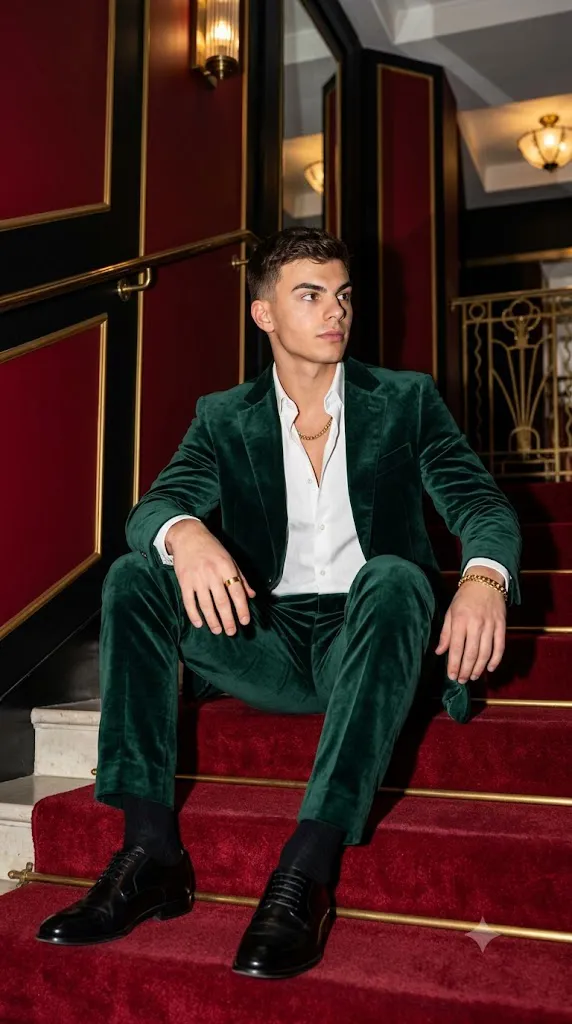
The 4K Cinematic Emerald Velvet Suit Editorial Portrait style has become one of the most popular trends in AI-generated fashion photography. Inspired by luxury magazine editorials, premium menswear campaigns, and cinematic portrait photography, this style combines sophisticated fashion with dramatic lighting and ultra-realistic image quality. The deep emerald velvet suit, rich Art Deco interiors, bold flash photography, and confident posing create an image that feels worthy of a luxury fashion publication.
"4K Cinematic Emerald Velvet Suit Editorial Portrait Prompt"
Using the reference image strictly for facial identity and hairstyle, create a hyper-realistic cinematic editorial portrait of a stylish young man sitting confidently on a luxurious red-carpeted staircase inside an elegant Art Deco building. He wears a premium emerald green velvet suit with realistic fabric texture and natural sheen, paired with a white shirt casually unbuttoned at the collar, polished black leather shoes, black socks, and subtle gold accessories including a chain, bracelet, and ring. The pose is relaxed yet confident, with a thoughtful side glance and natural posture. The environment features rich red carpeting, black architectural details, and refined gold trim, creating a sophisticated luxury atmosphere. High-end fashion flash photography illuminates the face and upper body with crisp directional light, producing dramatic shadows while preserving natural skin texture. DSLR-quality sharpness, cinematic HDR lighting, shallow depth of field, ultra-realistic details, realistic clothing folds, premium editorial styling, masterpiece quality, 8K realism, magazine cover composition, and a 4:5 aspect ratio.
Unlike ordinary AI portrait prompts, this editorial style focuses on premium visual storytelling. Every detail matters—from the texture of the velvet fabric and polished leather shoes to the direction of the lighting and the natural expression of the subject. A carefully written prompt helps the AI understand how to reproduce realistic skin texture, authentic clothing materials, cinematic shadows, and DSLR-quality sharpness.
Whether you are a content creator, AI artist, fashion enthusiast, photographer, or blogger, learning how to build detailed editorial prompts can significantly improve your image quality. Combined with professional photo editing software, AI-generated portraits can achieve a polished appearance suitable for portfolios, social media, advertisements, magazine layouts, and digital artwork.
This guide explains how to use AI photo editing, the best tools for creating editorial portraits, an example prompt structure, and professional editing techniques that help produce stunning 4K cinematic results.
How To Use Photo Editing?
Photo editing transforms a good AI-generated portrait into a premium editorial masterpiece. While AI creates the initial composition, editing software enhances lighting, textures, colors, and overall realism.
Follow these steps for the best results:
Step 1: Select a High-Quality Reference Photo
Choose a clear portrait with good lighting and visible facial details. High-resolution reference images help preserve facial identity and improve realism.
Step 2: Copy a Detailed Prompt
Use a professionally written prompt that clearly describes the subject, outfit, pose, environment, lighting, mood, camera settings, and desired artistic style.
Step 3: Upload the Reference Image
Import your portrait into an AI image generator that supports image-to-image editing or facial reference.
Step 4: Generate Multiple Versions
Create several image variations and compare lighting, composition, clothing realism, and facial accuracy before selecting the strongest result.
Step 5: Refine the Final Image
Open the selected image in professional editing software to improve contrast, sharpen details, remove imperfections, and complete the luxury editorial finish.
Using both AI generation and traditional photo editing produces images that look more authentic and professionally photographed.
Tools You Can Use For Prompt Copy and Create Photo
Professional results depend on choosing the right AI and editing tools.
ChatGPT
Excellent for writing highly detailed AI prompts with realistic descriptions of clothing, lighting, composition, and camera settings.
Midjourney
Known for producing artistic, cinematic fashion editorials with outstanding composition and premium visual quality.
Flux AI
Creates realistic portraits while preserving facial identity and producing natural skin textures.
Stable Diffusion
Provides advanced customization through image-to-image generation, ControlNet, and prompt refinement for experienced users.
GPT Image
Useful for generating realistic editorial portraits directly from descriptive prompts while maintaining strong visual consistency.
Adobe Photoshop
Perfect for advanced retouching, skin refinement, object removal, sharpening, masking, and final image enhancement.
Adobe Lightroom
Ideal for exposure correction, black levels, highlight recovery, texture enhancement, and cinematic color grading.
Canva
Helpful for creating magazine covers, social media posts, YouTube thumbnails, and promotional graphics using the finished portrait.
Combining AI image generation with professional editing software ensures the highest level of quality and realism.
How To Edit Photo?
After generating the portrait, professional editing enhances every detail and creates a polished editorial finish.
Clean the Portrait
Remove unwanted artifacts, distractions, or imperfections while preserving realistic skin texture and natural facial details.
Enhance the Lighting
Adjust exposure, highlights, and shadows to emphasize the face and create a dramatic cinematic atmosphere.
Improve Fabric Texture
Increase clarity and texture to showcase the luxurious appearance of velvet without making the material look overly sharp.
Sharpen Important Details
Enhance the eyes, hair, jewelry, clothing, and leather shoes while maintaining a natural look.
Color Grade the Image
Fine-tune the emerald tones, deep reds, gold accents, and neutral skin colors to create a premium editorial appearance with balanced contrast.
Refine the Background
Keep the Art Deco architecture clean and uncluttered while preserving elegant lines and symmetrical composition.
Export in 4K
Save the completed portrait at 3840 × 2160 resolution or higher using maximum quality settings for digital portfolios, print projects, websites, or social media.
Conclusion
The 4K Cinematic Emerald Velvet Suit Editorial Portrait style combines luxury fashion, cinematic photography, and advanced AI image generation into one powerful creative workflow. A carefully written prompt ensures realistic facial identity, premium wardrobe styling, dramatic lighting, and elegant architectural backgrounds that resemble high-end fashion editorials.
Professional editing further enhances these AI-generated images by refining textures, improving lighting, sharpening details, and applying sophisticated color grading. The result is a portrait that feels authentic, stylish, and suitable for magazine covers, advertising campaigns, portfolios, and premium digital content.
As AI image generation continues to evolve, mastering detailed prompt writing and thoughtful post-processing will help you consistently produce exceptional editorial portraits. Experiment with different poses, luxury interiors, lighting techniques, and fashion styles to create unique visuals that combine creativity with professional-quality realism.