Introduction
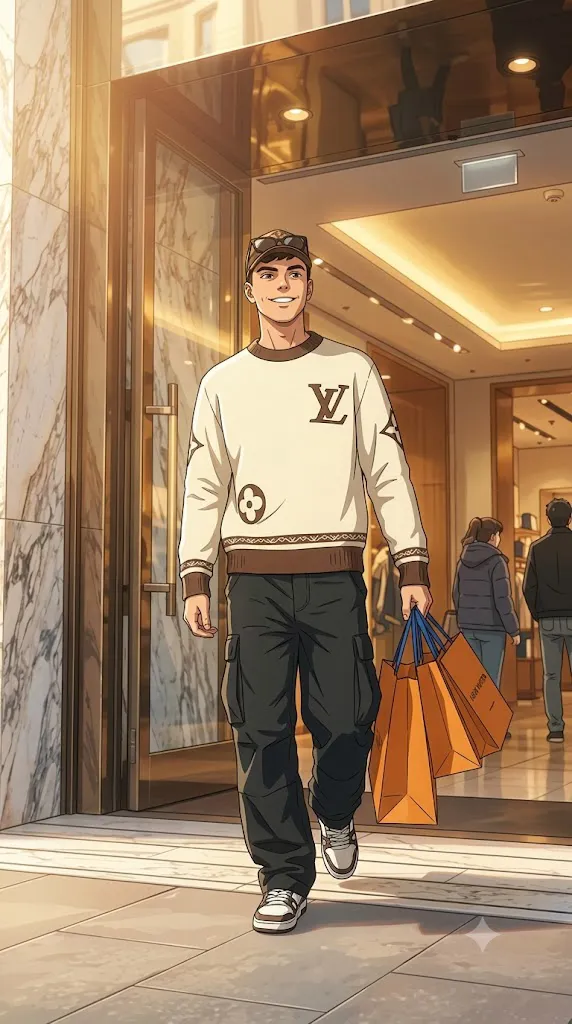
The 4K Cinematic Japanese Slice-of-Life Anime Portrait style has become one of the most admired trends in AI image generation. Inspired by modern Japanese slice-of-life animation, this artistic approach combines hand-painted backgrounds, expressive character design, warm natural lighting, and emotional storytelling to create images that feel like scenes from a beautifully animated film. Unlike traditional anime portraits, this style focuses on realism, subtle emotions, and immersive environments while preserving the subject’s original identity.
"4K Cinematic Japanese Slice-of-Life Anime Portrait Prompt"
Use the uploaded reference image as the character reference while preserving the exact facial identity, hairstyle, eye shape, body proportions, skin tone, clothing, accessories, and natural expression with extremely high character consistency. Transform the portrait into a premium cinematic anime illustration inspired by modern Japanese slice-of-life films. Create a beautifully hand-painted environment with detailed streets, traditional and modern Japanese architecture, lush greenery, soft painterly textures, warm golden-hour lighting, gentle volumetric sunlight, realistic atmospheric perspective, cinematic framing, emotional storytelling, elegant composition, subtle depth of field, clean anime line art, rich color grading, highly detailed background, natural shadows, premium movie-quality artwork, ultra-high resolution, masterpiece quality, realistic anime textures, soft cinematic mood, and professional 4K detail.
A high-quality anime portrait prompt does much more than simply apply an anime filter. It carefully describes facial consistency, hairstyle, body proportions, clothing, lighting, atmosphere, architecture, painterly textures, and cinematic composition. These detailed instructions help AI image generators transform a real photograph into a premium anime illustration without losing the recognizable appearance of the original subject.
Modern AI tools allow artists, photographers, content creators, and anime enthusiasts to create stunning illustrations that resemble professionally animated movie frames. By combining a detailed prompt with professional editing techniques, you can produce artwork suitable for wallpapers, posters, social media, YouTube thumbnails, digital portfolios, and personal collections.
This guide explains how to use AI photo editing, the best tools for generating cinematic anime portraits, an example prompt structure, and professional editing techniques to achieve premium 4K results.
How To Use Photo Editing?
Photo editing plays a major role in creating realistic anime illustrations. AI image generators provide the artistic transformation, while editing software helps refine colors, lighting, textures, and overall composition.
Follow these simple steps:
Step 1: Choose a High-Quality Reference Image
Start with a clear portrait that has sharp facial details and balanced lighting. A high-resolution image improves facial consistency and produces cleaner anime artwork.
Step 2: Copy a Detailed Prompt
Use a well-written prompt describing facial identity, hairstyle, outfit, background, lighting, anime style, and overall mood. Detailed prompts generally produce more accurate results.
Step 3: Upload the Reference Photo
Import your image into an AI image generation platform that supports image-to-image transformation or character reference features.
Step 4: Generate Multiple Versions
Create several variations and compare facial accuracy, background quality, painterly textures, lighting, and emotional atmosphere before selecting the strongest image.
Step 5: Edit the Final Artwork
Use editing software to improve sharpness, enhance colors, balance lighting, and complete the cinematic anime appearance.
Combining AI generation with manual editing produces artwork that feels polished and professionally illustrated.
Tools You Can Use For Prompt Copy and Create Photo
Several AI platforms and editing applications can help create premium cinematic anime portraits.
ChatGPT
Generate detailed prompts describing anime aesthetics, cinematic lighting, emotional storytelling, architecture, and artistic composition.
Midjourney
Excellent for producing highly artistic anime-inspired illustrations with rich painterly textures and beautiful environments.
Flux AI
Creates realistic character transformations while preserving facial identity and natural proportions.
Stable Diffusion
Offers advanced image-to-image editing, character consistency, and extensive customization through community models.
GPT Image
Useful for generating cinematic anime illustrations directly from descriptive prompts while maintaining visual consistency.
Adobe Photoshop
Perfect for cleaning artifacts, sharpening details, adjusting lighting, and refining colors after image generation.
Adobe Lightroom
Ideal for enhancing exposure, contrast, color grading, and subtle cinematic warmth.
Canva
Useful for creating posters, wallpapers, social media posts, YouTube thumbnails, and presentation graphics using your completed anime portrait.
Using AI generation together with professional editing software delivers the highest-quality results.
How To Edit Photo?
Once the AI-generated illustration is complete, professional editing enhances every visual element.
Clean the Artwork
Remove unwanted artifacts, rough edges, or distracting details while preserving the anime illustration style.
Enhance Lighting
Adjust brightness and contrast to emphasize warm sunlight, atmospheric depth, and cinematic highlights.
Improve Color Grading
Balance warm and cool tones to create the soft emotional atmosphere commonly seen in slice-of-life anime films.
Sharpen Important Details
Enhance facial features, hair strands, clothing folds, architectural elements, and background details while maintaining painterly textures.
Add Atmospheric Effects
Subtle light rays, gentle bloom, soft haze, floating leaves, or delicate dust particles can increase the cinematic feeling without overwhelming the artwork.
Refine Background Composition
Maintain clean perspective, realistic environmental depth, and harmonious colors to strengthen the storytelling aspect of the image.
Export in 4K Resolution
Save the completed artwork in Ultra HD (3840 × 2160) or higher resolution for wallpapers, posters, printing, portfolios, or digital publishing.
Conclusion
The 4K Cinematic Japanese Slice-of-Life Anime Portrait style beautifully combines AI technology with the timeless visual language of Japanese animation. By using a detailed prompt, a high-quality reference image, and thoughtful editing techniques, you can create illustrations that preserve personal identity while capturing the warmth, emotion, and beauty associated with cinematic anime films.
The secret to exceptional results lies in accurate character consistency, carefully described environments, natural lighting, painterly textures, and refined post-processing. Whether you are an anime fan, digital artist, content creator, or blogger, mastering this prompt style allows you to create memorable visuals that feel immersive and emotionally engaging.
Continue experimenting with different seasons, lighting conditions, architectural settings, and storytelling elements to develop your own artistic style. With consistent practice and creative refinement, you can produce stunning 4K anime portraits that resemble scenes from a premium Japanese animated feature while maintaining outstanding realism and artistic quality.