Introduction
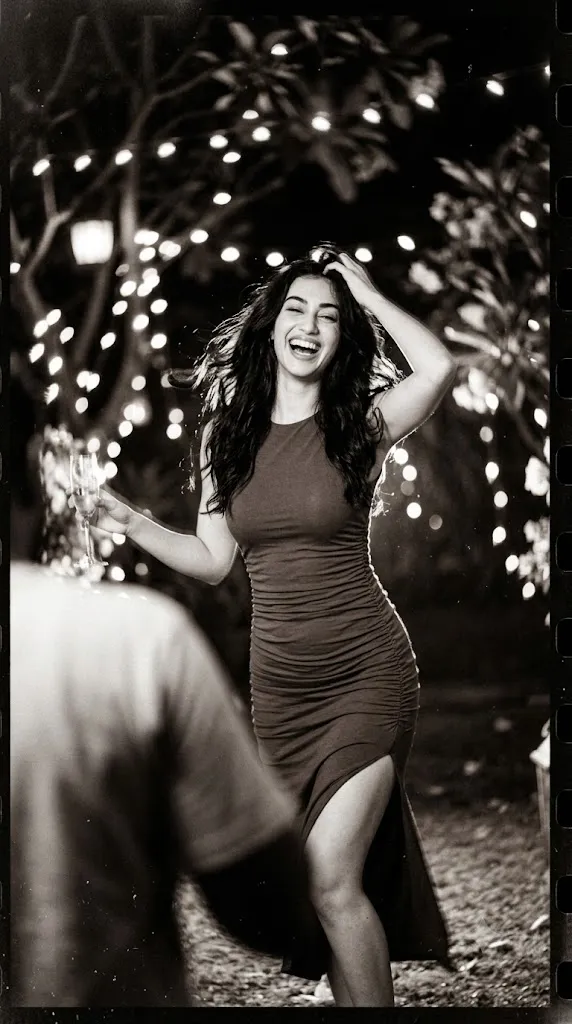
Fashion photography has always evolved with changing trends, but the glamour of the 1990s remains one of the most admired styles in the industry. The 90s Supermodel Retro Glam Cinematic Fashion Portrait Prompt captures the bold confidence, playful personality, and timeless elegance that defined the golden era of fashion photography. Inspired by iconic supermodels and classic analog film aesthetics, this prompt creates portraits filled with cinematic storytelling, dramatic lighting, and authentic vintage charm.
"90s Supermodel Retro Glam Cinematic Fashion Portrait Prompt"
Create a playful and sensual night fashion portrait inspired by iconic 90s supermodel editorials. A confident woman is captured in candid, dynamic movement with bold feminine energy, spontaneous laughter, and an expressive yet elegant pose. The atmosphere features retro-glam styling, cinematic chaos, dramatic high-contrast lighting, deep shadows, authentic analog film grain, realistic 35mm vintage film texture, editorial composition, luxury fashion photography, ultra-detailed skin texture, soft cinematic color grading, and timeless magazine-quality realism.
The portrait features a confident woman radiating bold feminine energy while expressing natural joy through spontaneous laughter and dynamic movement. Her candid pose creates a sense of authenticity, while the retro-glam styling reflects the unforgettable fashion editorials of the 90s. Deep shadows, high-contrast lighting, and heavy analog film grain recreate the nostalgic appearance of photographs captured on vintage 35mm film.
Whether you are an AI artist, fashion enthusiast, photographer, or content creator, this prompt provides an excellent foundation for producing luxury editorial portraits with timeless appeal. The combination of cinematic composition, retro atmosphere, and expressive emotion transforms a simple portrait into a magazine-worthy masterpiece.
How To Use Photo Editing?
Once your AI-generated portrait is ready, professional photo editing can enhance its overall quality and make it look like an authentic editorial photograph. The goal is to preserve realism while emphasizing the nostalgic film-inspired aesthetic.
Begin by adjusting the exposure and contrast to achieve balanced lighting. Increase contrast slightly to create dramatic depth while maintaining visible facial details. Lower the highlights to avoid overexposed areas and lift the shadows just enough to preserve texture.
Apply warm vintage color grading with soft golden highlights and slightly faded tones. Reduce digital sharpness and introduce subtle film grain to imitate classic analog photography. This step gives the portrait its signature retro appearance.
Enhance facial features naturally by removing only temporary blemishes while preserving realistic skin texture. Avoid excessive smoothing, as authentic fashion photography celebrates natural beauty.
Finally, apply a soft vignette around the edges and gently sharpen the eyes, lips, and hair. These adjustments help direct the viewer's attention toward the subject while maintaining a luxurious editorial feel.
Tools You Can Use For Prompt Copy and Create Photo
Several AI image generation platforms can transform this prompt into a stunning fashion portrait. Below are some of the best options available.
1. ChatGPT Image Generation
ChatGPT can create highly detailed cinematic portraits from descriptive prompts. It excels at understanding emotions, lighting, composition, fashion styling, and storytelling.
2. Midjourney
Midjourney is one of the most popular AI image generators for editorial photography. It produces artistic lighting, luxury fashion compositions, and realistic analog-inspired textures.
3. Flux AI
Flux AI is known for generating highly realistic portraits with exceptional facial accuracy, cinematic lighting, and natural skin textures.
4. Leonardo AI
Leonardo AI provides advanced prompt customization, allowing users to control lighting, clothing, facial expressions, poses, and artistic styles.
5. Google Gemini
Google Gemini offers impressive AI image generation with realistic details and excellent prompt interpretation, making it suitable for fashion editorials.
6. Adobe Firefly
Adobe Firefly integrates AI generation with Adobe Creative Cloud, making it easy to continue editing in Photoshop or Lightroom.
7. Ideogram AI
Ideogram AI creates clean, realistic portraits with strong prompt understanding and high-quality image output.
How To Edit Photo?
Creating a professional retro-glam portrait is easy when you follow these editing steps.
Step 1: Copy the Prompt
Copy the complete AI prompt and paste it into your preferred AI image generator such as ChatGPT, Midjourney, Flux AI, Leonardo AI, or Google Gemini.
Step 2: Generate the Image
Generate the portrait in HD or 4K resolution. If necessary, regenerate until you achieve the desired expression, pose, and cinematic lighting.
Step 3: Download the Image
Save the generated image in the highest available resolution to maintain maximum quality during editing.
Step 4: Import into Editing Software
Open the image in Adobe Lightroom, Adobe Photoshop, Snapseed, PicsArt, or Canva for post-processing.
Step 5: Adjust Lighting
Increase exposure slightly, deepen the shadows, reduce highlights, and add moderate contrast to achieve a dramatic editorial appearance.
Step 6: Apply Retro Color Grading
Use warm highlights, faded blacks, and slightly desaturated colors to recreate the nostalgic look of classic 35mm analog film.
Step 7: Add Film Grain
Apply subtle analog grain and a gentle vignette to produce an authentic vintage magazine aesthetic without making the image appear noisy.
Step 8: Enhance Details
Sharpen the eyes, lips, hair, and clothing while preserving natural skin texture. Avoid excessive retouching to maintain realism.
Step 9: Final Touches
Review the composition, adjust colors if necessary, and ensure the portrait maintains its cinematic balance between highlights and shadows.
Step 10: Export the Image
Export the final image in high-quality JPG or PNG format. Your 90s Supermodel Retro Glam Cinematic Fashion Portrait is now ready for Instagram, Pinterest, fashion blogs, portfolios, or editorial publications.
Conclusion
The 90s Supermodel Retro Glam Cinematic Fashion Portrait Prompt perfectly combines timeless fashion, cinematic storytelling, and nostalgic analog aesthetics. Inspired by the legendary supermodel era, this prompt emphasizes confidence, elegance, playful emotion, and vintage glamour through dramatic lighting and authentic film textures.
Whether you are creating AI-generated artwork, fashion editorials, social media content, or portfolio images, this prompt provides a powerful foundation for producing luxurious and visually captivating portraits. By combining a detailed prompt with thoughtful post-processing techniques, you can transform a simple concept into a striking editorial masterpiece that reflects the beauty and sophistication of classic 90s fashion photography.