Introduction
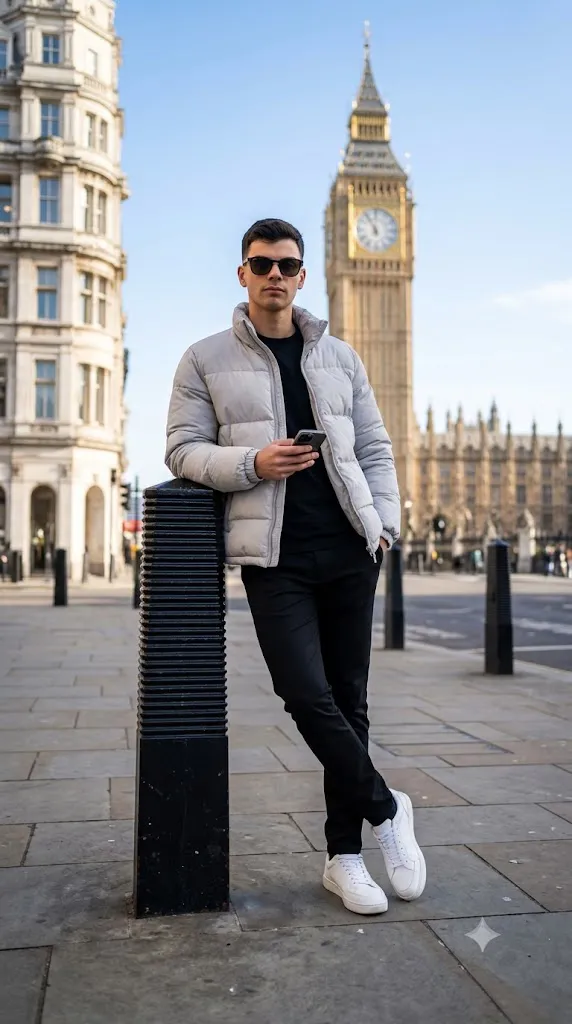
The Big Ben London Street Portrait AI Prompt is a premium AI photography prompt designed to create stunning editorial-style portraits in one of the world's most iconic locations—London. Combining luxury street fashion, cinematic photography, and realistic urban architecture, this prompt helps generate professional-quality images suitable for social media, portfolios, blogs, and digital artwork. Featuring the famous Big Ben and the Houses of Parliament in the background, this prompt delivers a timeless blend of fashion and travel photography.
"Big Ben London Street Portrait AI Prompt"
The subject is positioned confidently on a London street, leaning against a black ribbed bollard while wearing a stylish light grey puffer jacket, black T-shirt, slim-fit black trousers, and clean white sneakers. Dark sunglasses and a smartphone add a modern lifestyle aesthetic, while the low-angle, wide-angle composition creates a dramatic editorial perspective. Natural daylight enhances every texture, from the clothing fabric to the stone pavement, giving the final image an authentic and premium appearance.
This prompt works exceptionally well with AI image generators because it includes detailed descriptions of the pose, clothing, lighting, camera angle, environment, and background. By providing these details, the AI can produce realistic shadows, accurate architectural elements, natural skin tones, and professional depth of field. Whether you are creating content for Instagram, Pinterest, YouTube thumbnails, fashion websites, or AI art portfolios, this prompt provides an excellent foundation for creating visually impressive results.
How To Use Photo Editing?
Generating the AI image is only the beginning. Proper photo editing helps transform a good image into a polished editorial masterpiece.
Step 1: Generate the Portrait
Copy the complete prompt and paste it into your preferred AI image generator. Use a portrait-friendly aspect ratio such as 4:5, 3:4, or 9:16 depending on where you plan to publish the image.
Step 2: Inspect the Image
After generation, carefully review the portrait. Check that:
- The face matches the uploaded reference image.
- Big Ben and the Houses of Parliament are clearly recognizable.
- The subject's pose appears natural.
- Hands and fingers look realistic.
- Clothing details are clean and accurate.
If necessary, regenerate the image for better composition.
Step 3: Improve Lighting
Adjust brightness and exposure while preserving natural highlights. Avoid making the image overly bright, as London street photography often looks best with balanced daylight.
Step 4: Enhance Colors
Increase vibrance slightly while keeping the overall color palette natural. Maintain the rich black tones of the clothing and the warm stone colors of the historic buildings.
Step 5: Sharpen Key Details
Apply sharpening to:
- Face
- Hair
- Sunglasses
- Jacket texture
- Sneakers
- Big Ben clock tower
- Pavement details
Leave the background slightly softer to maintain a professional depth-of-field effect.
Step 6: Add Cinematic Effects
Finish the image with a subtle vignette, soft contrast, and light film grain to create a high-end editorial look.
Tools You Can Use For Prompt Copy and Create Photo
The following AI image generators are excellent choices for producing realistic portraits using this prompt.
1. ChatGPT Image
ChatGPT Image understands detailed prompts and generates realistic portraits with accurate facial features, natural lighting, and cinematic compositions.
2. Midjourney
Known for creating luxury editorial photography with beautiful lighting, realistic environments, and premium artistic quality.
3. FLUX AI
FLUX produces highly realistic portraits with detailed facial expressions, clothing textures, and architectural backgrounds.
4. Stable Diffusion
Perfect for advanced users who want greater creative control through custom models, LoRA files, and ControlNet features.
5. Ideogram AI
Excellent for realistic portrait generation with strong prompt interpretation and clean image composition.
6. Leonardo AI
Provides multiple preset styles for cinematic portraits, fashion photography, and lifestyle content with impressive quality.
7. Adobe Firefly
Ideal for users already working within the Adobe Creative Cloud ecosystem, offering seamless editing and AI image generation.
8. Canva AI
A beginner-friendly platform that combines AI image creation with simple editing tools for social media graphics and marketing content.
How To Edit Photo?
After generating your AI portrait, follow these editing steps to achieve a polished editorial finish.
Step 1: Import the Image
Open your portrait in Lightroom, Photoshop, Snapseed, Canva, or another professional editing application.
Step 2: Crop the Composition
Use a portrait crop that keeps the subject on the left side while showcasing Big Ben and the Houses of Parliament on the right. This balanced framing enhances the storytelling.
Step 3: Correct Exposure
Fine-tune highlights and shadows to reveal detail in the jacket, pavement, and architecture without losing realism.
Step 4: Adjust Contrast
Increase contrast moderately to make the clothing textures, sunglasses, and city details stand out.
Step 5: Apply Cinematic Color Grading
Use a subtle color grade with:
- Cool blue sky tones
- Warm stone colors
- Neutral skin tones
- Rich black clothing
- Soft grey highlights
This combination creates a premium editorial atmosphere.
Step 6: Enhance Skin Naturally
Remove small imperfections while preserving natural skin texture. Avoid excessive smoothing that can make the portrait appear artificial.
Step 7: Refine Background Details
Slightly reduce clarity in distant buildings while keeping Big Ben recognizable. This increases subject separation without losing the iconic London setting.
Step 8: Increase Texture
Enhance texture on:
- Puffer jacket
- Pavement stones
- Hair
- Big Ben architecture
- Shoes
These details contribute to a realistic, high-resolution appearance.
Step 9: Add a Soft Vignette
A gentle vignette draws attention toward the subject while maintaining the cinematic mood.
Step 10: Export in High Resolution
Save the final image in 4K or 8K resolution for the best quality. High-resolution exports are ideal for professional portfolios, prints, websites, and social media.
Conclusion
The Big Ben London Street Portrait AI Prompt is an outstanding choice for creating luxury urban portraits that combine fashion, travel, and cinematic photography. With its detailed composition, realistic clothing, iconic London landmarks, and natural lighting, this prompt consistently generates high-quality editorial images that look professionally photographed.
To maximize the final result, pair a well-written AI prompt with careful post-processing. Small adjustments to lighting, color grading, sharpness, and composition can dramatically improve realism and visual appeal. Whether you are an AI artist, digital creator, photographer, or fashion enthusiast, this prompt provides everything needed to produce elegant, modern, and visually captivating portraits inspired by one of the world's most famous cities.