Introduction
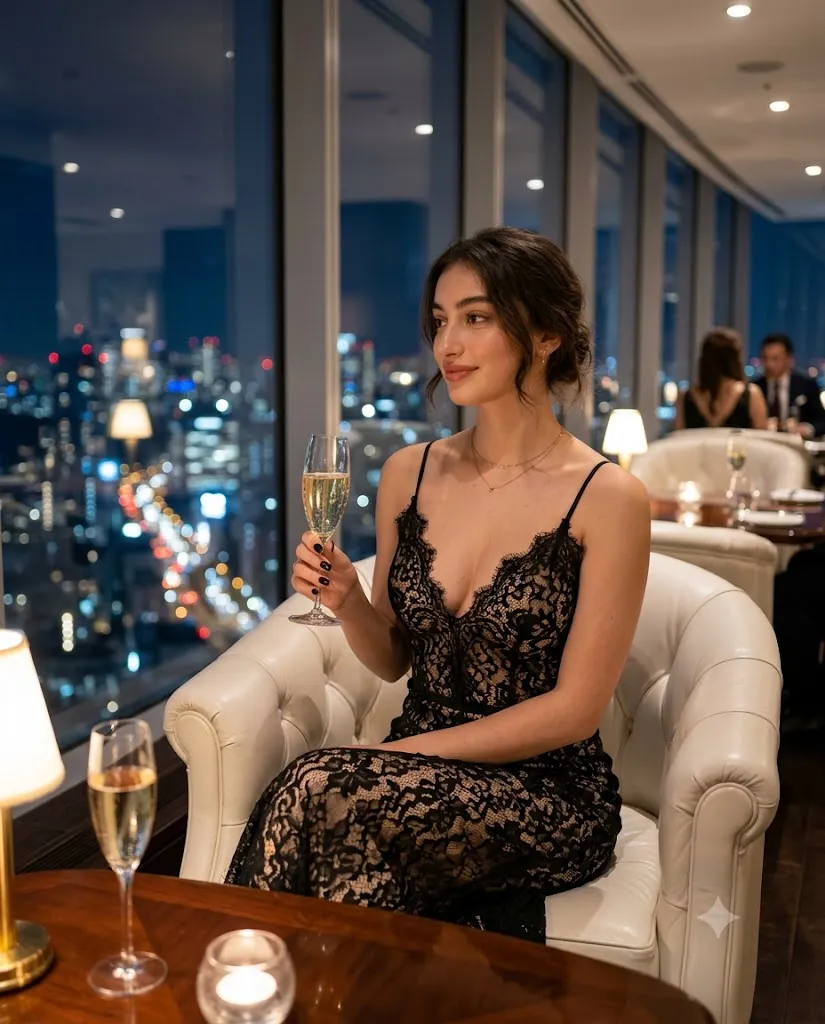
Luxury portrait photography is all about elegance, confidence, and refined style. The Black Lace Evening Restaurant Portrait Prompt is designed to create a glamorous editorial image inspired by fine dining, luxury fashion campaigns, and cinematic lifestyle photography. This prompt combines sophisticated clothing, warm ambient lighting, premium interiors, and natural posing to produce a portrait that feels both timeless and modern.
"Black Lace Evening Restaurant Portrait Prompt"
Create an ultra-realistic cinematic fashion portrait of an elegant young woman sitting inside a luxury restaurant at night. She wears a sophisticated black lace evening dress with thin straps and graceful detailing while holding a sparkling champagne glass in her right hand. She sits comfortably on a white leather armchair, looking away with a relaxed expression and a soft smile. The luxurious restaurant features panoramic windows overlooking a glowing metropolitan skyline at night. Warm ambient lighting, realistic skin texture, intricate lace details, natural reflections on the champagne glass, shallow depth of field, editorial fashion photography, premium interior design, cinematic composition, and ultra-high-resolution quality create a timeless luxury atmosphere.
The scene features an elegant young woman seated comfortably at a table inside an upscale restaurant. She wears an exquisite black lace evening dress with delicate thin straps and a graceful neckline that enhances the overall editorial aesthetic. In one hand, she gently holds a sparkling champagne glass while looking away with a calm expression and a soft smile, creating a relaxed yet luxurious atmosphere.
The restaurant interior adds to the elegance with white leather armchairs, panoramic floor-to-ceiling windows, warm golden lighting, and breathtaking views of a glowing metropolitan skyline at night. High-detail skin textures, realistic lace fabric, reflections on the champagne glass, and soft cinematic lighting complete the composition. This prompt is perfect for creating fashion editorials, luxury lifestyle portraits, magazine covers, social media content, and AI-generated artwork with a premium look.
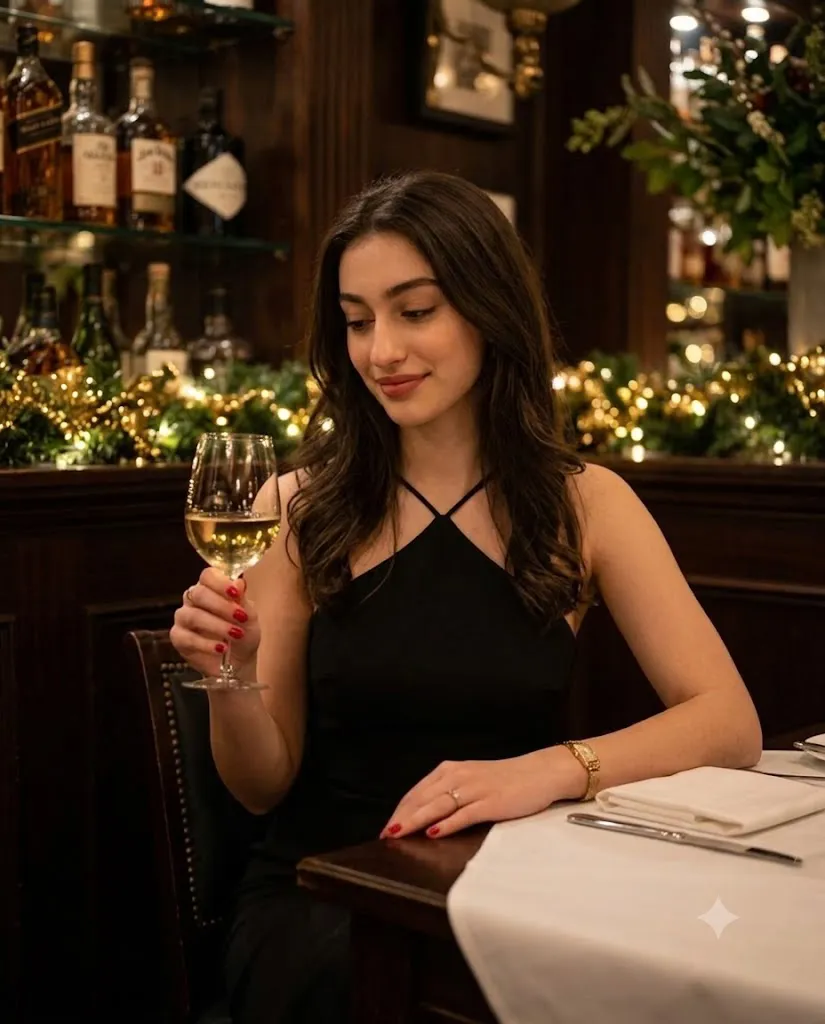
"Elegant Evening Restaurant Cinematic Portrait Prompt"
Do not change the face or its features. Interior shoot, waist-level shot, action in a dark, cozy restaurant in the evening, a calm, nuanted scene: clothing as in photo reference 2; camera at waist level with a slight tilt from above to eye level, the woman sits in the center of the frame, slightly turned to the side, focus on the face and the hand with a glass she has groomed eyebrows, defined lashes, neutral lipstick, facial features remain unchanged: black dress with a triangular neckline, teft hand holding a glass of white wine, head bowed, turned three bartus, gaze lowered, gentle smile, nails red, right hand resting on the table, on the right wrist a gold-thin bracelet/watch, there is a ring scround-dark wooden panel, shelves with bottles and decorati Light, greenery with garlands and a red-uphitterend bes tablecloth and neatly folded napkin on the table, ghe from above/side and accent lighting on seves not evening vibe with a light cinematographic biet tiltro tran FUSE
How To Use Photo Editing?
After generating your AI portrait, professional photo editing helps transform it into a magazine-quality fashion image. Begin by adjusting the exposure to maintain a balanced nighttime atmosphere while preserving the warm interior lighting. Increase the contrast slightly to create depth without making the shadows too harsh.
Adjust the white balance by adding soft golden tones that enhance the luxurious restaurant environment. Reduce highlights on reflective surfaces such as the champagne glass while preserving realistic shine.
Use selective adjustments to brighten the subject's face and maintain focus on her expression. Increase texture slightly on the lace dress to reveal intricate fabric details while keeping the skin smooth and natural.
Apply subtle cinematic color grading using warm highlights and slightly cool shadows to achieve a premium editorial appearance. Finish with gentle sharpening on the eyes, hair, lace fabric, and jewelry while maintaining a beautifully blurred background.
Tools You Can Use For Prompt Copy and Create Photo
Many AI image generation platforms can accurately create luxury fashion portraits from detailed prompts. Here are some of the best choices.
1. ChatGPT Image Generation
ChatGPT creates highly realistic editorial portraits with excellent lighting, natural expressions, luxurious environments, and photorealistic details.
2. Midjourney
Midjourney is well known for producing artistic luxury fashion portraits with cinematic lighting, elegant compositions, and premium-quality textures.
3. Flux AI
Flux AI delivers realistic skin textures, accurate facial details, and impressive lighting that works perfectly for fashion and lifestyle portraits.
4. Leonardo AI
Leonardo AI provides advanced prompt customization, allowing users to refine poses, outfits, backgrounds, and editorial lighting.
5. Google Gemini
Google Gemini produces realistic AI portraits with strong prompt understanding and high-quality visual realism.
6. Adobe Firefly
Adobe Firefly combines AI image generation with Adobe Creative Cloud, making professional editing and refinement simple.
7. Ideogram AI
Ideogram AI generates clean, detailed fashion portraits with realistic proportions and premium visual quality.
How To Edit Photo?
Follow these simple steps to transform your AI-generated portrait into a professional luxury editorial image.
Step 1: Copy the Prompt
Copy the complete AI prompt and paste it into your preferred AI image generator, such as ChatGPT, Midjourney, Flux AI, Leonardo AI, or Google Gemini.
Step 2: Generate the Portrait
Generate the image in the highest available quality. If needed, regenerate the portrait until the pose, facial expression, lighting, and restaurant background meet your expectations.
Step 3: Download the Image
Download the portrait in 4K or 8K resolution to preserve every detail for editing.
Step 4: Open in a Photo Editing App
Import the image into Adobe Lightroom, Adobe Photoshop, Snapseed, PicsArt, or any professional editing software.
Step 5: Adjust Lighting
Increase exposure slightly, reduce highlights, lift shadows, and fine-tune contrast to maintain the luxurious evening ambiance.
Step 6: Enhance Colors and Details
Apply warm color grading, enhance the black lace texture, improve the reflections on the champagne glass, and maintain natural skin tones for a refined editorial look.
Step 7: Retouch the Portrait
Sharpen the eyes, eyelashes, hair, and dress details while performing gentle skin retouching that preserves realistic texture. Avoid excessive smoothing to keep the portrait authentic.
Step 8: Export the Final Image
Save the edited portrait as a high-quality JPG or PNG file in maximum resolution. Your luxury restaurant portrait is now ready for Instagram, Pinterest, fashion portfolios, magazine layouts, or professional branding.
Conclusion
The Black Lace Evening Restaurant Portrait Prompt beautifully combines elegance, luxury, and cinematic storytelling into a single editorial-style portrait. From the sophisticated black lace evening dress and sparkling champagne glass to the warm restaurant lighting and breathtaking city skyline, every detail contributes to a premium visual experience.
Whether you are an AI artist, fashion photographer, content creator, or digital designer, this prompt provides an excellent foundation for producing realistic, high-end portraits. By pairing a powerful AI image generator with thoughtful photo editing techniques, you can create magazine-quality images suitable for social media, portfolios, websites, and luxury branding. Experiment with different lighting styles, camera angles, and color grading techniques to develop your own signature editorial aesthetic while maintaining timeless elegance.