Introduction
Modern portrait photography has evolved beyond traditional studio setups. Today, some of the most engaging images are those that capture everyday moments with a cinematic touch. The Cinematic Digital Glow Lifestyle Portrait Prompt is designed to recreate this contemporary aesthetic, blending realism, comfort, technology, and subtle storytelling into a single frame.
"Cinematic Digital Glow Lifestyle Portrait Prompt"
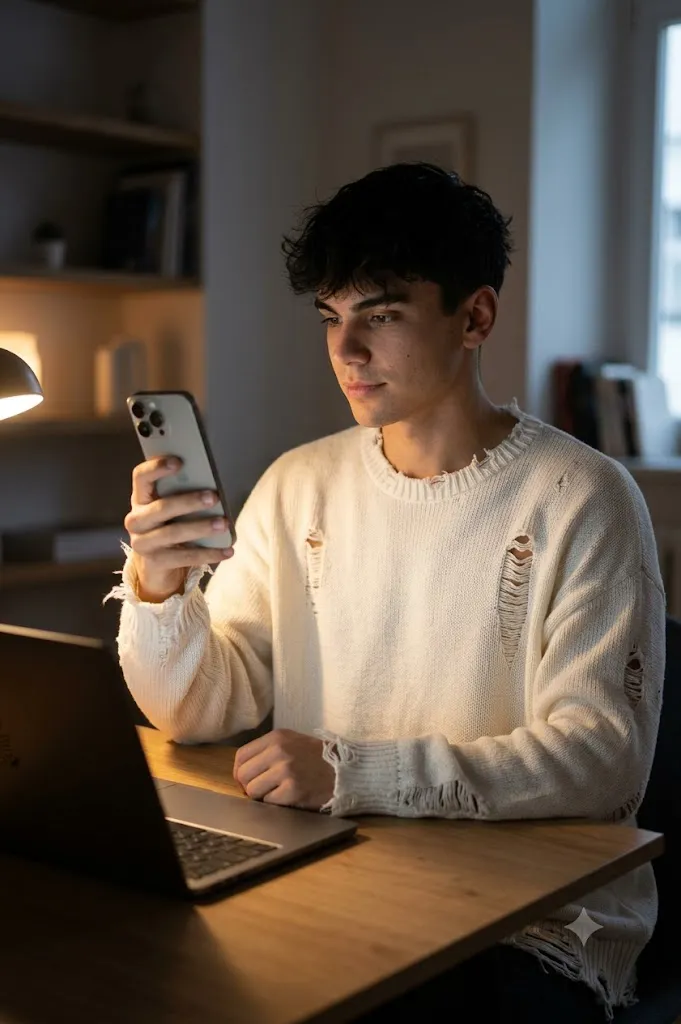
Create a realistic candid indoor photograph using the uploaded face reference with complete facial fidelity. A young man sits casually at a desk in front of an open laptop, holding an iPhone 16 Pro in one hand while looking naturally at the screen. He wears a slightly oversized white distressed knit sweater featuring small rips and frayed details. His black hair is naturally tousled and softly frames his face. Expression is calm, confident, and subtly focused. Warm ambient lighting comes from the laptop display and a nearby desk lamp, creating soft highlights across the face and sweater. Dim room atmosphere, realistic reflections on the laptop surface, modern minimalist interior, cinematic lifestyle photography, shallow depth of field, photorealistic textures, natural skin detail, cozy digital glow, 8K resolution, ultra-realistic quality.
The concept centers around a young man sitting casually at a desk in a softly illuminated room. He holds an iPhone 16 Pro in one hand while seated in front of an open laptop. The scene feels natural and unposed, as though the camera captured a genuine moment rather than a planned photoshoot. This authenticity is what makes lifestyle portrait photography so appealing.
A key visual element of this prompt is the lighting. Instead of relying on powerful studio strobes, the image uses the warm glow of a laptop screen and a desk lamp to illuminate the subject. These practical light sources create a cozy atmosphere while adding depth and realism. Soft highlights fall across the face, hair, and sweater, while shadows help define the mood of the scene.
The oversized distressed white knit sweater contributes significantly to the aesthetic. Small rips, frayed details, and relaxed styling create an effortlessly fashionable appearance that feels modern without appearing overly styled. Combined with naturally tousled hair and a calm expression, the overall look communicates confidence and comfort.
Another important characteristic is facial fidelity. When using a reference image, the goal is to preserve facial structure, skin tone, proportions, and identity exactly as they appear in the original photo. The portrait should look like the same person photographed in a different environment, not a reimagined version.
The final result is a photorealistic image that feels intimate, cinematic, and contemporary. Whether used for social media content, personal branding, portfolio creation, or AI art projects, this style offers a sophisticated balance between realism and visual storytelling.
How To Use Photo Editing?
Photo editing plays a crucial role in transforming a good portrait into a professional-quality image. Even when an AI-generated image already appears realistic, thoughtful adjustments can elevate the atmosphere and visual impact.
The first step is exposure balancing. The laptop screen and desk lamp create localized light sources, which means the image should maintain realistic brightness variation. The face should be illuminated naturally without losing detail in the shadows.
Color grading is another important aspect. Warm tones from artificial lighting create comfort and intimacy. Enhancing these tones slightly while maintaining natural skin colors can strengthen the cinematic mood.
Contrast adjustments help separate the subject from the background. A subtle increase in contrast can emphasize textures in the sweater and hair while preserving a soft appearance overall.
Reflections deserve attention as well. The laptop screen may contain gentle reflections that contribute to realism. Enhancing these reflections slightly can add depth without distracting from the subject.
Skin retouching should remain minimal. Preserve natural pores, texture, and facial details. Over-editing often removes authenticity, which is essential for lifestyle photography.
Background refinement can also improve the image. Softening distractions while maintaining environmental detail helps keep attention focused on the subject. The room should feel lived-in and realistic rather than artificially blurred.
Finally, subtle film grain can be added to create a premium editorial appearance. The effect should be gentle and natural rather than overpowering.
Tools You Can Use For Prompt Copy and Create Photo
Creating high-quality AI portraits requires reliable tools for both image generation and editing.
AI Image Generation Tools
ChatGPT
ChatGPT can help create highly detailed prompts that describe lighting, styling, mood, composition, and technical camera settings.
Midjourney
Midjourney excels at cinematic portrait generation and artistic visual storytelling.
Leonardo AI
Leonardo AI produces highly realistic textures and detailed facial rendering.
Ideogram
Ideogram is useful for generating clean compositions and realistic character portraits.
Adobe Firefly
Adobe Firefly integrates AI image creation with professional creative workflows.
Photo Editing Software
Adobe Photoshop
Photoshop offers advanced retouching, color grading, and compositing tools.
Adobe Lightroom
Lightroom is excellent for adjusting exposure, color temperature, and cinematic tones.
Capture One
Capture One provides industry-leading color management and portrait editing capabilities.
Affinity Photo
Affinity Photo serves as a powerful alternative to Photoshop for professional editing.
Snapseed
Snapseed offers convenient mobile editing tools for quick adjustments and enhancements.
How To Edit Photo?
Step 1: Generate the Base Image
Use an AI image generator to create the initial portrait from the prompt.
Step 2: Correct Exposure
Balance brightness between the laptop glow and surrounding shadows.
Step 3: Refine White Balance
Maintain warm indoor tones while preserving accurate skin colors.
Step 4: Enhance Texture
Improve detail in the sweater fabric, hair strands, and facial features.
Step 5: Adjust Contrast
Create subtle separation between subject and background.
Step 6: Improve Reflections
Enhance realistic reflections on the laptop and phone surfaces.
Step 7: Retouch Carefully
Remove distractions while preserving natural skin texture.
Step 8: Add Cinematic Color Grading
Introduce warm highlights and slightly cooler shadow tones.
Step 9: Refine Depth of Field
Keep the subject sharp while softly blurring the background.
Step 10: Add Subtle Film Grain
Apply fine grain to create a premium editorial appearance.
Step 11: Check Composition
Ensure the subject remains the primary focal point.
Step 12: Export High Resolution
Save the final image in PNG, TIFF, or high-quality JPEG format for maximum detail.
Conclusion
The Cinematic Digital Glow Lifestyle Portrait Prompt combines modern technology, natural styling, and atmospheric lighting to create a portrait that feels authentic and visually compelling. Rather than relying on dramatic poses or elaborate sets, the image finds beauty in an ordinary moment enhanced through thoughtful composition and lighting.
The warm glow of a laptop screen, the soft illumination of a desk lamp, and the relaxed styling of a distressed knit sweater work together to create an inviting and contemporary atmosphere. This balance of realism and cinematic storytelling makes the portrait suitable for social media, branding, editorial projects, and personal portfolios.
AI image-generation tools now allow creators to achieve professional-quality results with remarkable ease. However, the strongest images still depend on well-crafted prompts and careful editing. Attention to lighting, color grading, texture, and composition helps transform a simple portrait into a memorable visual experience.
By mastering this style, photographers, designers, and content creators can produce imagery that feels modern, personal, and emotionally engaging. The Cinematic Digital Glow Lifestyle Portrait remains one of the most versatile and appealing aesthetics in contemporary portrait photography, offering a perfect blend of comfort, realism, and cinematic sophistication.