Introduction
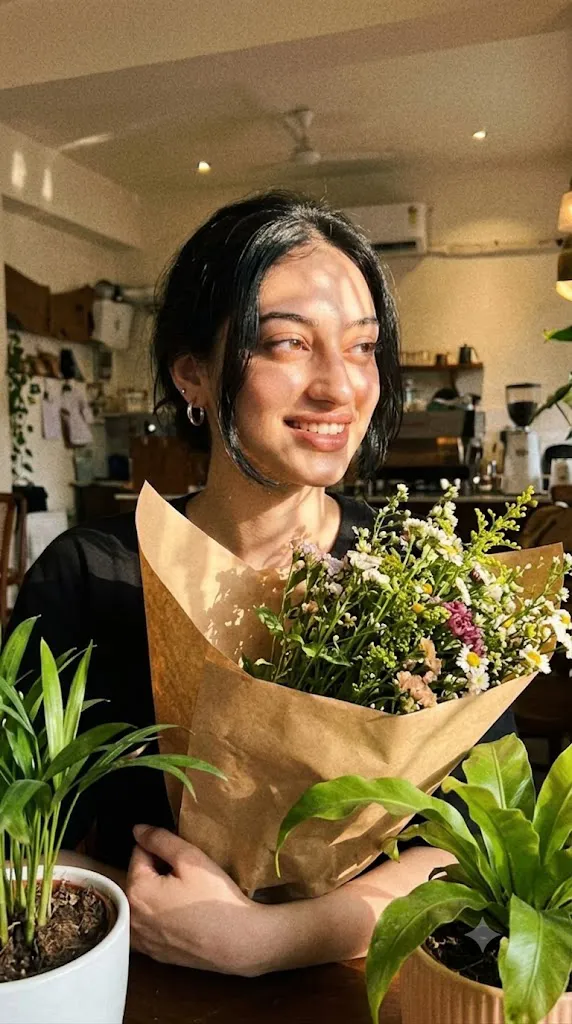
The Cinematic Everyday Floral Portrait Prompt combines the authenticity of a spontaneous smartphone snapshot with the beauty of cinematic editorial photography. Instead of a perfectly posed studio image, this concept captures a natural, emotionally rich moment that feels as though it was taken casually during an ordinary day. The result is an intimate portrait filled with warmth, movement, soft light, and youthful charm.
"Cinematic Everyday Floral Portrait Prompt"
Create an ultra-realistic everyday cinematic portrait using the uploaded image strictly as the facial identity reference. Preserve the exact facial structure, skin tone, hairstyle, expression, and proportions without beautification. Place the subject outdoors surrounded by lush greenery while holding a large bouquet wrapped in rustic kraft paper. Dress the subject in casual black clothing with silver hoop earrings. Illuminate the portrait using strong warm side lighting filtered through leaves to create natural dappled shadows across the face. Capture the image with slight motion blur, relaxed framing, awkward composition, realistic skin texture, soft analog film grain, subtle cinematic color grading, and an authentic smartphone snapshot aesthetic while maintaining ultra-detailed 8K quality. No text or watermark
One of the defining characteristics of this prompt is its intentional imperfection. The image should resemble a quick iPhone photo taken without careful planning. Slight motion blur, an awkward camera angle, imperfect framing, and relaxed composition contribute to the realism. Rather than reducing quality, these imperfections make the photograph feel genuine and emotionally engaging.
The subject appears surrounded by lush greenery while holding a large bouquet of fresh flowers wrapped in rustic kraft paper. The bouquet introduces natural color and texture while reinforcing the peaceful outdoor atmosphere. Casual black clothing provides visual contrast against the vibrant greenery and delicate flowers, allowing the subject to remain the primary focus.
Identity preservation is essential throughout the image generation process. When using an uploaded reference photograph, the AI should preserve the exact facial structure, proportions, skin tone, hairstyle, eyes, nose, lips, jawline, and natural facial expression. No beautification, reshaping, or facial modifications should be introduced. The final portrait must remain instantly recognizable as the original subject.
Lighting plays an equally important role. Strong warm side lighting filters through nearby trees, producing beautiful dappled shadows across the face and clothing. Individual strands of hair become softly illuminated, while realistic highlights and shadows create depth without appearing artificially dramatic.
Although the composition resembles an everyday smartphone snapshot, the overall image still benefits from subtle editorial refinement. Fine film grain, natural motion blur, realistic skin texture, and cinematic color grading help elevate the photograph while preserving its spontaneous character.
Whether used for AI portrait generation, lifestyle photography, artistic social media content, fashion inspiration, or editorial storytelling, this prompt celebrates natural beauty by transforming ordinary moments into memorable visual narratives.
How To Use Photo Editing?
After generating the portrait, thoughtful editing enhances realism while maintaining the casual smartphone aesthetic.
Begin by balancing exposure. Bright outdoor lighting should remain soft without overexposing facial highlights or flower petals.
Adjust white balance toward warm natural daylight. Skin tones should appear healthy and realistic while preserving the golden side lighting.
Retain natural skin texture. Editorial-quality portraits look more authentic when pores and subtle facial details remain visible rather than being heavily smoothed.
Enhance the bouquet slightly using selective clarity adjustments. Individual flowers and kraft paper wrapping should display realistic texture while remaining soft.
Maintain the natural motion blur present in the original composition. Avoid sharpening every element excessively because slight softness contributes to the spontaneous snapshot feeling.
Apply gentle cinematic color grading with reduced contrast and warm highlights. Greens, blacks, skin tones, and floral colors should remain balanced and harmonious.
Finish with subtle analog-inspired film grain that complements the casual smartphone appearance without making the image look overly processed.
Tools You Can Use For Prompt Copy and Create Photo
Several AI platforms and editing applications can successfully produce this editorial lifestyle style.
AI Image Generation Tools
ChatGPT
Excellent for writing detailed prompts describing identity preservation, lighting, clothing, composition, camera behavior, and emotional storytelling.
Midjourney
Creates artistic editorial portraits with cinematic environments and natural lighting.
Leonardo AI
Produces realistic facial consistency with impressive detail and texture.
Ideogram
Useful for lifestyle portraits and modern editorial compositions.
Adobe Firefly
Integrates AI image generation with Adobe's professional creative workflow.
Photo Editing Software
Adobe Photoshop
Perfect for advanced retouching, object cleanup, and detailed portrait refinement.
Adobe Lightroom
Excellent for exposure correction, warm color grading, and cinematic finishing.
Capture One
Provides professional skin-tone rendering and advanced color management.
Affinity Photo
Offers high-quality editing tools suitable for editorial photography.
Snapseed
A practical mobile editor for improving warmth, contrast, detail, and subtle grain.
How To Edit Photo?
Step 1: Generate the Base Portrait
Create the complete outdoor scene while preserving facial identity exactly.
Step 2: Balance Exposure
Maintain soft highlights and detailed shadows across the portrait.
Step 3: Preserve Natural Skin
Avoid heavy beauty filters while keeping realistic facial texture.
Step 4: Refine Flower Details
Enhance bouquet colors and textures without making them appear artificial.
Step 5: Improve Hair Detail
Preserve individual hair strands illuminated by warm side lighting.
Step 6: Maintain Casual Composition
Avoid over-cropping or perfectly centering the subject. Keep the relaxed snapshot feeling.
Step 7: Apply Cinematic Color Grading
Introduce warm daylight tones, gentle greens, and balanced contrast.
Step 8: Add Fine Film Grain
Apply subtle analog grain to reinforce realism.
Step 9: Preserve Motion Blur
Retain slight blur where appropriate to communicate movement naturally.
Step 10: Review Facial Consistency
Verify that every facial feature remains identical to the uploaded reference image.
Step 11: Final Refinements
Remove distracting artifacts while preserving authentic lighting and texture.
Step 12: Export in High Resolution
Save the final image as PNG or TIFF to maintain maximum quality for portfolios, editorial projects, websites, or print.
Conclusion
The Cinematic Everyday Floral Portrait Prompt demonstrates that extraordinary portraits do not always require elaborate studio lighting or perfect composition. By embracing everyday photography characteristics such as spontaneous framing, slight motion blur, natural lighting, and authentic expressions, this style creates emotionally engaging images that feel genuine and memorable.
The combination of lush greenery, a beautifully wrapped bouquet, warm side lighting, realistic skin texture, and subtle cinematic grading produces an image that balances documentary realism with editorial elegance. Every visual element contributes to a portrait that feels both intimate and artistic.
Although AI image-generation technology can create remarkably realistic portraits, achieving premium results depends on thoughtful prompting and careful editing. Preserving facial identity, maintaining natural imperfections, balancing warm outdoor lighting, refining textures, and applying restrained color grading ensure the final image remains believable while retaining its cinematic atmosphere.
Whether you're creating lifestyle photography, fashion-inspired editorials, portfolio images, social media content, or artistic AI portraits, the Cinematic Everyday Floral Portrait Prompt provides a versatile foundation for producing authentic, photorealistic images that celebrate the beauty of ordinary moments.