Introduction
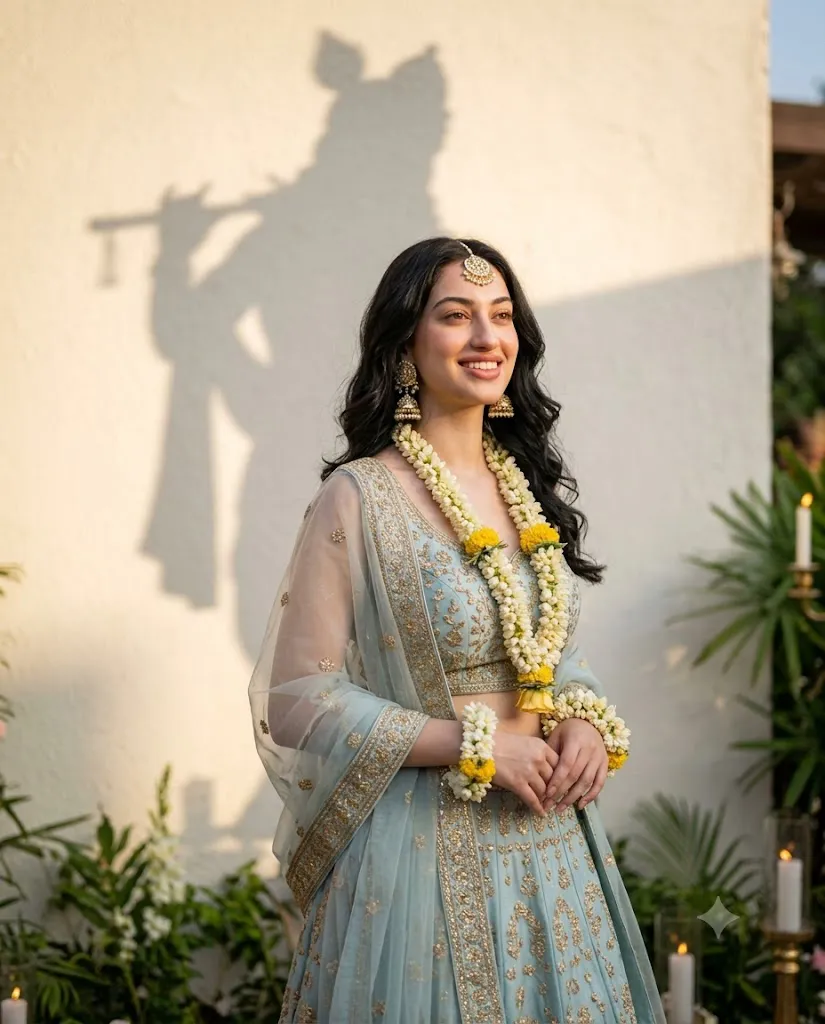
The Cinematic Krishna Shadow Editorial Portrait Prompt is a premium AI photography concept that blends traditional Indian culture with modern editorial portrait styling. This unique aesthetic combines elegant ethnic fashion, warm cinematic lighting, symbolic storytelling, and realistic photography to create an image that feels both luxurious and emotionally meaningful. Inspired by high-end fashion editorials and devotional artistic themes, this portrait style transforms a simple photograph into a timeless masterpiece.
"Cinematic Krishna Shadow Editorial Portrait Prompt"
Use the uploaded image strictly only for face and identity reference. Create a premium cinematic editorial portrait featuring the subject positioned slightly left of center, body subtly angled toward the right with the gaze directed upward, expressing a soft joyful smile. Dress the subject in a pastel blue lehenga richly decorated with intricate gold embroidery, paired with a matching flowing skirt and sheer dupatta gracefully draped over the arms. Add elegant floral jewelry including white and yellow flower garlands, matching floral wrist adornments, a traditional maang tikka, and ornate jhumka earrings. Style the hair in soft natural waves with gentle side-swept volume.Place the subject before an off-white textured wall featuring a large artistic shadow silhouette of Lord Krishna playing the flute, softly blended yet clearly visible as a symbolic background element. Enhance the scene with subtle greenery, warm candlelight accents, and dreamy golden-hour lighting. Maintain realistic skin texture with visible pores, cinematic shallow depth of field, luxurious editorial composition, balanced negative space, ultra-detailed embroidery, 8K HDR quality, professional photography aesthetics, and a vertical 4:5 aspect ratio.
The most distinctive feature of this style is the artistic shadow silhouette of Lord Krishna playing the flute, softly projected onto an off-white textured wall behind the subject. Rather than becoming the main focus, the shadow serves as a symbolic background element that represents devotion, peace, love, and cultural beauty. Combined with traditional attire, floral accessories, and golden-hour lighting, the portrait creates a poetic and graceful visual experience.
The subject typically wears a pastel blue lehenga decorated with intricate gold embroidery, complemented by delicate floral jewelry, elegant earrings, and soft natural makeup. The portrait uses realistic skin textures, cinematic depth of field, and luxurious editorial composition to produce an image suitable for fashion campaigns, festive celebrations, cultural photography, wedding inspiration, and premium social media content.
Thanks to modern AI image generation technology, creating this sophisticated portrait style has become easier than ever. With a detailed prompt and a high-quality reference photo, AI can preserve the subject's facial identity while transforming the entire scene into a professional editorial photograph.
This guide explains how to use AI photo editing, the best tools for creating cinematic Krishna shadow portraits, an example prompt, and editing techniques that help produce stunning professional-quality artwork.
How To Use Photo Editing?
Creating a Cinematic Krishna Shadow Editorial Portrait begins with selecting a high-quality reference image. The reference photo should have a clear face, natural expression, and sufficient resolution for AI to preserve identity accurately.
AI photo editing relies heavily on detailed prompts. The more specific your description is, the more accurately the AI can recreate clothing, lighting, composition, accessories, and symbolic background elements.
Step 1: Select A High-Resolution Portrait
Choose a portrait with visible facial features, balanced lighting, and natural expressions. Clear facial details help AI maintain realism throughout the transformation.
Step 2: Write A Detailed Prompt
Describe every important visual element, including:
- Traditional pastel blue lehenga
- Gold embroidery
- Floral jewelry
- Krishna flute shadow silhouette
- Warm golden-hour lighting
- Off-white textured wall
- Dreamy cinematic atmosphere
- Editorial photography composition
- Realistic skin texture
- Medium-full portrait framing
Detailed prompts consistently produce more realistic and visually balanced results.
Step 3: Upload The Reference Photo
Import your image into an AI image generator that supports face reference or image-to-image transformation. This allows the AI to preserve facial identity while redesigning the scene.
Step 4: Generate Multiple Variations
Create several versions and compare composition, facial resemblance, lighting quality, shadow placement, and overall mood.
Step 5: Choose The Best Result
Select the portrait that best balances realism, cultural elegance, and cinematic storytelling while maintaining the subject's natural appearance.
Step 6: Apply Final Enhancements
Use professional editing software to refine color grading, sharpen embroidery details, improve lighting transitions, and remove any AI-generated imperfections.
Combining AI generation with careful post-processing produces a premium editorial-quality portrait.
Tools You Can Use For Prompt Copy and Create Photo
Several AI and editing tools can help create high-end cinematic editorial portraits.
ChatGPT
Perfect for generating detailed prompts describing lighting, composition, clothing, symbolism, accessories, and photography style.
Midjourney
Produces artistic editorial portraits with exceptional cinematic lighting, luxurious textures, and visually rich compositions.
Flux AI
Excellent for preserving facial identity while creating realistic clothing, jewelry, and natural skin textures.
Stable Diffusion
Provides advanced image-to-image workflows with customizable artistic controls for highly detailed portrait generation.
GPT Image
Useful for creating realistic editorial portraits using carefully written prompts and face-reference guidance.
Adobe Photoshop
Ideal for refining AI-generated portraits by improving:
- Skin texture
- Color grading
- Lighting balance
- Background cleanup
- Embroidery details
- Shadow refinement
- Adobe Lightroom
Excellent for adjusting exposure, highlights, warmth, shadows, and creating a soft golden-hour cinematic atmosphere.
Canva
Useful for creating elegant presentation layouts, social media posts, portfolio covers, invitation designs, and printable portrait artwork.
Using AI image generation together with professional editing software ensures the final portrait looks polished, realistic, and publication-ready.
How To Edit Photo?
Professional editing enhances the realism and luxury of the portrait while preserving its natural beauty.
Enhance Skin Naturally
Maintain realistic skin texture with visible pores. Avoid excessive smoothing to keep the portrait authentic.
Refine Color Grading
Use warm golden tones balanced with soft neutral colors to achieve a cinematic editorial finish.
Improve Embroidery Details
Sharpen the gold embroidery so the craftsmanship remains crisp and visually striking.
Balance Background Lighting
Darken the off-white wall slightly to improve contrast while ensuring the Krishna shadow silhouette remains soft yet recognizable.
Add Atmospheric Depth
Use gentle background blur, soft highlights, and subtle ambient glow to create a dreamy, immersive environment.
Maintain Composition
Ensure the subject occupies approximately two-thirds of the frame while leaving elegant negative space around the silhouette.
Export In High Resolution
Save the completed artwork in 8K or higher resolution for digital publishing, large-format printing, wedding albums, or professional portfolios.
Conclusion
The Cinematic Krishna Shadow Editorial Portrait Prompt beautifully combines Indian tradition, symbolic storytelling, and modern editorial photography into one sophisticated visual style. Its elegant composition, luxurious ethnic fashion, warm cinematic lighting, and meaningful background symbolism make it one of the most distinctive AI portrait concepts available today.
Achieving professional-quality results depends on writing a detailed prompt that clearly explains composition, clothing, accessories, lighting, and atmosphere. High-quality reference images combined with AI generation and thoughtful post-processing produce portraits that feel realistic, artistic, and emotionally engaging.
Whether you are creating festive portraits, wedding-inspired artwork, devotional-themed photography, cultural fashion content, or premium social media visuals, this cinematic editorial style offers endless creative possibilities. With careful prompt writing and refined editing, you can consistently produce timeless portraits that celebrate both artistic excellence and cultural elegance.