Introduction
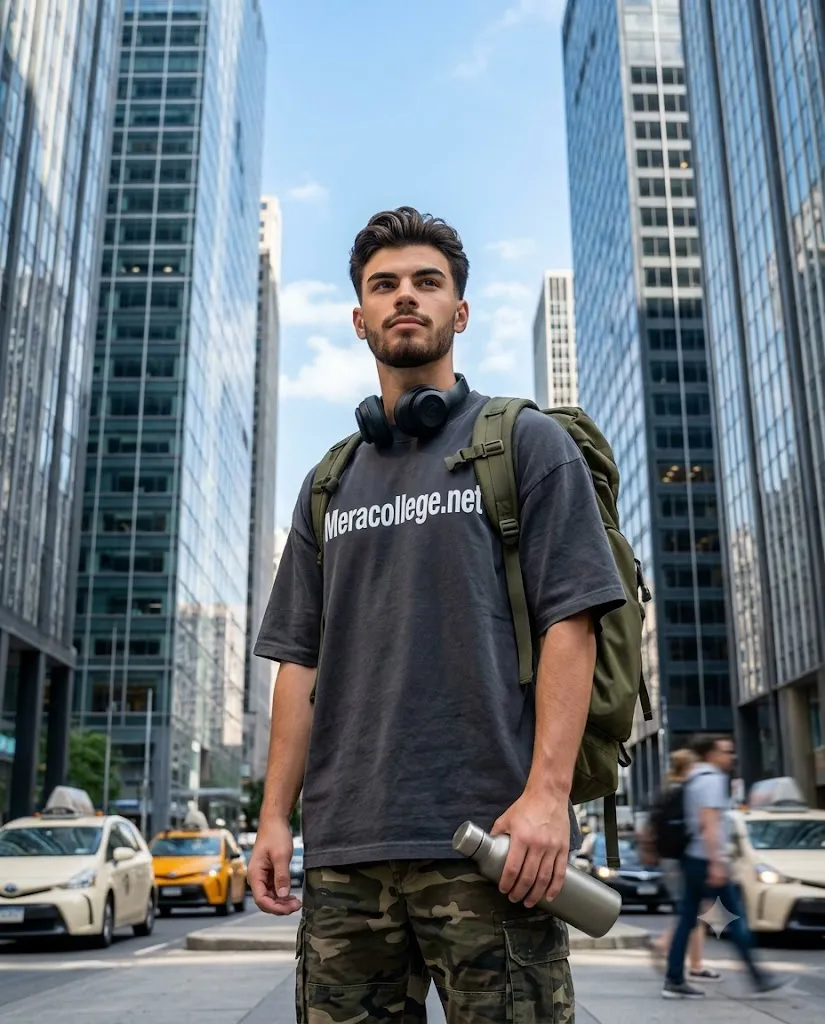
The Cinematic Low Angle City Editorial Portrait is a modern AI photography style that combines fashion editorial aesthetics, urban architecture, and cinematic storytelling. Inspired by luxury magazine covers, professional advertising campaigns, and high-end street photography, this style transforms an ordinary portrait into a dramatic city scene where the subject appears confident, stylish, and larger than life.
"Cinematic Low Angle City Editorial Portrait Prompt"
Use the uploaded image strictly as a visual reference for the subject's facial features, hairstyle, beard, skin tone, body proportions, and identity. Preserve the exact facial structure and expression without alteration.Create a hyper-realistic cinematic portrait of a young man standing confidently in the middle of a modern downtown street. Capture the image from a dramatic low-angle perspective, making the subject appear confident and adventurous while emphasizing towering glass-and-steel skyscrapers converging toward the sky.The subject wears an oversized charcoal-gray t-shirt with bold white "Meracollege.net" lettering across the chest, camouflage cargo shorts with realistic fabric folds, an olive-green backpack over both shoulders, black over-ear headphones around the neck, and holds a matte metal water bottle.The background includes pedestrians and yellow taxis with subtle motion blur while maintaining sharp focus on the subject. Use bright late-morning daylight, a clean blue sky with soft clouds, realistic neutral skin tones, crisp architectural details, shallow depth of field, DSLR-quality photography, professional editorial color grading, ultra-detailed textures, realistic beard and skin pores, fabric fibers, cinematic composition, 4:5 aspect ratio, and Ultra HD resolution.
One of the defining features of this style is the low-angle camera perspective. Instead of photographing the subject from eye level, the camera is positioned lower, looking upward. This perspective naturally makes the subject appear taller, stronger, and more heroic while emphasizing the towering skyscrapers in the background. The result is a dynamic composition that feels suitable for a fashion magazine or travel campaign.
The environment plays an equally important role. Modern glass-and-steel skyscrapers, busy city streets, moving taxis, and pedestrians create a realistic urban atmosphere without distracting attention from the subject. A shallow depth of field keeps the person sharp while softly blurring the background, creating a premium DSLR look.
This style also emphasizes realistic clothing textures, detailed facial features, cinematic lighting, and professional color grading. Every detail—from fabric folds and backpack materials to reflections on metal accessories—is carefully rendered for maximum realism.
With today's AI image generation tools, anyone can create this editorial photography style by combining a high-quality reference image with a detailed prompt. This guide explains how to use AI photo editing, the best tools for creating cinematic city portraits, an example prompt, and editing techniques to achieve a professional editorial result.
How To Use Photo Editing?
Creating a Cinematic Low Angle City Editorial Portrait begins with selecting a suitable reference image. Choose a portrait where the face is clearly visible, lighting is balanced, and the body posture is natural.
Unlike standard portrait editing, this style focuses on preserving the person's identity while placing them inside a dramatic urban environment. The AI should recreate the face accurately without changing expressions or facial proportions.
Step 1: Select A High-Resolution Portrait
Choose a clear image with visible facial features, hairstyle, beard, clothing, and body proportions. Higher-quality images help AI maintain identity more accurately.
Step 2: Copy A Detailed Prompt
A detailed prompt should describe every important visual element, including:
- Exact facial identity
- Hairstyle
- Beard texture
- Clothing details
- Camera angle
- City environment
- Lighting conditions
- Accessories
- Editorial photography style
- DSLR quality
The more detailed the prompt, the better the final image will match your creative vision.
Step 3: Upload The Reference Image
Upload the reference image into an AI image editor or generator that supports image-to-image transformation or reference-based editing.
Step 4: Generate Multiple Variations
Generate several versions of the portrait and compare:
- Facial resemblance
- Clothing accuracy
- Camera angle
- Lighting
- City background
- Overall realism
Step 5: Choose The Best Result
Select the version that preserves the original identity while creating the strongest cinematic atmosphere.
Step 6: Apply Final Refinements
Use editing software to enhance contrast, improve colors, sharpen details, and remove any unwanted AI artifacts.
Combining AI generation with manual refinement creates a polished editorial-quality portrait.
Tools You Can Use For Prompt Copy and Create Photo
Several AI and editing applications can help create professional city editorial portraits.
ChatGPT
Useful for writing highly detailed prompts that describe composition, lighting, clothing, architecture, camera perspective, and cinematic atmosphere.
Midjourney
Produces artistic editorial portraits with beautiful city environments, dramatic perspectives, and premium visual quality.
Flux AI
Excellent for preserving facial identity while generating highly realistic cinematic images.
Stable Diffusion
Provides advanced image-to-image editing, prompt customization, and detailed control over the final artwork.
GPT Image
Ideal for generating realistic editorial portraits with accurate facial preservation and creative urban scenes.
Adobe Photoshop
Professional editing software that helps refine:
- Skin details
- Clothing textures
- Background cleanup
- Color grading
- Lighting adjustments
- Final composition
- Adobe Lightroom
Perfect for enhancing exposure, highlights, contrast, shadows, and achieving clean editorial color grading.
Canva
Useful for creating magazine covers, social media posts, posters, thumbnails, and presentation layouts using the completed portrait.
Combining AI generation with professional editing software produces realistic editorial photography suitable for digital portfolios and creative projects.
How To Edit Photo?
Professional editing helps improve the realism and visual impact of the final portrait.
Improve Facial Details
Maintain the subject's original identity while enhancing skin texture, beard definition, and natural facial highlights.
Adjust Lighting
Use clean daylight with balanced exposure. Avoid heavy orange or teal filters because this style depends on realistic neutral colors.
Enhance Clothing
Increase clarity on fabric fibers, folds, and material textures to achieve a premium fashion look.
Improve Background
Apply a shallow depth of field so the city remains recognizable while keeping the subject as the main focus.
Refine Color Grading
Use neutral skin tones, blue skies, and realistic concrete colors. Balanced contrast creates a professional editorial appearance.
Increase Detail
Sharpen architectural lines, backpack textures, headphone materials, and reflections on metallic objects without over-processing the image.
Export In High Resolution
Save the final image in Ultra HD or higher resolution for social media, portfolios, posters, magazine covers, or commercial printing.
Conclusion
The Cinematic Low Angle City Editorial Portrait style combines urban photography, fashion aesthetics, and AI creativity to create bold, professional-quality portraits. By using dramatic low-angle perspectives, realistic city environments, and detailed editorial styling, this technique transforms ordinary images into magazine-worthy artwork.
The key to achieving outstanding results is writing a detailed prompt that accurately describes facial identity, clothing, camera angle, environment, lighting, and composition. AI tools simplify the creative process, while professional editing software helps refine the final image.
Whether you are creating portfolio photographs, personal branding images, fashion editorials, social media content, or creative commercial projects, this cinematic city portrait style offers endless possibilities. With the right prompt, thoughtful editing, and attention to detail, you can consistently create high-end editorial portraits that capture confidence, realism, and modern urban storytelling.