Introduction
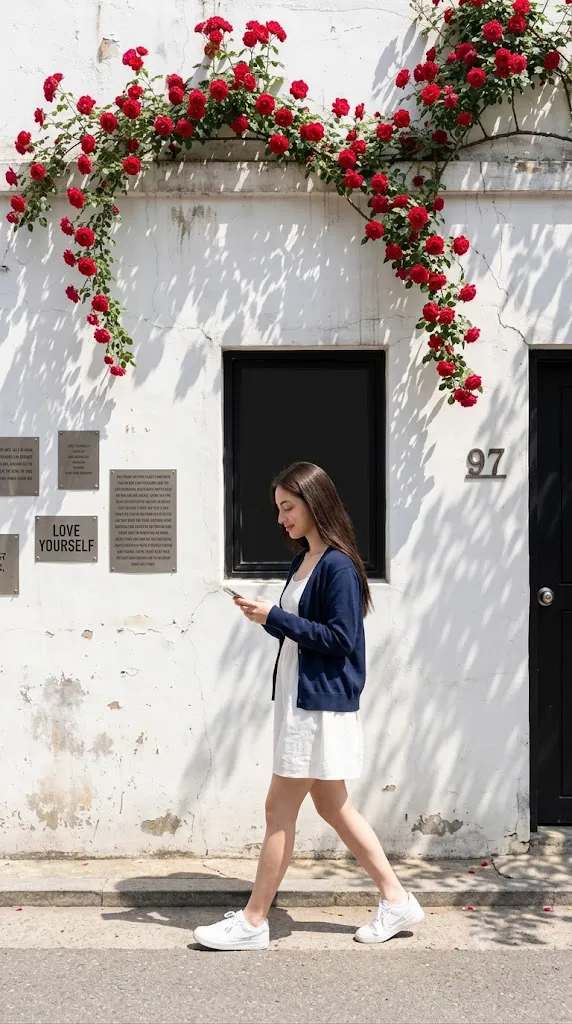
The Cinematic Rose Wall Street Photography Portrait Prompt combines the elegance of fashion photography with the authenticity of candid street photography. Rather than creating a heavily staged portrait, this prompt focuses on capturing a realistic everyday moment where the subject naturally walks along a charming urban street surrounded by beautiful architectural details, blooming roses, textured walls, and warm natural sunlight.
"Cinematic Rose Wall Street Photography Portrait Prompt"
Create a photorealistic full-body street photography portrait using the uploaded image strictly as the facial identity reference. Preserve the exact facial structure, skin tone, hairstyle, eyes, nose, lips, jawline, and proportions without beautification. Dress the subject in a casual white dress, navy-blue cardigan, and white sneakers. Position the subject walking naturally while looking down at a smartphone with a calm smile. Place the scene beside a textured white wall decorated with blooming red roses, architectural details, and realistic urban elements. Illuminate the scene using bright natural sunlight with soft tree shadows across the wall and subject. Capture the portrait using a wide-angle lens from a slightly low perspective with moderate depth of field, realistic skin texture, cinematic color grading, subtle analog film grain, and ultra-detailed 8K quality. No text or watermark.
Street photography is admired because it preserves genuine emotions and spontaneous movement. Instead of perfectly posed studio portraits, it tells visual stories through ordinary moments. This prompt recreates that feeling by placing the subject within a picturesque outdoor environment where fashion, architecture, lighting, and natural surroundings work together to create an editorial-quality photograph.
One of the most important aspects of this prompt is complete facial identity preservation. When an uploaded reference image is used, the AI must keep the face exactly the same. Facial proportions, skin tone, hairstyle, eyes, eyebrows, nose, lips, jawline, and every recognizable facial feature should remain unchanged. The objective is to change only the clothing, environment, lighting, and pose while preserving the person's real identity.
The wardrobe is intentionally simple yet elegant. A flowing white casual dress paired with a navy-blue cardigan and white sneakers creates a relaxed lifestyle aesthetic suitable for modern street fashion editorials. The outfit feels timeless while allowing the architectural surroundings and floral details to remain visually prominent.
The environment adds strong storytelling value. A textured white wall with subtle weathering, climbing red roses, decorative signs, an old window opening, and a black doorway create the impression of a charming neighborhood filled with character. These elements transform an ordinary street into an attractive editorial backdrop.
Natural sunlight plays a significant role in the final result. Bright daylight creates realistic shadows from nearby trees while producing soft highlights on the subject. These layered shadows introduce visual depth and make the photograph feel naturally captured rather than artificially lit.
Captured with a wide-angle lens from a slightly low perspective, the composition emphasizes both the subject and the surrounding environment. Moderate depth of field keeps the subject sharp while allowing the background to remain gently softened, creating a professional street photography aesthetic suitable for magazines, portfolios, travel editorials, or lifestyle campaigns.
How To Use Photo Editing?
Professional editing enhances realism while maintaining the natural atmosphere of the street scene.
Begin by balancing exposure. Bright white walls should retain texture while preserving detail within both highlights and shadows.
Adjust white balance toward warm daylight tones without introducing excessive yellow coloring. Skin should remain natural while sunlight appears inviting.
Maintain realistic skin texture throughout editing. Avoid over-smoothing because authentic street photography benefits from natural facial detail.
Enhance clothing textures carefully. The cardigan knit, flowing dress fabric, and sneakers should retain visible material quality.
Increase local contrast slightly around architectural textures including the wall, doorway, window, and climbing roses.
Refine tree shadows so they remain soft yet clearly defined across the wall and pavement.
Finish with subtle cinematic color grading and fine analog-inspired grain for a timeless editorial appearance.
Tools You Can Use For Prompt Copy and Create Photo
Modern AI generators and editing software make creating cinematic lifestyle portraits much easier.
AI Image Generation Tools
ChatGPT
Excellent for creating highly detailed prompts describing facial preservation, wardrobe, architecture, lighting, camera settings, and street atmosphere.
Midjourney
Produces beautiful editorial photography with cinematic composition and artistic color grading.
Leonardo AI
Creates highly realistic portraits with excellent facial consistency.
Ideogram
Suitable for lifestyle editorials and realistic outdoor portrait concepts.
Adobe Firefly
Provides AI image generation integrated into Adobe Creative Cloud.
Photo Editing Software
Adobe Photoshop
Ideal for advanced retouching, architectural cleanup, and lighting refinement.
Adobe Lightroom
Excellent for exposure balancing, cinematic color grading, and subtle finishing adjustments.
Capture One
Offers professional skin-tone rendering and exceptional color management.
Affinity Photo
Suitable for detailed retouching and editorial-quality adjustments.
Snapseed
A practical mobile editor for refining contrast, warmth, sharpness, and natural color.
How To Edit Photo?
Step 1: Generate the Base Portrait
Create the complete outdoor environment while preserving facial identity exactly.
Step 2: Balance Exposure
Maintain detail in white architectural surfaces without clipping highlights.
Step 3: Preserve Natural Skin
Retain authentic pores and facial textures throughout the portrait.
Step 4: Enhance Clothing Details
Improve textures on the cardigan, dress, and sneakers while maintaining realism.
Step 5: Refine Architectural Elements
Increase clarity around the textured wall, roses, doorway, and window without oversharpening.
Step 6: Improve Natural Shadows
Preserve soft tree shadows that enhance depth and realism.
Step 7: Apply Cinematic Color Grading
Balance natural greens, vivid red flowers, white architecture, and blue clothing while maintaining realistic skin tones.
Step 8: Add Fine Film Grain
Introduce subtle analog grain that complements the editorial style.
Step 9: Sharpen Important Features
Increase clarity around the eyes, hair, and clothing while keeping the background naturally softer.
Step 10: Verify Facial Consistency
Confirm that every facial feature precisely matches the uploaded reference image.
Step 11: Final Refinements
Remove visual artifacts while preserving realistic lighting and composition.
Step 12: Export in High Resolution
Save the completed portrait as PNG or TIFF to preserve maximum image quality for portfolios, publications, websites, or print.
Conclusion
The Cinematic Rose Wall Street Photography Portrait Prompt captures the beauty of everyday urban life through elegant composition, authentic lighting, realistic fashion styling, and natural storytelling. Instead of relying on elaborate fantasy settings, it transforms an ordinary street into a sophisticated editorial environment filled with architectural charm and floral elegance.
The combination of authentic facial preservation, relaxed wardrobe styling, blooming roses, textured walls, bright natural sunlight, and wide-angle composition creates a portrait that feels both cinematic and believable. Every visual element contributes to a timeless lifestyle photograph suitable for magazines, fashion editorials, travel features, or creative portfolios.
Although AI image generation makes creating realistic portraits easier than ever, exceptional results still depend on carefully written prompts and thoughtful editing. Preserving facial identity, balancing natural lighting, refining architectural textures, enhancing clothing details, and maintaining harmonious color grading ensure the finished image feels professional while remaining emotionally authentic.
Whether you're creating lifestyle content, fashion campaigns, travel photography, social media artwork, or editorial portfolios, the Cinematic Rose Wall Street Photography Portrait Prompt offers an outstanding foundation for producing elegant, photorealistic street portraits filled with warmth, realism, and visual storytelling.