Introduction
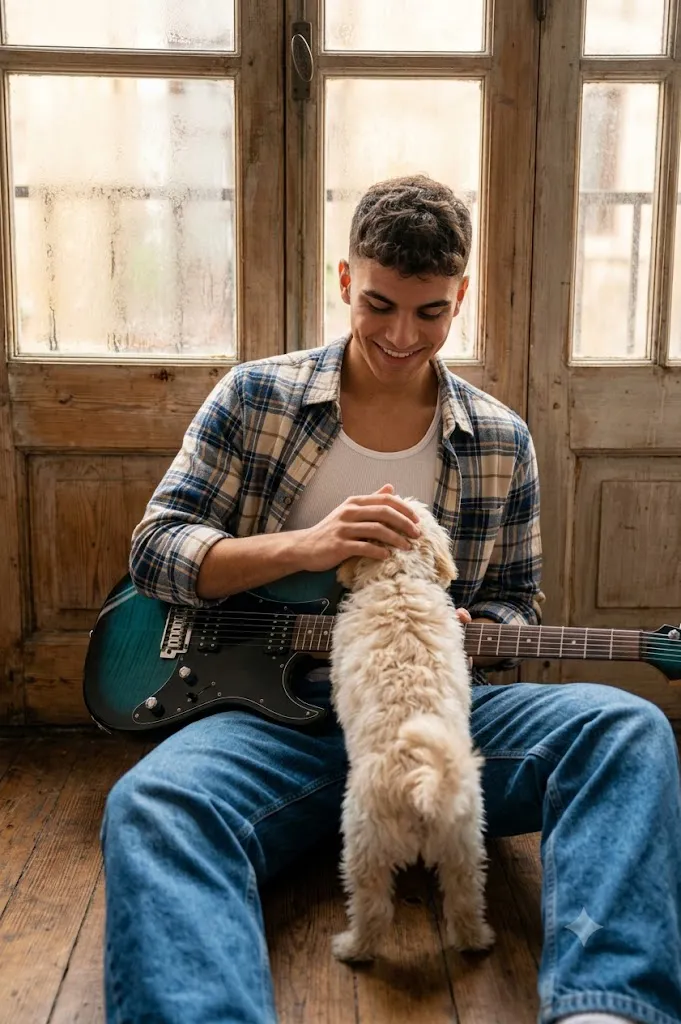
The Cinematic Rustic Guitarist & Puppy Lifestyle Portrait is a beautiful blend of storytelling, emotion, music, and lifestyle photography. This portrait style captures more than just a person's appearance—it tells a visual story through natural expressions, warm lighting, rustic surroundings, and meaningful interactions. Combining a musician's artistic personality with the affectionate presence of a playful puppy creates a heartwarming scene that feels authentic, cinematic, and emotionally engaging.
"Cinematic Rustic Guitarist & Puppy Lifestyle Portrait Prompt"
Preserve the original person's identity, face, and physical features with complete accuracy. Create an ultra-realistic cinematic lifestyle portrait of a young man with medium-length wavy black hair sitting in a rustic sunlit room. He wears a white ribbed tank top beneath a blue, beige, and white plaid flannel shirt with rolled sleeves, paired with loose blue jeans. A glossy dark teal electric guitar rests across his lap. He sits on a wooden floor with legs casually crossed while smiling warmly at a small cream-colored fluffy dog standing against him. Large weathered wooden-framed windows diffuse warm golden sunlight into the room. Rustic wooden floorboards, cinematic depth of field, soft natural lighting, realistic textures, editorial lifestyle photography, ultra-detailed 8K quality.
In recent years, lifestyle portrait photography has become increasingly popular because it focuses on genuine moments rather than overly posed studio images. The rustic guitarist portrait aesthetic embraces natural environments, vintage textures, soft sunlight, and candid expressions. The addition of a fluffy dog introduces warmth and personality, transforming a simple portrait into a narrative-driven image that resonates with viewers.
The key elements of this portrait style include a rustic indoor setting, weathered wooden windows, warm natural light, casual fashion, and a calm yet expressive subject. The electric guitar becomes a visual centerpiece while also reinforcing the creative identity of the subject. Together, these elements create a scene that feels both timeless and modern.
AI image generation tools have made it easier than ever to create cinematic lifestyle portraits with incredible detail and realism. By combining a carefully written prompt with professional editing techniques, photographers, artists, and content creators can produce images that look like high-end editorial photographs.
This guide explains how to create a Cinematic Rustic Guitarist & Puppy Lifestyle Portrait, which tools to use, how to edit the image effectively, and how to achieve a polished professional result while maintaining realism and emotional depth.
How To Use Photo Editing?
Photo editing is essential for transforming a good portrait into a visually captivating cinematic image. Even when AI-generated portraits appear highly realistic, proper editing can enhance mood, depth, color harmony, and storytelling.
The first step is evaluating the overall exposure. Rustic lifestyle portraits typically rely on warm natural light streaming through windows. The highlights should appear soft and luminous without becoming overexposed. Adjust brightness carefully to preserve details in the face, guitar, clothing, and puppy fur.
White balance plays a major role in defining the atmosphere. Warm tones help create a cozy indoor environment, while subtle golden highlights reinforce the nostalgic rustic aesthetic. Avoid excessive warmth, which can make skin tones appear unnatural.
Skin retouching should remain minimal. The goal is to preserve authentic skin texture, natural pores, and realistic imperfections. Lifestyle portraits benefit from a natural appearance rather than heavily airbrushed perfection.
The guitar and clothing textures should receive special attention. Enhance clarity slightly to reveal details in the glossy guitar finish, plaid flannel fabric, denim folds, and wooden surfaces. These textures contribute significantly to the realism of the image.
Color grading helps unify the scene. Rich wooden tones, golden sunlight, denim blues, and earthy neutrals should complement one another. Cinematic grading often involves slightly muted colors combined with subtle contrast adjustments.
Background editing is equally important. Softening the weathered windows and creating a smooth depth-of-field effect helps direct attention toward the subject and puppy while maintaining environmental context.
Finally, adding subtle film grain can introduce a cinematic quality that feels organic and timeless. Grain should remain delicate and enhance the atmosphere without reducing image clarity.
Tools You Can Use For Prompt Copy and Create Photo
Creating professional-quality lifestyle portraits requires both AI image-generation platforms and editing software.
AI Image Generation Tools
ChatGPT
ChatGPT is excellent for developing detailed prompts that describe facial identity, clothing, lighting, environment, mood, and composition with precision.
Midjourney
Midjourney excels at cinematic storytelling, artistic lighting, and visually striking lifestyle portraits.
Leonardo AI
Leonardo AI is known for generating realistic skin textures, detailed environments, and photorealistic lifestyle imagery.
Ideogram
Ideogram works well for generating balanced compositions and realistic portrait scenes.
Adobe Firefly
Adobe Firefly integrates AI image generation with Adobe's professional creative ecosystem.
Photo Editing Software
Adobe Photoshop
Photoshop offers advanced retouching, compositing, masking, and detailed portrait enhancements.
Adobe Lightroom
Lightroom is ideal for exposure correction, color grading, and cinematic mood adjustments.
Capture One
Capture One provides professional-level color control and image refinement.
Snapseed
Snapseed offers mobile-friendly editing tools suitable for quick enhancements.
PicsArt
PicsArt provides creative filters and effects useful for social-media-ready portrait images.
How To Edit Photo?
Step 1: Import the Image
Open the portrait in Lightroom or Photoshop and analyze the lighting balance.
Step 2: Adjust Exposure
Increase brightness carefully while preserving highlights in the windows and maintaining detail in shadows.
Step 3: Refine White Balance
Apply slightly warm tones to reinforce the cozy indoor atmosphere.
Step 4: Improve Skin Realism
Retouch minimally and preserve natural skin texture and facial details.
Step 5: Enhance the Eyes
Apply selective sharpening to the eyes for stronger visual engagement.
Step 6: Emphasize Hair Detail
Enhance individual hair strands while maintaining softness.
Step 7: Enhance Guitar Textures
Increase clarity and contrast slightly to reveal details in the guitar finish.
Step 8: Refine Clothing Textures
Bring out natural folds and fabric characteristics in the flannel shirt and jeans.
Step 9: Improve Puppy Details
Enhance fur texture while keeping the appearance soft and natural.
Step 10: Create Cinematic Color Grading
Blend warm sunlight with rustic wood tones and balanced skin colors.
Step 11: Add Depth
Use selective blur and masking techniques to strengthen subject-background separation.
Step 12: Apply Film Grain
Introduce subtle grain for a cinematic lifestyle photography appearance.
Step 13: Final Export
Export the image at maximum quality in PNG, TIFF, or high-resolution JPEG format.
Conclusion
The Cinematic Rustic Guitarist & Puppy Lifestyle Portrait Prompt combines music, emotion, companionship, and rustic storytelling into a powerful visual experience. Through warm sunlight, weathered textures, casual styling, and heartfelt interactions, this portrait style captures genuine moments that feel authentic and cinematic.
The combination of a musician with a beloved pet creates an emotionally engaging image that appeals to a wide audience. By using detailed prompts, professional AI tools, and thoughtful editing techniques, creators can produce portraits that rival commercial lifestyle photography while maintaining realism and personality.
Whether you are an AI artist, photographer, content creator, or digital storyteller, mastering this portrait style allows you to create visually rich images filled with warmth, creativity, and human connection. The result is a timeless portrait that feels both professionally crafted and naturally authentic, making it perfect for portfolios, social media, editorial projects, and personal artwork.