Introduction
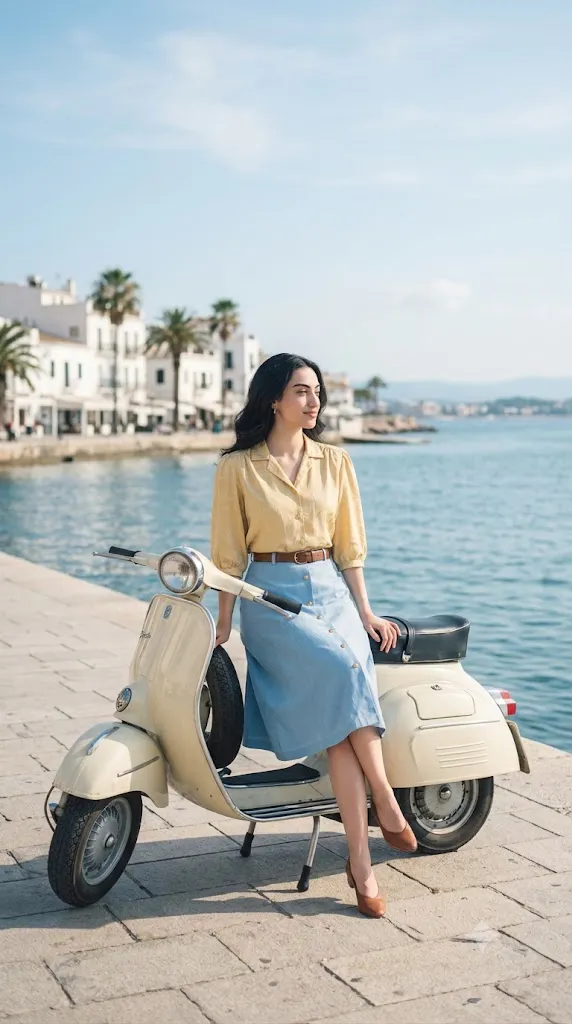
The Cinematic Seaside Vespa Lifestyle Portrait Prompt is one of the most popular AI photo prompts for creating elegant and realistic lifestyle portraits. Inspired by coastal scenery, vintage Vespa scooters, and bright natural lighting, this prompt helps generate images that look like they were captured by a professional photographer. Whether you are creating content for Instagram, Pinterest, a portfolio, or simply experimenting with AI art, this style delivers beautiful, high-quality results.
"Cinematic Seaside Vespa Lifestyle Portrait Prompt"
cinematic lifestyle photo of a girl sitting sideways on a vespa scooter near the seaside, use the uploaded reference photo as the source for the woman's face, body, hairstyle and clothing, keep the same appearance and outfit, relaxed puse with one leg crossed over the other and hands lightly holding the seat or handlebar, body slightly turned away from camera, head turned to the side looking into the distance, soft natural smile, camera at waist level, slightly wide angle perspective, bright daylight with soft pastel tones, clear blue sky with light clouds, fresh airy color grading with sutt blues and warm highlights, shallow depth of field, film photography style, shot on full frame camera, 50mm lens, soft grain, ultra photorealistic, no watermarks, no text, ne logos
This prompt focuses on a relaxed atmosphere where a girl sits sideways on a Vespa scooter near the seaside. The soft pastel sky, blue ocean, natural smile, and cinematic color grading create a timeless and aesthetic look. When combined with an uploaded reference photo, AI tools can preserve the person's facial features, hairstyle, clothing, and body proportions while placing them in a completely new environment.
The result is an ultra-photorealistic image with soft lighting, shallow depth of field, film-like grain, and professional camera quality. Even beginners can create stunning portraits by copying the prompt and following a few simple editing steps.
How To Use Photo Editing?
Photo editing with AI has become easier than ever. Instead of spending hours adjusting backgrounds, lighting, or poses manually, you can simply upload your reference image and use a detailed prompt to generate a cinematic portrait.
Start by selecting a high-quality reference photo. A clear image with good lighting helps AI preserve facial details more accurately. Upload the image to your preferred AI image generator and paste the complete Cinematic Seaside Vespa Lifestyle Portrait Prompt.
Make sure the prompt includes important details such as:
- Seaside location
- Vintage Vespa scooter
- Bright daylight
- Soft pastel color grading
- Natural smile
- Waist-level camera angle
- 50mm lens
- Shallow depth of field
- Film photography style
- Ultra-photorealistic quality
If your AI tool supports image strength or identity preservation, adjust the settings to maintain the original appearance. After generating the image, review the result carefully. If necessary, regenerate with small prompt adjustments to improve lighting, facial accuracy, or composition.
Tools You Can Use For Prompt Copy and Create Photo
There are many AI tools available that support detailed prompts and reference images. Each platform offers different features depending on your editing needs.
Midjourney
One of the most popular AI image generators for creating cinematic, artistic, and realistic portraits with impressive detail.
ChatGPT Image Generation
Excellent for generating high-quality lifestyle portraits using detailed natural-language prompts while maintaining realism.
Google Gemini
Useful for generating creative AI visuals and refining prompt ideas before creating final images.
Leonardo AI
A powerful platform for realistic portrait generation with advanced prompt controls and style customization.
Flux AI
Produces highly detailed and photorealistic images with accurate lighting and cinematic compositions.
Ideogram AI
Perfect for realistic portraits and creative compositions while also supporting typography when required.
Recraft AI
Useful for both AI illustrations and realistic image generation with clean visual quality.
Adobe Firefly
A beginner-friendly platform offering AI-powered image generation with commercial-friendly creative tools.
Choosing the right tool depends on your desired style. For ultra-realistic portraits, Leonardo AI, Flux AI, and ChatGPT Image Generation are excellent choices.
How To Edit Photo?
Creating a cinematic seaside Vespa portrait is simple if you follow these steps.
Step 1: Choose a Clear Reference Photo
Select a high-resolution image with a clear face and natural lighting. Avoid blurry or low-quality images because AI relies heavily on facial details.
Step 2: Upload the Image
Open your preferred AI image generator and upload the reference photo. This allows the AI to preserve facial identity, hairstyle, clothing, and body proportions.
Step 3: Copy the Prompt
Paste your complete Cinematic Seaside Vespa Lifestyle Portrait Prompt into the prompt box. Make sure every important detail is included, such as:
- Woman sitting sideways on a Vespa
- Relaxed pose
- Bright seaside location
- Clear blue sky
- Soft pastel tones
- Natural smile
- Film photography
- Full-frame camera
- 50mm lens
- Ultra-photorealistic quality
Step 4: Adjust Settings
If your AI tool provides advanced options, enable:
- High image quality
- Identity preservation
- Face consistency
- Photorealistic rendering
- High resolution
- Soft cinematic lighting
These settings greatly improve the final output.
Step 5: Generate the Image
Click the Generate button and allow the AI to process the prompt. Depending on the platform, image creation may take a few seconds or a couple of minutes.
Step 6: Refine the Result
If the generated image does not perfectly match your expectations, modify the prompt slightly. You can adjust camera angle, lighting intensity, background details, or pose while keeping the core cinematic seaside theme.
Step 7: Final Enhancement
For extra polish, use editing software like Photoshop, Lightroom, or Canva to fine-tune brightness, contrast, skin tones, color grading, and sharpness. Small adjustments can make the image appear even more realistic and professional.
Conclusion
The Cinematic Seaside Vespa Lifestyle Portrait Prompt is an excellent choice for anyone looking to create stylish, realistic, and eye-catching AI portraits. By combining a high-quality reference image with a detailed prompt, you can produce professional-looking photographs that feature beautiful seaside scenery, soft pastel lighting, and cinematic composition.
Whether you are a content creator, photographer, digital artist, or AI enthusiast, this prompt provides an easy way to generate stunning lifestyle portraits without expensive cameras or complicated editing techniques. With modern AI tools like ChatGPT Image Generation, Leonardo AI, Flux AI, Midjourney, and Adobe Firefly, creating breathtaking seaside Vespa portraits has never been easier. Experiment with different lighting conditions, camera angles, and color styles to develop your own unique visual aesthetic while maintaining a natural and photorealistic appearance.