Introduction
The Cinematic Studio Fashion Editorial Portrait Prompt is designed for creating premium-quality fashion portraits that resemble professional magazine editorials. Inspired by luxury fashion campaigns, contemporary menswear photography, and high-end studio productions, this prompt combines dramatic lighting, refined styling, and photorealistic rendering into one visually striking composition. The result is a portrait that feels polished, sophisticated, and suitable for fashion magazines, portfolios, advertising campaigns, or luxury social media content.
"Cinematic Studio Fashion Editorial Portrait Prompt"
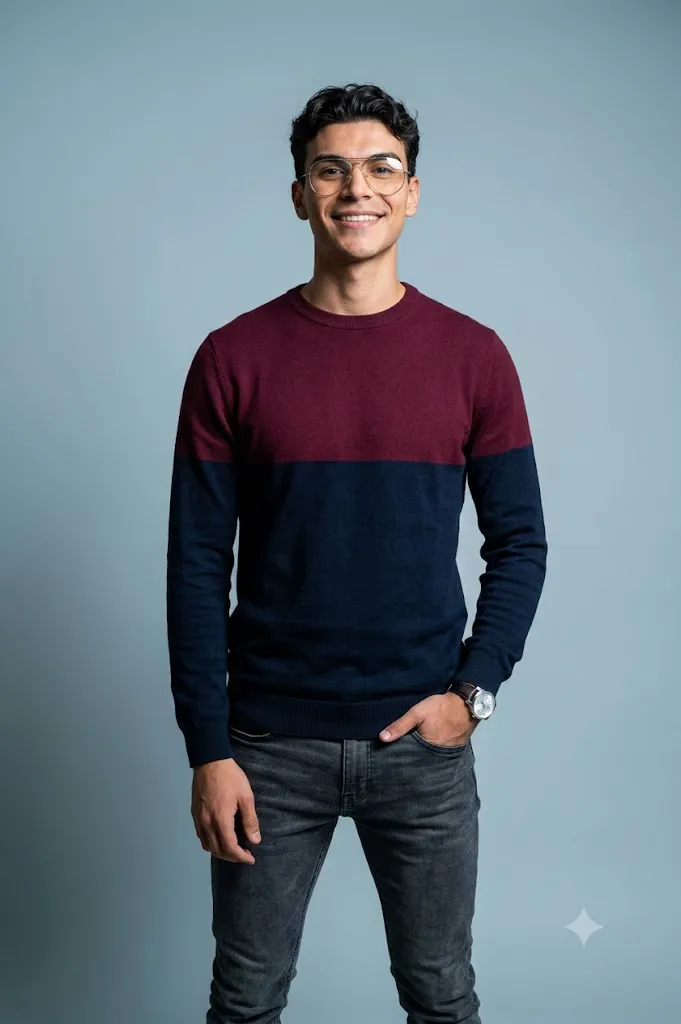
Create an ultra-photorealistic full-body studio fashion portrait using the uploaded image strictly as the facial identity reference. Preserve the exact facial structure, skin tone, hairstyle, eyes, nose, lips, jawline, and proportions without beautification. Dress the subject in a modern burgundy and navy color-blocked crewneck sweater, thin gold aviator glasses, and a silver wristwatch. Position the subject standing confidently with one hand inside a pocket and the other relaxed naturally. Illuminate the scene using dramatic directional studio lighting from the left side with soft shadows. Use a seamless slate blue-gray studio background, shallow depth of field, professional 35mm lens perspective, realistic skin texture, premium editorial color grading, subtle analog film grain, and ultra-detailed 8K quality. No text or watermark.
A defining feature of this prompt is complete facial identity preservation. When using an uploaded reference image, the AI must preserve the subject’s face with absolute accuracy. Facial proportions, skin tone, eye shape, eyebrows, nose, lips, jawline, hairstyle, and expression should remain exactly as they appear in the original reference. The prompt allows changes only to clothing, accessories, pose, lighting, and background while maintaining full facial fidelity.
The styling emphasizes modern menswear with a bold color-blocked crewneck sweater in deep burgundy and navy tones. Clean geometric color divisions create a contemporary aesthetic that stands out without appearing overly complex. Thin gold wire-rim aviator glasses introduce elegance, while a silver wristwatch adds a refined finishing touch that enhances the overall editorial look.
Pose selection is intentionally natural rather than exaggerated. Standing comfortably with one hand inside a pocket and the other relaxed at the side creates confidence without stiffness. Slight body rotation toward the camera adds depth while maintaining a relaxed posture that feels authentic and effortless.
Studio lighting is the visual centerpiece of this prompt. A single directional light positioned to one side sculpts the subject’s face and clothing, creating soft shadows that reveal texture while preserving realistic skin tones. This cinematic lighting style is commonly seen in luxury editorial photography because it creates dimensionality without overwhelming the subject.
The seamless slate blue-gray studio background provides subtle contrast against the wardrobe while maintaining a clean and distraction-free composition. Combined with shallow depth of field and a professional 35mm lens perspective, the portrait achieves a timeless editorial appearance suitable for commercial fashion work.
How To Use Photo Editing?
Professional editing transforms the generated portrait into a publication-ready editorial image while preserving realism.
Begin by balancing overall exposure. Highlights should remain clean while shadow areas preserve detail without becoming completely black.
Adjust white balance toward neutral tones. Skin should appear healthy and natural while the burgundy and navy sweater maintains rich, accurate colors.
Avoid excessive skin smoothing. Fashion editorials generally preserve natural pores and subtle facial textures because authenticity contributes to premium visual quality.
Increase texture carefully on knit fabrics, eyewear, hair, and accessories. Clothing should feel tangible without looking artificially sharpened.
Enhance local contrast around facial contours using subtle dodge-and-burn techniques to reinforce studio lighting.
Apply slight sharpening only to key areas such as eyes, eyebrows, hair, glasses, and clothing seams while leaving the background naturally soft.
Finish with cinematic color grading and minimal analog-inspired grain for an elegant editorial finish.
Tools You Can Use For Prompt Copy and Create Photo
Professional AI platforms and editing software can help produce high-quality fashion editorials.
AI Image Generation Tools
ChatGPT
Ideal for writing detailed prompts that describe wardrobe, lighting, camera settings, composition, and identity preservation.
Midjourney
Excellent for producing premium editorial fashion imagery with artistic lighting.
Leonardo AI
Provides highly realistic portraits with excellent consistency in facial identity and clothing details.
Ideogram
Suitable for creating fashion-oriented editorial concepts and portrait compositions.
Adobe Firefly
Integrates AI image generation directly within Adobe's professional creative ecosystem.
Photo Editing Software
Adobe Photoshop
Perfect for professional retouching, lighting refinement, background cleanup, and advanced fashion editing.
Adobe Lightroom
Excellent for color correction, exposure balancing, and cinematic finishing.
Capture One
Provides exceptional skin rendering and advanced color management for professional photographers.
Affinity Photo
Offers comprehensive retouching capabilities suitable for editorial-quality projects.
Snapseed
A convenient mobile editing solution for quick adjustments involving sharpness, warmth, and subtle grain.
How To Edit Photo?
Step 1: Generate the Base Portrait
Create the complete studio portrait while preserving facial identity perfectly.
Step 2: Balance Exposure
Ensure highlights remain controlled while preserving detail inside shadows.
Step 3: Preserve Natural Skin
Maintain realistic pores and facial texture throughout the editing process.
Step 4: Refine Clothing Texture
Improve knit fabric detail without introducing unnatural sharpness.
Step 5: Enhance Accessories
Increase clarity around glasses, watch, and metallic reflections naturally.
Step 6: Improve Hair Detail
Sharpen individual hair strands while maintaining soft transitions.
Step 7: Apply Cinematic Color Grading
Balance skin tones with the rich sweater colors while preserving realistic contrast.
Step 8: Add Fine Film Grain
Introduce subtle analog grain to reinforce the editorial aesthetic.
Step 9: Refine Background
Keep the seamless studio backdrop smooth and distraction-free while preserving gentle tonal variation.
Step 10: Verify Facial Consistency
Ensure every facial feature exactly matches the uploaded reference image.
Step 11: Final Refinements
Remove unwanted artifacts while preserving realistic lighting and textures.
Step 12: Export in High Resolution
Save the finished portrait as PNG or TIFF to maintain maximum quality for magazines, advertising campaigns, websites, portfolios, or print publications.
Conclusion
The Cinematic Studio Fashion Editorial Portrait Prompt blends professional studio photography with modern fashion styling to create polished, high-end editorial portraits. Carefully controlled lighting, refined wardrobe selection, authentic posing, and seamless composition work together to produce images that appear ready for luxury fashion magazines or commercial advertising.
Maintaining complete facial identity while updating clothing and environment ensures that the subject remains instantly recognizable while benefiting from premium editorial presentation. Directional studio lighting enhances depth and texture, while clean backgrounds keep full attention on the subject.
Although AI image generation significantly simplifies professional portrait creation, achieving truly editorial results still depends on carefully written prompts and thoughtful editing. Preserving facial identity, refining fabric textures, balancing studio lighting, maintaining realistic skin detail, and applying tasteful color grading all contribute to a convincing final image.
Whether you're producing fashion portfolios, commercial campaigns, magazine spreads, branding materials, or creative social media content, the Cinematic Studio Fashion Editorial Portrait Prompt provides an excellent foundation for creating elegant, photorealistic fashion portraits with timeless editorial appeal.