Introduction
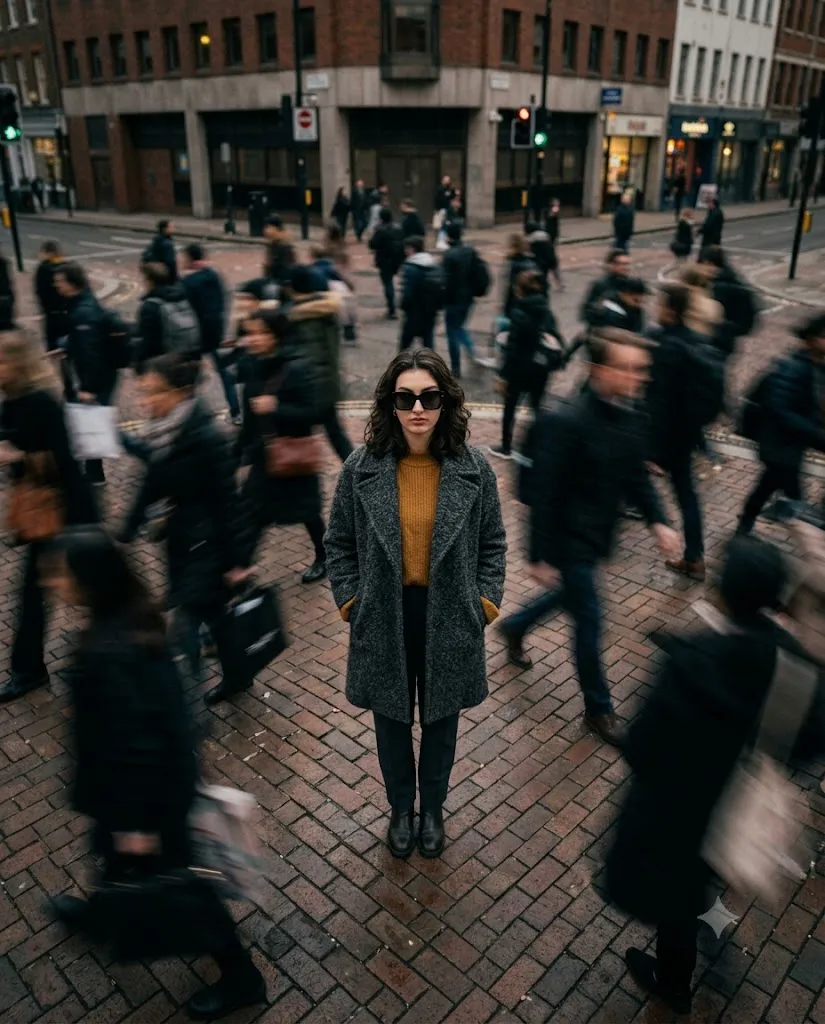
The Cinematic Urban Solitude Motion Blur Portrait Prompt captures a powerful visual story by contrasting stillness with movement. Inspired by modern street photography and high-fashion editorials, this prompt places a calm, confident woman at the center of a busy city while crowds blur around her. The result is an emotional portrait that symbolizes focus, self-reflection, and inner peace amid the fast pace of urban life.
"Cinematic Urban Solitude Motion Blur Portrait Prompt"
Create a cinematic overhead portrait of a fashionable young woman standing perfectly still in the center of a busy urban street while crowds move rapidly around her with realistic motion blur. Capture the scene from a top-down perspective using a 35mm lens. She wears oversized sunglasses, a grey textured coat, and a mustard sweater with a confident, serious expression. The street features textured stone pavement and modern city surroundings. Apply shallow depth of field, warm Kodak Gold film color grading, natural daylight, soft cinematic shadows, realistic motion blur, premium editorial fashion styling, documentary-style realism, ultra-detailed textures, and high-resolution quality.
In this cinematic composition, the woman stands perfectly still in the middle of a stone-paved street as pedestrians rush past, creating beautiful motion blur that emphasizes the difference between calm and chaos. The overhead camera angle provides a unique perspective, making the subject the visual anchor of the entire frame.
She wears a stylish grey textured coat layered over a mustard sweater and completes the sophisticated look with oversized sunglasses. Her serious expression conveys confidence and introspection, while the moody urban environment enhances the emotional storytelling. Styled with the nostalgic look of Kodak Gold film, the portrait combines warm cinematic colors, natural grain, and shallow depth of field to create a timeless editorial masterpiece.
Whether you're creating AI-generated portraits, fashion photography concepts, or social media content, this prompt delivers an elegant balance between realism, emotion, and cinematic artistry.
How To Use Photo Editing?
Once your AI-generated portrait is complete, photo editing helps refine every detail while preserving its cinematic atmosphere. Begin by adjusting the exposure to maintain balanced lighting throughout the scene. Increase contrast slightly to make the subject stand out while preserving the softness of the blurred crowd.
Apply a warm color grade inspired by Kodak Gold film. Enhance golden highlights while keeping shadows slightly muted to create a nostalgic analog appearance. Add a small amount of film grain for a realistic vintage texture without introducing excessive noise.
Use selective masking to brighten the woman's face and clothing while leaving the background slightly darker. This naturally directs the viewer's attention toward the subject.
Preserve the motion blur around pedestrians, as it is one of the most important storytelling elements of the composition. Avoid sharpening the moving figures while keeping the subject's face, coat, and accessories crisp and detailed.
Finally, apply a gentle vignette around the frame and make subtle adjustments to saturation and clarity. The finished portrait should feel like a premium fashion editorial photographed on classic Kodak film.
Tools You Can Use For Prompt Copy and Create Photo
Several AI image generators are capable of producing stunning cinematic fashion portraits from this prompt.
1. ChatGPT Image Generation
ChatGPT creates realistic cinematic portraits with detailed lighting, natural poses, accurate facial features, and high-fashion compositions.
2. Midjourney
Midjourney excels at cinematic street photography, motion effects, editorial styling, and artistic urban environments.
3. Flux AI
Flux AI produces photorealistic portraits with impressive facial accuracy, realistic textures, and beautifully balanced lighting.
4. Leonardo AI
Leonardo AI provides advanced controls for refining clothing, composition, facial expressions, and cinematic lighting.
5. Google Gemini
Google Gemini delivers realistic image generation with strong prompt interpretation and detailed environmental rendering.
6. Adobe Firefly
Adobe Firefly integrates AI image generation with professional editing tools, making post-processing easier for designers and photographers.
7. Ideogram AI
Ideogram AI is an excellent choice for creating high-quality fashion portraits with realistic textures and detailed prompt accuracy.
How To Edit Photo?
Follow these simple steps to transform your AI-generated portrait into a professional cinematic editorial image.
Step 1: Copy the Prompt
Copy the complete AI prompt and paste it into your preferred AI image generator, such as ChatGPT, Midjourney, Flux AI, Leonardo AI, or Google Gemini.
Step 2: Generate the Portrait
Generate the portrait in the highest available resolution. If necessary, regenerate the image until the overhead composition, motion blur, and subject placement look perfect.
Step 3: Download the Image
Download the image in 4K or 8K resolution to preserve every detail before editing.
Step 4: Open in a Photo Editing App
Import the image into Adobe Lightroom, Adobe Photoshop, Snapseed, PicsArt, or any professional editing software.
Step 5: Adjust Lighting
Increase exposure slightly, reduce highlights, raise shadows, and add moderate contrast to create a balanced cinematic look while preserving the moody atmosphere.
Step 6: Apply Kodak Gold Color Grading
Add warm golden highlights, slightly faded shadows, and subtle film grain to recreate the nostalgic appearance of Kodak Gold film. Keep skin tones natural and realistic.
Step 7: Enhance Subject Details
Sharpen the woman's face, sunglasses, coat texture, and sweater while leaving the surrounding crowd naturally blurred. Preserve the motion blur to maintain the feeling of movement and contrast.
Step 8: Export the Final Image
Save the edited portrait in high-quality JPG or PNG format at maximum resolution. Your cinematic urban solitude portrait is now ready for Instagram, Pinterest, fashion portfolios, digital galleries, or editorial publications.
Conclusion
The Cinematic Urban Solitude Motion Blur Portrait Prompt is a perfect blend of fashion, storytelling, and cinematic street photography. By placing a calm subject in the center of a fast-moving urban environment, it creates a powerful visual metaphor for focus, confidence, and self-reflection.
Whether you are an AI artist, photographer, fashion creator, or content designer, this prompt offers endless creative possibilities. Combined with thoughtful editing, realistic motion blur, Kodak Gold-inspired color grading, and premium editorial styling, it can produce breathtaking portraits that stand out across social media, portfolios, websites, and digital publications. Experiment with different city locations, lighting conditions, and fashion styles to create your own unique cinematic masterpiece.