Introduction
The Cozy Kawaii Plushie Bedroom Portrait is a heartwarming photography style that combines soft pastel colors, adorable plush toys, cozy bedroom aesthetics, and natural daylight into one dreamy composition. Inspired by Japanese kawaii culture, lifestyle photography, and modern social media portrait trends, this style creates images that feel playful, comforting, and full of positive energy.
"Cozy Kawaii Plushie Bedroom Portrait Prompt"
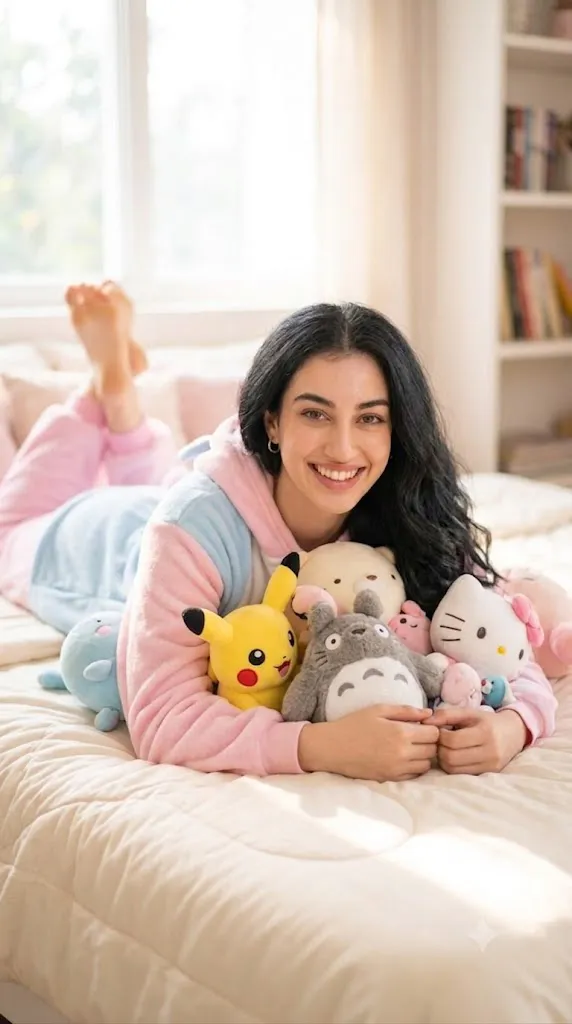
Create an ultra-realistic lifestyle portrait using the uploaded image strictly as the facial identity reference. Preserve facial structure, skin tone, and identity exactly. A happy young woman lies comfortably on her stomach on a cozy bed surrounded by adorable plushies and Japanese cartoon toys. She wears pastel-colored onesie pajamas in soft pink, cream, and baby-blue tones. She smiles brightly while cuddling plush toys. Soft natural daylight enters through a nearby window, creating gentle highlights and dreamy bokeh in the background. Cozy bedroom environment with warm textures and kawaii decorations. Shallow depth of field, realistic skin texture, detailed plush fabrics, soft cinematic lighting, photorealistic, 8K resolution, pastel aesthetic, cheerful mood.
At the center of this portrait concept is a young woman relaxing on a soft bed surrounded by cute plushies, Japanese cartoon toys, and pastel-colored décor. Her joyful smile and relaxed pose create an atmosphere of genuine happiness, while the surrounding stuffed animals add a whimsical and nostalgic charm.
One of the most attractive elements of this portrait style is its emotional warmth. Unlike dramatic fashion photography or highly stylized editorial portraits, the Cozy Kawaii Plushie Bedroom Portrait focuses on comfort, innocence, and everyday happiness. The viewer instantly feels invited into a peaceful and cheerful environment.
The wardrobe contributes significantly to the overall mood. Soft pastel-colored onesie pajamas create a playful and cozy appearance while maintaining visual harmony with the plush toys and room décor. The pastel palette—typically pink, cream, baby blue, and soft lavender—helps establish a dreamy atmosphere that feels light and relaxing.
Natural daylight is another defining characteristic. Gentle sunlight entering through a nearby window creates beautiful highlights on the face, hair, and plushies. Combined with a shallow depth of field and creamy bokeh, the result feels cinematic while remaining natural and believable.
Modern AI image-generation technology allows creators to reproduce this charming aesthetic with remarkable realism. However, achieving a professional result requires understanding how prompts, editing techniques, lighting, and color grading work together.
This article explores the process of creating a beautiful Cozy Kawaii Plushie Bedroom Portrait, including editing workflows, recommended tools, and practical techniques for achieving a polished final image.
How To Use Photo Editing?
Photo editing plays a vital role in transforming an AI-generated portrait into a professional-quality image. Even highly realistic portraits benefit from careful adjustments that enhance lighting, color harmony, and overall atmosphere.
The first step is exposure correction. Bedroom portraits often contain bright highlights near windows and softer shadows throughout the room. Proper exposure balancing ensures details remain visible in both areas.
White balance is equally important. Since this aesthetic relies on warm natural daylight, a slightly warm color temperature helps create a cozy atmosphere. Avoid excessive warmth that may distort skin tones or pastel colors.
Skin retouching should remain subtle and natural. Modern portrait trends favor realistic skin texture rather than overly smoothed, artificial-looking skin. Preserve pores and natural details while gently reducing distractions.
Color enhancement is especially important in kawaii-style portraits. The pastel tones should remain soft and airy rather than oversaturated. Increasing vibrance selectively can help plush toys and clothing appear more appealing without becoming unrealistic.
Hair adjustments can significantly improve the portrait. Enhancing shine and texture helps reveal individual strands illuminated by the sunlight. This adds realism and visual depth.
The plush toys themselves deserve attention during editing. Slight increases in texture and clarity help showcase their soft materials while maintaining a cozy appearance.
Background optimization is another useful step. Maintaining gentle blur helps direct attention toward the subject while preserving the inviting bedroom atmosphere.
Film grain can be added carefully to create a soft nostalgic feel. A subtle grain layer often enhances warmth without compromising image quality.
Finally, selective sharpening should focus on the eyes, facial features, and key plush toys nearest the subject.
Tools You Can Use For Prompt Copy and Create Photo
Creating a successful Cozy Kawaii Plushie Bedroom Portrait becomes easier when using the right AI generation and editing tools.
AI Image Generation Tools
ChatGPT
ChatGPT is excellent for creating highly detailed prompts describing lighting, wardrobe, plush toys, room design, and facial reference requirements.
Midjourney
Midjourney produces beautiful dreamy aesthetics with strong artistic styling and excellent color harmony.
Leonardo AI
Leonardo AI excels at generating realistic portraits with detailed textures and natural lighting.
Ideogram
Ideogram creates balanced lifestyle portraits with clean compositions and realistic environments.
Adobe Firefly
Adobe Firefly provides professional image-generation capabilities with strong integration into Adobe workflows.
Photo Editing Software
Adobe Photoshop
Photoshop offers advanced retouching tools for portrait refinement and creative enhancements.
Adobe Lightroom
Lightroom is ideal for color grading, exposure correction, and overall image optimization.
Capture One
Capture One provides exceptional color management and professional editing workflows.
Snapseed
Snapseed allows powerful mobile editing with intuitive controls.
PicsArt
PicsArt is useful for playful overlays, aesthetic effects, and social-media-ready content creation.
How To Edit Photo?
Step 1: Import the Portrait
Open the image inside Photoshop, Lightroom, or your preferred editing software.
Step 2: Correct Exposure
Balance window highlights and indoor shadows while maintaining natural brightness.
Step 3: Adjust White Balance
Add gentle warmth to reinforce the cozy atmosphere.
Step 4: Refine Skin Appearance
Maintain realistic skin texture and natural complexion.
Step 5: Enhance Hair Details
Increase texture and shine while preserving softness.
Step 6: Improve Plush Toy Textures
Add subtle clarity to reveal soft fabrics and stitching details.
Step 7: Enhance Eye Sharpness
Ensure the eyes remain the strongest focal point.
Step 8: Strengthen Pastel Colors
Boost vibrance slightly while preserving softness.
Step 9: Add Cinematic Color Grading
Blend warm highlights with soft neutral shadows.
Step 10: Refine Background Blur
Maintain creamy bokeh and proper subject separation.
Step 11: Add Gentle Film Grain
Introduce subtle grain for warmth and nostalgic charm.
Step 12: Export at Maximum Quality
Save as PNG, TIFF, or high-quality JPEG for the best results.
Conclusion
The Cozy Kawaii Plushie Bedroom Portrait Prompt captures the essence of warmth, comfort, and joyful self-expression. Combining adorable plush toys, soft pajamas, natural daylight, and dreamy pastel colors, this portrait style creates images that feel welcoming and emotionally uplifting.
Its popularity continues to grow because it blends realism with playful storytelling. The combination of cozy bedroom aesthetics and kawaii culture creates a unique visual identity that appeals to audiences across social media, photography communities, and AI art platforms.
With modern AI tools and thoughtful editing techniques, anyone can create professional-quality portraits that capture this charming atmosphere. By focusing on lighting, texture, composition, and color harmony, creators can transform a simple concept into a visually stunning and emotionally engaging image.
Whether you are building a photography portfolio, creating content for social media, experimenting with AI-generated portraits, or simply exploring kawaii-inspired aesthetics, the Cozy Kawaii Plushie Bedroom Portrait offers endless opportunities for creative expression and visual storytelling.