Introduction
Social media has evolved far beyond simple photo sharing. Today, platforms like Instagram, Pinterest, and Threads are visual storytelling spaces where creators, influencers, brands, and photographers showcase carefully crafted content. One of the most popular trends in modern digital design is the Instagram Editorial Mockup, a creative presentation style that combines professional photography with realistic social media interface elements.
"Create a Instagram Editorial Mockup Prompt"
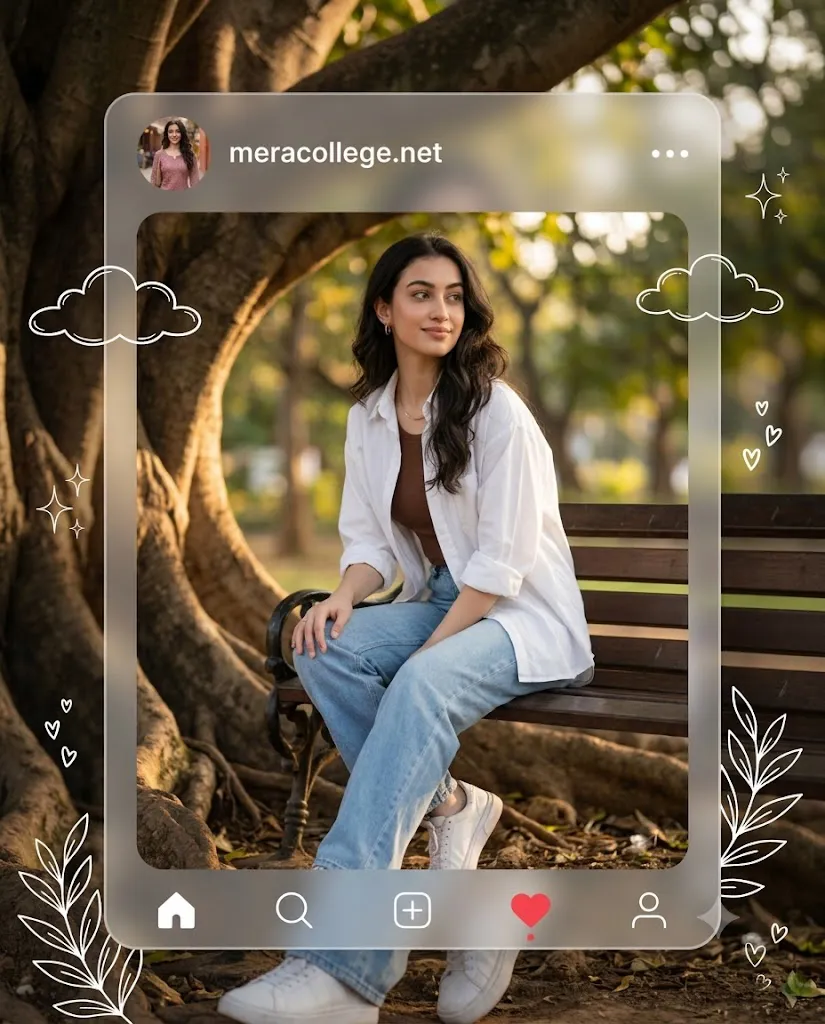
Create a premium Instagram social media mockup presentation in 4:5 aspect ratio featuring a beautiful young Indian woman wearing a stylish modern western outfit. She is sitting casually under a huge tree during golden hour, with a different pose (one hand resting on her knee, looking away with a soft smile). Outfit: oversized white shirt layered over a brown fitted top, light blue wide-leg jeans, white sneakers, minimal jewelry, natural makeup, loose wavy black hair. Place the portrait inside a semi-transparent frosted glass social media Ul frame with rounded corners. Add the profile name "meracollege.net" at the top with a small circular profile photo that is different from the main image but visually matching the same aesthetic. Include minimalist white Ul icons and make the heart/like icon red. Add elegant hand-drawn white cloud, sparkle, tiny heart and botanical doodles around the frame. Scene details: warm golden sunlight, dreamy bokeh, cinematic shadows, aesthetic park background, giant tree roots, soft depth of field, luxury editorial vibe, cozy and modern Instagram-inspired design. Photorealistic, ultra-detailed, 4K quality, HDR, natural skin texture, premium color grading, soft glow, Pinterest aesthetic, social media content creator style, highly realistic, sharp focus, elegant composition.
An Instagram editorial mockup transforms a simple portrait into a premium social media post by placing the image inside a realistic Instagram-inspired user interface. Elements such as profile pictures, usernames, interaction icons, frosted glass overlays, doodles, and elegant design details create the appearance of a polished content creator post. This style is especially popular among lifestyle bloggers, fashion influencers, AI artists, and digital marketers because it combines photography, branding, and graphic design into a single composition.
The addition of golden-hour lighting, stylish fashion, natural backgrounds, and modern user interface elements helps create content that feels both aspirational and relatable. Whether you're designing portfolio work, creating Pinterest graphics, promoting a brand, or generating AI images, Instagram editorial mockups offer a highly engaging visual format.
With modern AI image generators and editing software, creating professional-quality social media mockups has never been easier. This guide will show you how to use photo editing, which tools are best for creating editorial mockups, and how to edit your final design for maximum visual impact.
How To Use Photo Editing?
Photo editing plays a major role in transforming a standard portrait into a premium Instagram editorial mockup. Even if your image is generated through AI, editing helps improve realism, consistency, and professional presentation.
The first step is adjusting exposure and lighting. Editorial mockups often use soft natural light, particularly during golden hour. Enhancing warm highlights while preserving realistic shadows helps create a welcoming and luxurious atmosphere.
Color correction is equally important. Fashion outfits, skin tones, greenery, and background elements should appear balanced and natural. Avoid oversaturation because it can make the image look unrealistic.
Portrait enhancement should remain subtle. The goal is to maintain realistic skin texture while improving overall clarity. Professional editorial photography focuses on natural beauty rather than excessive retouching.
Background refinement can also elevate the final image. Applying a shallow depth-of-field effect helps separate the subject from the environment while preserving the beauty of the surrounding scenery.
User interface elements require careful attention. Icons, profile information, frosted glass panels, and decorative doodles should appear clean and cohesive with the overall design. Maintaining consistent spacing and visual balance creates a professional appearance.
Finally, cinematic color grading can unify all elements. Soft warm highlights, neutral shadows, and gentle contrast create the luxury editorial aesthetic commonly seen on high-end social media pages.
Tools You Can Use For Prompt Copy And Create Photo
There are many AI image generation platforms and editing applications that can help create Instagram editorial mockups.
AI Image Generation Tools
ChatGPT Image Generation
ChatGPT can generate highly detailed lifestyle portraits and social media mockup concepts using descriptive prompts. It performs particularly well with realistic lighting and fashion-oriented compositions.
Midjourney
Midjourney is widely known for producing artistic and visually stunning editorial-style images. It is ideal for premium social media aesthetics.
Leonardo AI
Leonardo AI offers excellent prompt control and realistic image generation suitable for content creators and designers.
Ideogram
Ideogram excels at creating realistic portraits and accurately interpreting detailed prompts.
Adobe Firefly
Adobe Firefly integrates with Adobe's creative ecosystem and provides high-quality commercial-style image generation.
Photo Editing Software
Adobe Photoshop
Photoshop remains the industry standard for creating realistic social media interfaces, frosted glass effects, and professional retouching.
Adobe Lightroom
Lightroom is excellent for color correction, lighting adjustments, and cinematic color grading.
Canva
Canva offers simple drag-and-drop tools for creating social media layouts and mockups.
Snapseed
A powerful mobile editing application suitable for quick portrait enhancements.
PicsArt
Popular for creative overlays, stickers, doodles, and social media design effects.
How To Edit Photo?
Once your image is generated, follow these steps to create a polished editorial mockup.
Step 1: Import The Image
Open the portrait in Photoshop, Canva, Lightroom, or another editing platform.
Step 2: Adjust Exposure
Balance highlights and shadows to create a soft, bright golden-hour atmosphere.
Step 3: Enhance Colors
Increase vibrance slightly while maintaining natural skin tones and realistic scenery.
Step 4: Improve Portrait Details
Sharpen eyes, hair, and clothing textures while preserving natural appearance.
Step 5: Create The Frosted Glass Frame
Design a semi-transparent glass panel with rounded corners to simulate a premium social media interface.
Step 6: Add User Interface Elements
Include profile image, username, interaction icons, and minimal design elements inspired by social media platforms.
Step 7: Add Decorative Doodles
Place subtle cloud, sparkle, heart, and botanical illustrations around the frame for added personality.
Step 8: Apply Cinematic Color Grading
Use warm highlights, soft shadows, and balanced contrast to achieve a luxury editorial aesthetic.
Step 9: Final Quality Check
Ensure all elements appear cohesive and professionally aligned.
Step 10: Export
Save the mockup in high resolution. PNG is recommended for preserving maximum quality.
Conclusion
Instagram editorial mockups represent the perfect fusion of photography, graphic design, branding, and social media storytelling. By combining stylish portraits with realistic interface elements and premium visual design, creators can produce content that feels modern, engaging, and highly professional.
Thanks to advanced AI image generators and powerful editing software, creating these mockups is now accessible to everyone. With a detailed prompt, thoughtful composition, and careful editing, you can create stunning editorial presentations that stand out across Instagram, Pinterest, websites, and marketing campaigns.
Whether you are a content creator, designer, photographer, influencer, or digital artist, mastering Instagram editorial mockups can significantly improve the quality and impact of your visual content while helping you build a recognizable and professional online presence.