Introduction
Dark aesthetic car photoshoot editing is one of the biggest trends on Instagram, Pinterest, and AI art platforms. Many users love creating cinematic portraits with luxury cars, night lighting, stylish outfits, and moody backgrounds. These edits look professional, dramatic, and visually attractive, especially when combined with AI photo editing tools.
A Dark Aesthetic Car Photoshoot Cinematic Portrait Prompt helps users generate ultra-realistic AI images using simple text instructions. With the help of AI tools, anyone can create stylish photos featuring luxury cars like Defender, BMW, Mercedes, or Lamborghini in night settings with streetlights, moonlight, and cinematic color grading.
This editing style is very popular among creators because it gives a luxury lifestyle vibe. Users can create social media posts, profile pictures, wallpapers, posters, and cinematic portraits within minutes. You only need a good image, a creative AI prompt, and the right editing tool.
In this article, you will learn how to use AI photo editing, the best tools for prompt-based editing, and how to create a cinematic dark aesthetic car portrait step by step.
How To Use Photo Editing?
AI photo editing is simple and beginner-friendly. You do not need advanced editing knowledge to create cinematic car portraits. Follow these steps carefully.
Step 1: Select a Good Photo
Choose a clear portrait image with good lighting. Full-body photos work best for cinematic car edits because they allow AI to create realistic poses and styling.
Step 2: Open an AI Editing Tool
Use an AI image generator or editing website. Upload your image to the platform.
Step 3: Copy the Prompt
Paste a detailed cinematic car photoshoot prompt such as:
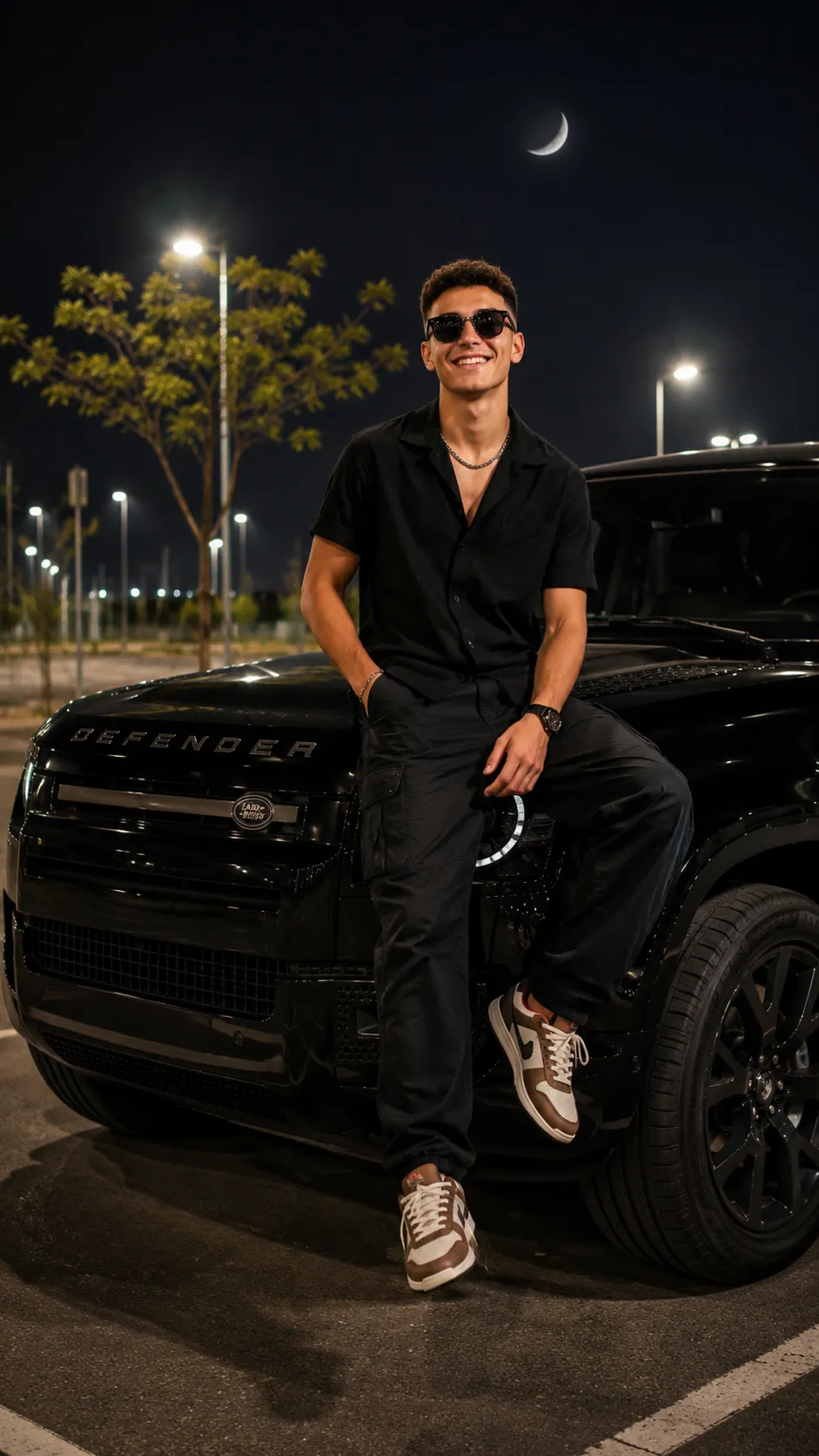
“A keeping the same face and hairstyle of 20 years old man with dark, wearing a black buffer shirt, black cargo lose jeans. brown-white sneakers, bracelet, chain, wristwatch, Sunglasses on eyes, sitting casually a sleek black Defender car side seating fayring the other on the car. The setting is an outdoor parking lot at night, illuminated by numerous streetlights. A crescent moon is visible in the dark sky, and a small tree is behind. 9:16.”
The more details you add, the better the final result will look.
Step 4: Generate the Image
Click the generate button and wait for the AI to process your image. Most AI tools generate the image within a few seconds.
Step 5: Download and Share
After the image is ready, download it in HD or 4K quality. You can share it on Instagram, Facebook, WhatsApp, or use it as wallpaper.
AI editing is fast, creative, and perfect for cinematic social media content.
Tools You Can Use For Prompt Copy and Create Photo
There are many AI editing platforms available online that can create cinematic car photoshoots and dark aesthetic portraits.
1. Leonardo AI
Leonardo AI is one of the best tools for realistic cinematic editing and luxury car portraits.
Features:
Ultra-realistic image generation
Cinematic lighting effects
High-quality portrait editing
Fast AI processing
2. Canva
Canva is beginner-friendly and perfect for adding text, overlays, and social media designs.
Features:
Easy drag-and-drop editing
Templates and effects
Background editing
Social media optimization
3. Adobe Firefly
Adobe Firefly helps users create professional AI-generated artwork with advanced effects.
Features:
AI creative tools
Realistic image enhancement
Professional editing quality
Stylish cinematic filters
4. Pixlr
Pixlr is a lightweight online editor with useful AI tools.
Features:
Background removal
Blur effects
AI enhancement
Mobile-friendly editing
5. Fotor
Fotor is great for portrait editing and cinematic color adjustments.
Features:
Beauty retouching
Cinematic filters
AI portrait enhancement
HD export quality
These tools make it easy for beginners and professionals to create stunning dark aesthetic car edits.
How To Edit Photo?
Creating a cinematic dark aesthetic car portrait becomes easy if you follow the correct editing process.
Step 1: Remove Background
First, remove the original background using an AI background remover. This helps place the subject into a cinematic night scene.
Step 2: Add Luxury Car Background
Choose a realistic luxury car background like a black Defender, BMW, or Mercedes parked in a parking lot at night.
Step 3: Add Night Lighting
Use soft cinematic lighting with streetlights and moonlight effects. This creates a moody and professional atmosphere.
Step 4: Apply Dark Color Grading
Adjust colors using dark aesthetic tones like black, grey, blue, and orange highlights. Reduce brightness slightly for a cinematic feel.
Step 5: Add Fashion Accessories
Enhance the portrait with sunglasses, chain, bracelet, and wristwatch effects to create a stylish luxury vibe.
Step 6: Use Blur and Glow Effects
Apply background blur and soft glow lighting for depth and realism. This makes the portrait look more cinematic.
Step 7: Final Adjustments
Adjust contrast, shadows, and highlights carefully. Make sure the subject blends naturally with the background.
Step 8: Export in HD
Save the image in Full HD, 4K, or 8K quality for the best results.
These simple steps help create professional-looking cinematic car portraits suitable for Instagram and social media.
Conclusion
Dark Aesthetic Car Photoshoot Cinematic Portrait Prompt editing is one of the most trending AI editing styles today. It combines luxury cars, stylish fashion, cinematic lighting, and night photography to create visually stunning portraits.
With AI tools like Leonardo AI, Canva, Adobe Firefly, Pixlr, and Fotor, anyone can create ultra-realistic cinematic edits without advanced editing knowledge. You only need a good prompt and a clear image to generate professional results within minutes.
Whether you want to create Instagram posts, wallpapers, profile pictures, or cinematic posters, dark aesthetic car edits are a perfect choice. By using detailed prompts, creative lighting, and realistic effects, users can easily create luxury-style portraits that look modern, stylish, and eye-catching.